


We may not have the course you’re looking for. If you enquire or give us a call on 01344203999 and speak to our training experts, we may still be able to help with your training requirements.
15 Best Cloud Computing Tools
ByThe Knowledge AcademyLast updated on: 18 November 2026
Explore the top 15 cloud computing tools, including AWS, Microsoft Azure, Google Cloud and DigitalOcean. Learn about their features, practical applications and suitability for managing cloud infrastructure, automation, monitoring, security and costs.
The Gist
1. Cloud computing tools help organisations deploy applications, manage infrastructure and support cloud operations.2. AWS, Azure, Google Cloud and DigitalOcean provide cloud services, while Terraform and Kubernetes support infrastructure automation and container management.3. Infrastructure automation tools help standardise configurations, reduce repetitive tasks and manage cloud resources consistently.4. Monitoring and security tools provide visibility into system performance, resource usage and potential security risks.5. Selecting suitable tools depends on compatibility, scalability, security requirements, technical capabilities and overall cost.
A business moves its applications to the cloud, expecting greater flexibility and easier infrastructure management. However, new challenges appear. How can teams automate deployments, monitor system performance, control spending and protect sensitive data?
Managing these challenges requires the right cloud computing tools. Each tool serves a different purpose, helping organisations deploy applications, streamline operations and maintain reliable cloud environments. Understanding their capabilities can help businesses select solutions that match their technical and operational needs.
Best Cloud Computing Tools
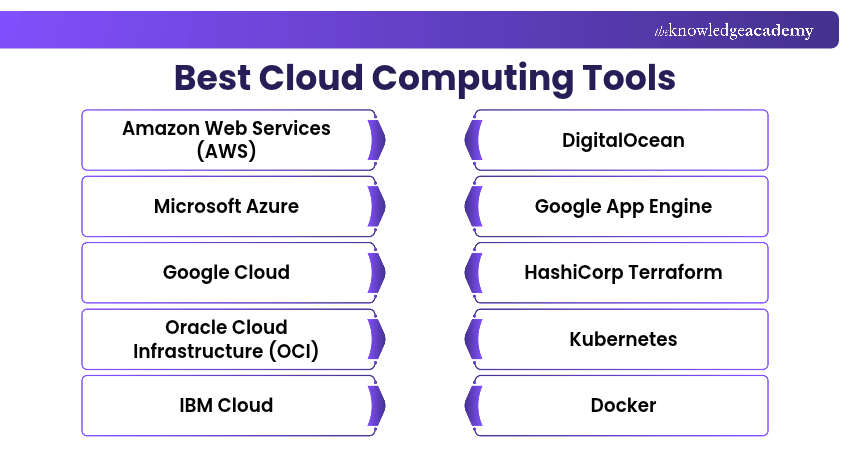
The following 15 cloud computing tools support different requirements, from infrastructure hosting and containerisation to automation, monitoring, cost management and security. Explore their features and applications to identify solutions that suit your needs.
1) Amazon Web Services (AWS)
Amazon Web Services (AWS) is a cloud computing platform that delivers infrastructure and managed services for applications, databases, storage, networking and analytics. Organisations use AWS to host websites, run enterprise applications, process data and build scalable cloud environments.
Key Features:
a) Amazon EC2: Provides configurable virtual computing resources.
b) Amazon S3: Offers object storage for files, backups and application data.
c) AWS Lambda: Supports running code in response to events without managing servers.
d) Amazon RDS: Provides managed relational database services.
e) AWS Identity and Access Management (IAM): Helps control access to AWS resources.
Best For: Organisations requiring a broad range of cloud infrastructure and managed services.
Pro Tip
Moving an application to AWS does not transfer every security responsibility to the cloud provider. Customers remain responsible for areas such as appropriate access permissions, application security and data protection according to the services they use. Review the shared responsibility model before deployment.
Learn to design optimal solutions using AWS services effectively with the AWS Certification Training – Join now!
2) Microsoft Azure
Microsoft Azure is a cloud computing platform that offers infrastructure, application hosting, databases, networking, analytics and AI-related services. It is commonly used by organisations developing cloud applications or integrating existing Microsoft technologies into their infrastructure.
Key Features:
a) Azure Virtual Machines: Provide configurable computing resources.
b) Azure App Service: Supports hosting web applications and APIs.
c) Azure Blob Storage: Provides scalable object storage.
d) Azure SQL Database: Offers managed relational database capabilities.
e) Microsoft Entra ID: Supports identity and access management.
Best For: Organisations using Microsoft technologies or requiring a broad cloud platform for application development and infrastructure management.
3) Google Cloud
Google Cloud provides computing, storage, databases, networking, analytics and AI services for developing and running applications. It supports different infrastructure models, including virtual machines, containers and managed application services.
Key Features:
a) Compute Engine: Provides virtual machines for running applications.
b) Google Kubernetes Engine (GKE): Offers managed Kubernetes capabilities.
c) Cloud Storage: Provides object storage for different workloads.
d) BigQuery: Supports large-scale data analysis.
e) Cloud Run: Runs supported containerised applications on managed infrastructure.
Best For: Organisations seeking cloud infrastructure, container management, data analytics and managed application services.
Become a sought-after pro in Google Cloud technologies and stay ahead in the cloud-first era. Sign up for the Google Cloud Certification Training now!
4) Oracle Cloud Infrastructure (OCI)
Oracle Cloud Infrastructure (OCI) is a cloud platform offering computing, storage, networking, databases and other infrastructure services. It is particularly relevant to organisations running Oracle databases and enterprise applications, although it supports other workloads.
Key Features:
a) OCI Compute: Provides virtual machines and bare metal computing resources.
b) Oracle Autonomous Database: Offers managed database capabilities with automated management features.
c) OCI Object Storage: Supports scalable data storage.
d) Virtual Cloud Network (VCN): Enables organisations to configure software-defined networking, including subnets, route tables and gateways within OCI.
e) Identity and Access Management: Helps manage user access and permissions.
Best For: Organisations using Oracle technologies or requiring enterprise cloud infrastructure and database services.
5) IBM Cloud
IBM Cloud provides infrastructure and platform services for applications, data processing and enterprise workloads. Its offerings include virtual servers, bare metal servers, storage, containers and managed services that support different deployment requirements.
Key Features:
a) Virtual Servers: Provide configurable cloud computing resources.
b) Bare Metal Servers: Offer dedicated physical servers.
c) IBM Cloud Object Storage: Supports scalable data storage.
d) IBM Cloud Kubernetes Service: Helps deploy and manage containerised applications.
e) Security and Access Controls: Support identity management and cloud resource protection.
Best For: Organisations requiring enterprise infrastructure, hybrid cloud capabilities and support for varied application environments.
6) DigitalOcean
DigitalOcean is a cloud computing platform that offers virtual machines, managed application hosting, databases and storage. It enables developers and businesses to deploy applications and manage cloud infrastructure through a range of managed services.
Key Features:
a) Droplets: Provide configurable cloud virtual machines for running applications and services.
b) App Platform: Supports managed application deployment from source repositories or container images.
c) DigitalOcean Kubernetes: Provides managed Kubernetes clusters for containerised workloads.
d) Managed Databases: Offers hosted databases with automated maintenance features.
e) Spaces Object Storage: Supports object storage for media, files and application data.
Best For: Developers, startups and businesses seeking accessible cloud infrastructure and managed application services.
7) Google App Engine
Google App Engine is a fully managed Platform as a Service (PaaS) offering within Google Cloud that allows developers to deploy supported web applications without directly managing servers. It provides standard and flexible environments with different runtime and scaling characteristics.
Key Features:
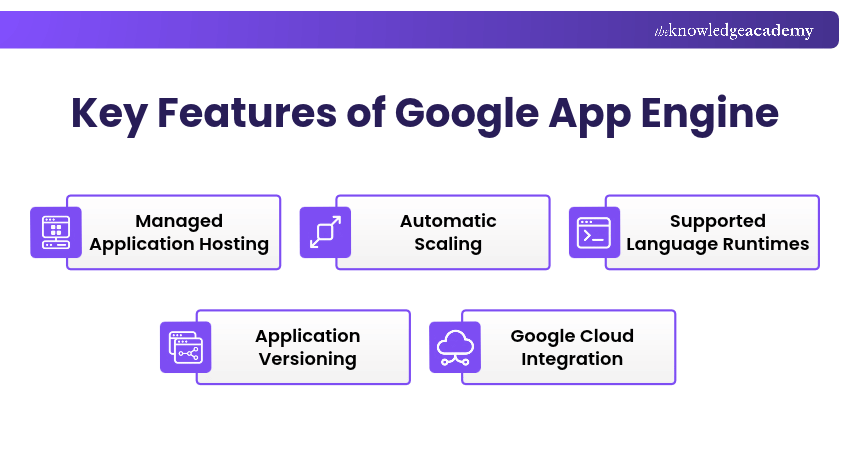
a) Managed Application Hosting: Reduces the need for direct server administration, allowing developers to focus on applications while Google Cloud manages the underlying infrastructure.
b) Automatic Scaling: Adjusts application instances according to demand and supported environment configurations, helping applications handle changing workloads with less manual intervention.
c) Supported Language Runtimes: Developers can build applications using supported languages and frameworks, including Python, Java, Node.js and Go.
d) Application Versioning: Supports deploying multiple versions and directing traffic between them for testing and gradual rollouts.
e) Google Cloud Integration: Connects applications with supported services such as Cloud Storage, Cloud SQL and Cloud Logging.
Best For: Developers who want managed web application hosting rather than direct infrastructure management.
8) HashiCorp Terraform
This is an Infrastructure as Code (IaC) tool used to define and manage cloud and on-premises resources through configuration files. Instead of manually creating resources through multiple management consoles, developers can describe the required infrastructure in code.
Key Features:
a) Infrastructure as Code: Defines infrastructure using reusable configuration files.
b) Multi-provider Support: Manages supported resources across different platforms.
c) Execution Planning: Displays proposed changes before they are applied.
d) State Management: Tracks information about managed resources.
e) Reusable Modules: Helps standardise infrastructure configurations.
Best For: DevOps Engineers, platform teams and organisations automating infrastructure provisioning.
Expert Insight: Provisioning and Configuration Are Different Tasks
Terraform is commonly used to provision infrastructure resources, while Red Hat Ansible Automation Platform supports infrastructure configuration, deployment and operational automation. Their capabilities overlap in certain areas, so organisations should assess whether they need one solution or both.
9) Kubernetes
Kubernetes is an open-source container orchestration platform for deploying, managing and scaling containerised applications. It supports declarative workload management across cloud and hybrid environments.
Key Features:
a) Container Orchestration: Manages containerised workloads across cluster nodes.
b) Horizontal Scaling: Adjusts workload replicas manually or automatically using configured metrics.
c) Self-healing: Restarts failed containers and replaces failed Pods according to the desired state.
d) Service Discovery and Load Balancing: Enables service communication and distributes traffic across available endpoints.
e) Rolling Updates: Supports gradual updates and rollbacks for supported workloads.
Best For: DevOps and platform teams managing containerised applications across multiple environments.
10) Docker
Docker is a containerisation platform used to package applications and their dependencies into portable images and run them in containers. It helps development teams maintain consistent environments across testing and deployment.
Key Features:
a) Docker Images: Package application components and runtime dependencies into reusable images.
b) Docker Containers: Run applications in isolated, portable environments.
c) Dockerfiles: Define repeatable image-building instructions.
d) Docker Compose: Defines and runs applications comprising multiple containers.
e) Docker Hub: Offers a registry for finding, storing and sharing container images.
Best For: Developers and DevOps teams preparing consistent application environments and container-based deployments.
11) Red Hat Ansible Automation Platform
Red Hat Ansible Automation Platform supports automation of infrastructure configuration, application deployment and IT operations. It enables teams to create reusable workflows and manage automation across cloud, on-premises and hybrid environments.
Key Features:
a) Ansible Playbooks: Define repeatable tasks and configuration workflows using YAML.
b) Automation Controller: Supports centralised execution, scheduling and management of automation jobs.
c) Automation Hub: Provides access to reusable automation content and collections.
d) Event-Driven Ansible: Enables automation triggered by supported operational events.
e) Execution Environments: Package dependencies for consistent automation execution.
Best For: IT operations, infrastructure and DevOps teams managing automation across multiple environments.
12) Sematext
Sematext provides monitoring and observability capabilities for applications, infrastructure and logs. It helps technical teams investigate system behaviour, identify performance problems and monitor operational health.
Key Features:
a) Infrastructure Monitoring: Tracks relevant system and infrastructure metrics.
b) Application Performance Monitoring: Helps examine application performance.
c) Log Management: Collects and analyses log data.
d) Alerting: Notifies teams when configured conditions are met.
e) Dashboard Visualisation: Presents monitoring information through dashboards.
Best For: Development and operations teams requiring visibility into application and infrastructure behaviour.
13) Prometheus
Prometheus is an open-source monitoring and alerting toolkit designed to collect and query time-series metrics. It is particularly useful for cloud-native applications and Kubernetes infrastructure.
Key Features:
a) Metrics Collection: Scrapes metrics from configured targets, commonly through HTTP endpoints.
b) PromQL: Supports querying and analysing time-series data.
c) Service Discovery: Helps identify monitoring targets in dynamic environments.
d) Alerting Rules: Evaluate configured conditions and generate alerts for handling through Alertmanager.
e) Exporters: Expose metrics from supported services and systems for collection.
Best For: DevOps, infrastructure and Site Reliability Engineering teams monitoring cloud-native applications.
14) IBM Cloudability
IBM Cloudability is a cloud financial management solution used to analyse spending, understand resource costs and support financial accountability. It supports FinOps practices, which encourage collaboration between business, finance teams and technology to improve the value of cloud expenditure.
Key Features:
a) Cloud Cost Visibility: Helps organisations examine expenditure across supported cloud services.
b) Cost Allocation: Supports attribution of spending to relevant teams, services or business units.
c) Budget Analysis: Helps teams evaluate spending against financial expectations.
d) Optimisation Insights: Supports identification of cost improvement opportunities.
e) Financial Reporting: Provides information for cloud financial management decisions.
Best For: FinOps, finance and IT teams managing cloud spending across complex environments.
Expert Insight
Knowing how much a cloud service costs does not automatically show whether the spending delivers value. Analyse consumption patterns, investigate underutilised resources and assess optimisation opportunities against performance and business requirements.
15) FortiCNAPP
FortiCNAPP is Fortinet's Cloud-Native Application Protection Platform (CNAPP), incorporating capabilities developed through the former Lacework platform. It helps organisations identify cloud security risks, examine workloads and prioritise potential threats across supported environments.
Key Features:
a) Cloud Security Posture Management: Helps identify cloud configuration risks.
b) Cloud Workload Protection: Supports security monitoring for cloud workloads.
c) Threat Detection: Helps identify suspicious activity and potential threats.
d) Identity-related Risk Analysis: Provides visibility into supported identity and permission risks.
e) Security Prioritisation: Helps teams assess and address significant cloud security findings.
Best For: Cloud security teams responsible for protecting applications, workloads and infrastructure.
Keep This in Mind
No single cloud computing tool meets every requirement. Start by identifying your operational priorities, then consider how different tools work together. A compatible combination of cloud services and specialised solutions can be more useful than relying on one platform alone.
Obtain insights into future trends and innovations in AI and cloud integration with our Certified Artificial Intelligence (AI) For Cloud Professionals Training – Join today!

The Knowledge Academy develops accessible learning content across Project Management, IT, Cybersecurity, Data Science, Business Analysis, HR, Accounting and Finance, Leadership and Health and Safety. Its resources combine subject research with clear explanations to help professionals build practical knowledge across a wide range of disciplines.
View Detail

 If you wish to make any changes to your course, please


