


We may not have the course you’re looking for. If you enquire or give us a call on 01344203999 and speak to our training experts, we may still be able to help with your training requirements.
Top 25 Automation Testing Tools
ByThe Knowledge AcademyLast updated on: 19 November 2026
Explore 25 automation testing tools for web, mobile, API and performance testing, including Playwright, Selenium, Cypress and Appium. Compare their capabilities, testing approaches and use cases to identify tools that suit your project requirements, testing goals and existing workflows.
At a Glance
1. Browser Testing: Playwright, Selenium and Cypress help automate browser-based testing across supported environments.2. API Testing: REST Assured, Postman and Karate support automated API checks, response validation and regression testing.3. Performance Testing: Apache JMeter and BlazeMeter help evaluate application performance under different workloads.4. Low-code and Codeless Testing: Katalon Studio, ACCELQ and Tricentis Tosca offer approaches that reduce the need for extensive scripting.5. Tool Selection: Consider programming requirements, platform compatibility, CI/CD integration and maintenance needs before choosing a tool.
Do you spend weeks testing every release by hand, clicking through the same screens again and again?
Do bugs still slip past your checks and reach your users first?
A bug that slips through testing can cost more than time. It can affect customer trust, delay releases and leave your developers fixing problems instead of building new features.
This is exactly why automation testing tools exist. They automate repetitive checks, help identify errors earlier and free your team to focus on work that needs human judgement.
If you're looking to improve your testing approach, this blog explores 25 automation testing tools and how they support different testing needs.
Best Automation Testing Tools
Here are 25 automation testing tools and their key capabilities to help you explore different testing requirements:
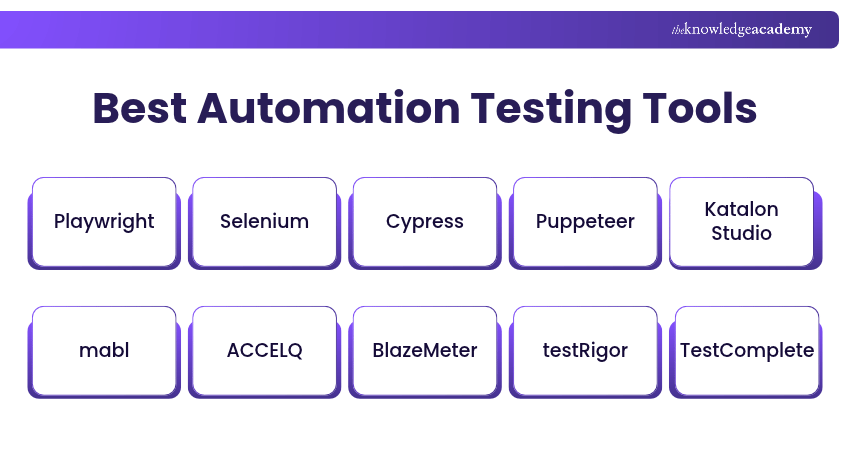
1) Playwright
Playwright is an open-source automation testing tool developed by Microsoft for automating web applications. Playwright supports automated testing using Chromium, Firefox and WebKit on Windows, macOS and Linux. It also supports branded Chromium-based browsers such as Google Chrome and Microsoft Edge.
Playwright automatically waits for elements to meet relevant actionability conditions before interacting with them, which can help reduce flaky tests. For JavaScript and TypeScript projects, Playwright Test supports parallel execution and provides built-in testing, debugging and reporting features.
Playwright supports multiple programming languages and integrates with CI/CD workflows, making it suitable for automated testing across development environments.
2) Selenium
Selenium is a widely used open-source automation testing tool, primarily used for web application testing. Selenium supports cross-browser testing with Google Chrome, Mozilla Firefox, Microsoft Edge and Safari. This makes it an invaluable tool for verifying browser compatibility. It supports multiple programming languages like Java, C#, Python, and Ruby.
It comprises different components, including Selenium WebDriver and Selenium Grid, that cater to various testing requirements. Also, Selenium can be integrated with JUnit and TestNG for organising and executing tests, alongside separate reporting and test management tools where required.
Start learning automation testing today with our Introduction to Test Automation with Selenium WebDriver course. Join now!
3) Cypress
Cypress is a JavaScript-based automation testing tool designed for web applications. Cypress runs automated web tests in supported browsers, including Google Chrome, Microsoft Edge and Firefox, with experimental support for WebKit. You will get real-time feedback by showing exactly what's happening during each step.
This automation testing tool is a JavaScript-based front-end tool, so code can be written in either JavaScript or TypeScript. This automation testing tool helps you get fast, developer-friendly test execution along with automatic waits and built-in retry logic.
4) Puppeteer
Puppeteer is an open-source Node.js library maintained by the Chrome browser automation team for automating Chrome and Firefox. QA Engineers can use Puppeteer for automated UI testing, web scraping and other browser automation tasks.
Puppeteer uses the Chrome DevTools Protocol for Chrome and WebDriver BiDi for Firefox, enabling browser automation, screenshots and PDF generation.
Pro Tip
Before choosing a browser automation tool, consider your team's programming skills, browser requirements and testing goals. Playwright, Selenium, Cypress and Puppeteer offer different approaches, so select the one that best fits your existing workflow rather than simply following popularity.
5) Katalon Studio
Katalon Studio is an automation testing platform that supports web, mobile, desktop and Application Programming Interface (API) testing. Katalon Studio also supports both codeless (using a record and playback feature) and coded tests. This makes it suitable for testers with various skill levels.
Additionally, it has a dual-scripting interface where users can generate scripts through a UI-driven interface or write scripts manually. It integrates with tools such as Jira, qTest and Slack.
Also, Katalon Studio comes with a pre-built keyword library, simplifying the scripting process for testers. This library is extensive and allows for powerful and flexible automation scripts.
6) mabl
mabl is an AI-assisted test automation platform that supports end-to-end testing across web applications, APIs and supported mobile workflows.
mabl uses AI-assisted capabilities for test creation, execution and maintenance. Its self-healing and failure analysis features can help teams investigate issues and adapt tests as applications change.
7) ACCELQ
ACCELQ is an AI-powered, codeless test automation platform that supports continuous testing and test management in Agile environments. Its model-based approach helps teams create, maintain and execute automated tests across supported applications within a unified platform.

8) BlazeMeter
BlazeMeter is a cloud-based performance testing platform that enables teams to create, execute and analyse load tests without requiring dedicated on-premises testing infrastructure.
BlazeMeter supports integrations with testing tools and frameworks such as Apache JMeter, Selenium and Gatling. Additionally, BlazeMeter offers real-time reporting with detailed performance metrics.
This includes error analysis, performance monitoring, and trend visualisation. As a result, it allows developers to make informed decisions about the performance of the software. BlazeMeter also integrates with compatible CI/CD tools, allowing teams to incorporate performance testing into their development workflows.
9) testRigor
testRigor is an AI-powered automation testing tool that permits users to create and run tests without extensive programming knowledge.
testRigor is designed to simplify and accelerate the creation and execution of end-to-end tests. testRigor enables users to create automated tests using plain-English instructions and supported natural-language capabilities.
10) TestComplete
TestComplete, a product of SmartBear, is a comprehensive commercial automation testing tool for desktop, web, and mobile applications. It supports both scripted and script-free (also known as record and replay) testing. This makes it easy to use for both beginners and experienced testers.
TestComplete supports scripting languages such as JavaScript, Python and VBScript, alongside legacy languages such as JScript. Its object recognition capabilities help identify interface elements, including dynamic controls, to support automated testing of complex applications.
Understand several types of testing possible with Automation Testing Using TestComplete Training. Sign up now!
11) JUnit
JUnit is a simple, open-source framework predominantly used for unit testing in the Java programming language. JUnit uses annotations to identify test methods and assertions to verify expected results.
JUnit tests can be run automatically. They check their own results and offer immediate feedback to the test runner. It's straightforward, easy to understand, and has become an industry standard for testing Java applications.
JUnit's straightforward structure makes it accessible to developers while offering the flexibility needed for different Java testing requirements.
JUnit also provides lifecycle annotations for setup and teardown operations, helping developers manage test execution. This annotation-based approach enhances the readability of tests and allows for more precise control over the testing lifecycle.
12) WebdriverIO
WebdriverIO is an open-source automation testing framework for web applications, mobile applications through Appium and supported desktop application technologies. It enables testers to create automated tests using JavaScript or TypeScript and supports browsers such as Chrome, Firefox, Edge and Safari.
WebdriverIO integrates with testing frameworks such as Mocha, Jasmine and Cucumber. It also supports parallel test execution, reporting and Continuous Integration/Continuous Delivery (CI/CD) pipelines, helping teams manage automated testing across different environments.
13) Tricentis Tosca
Tricentis Tosca is a commercial, continuous testing platform that accelerates testing with a scriptless, no-code approach for end-to-end test automation. Developed by Tricentis, the platform is recognised for its model-based test automation and AI-assisted testing capabilities.
Moreover, Tricentis Tosca provides a comprehensive toolkit for test automation with API, mobile, and GUI testing functionalities. The tool includes features to manage both agile and traditional projects. Tricentis Tosca supports automated functional testing, including regression and end-to-end testing across supported applications and technologies.
14) Squish GUI Tester
Squish GUI Tester, developed by Qt Group, is an automated Graphical User Interface (GUI) testing tool for desktop, mobile and web applications. It supports various technologies, including Qt, Java and web-based interfaces, and enables testers to perform functional and regression testing across different platforms.
One of its key features is object-level access, allowing testers to identify and interact with application interface elements rather than relying solely on on-screen coordinates. Squish also supports test recording, scripting and integration with CI/CD systems, helping teams create and maintain automated GUI tests.
15) REST Assured
REST Assured is an open-source Java library designed for automating Representational State Transfer (REST) API testing. It helps developers and testers send HTTP requests, validate responses and verify whether APIs behave as expected.
The library supports HTTP methods such as GET, POST, PUT, PATCH and DELETE. It also enables validation of response status codes, headers and data, making it useful for automated functional, integration and regression testing of REST APIs.
16) IBM DevOps Test UI
IBM DevOps Test UI, formerly known as IBM Rational Functional Tester (RFT), is an automated testing tool for functional, regression and GUI testing. It supports various applications, including web-based, Java, .NET and enterprise applications.
The tool offers test recording, data-driven testing and IBM's ScriptAssure technology, which helps maintain automated tests when application interfaces change. It also integrates with IBM DevOps testing solutions, supporting collaboration, test execution and management across development teams.
17) Karate
Karate is an open-source automation testing framework primarily used for API testing. It also supports UI automation, API mocking and performance testing through supported integrations, allowing teams to manage different testing requirements within a single framework.
Karate uses readable Gherkin-style syntax to create automated test scenarios without requiring separate step definitions. It provides built-in assertions, data-driven testing and reporting capabilities, making it useful for teams seeking a flexible approach to test automation.
18) TestNG
TestNG is an open-source Java testing framework inspired by JUnit and NUnit. It supports annotations, test grouping, parallel execution and lifecycle management, allowing developers to configure and organise automated tests.
TestNG allows users to organise test suites through XML configuration, include or exclude test groups and perform data-driven testing. It supports unit, integration, functional and other automated tests, depending on the test setup.
19) Appium
Appium is an open-source automation testing tool used mainly for testing mobile applications. It supports Android and iOS platforms and allows testers to create automated tests using different programming languages.
Appium generally allows testers to automate compatible applications without modifying their source code, although some applications may require additional configuration. Appium supports automation through compatible WebDriver client libraries, including those available for Java, Python, JavaScript, Ruby and C#.
20) SoapUI
SoapUI, developed by SmartBear, is a functional API testing tool with a graphical interface and command-line test execution capabilities. SoapUI supports functional and regression testing of APIs, including SOAP and REST services. It also offers load-testing capabilities, with more advanced performance and security testing available through specialised tools.
It also enables users to create robust and reusable test cases, create test suites, and offer mock services. Its mock services can simulate API behaviour before the corresponding services are fully implemented.
21) Postman
Postman is a user-friendly, AI-native tool with Agent Mode used for API testing. It provides a clean, intuitive Graphical User Interface (GUI) for constructing requests and reading responses. With Postman, users can send different types of HTTP requests like GET, POST, DELETE, PUT, and PATCH and validate responses.
Postman supports automated API testing through test scripts and collection runs. Teams can schedule tests or execute collections within CI/CD pipelines using the Postman CLI.
Gain expertise in using Postman for API testing with the Postman Certification Course. Join now!
22) Apache JMeter
Apache JMeter is an open-source load and performance testing tool used to simulate workloads and evaluate the performance of applications and services under different levels of demand.
JMeter can test a variety of protocols, including HTTP, HTTPS, JDBC, LDAP, JMS, and FTP. It can simulate multiple users or requests to measure response times, throughput and error rates under load. It can also analyse overall performance under different load types. Additionally, the tool offers a graphical analysis of performance reports.
23) Cucumber
Cucumber is an open-source Behaviour-driven Development (BDD) tool that uses Gherkin to describe expected application behaviour in readable test scenarios. These scenarios connect to executable test code through step definitions, making them easier for technical and non-technical stakeholders to understand.
Cucumber supports programming languages such as Java, Ruby and JavaScript, helping teams collaborate on testing requirements. It also supports data-driven testing through Scenario Outline, allowing the same scenario to run with different sets of example data.
Start automating acceptance tests with our Ruby with Cucumber Training. Join now!
24) Robot Framework
Robot Framework is an open-source automation testing tool that offers a flexible, powerful platform for both automation testing and Robotic Process Automation (RPA). It uses a keyword-driven testing approach, allowing users to create readable and easy-to-maintain test cases.
Its capabilities can be extended through test libraries and custom keywords, with Python commonly used for developing additional functionality.
25) Ranorex Studio
Ranorex Studio is an automation testing tool for desktop, web and mobile applications. It supports codeless test creation through a drag-and-drop interface, making it accessible to testers with limited programming experience.
The tool also provides an Integrated Development Environment (IDE), scripting capabilities, GUI recognition and reusable test modules. These features support functional and regression testing while helping teams create, execute and maintain automated tests efficiently.
Trainer's Insight
Automating more tests does not always mean better testing. Focus on reliable, maintainable tests that cover important user journeys and business risks. Review and update them regularly to make sure they continue to deliver useful results as applications change.
Selection Criteria for Automated Testing Tools
Choosing the correct automation testing tool depends on your testing needs, team capabilities and existing workflows. Consider these five factors before making a decision:
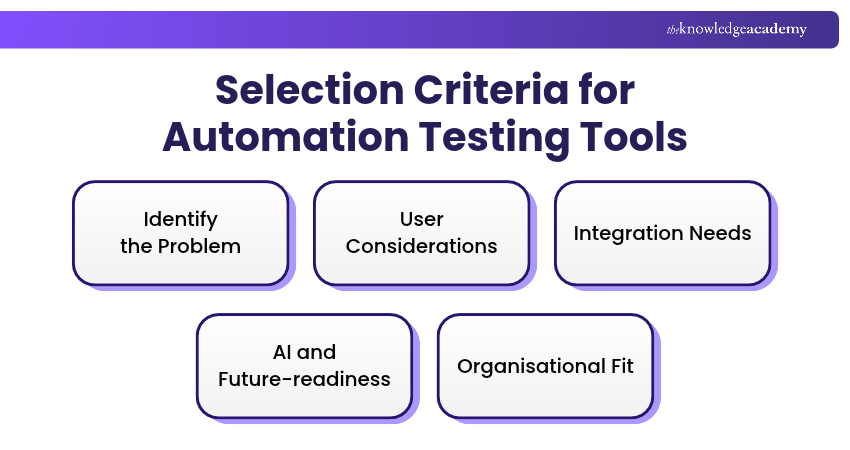
1) Identify the Problem
Begin by pinpointing the specific features and functionalities your desired automation testing tool must have to bridge the gap in your current setup.
2) User Considerations
Consider who will use the automation testing tool and how many licences you'll need. Decide if it's just for QA testers or if wider teams need access too, and weigh user-friendliness against the advanced features experienced testers might want.
3) Integration Needs
Evaluate the new tool's compatibility with your existing suite. Decide whether it will supplement your current tools, replace them, or require integration with other systems like your bug tracker or CI/CD pipeline.
4) AI and Future-readiness
See how well the tool's AI features, like self-healing scripts or automated test generation, actually work in practice rather than just on paper. Also check whether it can scale with your team and test volume as both grow, so you don't have to switch tools later.
5) Organisational Fit
Look beyond features and capabilities to how well the tool matches your company's actual processes. A popular tool doesn't mean it's right for your setup, so focus on what already works for your team and where the real gaps are.
Learn practical testing techniques to improve systems and application performance with the Software Testing Courses – Join now!

The Knowledge Academy develops accessible learning content across Project Management, IT, Cybersecurity, Data Science, Business Analysis, HR, Accounting and Finance, Leadership and Health and Safety. Its resources combine subject research with clear explanations to help professionals build practical knowledge across a wide range of disciplines.
View Detail

 If you wish to make any changes to your course, please


