




We may not have the course you’re looking for. If you enquire or give us a call on 01344203999 and speak to our training experts, we may still be able to help with your training requirements.
Essential Website Design Tips for a User-friendly Website
ByVishnu SankarLast updated on: 29 October 2026
Discover 12 essential website design tips to create an attractive, responsive and user-friendly website. Explore practical ways to improve navigation, readability, accessibility and loading speed while maintaining a consistent visual identity.

An Overview
1. A clean homepage, intuitive navigation and clear headings help visitors find information easily.2. Consistent colours, typography, white space and visuals create an appealing website design.3. Responsive layouts and accessible content improve usability across devices and user needs.4. Fast loading speeds, readable content and well-organised layouts support a better user experience.5. Regular testing, user feedback and performance monitoring help maintain an effective website.
Five seconds.
That's all we're giving you to explore a website.
The homepage looks attractive, but the menu is confusing. The text is difficult to read. And the button you're looking for? Nowhere to be found.
Would you stay or leave?
A website doesn't become user-friendly simply because it looks good. Every element, from navigation to page layout, influences how easily visitors can find what they need.
So, what makes a website worth exploring rather than abandoning? Let's discover the design tips that can make all the difference.
12 Effective Website Design Tips
An effective website balances visual appeal with usability, accessibility and performance. Whether you're creating a new site or improving an existing one, the following website design tips can help you deliver a better experience for visitors. Let's look at them below:
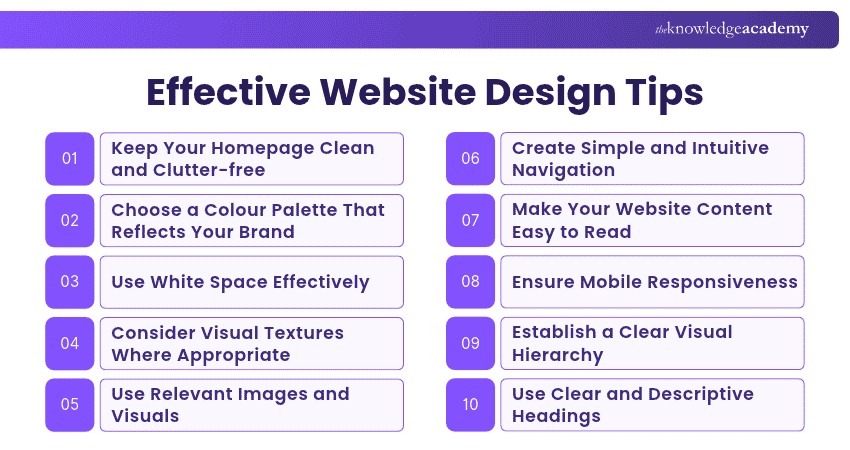
1) Keep Your Homepage Clean and Clutter-free
The main message of your website's homepage should be immediately apparent. Since people tend to scan rather than read every word, organise information so visitors can quickly understand what your website offers.
Simplifying the content and minimising unnecessary distractions enhances the user experience. Use clear headings, relevant visuals and prominent Calls to Action (CTAs) to guide visitors towards important information without overwhelming them.

2) Choose a Colour Palette That Reflects Your Brand
Colour plays a prominent role in shaping a website's visual identity and helping users distinguish different elements. Your chosen colour palette should:
a) Reinforce your brand identity
b) Maintain sufficient contrast between text and backgrounds
c) Create visual consistency across pages and interactive elements
d) Use complementary colours without compromising readability
For example, a brand may use one primary colour for its identity and a contrasting accent colour to highlight important buttons. The colours should remain distinguishable and readable rather than relying solely on assumed emotional associations.
3) Use White Space Effectively
Whitespace, or negative space, refers to the empty spaces between text, images and other design elements. It gives users visual breathing room as they navigate a website. By reducing visual clutter, whitespace helps separate content, establish visual hierarchy and draw attention to important information.
For example, adding sufficient spacing around a call-to-action button can make it easier to notice without introducing more decorative elements.
4) Consider Visual Textures Where Appropriate
Visual textures can introduce depth, character and personality into a website's design. They may include subtle patterns, illustrations or backgrounds that create a distinctive visual style. When used appropriately, textures can complement a brand's identity and make sections more visually engaging. However, avoid textures that reduce text readability, create visual clutter or distract users from important content.
For example, a restaurant website might use a subtle illustrated background that reflects its personality while keeping menus and other important information clearly visible.
5) Use Relevant Images and Visuals
Achieving a harmonious blend of text and images is crucial in web design. The integration of visuals enhances content by making it more informative, engaging and memorable. Use photographs, illustrations, charts or diagrams when they help communicate information or explain complex ideas.
Ensure meaningful images include appropriate alternative text and purely decorative images are marked so assistive technologies can ignore them. Choose suitable image formats, compress files and use appropriately sized images to support accessibility and loading performance.
Trainer's Insight
Every image should have a purpose. Product photographs can help visitors evaluate an item, while diagrams can simplify complex information. If an image adds no meaningful value or distracts from the content, consider removing it.
6) Create Simple and Intuitive Navigation
Simple navigation helps visitors find information and move between pages without confusion. Implement intuitive navigation, clear menu labels and a logical page structure so visitors can locate information without unnecessary effort.
Group related pages under meaningful categories, keep important links easy to find and maintain consistent navigation across the website. Regularly test navigation with real users to identify confusing labels, unnecessary steps or difficulties accessing important content.
7) Make Your Website Content Easy to Read
Readability refers to the ease with which individuals can understand words, sentences and phrases. A readable website uses clear language, suitable typography and well-structured content to help visitors find and understand information.
Consider the following practices:
a) Maintain Sufficient Contrast: Ensure text is clearly distinguishable from its background. For WCAG 2.2 Level AA, ordinary text generally requires a contrast ratio of at least 4.5:1, while large text generally requires at least 3:1.
b) Use Readable Font Sizes: Choose text sizes that remain comfortable to read across devices. A body font size of around 16px is a common starting point, but readability also depends on the typeface, spacing and layout.
c) Choose Fonts Carefully: Select legible serif or sans-serif typefaces that suit your website's visual identity.
d) Limit Unnecessary Font Variations: Maintain consistency by using a small, purposeful set of typefaces, sizes and weights.
e) Keep Paragraphs and Lines Manageable: Break lengthy text into shorter paragraphs and avoid excessively long lines that make content difficult to follow.
f) Use a Clear Text Hierarchy: Distinguish headings, subheadings and body text through consistent size, spacing and weight.
8) Ensure Mobile Responsiveness
Responsive web design enables websites to adapt their layouts to different screen sizes and devices, including desktops, tablets and smartphones. It commonly uses flexible layouts, responsive images and CSS media queries.
Test the website across different viewport sizes to ensure navigation menus, forms, images and interactive elements remain usable. Avoid horizontal scrolling for ordinary content and ensure important information remains accessible on smaller screens.
Pro Tip
Don't rely only on resizing your browser window to test mobile responsiveness. Check important pages on actual devices where possible, paying attention to navigation menus, forms, text readability and touch interactions.
9) Establish a Clear Visual Hierarchy
Visual hierarchy involves arranging website elements to show their relative importance and guide users through the content. It uses size, spacing, contrast, alignment and positioning to highlight key information.
For example, a product page might feature a prominent product title, supporting description, price and a clearly visible purchase button. This arrangement helps visitors identify essential information and understand what action they can take next.
10) Use Clear and Descriptive Headings
Headings help organise website content into meaningful sections, allowing visitors to scan pages and understand how information is arranged. Clear, descriptive headings also support navigation for people using assistive technologies.
Write headings that accurately describe the content that follows. Use a logical heading structure, with a main page heading and appropriately nested subheadings. Avoid vague labels or excessive decorative formatting that makes the content harder to understand or navigate.
11) Optimise Website Loading Speed
Website performance influences how quickly visitors can access content and interact with a page. Slow loading, delayed responses and unexpected layout movements can interrupt the user experience.
Improve performance by compressing images, using appropriate image formats, reducing unnecessary scripts and reviewing hosting and caching configurations. Google's Core Web Vitals measure important aspects of page experience:
a) Largest Contentful Paint (LCP): Measures how long it takes for the largest visible image, text block or other eligible content element to render within the viewport.
b) Interaction to Next Paint (INP): Measures a page's overall responsiveness to user interactions, such as clicks, taps and keyboard inputs.
c) Cumulative Layout Shift (CLS): Measures unexpected visual movement of page elements.
Design smarter interfaces and create experiences users love with the UI UX Design Course - Register now!
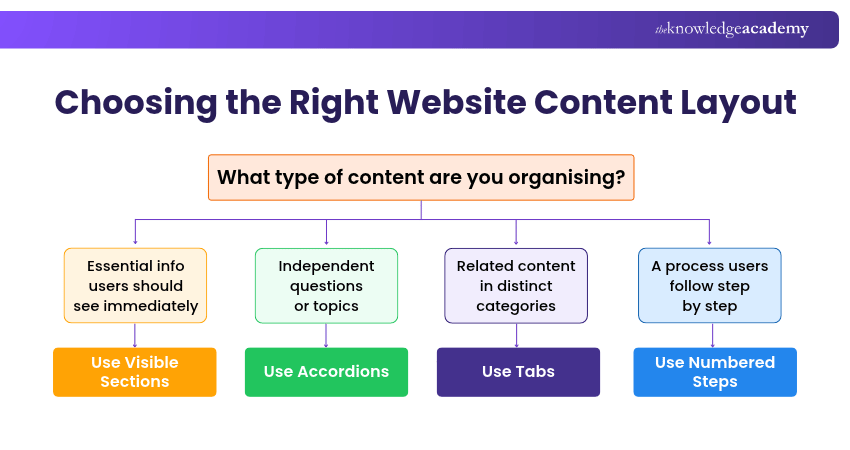
12) Use Accordions and Tabs Appropriately
Accordions and tabs can organise related information into manageable sections without displaying everything at once. They are particularly useful for FAQs, product details and information grouped into clear categories.
However, hiding essential information unnecessarily can make it harder for users to discover. Use descriptive labels, indicate which sections are expanded or selected and ensure controls work with keyboards and assistive technologies.
Essential Website Design Requirements
Creating a successful website requires a clear structure, well-defined goals and a smooth user experience. Website design requirements act as a blueprint, guiding designers and developers to build a site that aligns with business objectives and meets user expectations. Key requirements include:
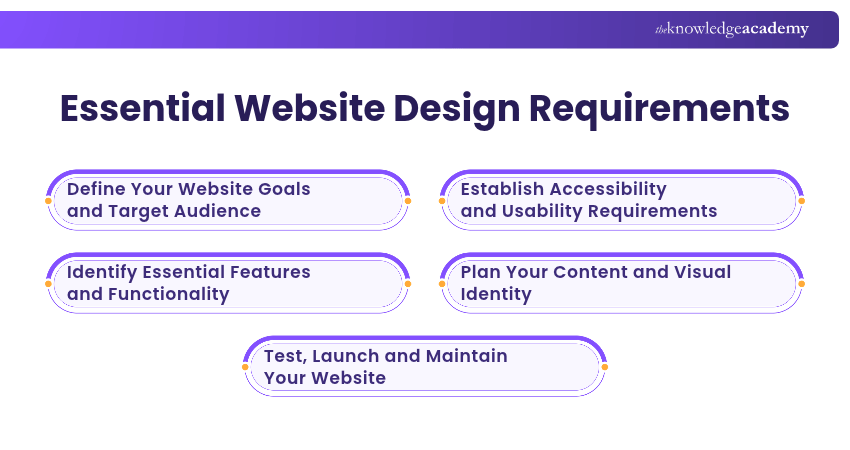
1) Define Your Website Goals and Target Audience
Before diving into design, it's crucial to outline the website's purpose. What do you want to achieve? Who is your target audience? Whether your goal is to boost sales, generate leads or provide information, setting clear objectives lays the foundation for the entire project.
Identify your visitors' main needs and the actions you want them to complete, as these decisions will guide the website's structure and content.
2) Identify Essential Features and Functionality
List the must-have functionalities. Do you need eCommerce capabilities, user login areas or an interactive dashboard?
Prioritise features according to user needs, business objectives and available resources. Document important requirements such as search functionality, forms, integrations and security expectations before development begins.
3) Establish Accessibility and Usability Requirements
A great website isn't just about looks. It needs to be fast, user-friendly and accessible to people with different abilities and needs.
Establish requirements for keyboard navigation, colour contrast, accessible forms, meaningful alternative text, responsive layouts and compatibility with assistive technologies. Use WCAG 2.2 as an accessibility reference and test the website with appropriate methods.
4) Plan Your Content and Visual Identity
Your content, whether text, images or videos, should be structured for clarity and engagement. Create a content plan covering page purposes, key messages, information hierarchy and content ownership.
Establish consistent colours, typography, imagery and layout guidelines to reinforce your brand identity. This helps maintain a cohesive experience across pages and supports future updates.
5) Test, Launch and Maintain Your Website
Before going live, the website should go through thorough testing to catch bugs, improve usability and optimise performance. Test key user journeys, forms, navigation, accessibility, responsiveness, security and compatibility across relevant browsers and devices.
After launch, regularly review performance, update content, apply security patches and assess user feedback. Use relevant metrics, such as conversion rates, task completion and page performance, to identify opportunities for improvement.
Make every screen count with smarter responsive design by joining the Responsive Web Design Training now!
Common Website Design Mistakes to Avoid
A poorly designed website can frustrate users, weaken your brand and stop your site from achieving its goals. Even small design decisions can affect how easily visitors understand information and complete important tasks. Here are six common mistakes to avoid:
1) Ignoring User Experience
A visually stunning website is pointless if it's hard to navigate. Prioritising looks over usability can frustrate visitors. Avoid designing solely around visual preferences. Consider how visitors find information, complete tasks, and interact with the website across different devices.
2) Overloading Pages with Content
Walls of text and cluttered visuals can overwhelm users. Keep content clear, concise and structured to ensure visitors quickly find what they need. Avoid placing too many competing messages, images and calls to action in the same area. Instead, prioritise essential information and organise supporting details logically.
3) Using Inconsistent Design Elements
Mismatched fonts, colours and layouts can make your website feel chaotic and unprofessional. A consistent visual theme helps build trust and makes your brand more recognisable. Use shared design components, consistent spacing and established style guidelines to create a familiar experience across pages.
4) Neglecting Website Accessibility
Not considering users with disabilities can limit your audience. Common accessibility problems include insufficient text contrast, missing alternative text, inaccessible forms and interactive controls that cannot be operated using a keyboard. Include accessibility checks throughout design and development rather than treating them as a final adjustment.
5) Using Unclear Calls to Action
If your website does not clearly guide visitors towards important actions, such as registering, making a purchase or contacting your business, you may miss valuable opportunities. Avoid vague labels such as "Click Here" when a more descriptive action is possible. Use clear language such as "Download the Guide" or "Request a Quote" to communicate what users can expect.
6) Ignoring User Feedback and Analytics
Without tracking user behaviour, you're missing useful information about how visitors interact with your website. Use website analytics tools to monitor performance, identify issues and make informed improvements. Combine this information with usability testing and customer feedback while following applicable privacy requirements.
Break accessibility barriers and design websites for everyone with the WCAG Training - Join today!

Vishnu Sankar is a Senior Content Writer with 5+ years of experience across content development, software development, web development and system administration. His technical background and professional training support his expertise in IT and Tech, while his extensive research and writing experience covers Project Management and Health and Safety.
View Detail

 If you wish to make any changes to your course, please


