


We may not have the course you’re looking for. If you enquire or give us a call on 01344203999 and speak to our training experts, we may still be able to help with your training requirements.
Essential Web Developer Skills for Career Growth
ByThe Knowledge AcademyLast updated on: 06 November 2026
Web Developer skills include coding, responsive design, testing, problem-solving and communication. These abilities help professionals create functional, accessible and secure websites.

Quick Preview
1. HTML, CSS and JavaScript help developers create interactive and responsive websites.2. Server-side programming, databases and APIs support website functionality and data processing.3. Git, frameworks and deployment tools help developers build, manage and maintain applications.4. Testing, debugging, accessibility and security practices support reliable web experiences.5. Problem-solving, creativity and communication help developers collaborate and deliver effective solutions.
A website that loads quickly, adapts smoothly to different screen sizes and responds to user interactions might look effortless. But behind that seamless experience lies a combination of coding expertise, creative thinking and problem-solving. That's where strong Web Developer skills make all the difference.
These skills are essential for everything from building interactive interfaces and managing databases to identifying and resolving technical issues. Whether you're an aspiring developer or an experienced professional looking to strengthen your abilities, this blog explores 14 essential Web Developer skills and practical ways to improve them.
Essential Web Developer Skills
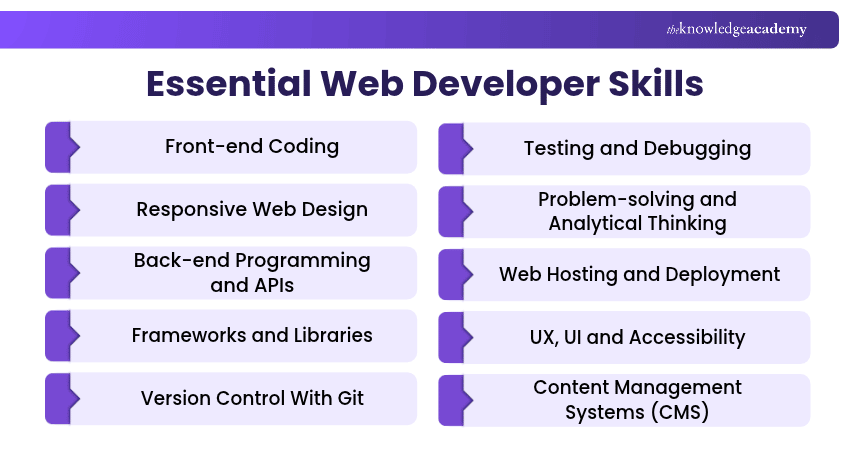
While some skills are fundamental across different roles, others become more important depending on whether you specialise in front-end, back-end or full-stack development. Here are the essential skills in detail:
1) Front-end Coding
Front-end coding involves creating the visible and interactive parts of websites using HTML, CSS and JavaScript. These technologies work together to structure content, style interfaces and add interactive functionality. HTML defines elements such as headings, paragraphs and forms, while CSS controls their appearance and layout.
JavaScript enables features such as interactive menus, form validation and dynamically updated content. For example, a Web Developer creating an online shopping website may use HTML to organise product information, CSS to design product cards and JavaScript to update a shopping basket.

2) Responsive Web Design
Responsive web design enables websites to adapt to different screen sizes, including desktops, tablets and smartphones. It helps users access content and interact with websites without unnecessary horizontal scrolling or layout difficulties. Developers use flexible layouts, relative units, responsive images and CSS media queries to create interfaces that adjust to available screen space.
For example, an online shopping website may display several product columns on a desktop but use a single-column layout on smaller screens. Responsive design improves adaptability, although loading speed and overall performance also depend on factors such as images, scripts and server configuration.
Pro Tip: Start With Mobile-first Design
Begin by designing for smaller screens before expanding the layout for larger displays. Use flexible grids, responsive images and CSS media queries to adjust the interface. This approach encourages you to prioritise essential content and identify layout problems early.
3) Back-end Programming and APIs
Back-end programming involves developing the server-side functionality that supports websites and web applications. It handles tasks such as processing requests, managing data, authenticating users and implementing business logic. Developers should also understand security practices such as input validation, access control and protecting sensitive data.
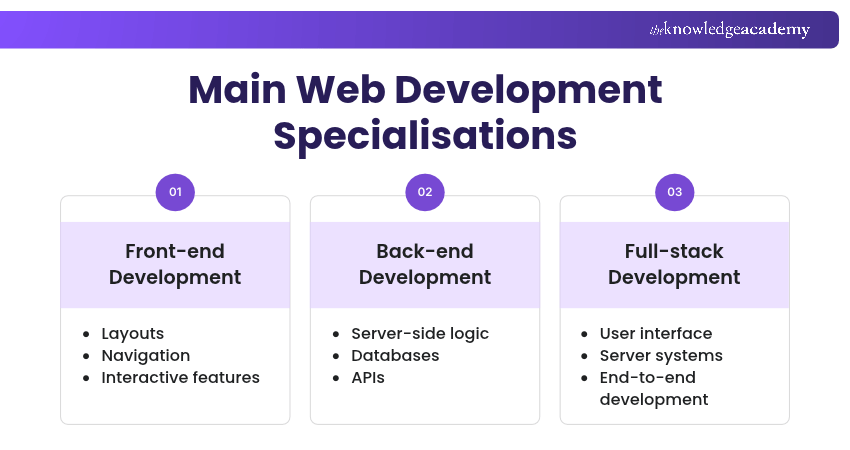
Web Developers also work with databases to store, retrieve and update information. They use Application Programming Interfaces (APIs) to enable communication between applications or software components. For example, when a user logs into an online learning platform, the back-end system may validate their credentials, check permissions and retrieve relevant account information.
4) Frameworks and Libraries
Frameworks and libraries provide reusable functionality, structures and development tools that help developers build applications more efficiently. Popular examples include React, a JavaScript library for building user interfaces; Angular, a web application framework; and Vue, a JavaScript framework.
The choice of framework or library should depend on the project's requirements, complexity, performance needs and the development team's experience. For example, a complex application with reusable interface components may benefit from a suitable framework, while a small informational website might not require the same level of tooling.
5) Version Control With Git
Git is a distributed version control system that helps developers track changes to source code and collaborate on software projects. It allows developers to record changes through commits, create branches for separate features and merge completed work into a shared codebase.
For example, when several developers are working on the same website, Git allows each person to develop features independently before integrating their changes. Developers should understand common operations such as committing changes, reviewing differences, managing branches and resolving merge conflicts.
Learn the basics of the Git branching tools with our Git & GitHub Fundamentals Training – Sign up now!
6) Testing and Debugging
Testing and debugging help developers identify problems, check expected behaviour and improve application reliability. Testing involves examining whether a website or application works as intended. Debugging focuses on investigating the causes of problems and correcting them.
Developers may use unit tests, integration tests, browser-based testing tools and automated testing frameworks to evaluate application behaviour. For example, a developer working on an online registration form may test whether the application accepts valid information, rejects invalid entries and handles server errors appropriately.
Trainer's Insight
A website may work correctly under normal conditions but fail when users submit invalid information, lose connectivity or perform unexpected actions. Include these scenarios in your testing alongside standard workflows to identify weaknesses that might otherwise go unnoticed.
7) Problem-solving and Analytical Thinking
Problem-solving and analytical thinking help Web Developers investigate technical challenges, identify their causes and develop suitable solutions. These skills involve breaking complex problems into smaller parts, examining available evidence and comparing possible approaches.
For example, if a website becomes slow, a developer may investigate network requests, JavaScript execution, image sizes and server response times to identify potential bottlenecks. They can then evaluate improvements such as image optimisation, reducing unnecessary scripts or improving resource loading.
8) Web Hosting and Deployment
Web hosting and deployment skills help developers make websites available to users and maintain applications after development. Hosting involves providing the infrastructure needed to serve a website, while deployment involves releasing application code and related assets to a suitable environment.
Developers should understand hosting options, domain configuration, environment variables, deployment pipelines and basic monitoring. For example, after developing a website locally, a developer may publish it to a hosting platform, configure its domain and test whether the deployed version behaves correctly.
9) UX, UI and Accessibility
Knowledge of user experience (UX) and user interface (UI) helps developers create websites that are intuitive, usable and visually consistent. UX focuses on how users experience and interact with a product, while UI concerns its visual and interactive elements, including buttons, forms, spacing and navigation.
Web accessibility includes designing and developing websites that people with a wide range of abilities and disabilities can navigate and use effectively. For example, a developer creating an online booking form should consider clear labels, readable error messages, logical keyboard navigation and sufficient colour contrast.
Master cutting-edge UI/UX principles to craft engaging digital experiences. Sign up for the UI UX Design Course now!
10) Content Management Systems (CMS)
Content management systems (CMSs) allow individuals and organisations to create, organise and update website content through an administrative interface. Popular examples include WordPress, Drupal and Joomla. Some projects also use headless CMS platforms that deliver content through APIs.
Web Developers working with CMS platforms may customise templates, develop themes, configure extensions and integrate third-party services. For example, a developer creating a company website with WordPress may customise its design and functionality while allowing authorised staff to update articles and images without editing the source code.
11) Attention to Detail
Attention to detail helps Web Developers identify small mistakes that could affect a website's functionality, appearance or usability. It involves reviewing code carefully, following agreed coding standards and checking whether implemented features match project requirements.
For example, a missing form label, incorrect link destination or small configuration error can negatively affect the user experience. Developers with strong attention to detail check their work systematically, review changes before deployment and verify important functionality.
12) Technical SEO
Technical Search Engine Optimisation (SEO) involves improving aspects of a website that help search engines discover, crawl and understand its content. Web Developers contribute to technical SEO by implementing semantic HTML, meaningful page titles, descriptive URLs, crawlable links and appropriate structured data.
They may also work on website performance, mobile usability and technical issues affecting search engine access. For example, a developer can ensure that important pages are accessible through standard links and that the website uses appropriate canonical URLs where necessary.
13) Communication and Collaboration
Communication skills help Web Developers explain technical concepts, understand requirements and collaborate with colleagues and stakeholders. Developers frequently interact with designers, Project Managers, testers, clients and other technical professionals.
Clear written and verbal communication is important when discussing project requirements, reporting issues and explaining implementation decisions. For example, when a requested website feature cannot be delivered within the available resources, a developer should explain the limitation and propose practical alternatives.
14) Creativity
Creativity enables Web Developers to explore different approaches to technical and design challenges. It involves considering alternative solutions, experimenting with interface features and finding effective ways to meet user requirements within project constraints.
For example, a developer may create an interactive product comparison feature that helps customers evaluate different options more easily. Creativity is not limited to visual design. It also supports identifying simpler implementations, improving existing features and solving unusual programming problems.
Portfolio Challenge: Build and Deploy a Responsive Website
Building a practical project is an effective way to apply several web development skills together. A personal portfolio website can demonstrate your coding knowledge, design awareness and ability to manage a project from development to deployment. Complete the following tasks to create your website:
Portfolio Project Checklist
□ Create a homepage, about section and project gallery using semantic HTML□ Use CSS to develop layouts that adapt to mobile, tablet and desktop screens□ Add a JavaScript feature, such as project filtering or a collapsible navigation menu□ Test keyboard navigation, links, responsive layouts and any forms included□ Track project changes using Git and organise your repository□ Deploy the website and document its main features and technologies
How to Improve Your Web Development Skills?
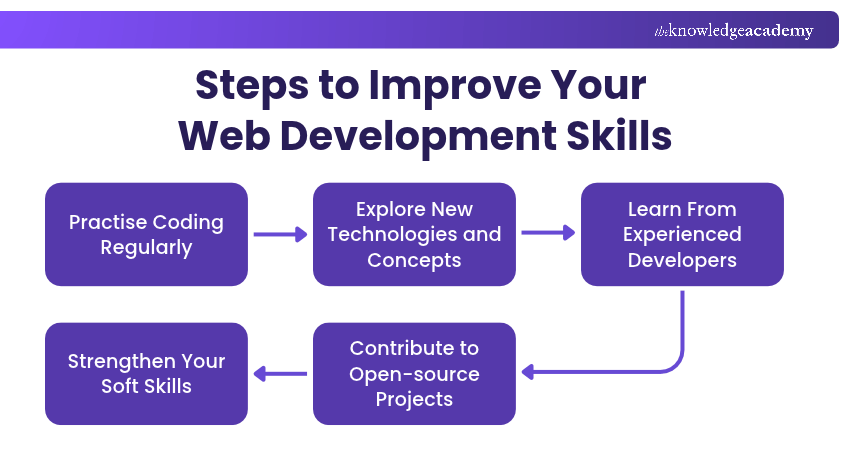
Improving Web Developer skills requires consistent practice, practical experience and continuous learning. Here are five effective ways to strengthen your abilities:
1) Practise Coding Regularly
Regular coding helps improve programming knowledge and problem-solving abilities. Start with simple exercises, such as creating forms or navigation menus, before progressing to larger projects. Reviewing your code also helps identify mistakes and areas for improvement.
2) Explore New Technologies and Concepts
Explore frameworks, libraries, APIs and development practices relevant to your career goals. Focus on understanding core concepts rather than learning every new tool. This helps you select suitable technologies for different projects.
3) Learn From Experienced Developers
Seek guidance through mentorship, code reviews and developer communities. Experienced professionals can provide feedback on coding practices, project structure and technical decisions, helping you improve your development approach.
4) Contribute to Open-source Projects
Participate in open-source projects to earn practical experience with real codebases and collaborative development. Start by improving documentation, fixing small bugs or contributing to existing features. This helps strengthen your coding, Git and teamwork skills.
5) Strengthen Your Soft Skills
Develop communication, time management and collaboration skills alongside technical expertise. Practise explaining technical concepts, understanding project requirements and responding to feedback. These abilities help you work effectively with development teams.
Keep This in Mind
Becoming a skilled Web Developer takes more than learning programming languages. It requires consistent practice, problem-solving and the ability to adapt to changing technologies. Whether you focus on front-end, back-end or full-stack development, strengthening both technical and soft skills can help you handle projects more confidently and grow professionally.
Learn cutting-edge technologies for versatile web solutions with our App & Web Development Training – Register now!

The Knowledge Academy develops accessible learning content across Project Management, IT, Cybersecurity, Data Science, Business Analysis, HR, Accounting and Finance, Leadership and Health and Safety. Its resources combine subject research with clear explanations to help professionals build practical knowledge across a wide range of disciplines.
View Detail

 If you wish to make any changes to your course, please


