


We may not have the course you’re looking for. If you enquire or give us a call on +44 20 4538 6376 and speak to our training experts, we may still be able to help with your training requirements.
10 Essential System Administrator Skills
ByThe Knowledge AcademyLast updated on: 04 November 2026
Learn the core capabilities System Administrators use to keep IT environments secure, reliable and efficient, with practical guidance for developing these skills and progressing in system administration.
Quick Look
1. System Administrators need both technical and interpersonal skills.2. Server, networking and cybersecurity knowledge support reliable IT operations.3. Automation and cloud skills help manage increasingly complex infrastructure.4. Troubleshooting, communication and prioritisation support effective daily administration.5. Practical experience and continuous learning help professionals strengthen their capabilities.
What happens when an organisation's servers suddenly crash, employees lose access to critical data, and essential systems stop working? Every minute of downtime can disrupt operations, but someone needs to identify the problem and restore normal service.
That's where a System Administrator steps in. Keeping IT infrastructure secure, efficient and reliable requires more than knowing how to fix technical issues. It demands expertise in managing complex systems, reducing the risk of failures and adapting to evolving technologies.
To manage these responsibilities effectively, System Administrators need a combination of technical and interpersonal skills. In this blog, we'll explore 10 essential System Administrator skills and practical ways to develop them for a career in IT.
Skills Needed for System Administration
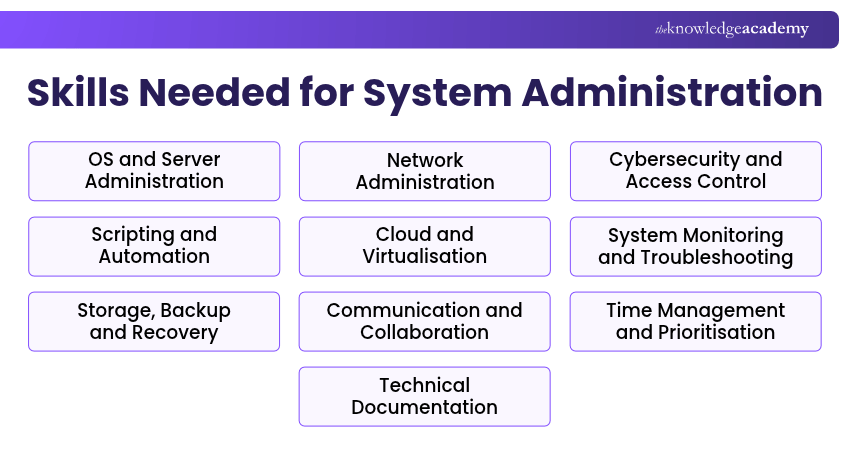
Effective system administration combines technical expertise with strong interpersonal skills. System Administrators need to manage operating systems, networks, security and modern cloud environments while communicating clearly and collaborating across teams.
Here are 10 essential System Administrator skills that support reliable IT operations and professional growth.
1) Operating System and Server Administration
Operating system and server administration involves installing, configuring, updating and maintaining systems that support organisational applications and services. System Administrators need knowledge of platforms such as Windows Server and Linux, including command-line operations, system services, software installations and server configuration.
Example: A System Administrator configures a Windows Server environment, installs necessary services and manages system updates to support business applications.
How to Develop: Practise installing Windows Server and Linux in virtual environments, managing system services and performing routine administrative tasks.
2) Network Administration and Protocols
Network administration skills help System Administrators understand how devices communicate and exchange information across an organisation. Knowledge of TCP/IP, Domain Name System (DNS), Dynamic Host Configuration Protocol (DHCP), routing and switching is valuable for maintaining reliable connectivity.
These skills also support the configuration of network services and the identification of connectivity issues.
Example: A System Administrator configures DHCP settings to assign IP addresses automatically to devices connected to an office network.
How to Develop: Study networking fundamentals, practise IP addressing and subnetting, and use tools such as Cisco Packet Tracer to explore network configurations.
Pro Tip: Follow a Structured Troubleshooting Approach
When investigating network issues, start by checking the physical or wireless connection and IP configuration. Then test gateway connectivity, DNS resolution and routing as appropriate to the symptoms. Use the results to identify the likely cause before making configuration changes.
3) Cybersecurity and Access Management
Cybersecurity and access management skills enable System Administrators to protect IT infrastructure from unauthorised access, vulnerabilities and security threats. Key activities include applying security patches, configuring firewalls, enforcing access permissions and implementing authentication controls.
Understanding security principles such as least privilege and Multi-factor Authentication (MFA) helps professionals protect organisational systems and sensitive information.
Example: A System Administrator implements role-based access controls and MFA to restrict access to confidential company resources.
How to Develop: Study cybersecurity fundamentals, practise managing user permissions and explore security configuration tools in a controlled environment.
4) Scripting and Automation
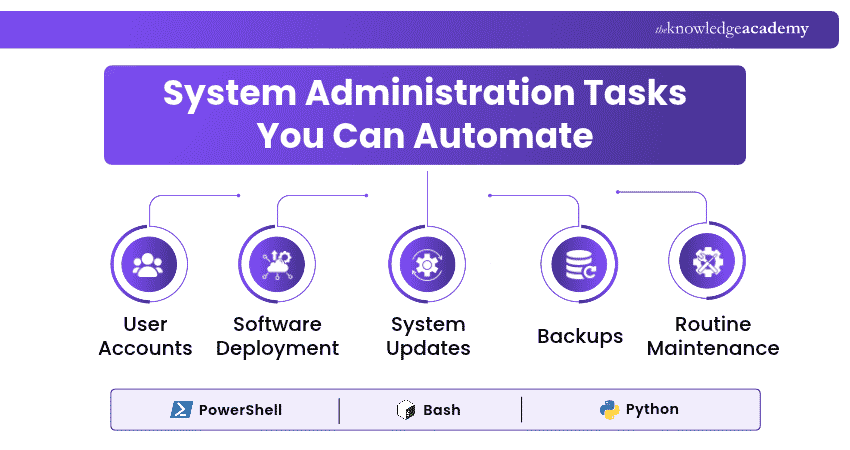
Scripting and automation skills allow System Administrators to streamline repetitive administrative activities, reduce manual effort and maintain consistent system configurations. Languages and tools such as PowerShell, Bash and Python help automate tasks including user account management, software deployment and scheduled maintenance.
Automation becomes particularly valuable when managing multiple servers or performing frequent operational tasks.
Example: A System Administrator creates a PowerShell script to automate the creation of user accounts based on approved employee information.
How to Develop: Learn basic scripting concepts, write simple automation scripts and gradually progress to more complex administrative workflows.
Strengthen your automation skills and streamline administrative tasks with the Automate Administration with PowerShell AZ-040 Training – Sign up today!
5) Cloud Computing and Virtualisation
Cloud computing and virtualisation skills help System Administrators manage IT resources across physical, virtual and cloud environments. Cloud platforms such as Microsoft Azure, Amazon Web Services (AWS) and Google Cloud provide infrastructure services, while virtualisation technologies enable multiple virtual machines to operate on shared hardware.
Understanding these technologies supports efficient resource allocation and infrastructure management.
Example: A System Administrator deploys virtual servers in Microsoft Azure to support applications without purchasing additional physical hardware.
How to Develop: Explore cloud service fundamentals, practise creating virtual machines and learn to manage resources using cloud administration consoles.
6) System Monitoring and Troubleshooting
System monitoring and troubleshooting skills help System Administrators detect operational issues, investigate their causes and restore normal functionality. Monitoring involves tracking metrics such as CPU usage, memory consumption, disk activity and service availability.
Troubleshooting requires interpreting system logs, testing possible causes and applying appropriate solutions to minimise disruption.
Example: A System Administrator investigates an application slowdown by reviewing server performance metrics and identifying a process consuming excessive memory.
How to Develop: Practise using monitoring tools, analysing system logs and resolving simulated technical problems through structured troubleshooting.
Quick Check: Can You Identify the Problem?
A server is running slowly, and its monitoring dashboard shows consistently high memory usage. What should a System Administrator investigate first?A. Network cable lengthB. Processes consuming excessive memoryC. Screen resolutionD. File naming conventionsAnswer: B. Processes consuming excessive memory.
7) Storage, Backup and Disaster Recovery
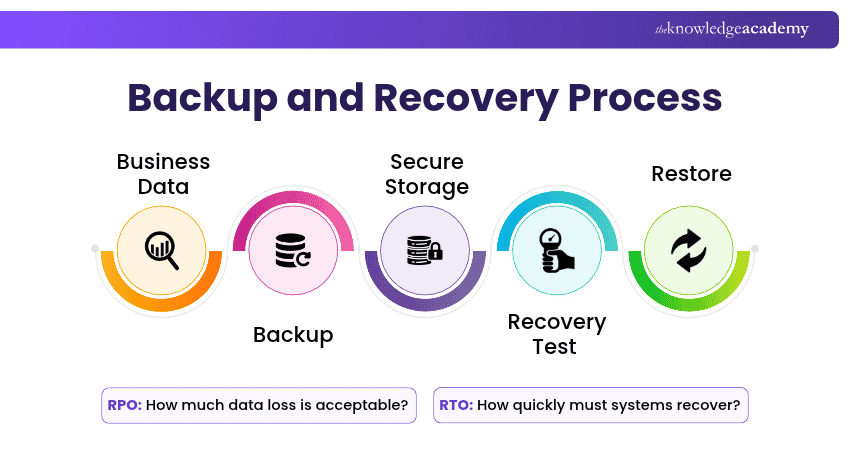
Storage, backup and disaster recovery skills help System Administrators maintain data availability and prepare for unexpected system failures. These capabilities include managing storage capacity, configuring file systems, scheduling backups and establishing recovery procedures.
Understanding recovery objectives and regularly testing restoration processes are important for maintaining business continuity. Recovery Point Objective (RPO) defines the maximum acceptable period of data loss, measured in time, while Recovery Time Objective (RTO) defines the maximum acceptable time for restoring systems or services after a disruption.
Example: A System Administrator configures scheduled backups and tests file restoration procedures to verify that critical business data can be recovered after a system failure.
How to Develop: Practise configuring storage volumes, creating backup schedules and performing recovery tests in a controlled environment.
8) Communication and Team Collaboration
Communication and team collaboration skills enable System Administrators to explain technical information clearly and work effectively with different departments. They frequently interact with employees, IT support teams, Network Engineers and cybersecurity professionals.
Strong collaboration helps coordinate technical activities, share important updates and resolve issues that require expertise from multiple teams.
Example: During a network upgrade, a System Administrator coordinates with Network Engineers and informs employees about planned service interruptions.
How to Develop: Practise explaining technical concepts in straightforward language, delivering clear updates and participating in collaborative IT projects.
9) Time Management and Prioritisation
Time management and prioritisation skills help System Administrators balance routine maintenance, scheduled upgrades, user requests and urgent incidents. They must assess tasks according to urgency, operational impact and business requirements.
Effective prioritisation ensures that critical technical issues receive appropriate attention without overlooking essential administrative responsibilities.
Example: A System Administrator prioritises restoring an unavailable business application before completing a routine software installation.
How to Develop: Use task management tools, create realistic maintenance schedules and practise assessing technical incidents according to their business impact.
10) Technical Documentation
Technical documentation skills involve creating accurate records of system configurations, administrative procedures, maintenance activities and technical changes. Clear documentation enables IT teams to understand existing infrastructure, follow consistent procedures and maintain operational knowledge.
It also supports troubleshooting, knowledge transfer and the smooth transition of responsibilities between team members.
Example: A System Administrator prepares a step-by-step guide explaining how to configure a new server and verify that essential services are functioning correctly.
How to Develop: Practise writing technical guides, recording configuration changes and organising documentation using platforms such as Confluence or SharePoint.
How to Improve Your System Administrator Skills
Strong system administration skills are built through practice, continuous learning and exposure to real-world challenges. The following six approaches can help you strengthen your capabilities and prepare for greater responsibilities.
1) Assess Your Current Skills: Evaluate your technical knowledge and interpersonal abilities against job requirements. Identify gaps and create a development plan with achievable learning goals.
2) Build a Home Lab and Gain Practical Experience: Set up virtual machines to practise server installation, networking and system configuration. Explore internships or entry-level IT roles to gain workplace experience.
3) Practise Scripting and Cloud Administration: Build small projects that combine scripting and cloud administration, such as deploying a virtual machine and automating a routine configuration task.
4) Earn Relevant IT Certifications: Consider recognised certifications such as CompTIA Network+, CompTIA Security+, Red Hat Certified System Administrator (RHCSA) or AWS Certified CloudOps Engineer – Associate, depending on your career goals.
5) Document Your Projects and Troubleshooting Experience: Maintain records of completed projects, technical challenges and solutions. Build a portfolio that demonstrates your practical abilities and problem-solving approach.
6) Stay Updated with Emerging Technologies: Follow official technical documentation, participate in IT communities and explore developments in cloud infrastructure, automation and cybersecurity.
Career Tip
Build broad system administration knowledge, then deepen your expertise in an area such as cloud infrastructure, automation, cybersecurity or networking.
Strong System Administrators combine technical expertise with clear communication, structured problem-solving and continuous learning. Developing these capabilities helps professionals maintain reliable IT environments, respond effectively to challenges and adapt to changing infrastructure needs.
Build practical skills in troubleshooting, networking and IT infrastructure with our IT Support and Solution Training – Register now!

The Knowledge Academy develops accessible learning content across Project Management, IT, Cybersecurity, Data Science, Business Analysis, HR, Accounting and Finance, Leadership and Health and Safety. Its resources combine subject research with clear explanations to help professionals build practical knowledge across a wide range of disciplines.
View Detail

 If you wish to make any changes to your course, please


