




We may not have the course you’re looking for. If you enquire or give us a call on 01344203999 and speak to our training experts, we may still be able to help with your training requirements.
Essential Software Developer Skills: Technical and Soft Skills
ByVishnu SankarLast updated on: 29 October 2026
Software Developer skills include programming, database management, software testing, problem-solving and effective communication. This blog explores the essential technical and soft skills developers need and practical ways to improve their capabilities.

Quick Overview
1. Technical Skills: Programming, databases, operating systems and application security form the foundation of software development.2. Development Tools: Git, IDEs, Cloud platforms and testing tools help developers build and maintain applications.3. Soft Skills: Communication, teamwork, time management and adaptability support effective collaboration.4. Analytical and Computational Thinking: Analytical thinking, algorithms and data structures help developers solve complex problems and optimise software performance.5. Skill Development: Practical projects, code reviews, open-source contributions and continuous learning strengthen development capabilities.
A simple click. A complex process. You click “Place Order” on a shopping app.
Behind that single action, several systems may be working together:
User Interface → Application Logic → Database → Payment Service → Order Confirmation
Developers help design, connect, test and maintain these components. Each stage requires different technical abilities, while teamwork and clear communication keep the development process coordinated.
So, what does it take to build software that works beyond the screen? Let's explore the essential Software Developer skills behind modern software development.
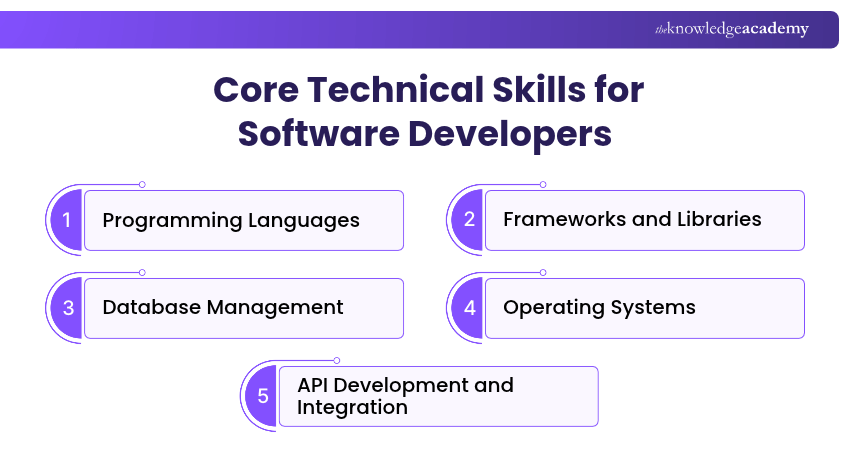
Core Technical Skills for Software Developers
Technical skills provide the foundation for developing functional, reliable and maintainable software. They help Software Developers understand how applications operate, manage information and interact with different systems. Here are the core technical skills worth developing:
1) Programming Languages
Programming languages enable Software Developers to write instructions that computers can execute. Knowledge of programming concepts such as variables, data types, functions, loops and object-oriented programming helps developers build applications and solve technical problems.
Different languages are suited to different development tasks. Some commonly used examples include:
1) Python: Used in backend development, automation, data analysis and Machine Learning (ML) applications.
2) Java: Commonly used for enterprise applications, backend systems and Android development.
3) JavaScript: Widely used for interactive websites and web applications, including server-side development through Node.js.
4) C and C++: Used in systems programming, embedded applications and performance-sensitive software.
5) C#: Commonly used for applications built with .NET, business software and game development.
6) TypeScript: Extends JavaScript with static type checking and is widely used in larger web application projects.
7) Kotlin: Widely used for Android application development and also supports backend and multiplatform development.
Rather than learning every language simultaneously, developers can start with one language suited to their goals and strengthen their understanding through practical coding.
Practical Example
A developer building an interactive website might use JavaScript or TypeScript, while someone developing an automation script may choose Python. The appropriate language depends on the application requirements, available tools and development environment.

2) Frameworks and Libraries
Frameworks and libraries provide reusable components and functionalities that simplify software development. They reduce the need to write common features from scratch and help developers maintain consistency across applications. A library provides functionality that developers can call when needed, whereas a framework typically provides a broader structure for organising an application.
Some commonly used frameworks and libraries include:
a) React: A JavaScript library for building interactive user interfaces in web applications.
b) Angular: A TypeScript-based web application framework used to develop structured, scalable applications.
c) Django: A Python framework commonly used for backend web development.
d) Spring Boot: A Java-based framework used to develop backend applications and services.
e) ASP.NET Core: A framework used to build web applications and APIs with C# and .NET.
f) NumPy: A Python library used for numerical computing and working with multidimensional arrays.
3) Database Management
Databases enable software applications to store, organise, retrieve and update information. Database management skills are particularly important when building applications that handle customer records, transactions, product information or other structured data.
Developers should understand the following concepts:
1) Data Storage and Retrieval: Storing application information and retrieving it when required.
2) Database Queries: Using query languages such as SQL to retrieve, insert, update and delete data.
3) Data Integrity: Applying constraints and validation rules to maintain accurate and consistent information.
4) Database Relationships: Understanding how relational databases connect information through primary and foreign keys.
5) Performance Optimisation: Using appropriate indexes, query design and database structures to improve performance.
Common relational database systems include PostgreSQL, MySQL and Microsoft SQL Server. Developers may also work with non-relational databases such as MongoDB, depending on application requirements.
Practical Application
In an online shopping application, a database stores product information, customer details and order records. Developers use database queries and relationships to retrieve the appropriate information when customers browse products or complete purchases.
4) Operating Systems
Operating systems manage the hardware and software resources required to run applications. Understanding how operating systems work helps developers build compatible, efficient and reliable software.
Important areas of operating system knowledge include:
1) Resource Management: Understanding how CPU, memory and storage resources are allocated.
2) Process and Thread Management: Understanding how processes and threads execute application tasks and support concurrent operations.
3) File Systems: Working with files, directories, permissions and storage structures.
4) System Security: Understanding access controls, user permissions and operating system security mechanisms.
5) System Compatibility: Recognising differences between environments such as Windows, Linux and macOS.
Familiarity with operating systems can also help developers troubleshoot performance issues and understand application behaviour across different environments.
5) API Development and Integration
APIs define rules and interfaces that allow software components, applications or services to access functionality and exchange information. API knowledge helps Software Developers integrate external services and develop applications that interact with other systems.
Key areas include:
1) API Fundamentals: Understanding API endpoints, requests, responses and how applications interact through defined interfaces.
2) HTTP Methods: Learning how methods such as GET, POST, PUT, PATCH and DELETE are commonly used in web APIs.
3) Data Formats: Working with formats such as JSON to exchange information between applications.
4) API Testing: Checking requests, responses, error handling and expected behaviour.
Developers may also need to understand REST-based API design, documentation and error handling. For example, a travel application can use an external weather API to retrieve forecast information and display it to users without maintaining its own weather forecasting system.
6) Secure Coding and Cryptography
Secure coding involves developing applications that protect information and reduce exposure to security vulnerabilities. Cryptography supports this process by providing mechanisms for encryption, authentication and data integrity.
Important skills include:
1) Input Validation: Checking untrusted data against expected formats and requirements. Additional controls, such as parameterised queries and context-appropriate output encoding, help prevent injection vulnerabilities.
2) Data Encryption: Understanding how established encryption methods help protect sensitive information.
3) Secure Communication: Using protocols such as HTTPS, which rely on Transport Layer Security (TLS), to protect data transmitted between systems.
4) Cryptographic Hashing: Understanding how secure password-hashing algorithms, such as Argon2id, protect stored passwords and how cryptographic hashes help verify data integrity.
5) Secure Dependencies: Maintaining third-party libraries and addressing known vulnerabilities.
Software Developers should use well-maintained security libraries and established cryptographic methods rather than designing their own encryption algorithms. Security should be considered throughout development, from application design to testing and maintenance.
Support successful system design, testing and deployment processes with our Systems Development Essentials Training – Sign up now!
Essential Software Development Tools and Practices
Development tools help Software Developers write, organise, test and deploy applications. Familiarity with these tools can improve productivity, streamline collaboration and support consistent development workflows.
7) Version Control with Git and GitHub
Version control systems track changes to source code over time. They help developers maintain a record of modifications, manage different versions and collaborate on shared projects.
Git is a distributed version control system, while GitHub is a platform that provides repository hosting and collaboration features.
Important skills include:
1) Commit Management: Recording meaningful changes to source code.
2) Branching: Creating separate development branches for features, improvements or bug fixes.
3) Merging: Combining changes from different branches and resolving conflicts when necessary.
4) Code Reviews: Reviewing proposed modifications through pull requests or other review processes before integrating them into the main codebase.
5) Repository Management: Organising project files, managing access and maintaining project documentation.
Pro Tip: Write Meaningful Git Commit Messages
A good commit message briefly explains what changed and why. For example, "Fix login validation for empty passwords" provides more useful information than "Updated code." Clear commit histories make it easier to review changes, investigate issues and understand how a project has developed.
8) Integrated Development Environments (IDEs)
Integrated Development Environments (IDEs) combine software development tools within a single interface. They help developers write code, identify errors and manage development tasks more efficiently.
Common IDE features include:
1) Syntax Highlighting: Displays code elements in different colours to improve readability.
2) Code Completion: Suggests relevant functions, variables and code structures while typing.
3) Code Navigation: Helps developers locate definitions, references and related files.
4) Debugging Support: Provides tools for inspecting application execution and identifying errors.
5) Version Control Integration: Allows developers to manage code changes from within the development environment.
Examples include IntelliJ IDEA, Visual Studio and PyCharm. Editors such as Visual Studio Code can also provide many development features through built-in capabilities and extensions. Choosing a suitable development environment depends on the programming language, project requirements and personal preferences.
9) Cloud Computing and Deployment
Cloud computing allows developers to build, deploy and manage applications using remotely hosted computing resources accessed over the internet.
Cloud platforms such as Amazon Web Services (AWS), Microsoft Azure and Google Cloud provide services for application hosting, databases, storage and other infrastructure requirements.
Essential areas of Cloud knowledge include:
1) Cloud Fundamentals: Understanding computing, storage, networking and managed services.
2) Application Deployment: Learning how applications are packaged, configured and deployed.
3) Scalability: Understanding how applications can respond to changing workloads.
4) Resource Management: Monitoring infrastructure usage, availability and operating costs.
5) Cloud Security: Managing access permissions, application secrets and security configurations in line with the cloud provider's shared responsibility model.
6) Deployment Automation: Understanding how automated workflows support application delivery.
Developers do not need to master every major Cloud platform. Familiarity with one platform and its fundamental services can provide a useful starting point.
10) Debugging and Troubleshooting
Debugging is the process of identifying, investigating and correcting defects in software. Strong debugging skills help developers understand why applications behave unexpectedly.
Effective debugging involves:
1) Identifying the Problem: Understanding the reported issue and its expected behaviour.
2) Reproducing the Error: Establishing the conditions under which the problem occurs.
3) Analysing Logs: Reviewing error messages and application logs for relevant information.
4) Inspecting Code Execution: Using breakpoints and debugging tools to examine program behaviour.
5) Verifying the Solution: Testing the correction and checking that it does not introduce additional problems.
Developers may also use profiling tools to investigate performance bottlenecks and inefficient resource usage.
Trainer’s Insight: Debug the Cause, Not Just the Symptom
When an application fails, changing code immediately may hide the underlying problem without resolving it. A more reliable approach is to reproduce the issue, identify its cause and make a targeted correction. Testing the affected functionality afterwards helps confirm that the solution works as intended.
11) Scripting and Automation
Scripting involves writing programs to perform specific tasks, which can be executed automatically to reduce manual effort. It helps developers automate repetitive activities and manage development environments more efficiently.
Common applications include:
1) Task Automation: Automating repetitive file operations and routine development activities.
2) Data Processing: Cleaning, transforming and processing information.
3) Environment Configuration: Setting up development environments and managing configuration tasks.
4) Build Automation: Supporting processes that compile, package or prepare applications.
5) System Administration: Automating maintenance tasks and basic infrastructure operations.
Python, Bash and PowerShell are commonly used for scripting. For example, a developer might create a Python script that organises log files, identifies recurring errors and produces a summary report. This reduces repetitive manual work and improves consistency.
12) Software Testing
Software testing involves evaluating software and related work products to identify defects, verify requirements and assess whether a system is fit for its intended purpose. It can include reviews, test design and test execution throughout the development lifecycle.
Some essential software testing approaches include:
1) Unit Testing
Unit testing checks individual units or components of software in isolation where appropriate. These tests help verify that specific functions or methods produce the expected results.
2) Integration Testing
Integration testing checks whether connected components or systems interact correctly. It helps identify problems involving interfaces, data exchange and communication between modules.
3) System Testing
System testing evaluates an integrated application as a whole against specified requirements. It helps determine whether the complete system behaves as intended.
4) Regression Testing
Regression testing checks whether changes to software or its environment have introduced or uncovered defects in previously tested functionality.
Automated testing tools such as pytest, JUnit and Jest can help developers create and execute tests efficiently.
Real-world Example: Testing an Online Shopping Application
Consider an online store where customers can add products to their basket and complete payments.
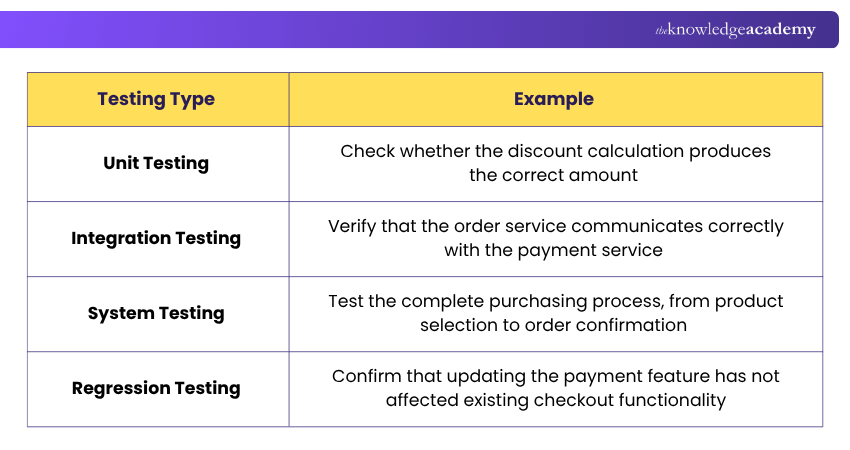
This example demonstrates how different testing approaches help evaluate software at different levels.
Soft Skills for Software Developers
Technical knowledge alone is not sufficient for successful software development. Software Developers also need interpersonal and professional skills to communicate requirements, collaborate with colleagues and manage changing project demands.
13) Communication
Effective communication helps Software Developers exchange information with team members, stakeholders and users. Developers often need to explain technical concepts, clarify requirements and discuss project challenges with people who have different levels of technical knowledge.
Important communication abilities include:
1) Requirements Clarification: Asking relevant questions to understand project expectations.
2) Technical Explanation: Presenting complex concepts in clear and understandable language.
3) Constructive Feedback: Sharing suggestions during code reviews and technical discussions.
4) Active Listening: Understanding concerns, requirements and feedback from others.
5) Written Communication: Preparing clear documentation, development notes and project updates.
Effective communication can reduce misunderstandings and help development teams make informed decisions.
14) Collaboration and Teamwork
Software development commonly involves professionals with different responsibilities, including developers, designers, testers and Project Managers. Collaboration enables these professionals to coordinate activities and work towards shared project goals.
Important aspects include:
1) Cross-functional Coordination: Working effectively with professionals from different technical backgrounds.
2) Shared Responsibility: Contributing to team objectives and supporting collective outcomes.
3) Knowledge Sharing: Exchanging technical expertise, practical advice and lessons learned.
4) Conflict Resolution: Addressing disagreements constructively and evaluating alternative approaches.
Developers who collaborate effectively can contribute to smoother workflows, improved code quality and better coordination across project teams.
15) Time Management
Software Developers often manage several responsibilities, including implementing features, fixing defects, reviewing code and attending meetings. Effective time management helps them organise these responsibilities without overlooking project priorities.
Key practices include:
1) Task Prioritisation: Identifying important activities based on urgency, dependencies and business value.
2) Work Planning: Breaking larger development tasks into manageable activities.
3) Effort Estimation: Assessing the approximate effort and resources required to complete development tasks.
4) Progress Monitoring: Reviewing completed tasks and identifying potential delays.
5) Managing Interruptions: Reserving sufficient time for focused development and essential collaboration.
Time management supports realistic planning and consistent progress. However, development schedules should remain flexible enough to accommodate unexpected technical challenges.
16) Adaptability and Continuous Learning
Software development changes as new technologies, tools and practices emerge. Adaptability helps developers respond to changing requirements and adjust their approaches when necessary. Continuous learning enables developers to strengthen existing knowledge and explore relevant technologies.
Important behaviours include:
1) Learning New Technologies: Exploring tools, languages and frameworks when they are relevant to development needs.
2) Responding to Change: Adjusting solutions when project requirements or priorities evolve.
3) Accepting Feedback: Using constructive criticism to improve technical and professional performance.
4) Evaluating New Practices: Assessing emerging development approaches before adopting them.
5) Maintaining Curiosity: Exploring alternative solutions and learning from technical challenges.
Developers may also encounter AI-assisted coding tools that help generate, explain or review code. Understanding their capabilities and limitations is increasingly useful. However, AI-generated code still requires human review, testing and security checks.
Gain practical experience with hands-on Agile tools and techniques with our Agile Software Development Training – Register today!
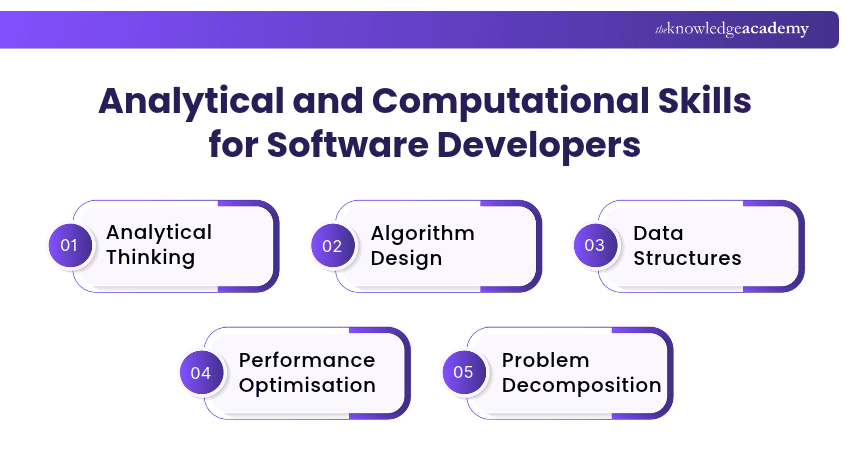
Analytical and Computational Skills
Problem-solving and algorithmic thinking help Software Developers approach complex tasks systematically. These abilities support efficient code development, logical decision-making and the creation of maintainable applications.
17) Analytical Thinking
Analytical thinking involves examining a problem carefully to understand its causes, requirements and constraints. Developers use this skill to identify relevant information, evaluate possible solutions and make logical decisions.
For example, when developing a new application feature, a developer may compare user requirements, technical constraints and available resources to determine the most suitable implementation approach.
18) Algorithm Design
An algorithm is a sequence of steps designed to solve a problem or complete a task. Algorithm design helps developers organise program logic and select appropriate methods for processing information.
For example, a developer creating a search feature may compare different search approaches based on the data structure, expected input size and performance requirements.
19) Data Structures
Data structures provide ways to organise, store and access information within programs. Common examples include:
1) Arrays: Store collections of elements that can be accessed by position.
2) Linked Lists: Connect elements through references to other elements.
3) Stacks: Follow a last-in, first-out approach to managing elements.
4) Queues: Commonly follow a first-in, first-out approach.
5) Trees: Organise information in hierarchical relationships.
6) Graphs: Represent connections between entities.
Understanding data structures helps developers select efficient approaches to storing and processing information.
20) Performance Optimisation
Performance optimisation involves improving software efficiency and responsiveness while managing computing resources effectively. Developers consider factors such as execution time, memory consumption and the scalability of their solutions.
Knowledge of time and space complexity helps them compare algorithms and understand how performance may change as the amount of data increases. However, optimisation should be guided by application requirements and measured performance rather than assumptions alone.
21) Problem Decomposition
Problem decomposition is the process of dividing complex problems into smaller, manageable parts. Instead of attempting to develop an entire application at once, developers can identify separate features and implement them systematically.
For example, an online booking platform can be divided into user registration, availability checking, reservation management and payment processing. This approach makes complex development tasks easier to understand, test and maintain.
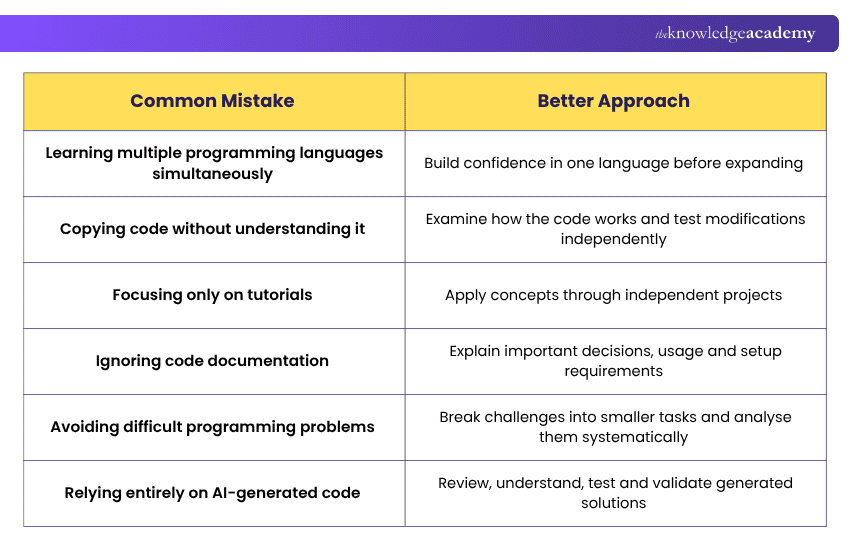
Common Mistakes to Avoid When Developing Software Skills
Learning software development can become less effective when attention is spread across too many activities. The following mistakes are worth avoiding:
How to Improve Your Software Developer Skills?
Improving Software Developer skills requires consistent practice, practical experience and a willingness to learn. Developers can strengthen their abilities by combining structured learning with real-world application.
Here are some effective strategies:
a) Identify Areas for Improvement
Evaluate your current capabilities and identify skills that require further development. Consider your technical knowledge, development experience and career goals before deciding what to learn next.
b) Build Practical Projects
Create applications that allow you to apply programming, database management, testing and other development skills. Start with manageable projects and gradually introduce more complex features.
c) Contribute to Open-source Projects
Participating in open-source projects provides experience with existing codebases, documentation, version control and collaborative development. Beginners can start with small improvements, tests or documentation contributions.
d) Learn New Languages and Frameworks
Explore additional technologies when they support your professional goals or project requirements. Focus on understanding fundamental concepts rather than collecting knowledge of numerous tools without practical application.
e) Attend Workshops and Training
Participate in structured training, coding workshops and relevant technical sessions. These learning opportunities can help you strengthen foundational knowledge and practise unfamiliar concepts.
f) Seek Mentorship and Code Reviews
Learning from experienced developers can improve your understanding of software design, debugging and development practices. Constructive code reviews also help identify areas where your solutions can become clearer or more maintainable.
g) Develop a Portfolio
Maintain a collection of completed projects that demonstrate your abilities. Include clear descriptions, relevant technologies, setup instructions and evidence of testing where appropriate.
Enhance your ability to deliver successful software projects with the Software Development Lifecycle Training – Join now!

Vishnu Sankar is a Senior Content Writer with 5+ years of experience across content development, software development, web development and system administration. His technical background and professional training support his expertise in IT and Tech, while his extensive research and writing experience covers Project Management and Health and Safety.
View Detail

 If you wish to make any changes to your course, please


