




We may not have the course you’re looking for. If you enquire or give us a call on +44 1344 203 999 and speak to our training experts, we may still be able to help with your training requirements.
Excel Skills on Resume: How to List Them Effectively
ByVishnu SankarLast updated on: 17 September 2026
Learn how to effectively showcase Excel Skills on your resume, highlight your proficiency and demonstrate practical experience to stand out to potential employers.

Imagine you are one click away from applying for a role that feels like the right next step.
Your resume is ready. Your experience is clear. Then you reach the skills section and type:
Microsoft Excel
But you stop and think:
“Does that show I can build reports, analyse data or solve real business problems?”
Probably not on its own.
Excel can mean many things. For one person, it means sorting a contact list. For another, it means creating PivotTables, using formulas, cleaning data or building dashboards. The key is showing employers the Excel Skills that match the role and proving how you have used them. So, how can you make your Excel Skills stand out on your resume? Let’s find out.
What are Excel Skills?
Excel Skills refer to the ability to use Microsoft Excel to organise, calculate, analyse and present data effectively. They can range from basic tasks such as data entry, formatting and sorting to more advanced capabilities such as formulas, PivotTables, charts, Power Query, macros and dashboards. The level of Excel Skills required often depends on the role and its data-related responsibilities.

Best Excel Skills to Include on a Resume
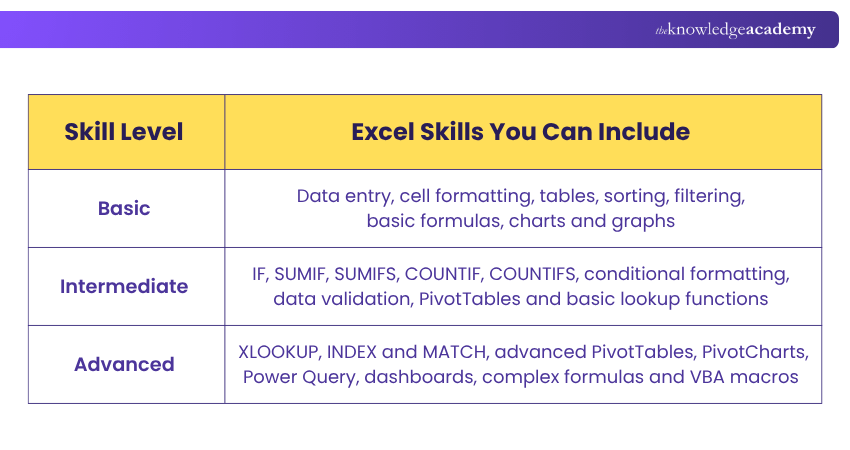
The right Excel Skills depend on your experience and the job requirements. Let’s look at some of the essential Excel Skills on Resume below:
1) Charts and Graphs
Charts and graphs can present data in a clear visual format. You can mention this skill if you have created charts to communicate trends, comparisons or performance results. For example, you may have created a monthly sales chart, a project-progress graph or a budget comparison report.
2) Data Analysis
Data Analysis skills show that you can review data, identify patterns and draw useful conclusions. This may include comparing values, tracking trends and preparing reports that support business decisions. Excel features such as PivotTables, charts, conditional formatting and formulas can support this work.
3) Sorting and Filtering Data
Sorting and filtering help users find and focus on relevant information in a worksheet or table. These are useful skills for managing records, reviewing customer information, tracking project tasks or checking sales data.
4) PivotTables
PivotTables help users calculate, summarise and analyse data. They can make it easier to identify comparisons, patterns and trends within large datasets. You can include this skill if you have created reports that group, filter or summarise data using PivotTables.
5) Formulas and Functions
Formulas and functions help automate calculations and reduce manual work. Useful examples include SUM, AVERAGE, IF, SUMIFS, COUNTIFS and lookup functions.
Trainer’s Insight
Mention advanced skills only when you have used them in practice. For example, list XLOOKUP, Power Query or VBA macros only if you can explain what you used them for and how they helped you complete a task.
6) Data Validation
Data validation helps control the type of information entered in a cell. For example, it can create a drop-down list or restrict entries to a specific date range, number range or list of values. This is a useful Excel Skill for roles that involve forms, record keeping, data-entry templates or shared reports.
7) Conditional Formatting
Conditional formatting changes the appearance of cells based on set rules. It can highlight overdue tasks, low-performing figures, duplicate values or important trends. This skill is useful when creating reports that need to be easy to review quickly.
8) Power Query
Power Query helps users import, connect to and reshape data from different sources. It can be used to remove columns, change data types, combine tables and refresh repeatable data-preparation steps. It is particularly relevant for roles involving regular data cleaning, reporting or analysis.
9) VBA Macros
Visual Basic for Applications (VBA) can automate repetitive actions in Excel. For example, a macro may format a recurring report, copy data between worksheets or carry out a repeated calculation process. Only list VBA macros if you have created, edited or confidently used them.
Trainer’s Insight
A long list of Excel features does not automatically make a resume stronger. Choose a smaller number of relevant skills that you can explain clearly and support with real examples.
Streamline workflows and improve data management efficiency with Microsoft Excel VBA and Macro Training – Join now!
How to List Excel Skills on Resume?
You can highlight Excel Skills in three key sections of your resume. Using more than one section helps employers see both your technical knowledge and how you have applied it. Let’s look at how you can include Excel skills in each of these sections:
1) Professional Summary
Use your professional summary to mention your strongest Excel capability and how it supports your work.
Example:
Detail-oriented Operations Coordinator with experience using Excel to maintain reporting data, track budgets, and create PivotTable-based summaries for management review.
2) Skills Section
Create a clear skills list that names the Excel features and functions you can use confidently.
Example:
Microsoft Excel: PivotTables, XLOOKUP, SUMIFS, conditional formatting, data validation, charts and reporting dashboards.
3) Work Experience Section
Show how you used Excel to complete a task, solve a problem or support a business outcome.
Example:
Created monthly Excel reports using PivotTables and charts to summarise departmental spending and support budget reviews.
Trainer’s Insight
A skills section tells employers what you know. A work experience section shows how you have used that knowledge. Including both makes your Excel Skills more credible.
Build expertise in data analysis and reporting to support strategic business decisions with Business Analytics with Excel Course – Sign up soon!
Excel Skills Resume Examples
The examples below show how to turn general Excel claims into clear, evidence-based resume statements. Let’s look at the table below:
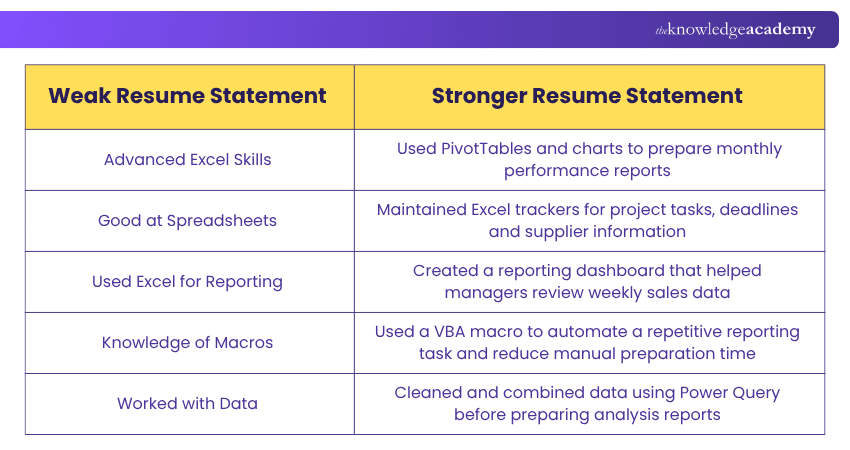
Also, one important thing to note is to use numbers only when they are accurate and you can explain them. For example:
a) Reduced monthly report preparation time by 30% by automating formatting and calculations with a VBA macro.
b) Created a PivotTable report to summarise data from more than 5,000 records.
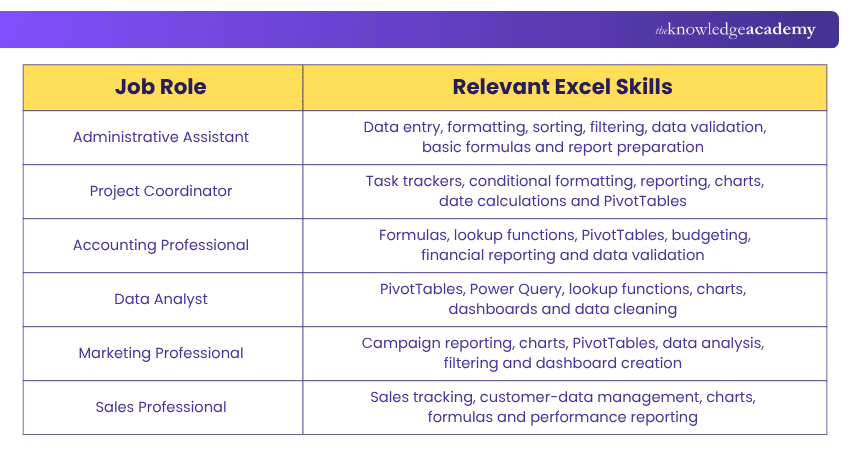
Excel Skills for Different Jobs
The Excel Skills you highlight should fit the role you are applying for. Let’s look at the table below for a better understanding:
Build confidence beyond basic spreadsheets and make Excel your career advantage with the Microsoft Excel Course – Register today!

Vishnu Sankar is a Senior Content Writer with 5+ years of experience across content development, software development, web development and system administration. His technical background and professional training support his expertise in IT and Tech, while his extensive research and writing experience covers Project Management and Health and Safety.
View Detail

 If you wish to make any changes to your course, please


