




We may not have the course you’re looking for. If you enquire or give us a call on +1 7204454674 and speak to our training experts, we may still be able to help with your training requirements.
IT Support Job Description: Roles, Skills and Salary
ByVishnu SankarLast updated on: 30 October 2026
Explore the IT support job description, including key responsibilities, essential technical skills, qualifications and salary expectations.
Quick Overview
1. IT support professionals troubleshoot hardware, software and network issues to keep systems operational.2. Their responsibilities include technical assistance, system maintenance, user support and incident management.3. Common roles include help desk, desktop, network and application support.4. Essential skills include operating system knowledge, troubleshooting, communication and customer service.5. Salary expectations depend on experience, location, technical specialisation and employer requirements.
"The system isn't responding, and I can't access my files."
"Have you contacted IT support?"
Situations like these highlight how important IT support is to everyday workplace operations. From resolving technical issues to restoring access to essential systems, IT support professionals help employees overcome technology-related challenges and continue their work with minimal disruption.
An IT support job description outlines the key responsibilities, skills and qualifications required for the role. In this blog, we'll explore IT support duties, essential skills, qualifications, salary expectations and sample job descriptions to help you understand what the position involves.
Roles and Responsibilities of IT Support Professionals
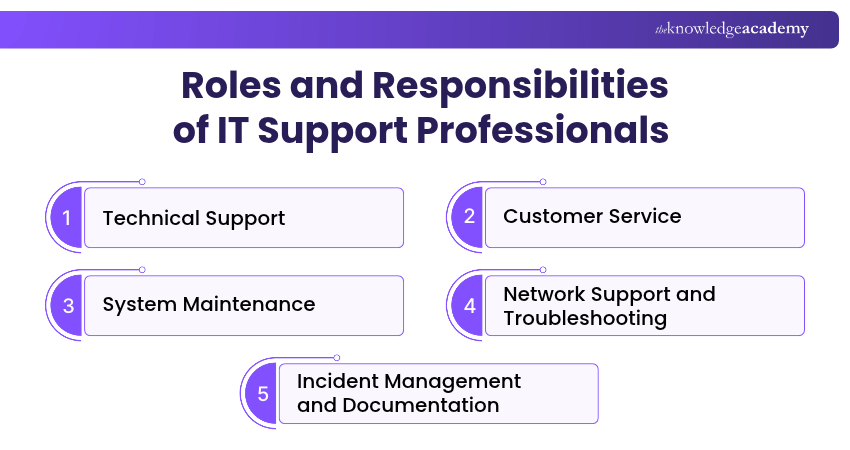
IT support professionals perform various activities to keep workplace technology functioning efficiently. Their responsibilities range from resolving individual technical issues to maintaining systems and coordinating incident resolution:
1) Technical Support
Providing technical assistance is one of the primary responsibilities of an IT support professional. This involves identifying and resolving hardware, software and device-related problems that affect users. IT support staff may diagnose operating system errors, install applications, configure peripherals and replace faulty components where authorised.
They also help users resolve common technical problems and restore access to essential systems. Their goal is to reduce disruption and ensure that employees can use workplace technology effectively.

2) Customer Service
IT support professionals regularly interact with users who may have limited technical knowledge. Providing customer service involves responding to users professionally, setting clear expectations and keeping them informed throughout the support process. This includes listening carefully, asking relevant questions and explaining troubleshooting steps in straightforward language.
They should also keep users informed about incident progress and expected next steps. Effective customer service helps build trust and ensures that users understand the support provided.
3) System Maintenance
System maintenance involves carrying out routine activities that help keep devices and applications reliable, secure and up to date. IT support professionals may install approved software updates, apply security patches, perform system health checks and monitor device performance.
Depending on their responsibilities, they may also verify backup status or assist with routine maintenance procedures. These activities help identify potential problems early and reduce the likelihood of avoidable service interruptions.
Trainer Insight
Think beyond individual devices. IT problems often involve several connected systems. Understanding how devices, applications, networks and user accounts interact can help professionals identify underlying causes rather than addressing only visible symptoms.
4) Network Support and Troubleshooting
IT support professionals often assist with network-related issues that affect connectivity and access to organisational resources. Their tasks may include troubleshooting Wi-Fi connections, checking network settings, investigating basic connectivity problems and helping users access shared resources.
Some roles also involve troubleshooting network access permissions and assisting with approved network device configurations. More complex responsibilities, such as advanced firewall administration or network architecture, may be handled by specialist teams.
5) Incident Management and Documentation
Incident management involves recording, tracking and resolving technical issues reported by users. IT support professionals commonly use ticketing systems to organise requests and monitor their progress. They document problem descriptions, troubleshooting steps, actions taken and final resolutions.
When an issue cannot be resolved within their responsibilities, they escalate it to the appropriate technical team. Accurate documentation supports consistent service delivery and helps teams resolve recurring problems more efficiently.
Pro Tip
Before escalating an unresolved issue, record the symptoms, error messages and troubleshooting steps already attempted. Clear documentation helps the next support team investigate the problem without repeating unnecessary checks.
Essential Skills and Qualifications for IT Support
IT support professionals need a combination of technical knowledge, communication skills and relevant training to resolve problems effectively. Employers may look for different capabilities depending on the role's complexity. The following sections cover key technical skills, soft skills and common qualification pathways:
1) Technical Skills
Technical skills help IT support professionals diagnose issues, configure systems and maintain workplace technology. Some of the most relevant skills include:
a) Operating System Knowledge: Understanding Windows, macOS and, where relevant, Linux helps professionals troubleshoot system errors, configure settings and support users.
b) Hardware Troubleshooting: Knowledge of computer components, printers and peripherals helps identify and resolve device-related problems.
c) Networking Fundamentals: Familiarity with IP addresses, DNS, DHCP and network connectivity supports the investigation of common communication problems.
d) Software Installation and Configuration: IT support professionals should understand how to install, update and configure supported applications.
e) Ticketing and IT Service Management Tools: Experience using support platforms helps professionals manage requests, document incidents and coordinate resolutions.
2) Soft Skills
Technical expertise is essential, but IT support professionals also need interpersonal skills to communicate with users and manage support requests efficiently. The following are five important soft skills:
a) Problem-solving: Helps identify the causes of technical issues and evaluate suitable solutions.
b) Communication: Enables professionals to explain technical information clearly to users with different levels of knowledge.
c) Time Management: Supports the prioritisation of incidents and completion of support tasks within appropriate timeframes.
d) Organisational Skills: Helps manage multiple tickets, maintain documentation and track outstanding requests.
e) Customer Service: Encourages patient, respectful and helpful interactions with users who need technical assistance.
Learn about Internet Protocol (IP) for communication between different networks with our Introduction to Networking Training - Join now!
3) Educational Requirements and Certifications
Educational requirements for IT support positions vary by employer and level of responsibility. Some roles accept candidates with relevant technical training and practical experience, while others may prefer formal qualifications. Common pathways include:
a) Educational Qualifications: College courses, vocational qualifications, apprenticeships and degrees in information technology or related subjects can provide useful foundations.
b) Practical Experience: Internships, apprenticeships, technical projects and previous support roles can help candidates develop troubleshooting and communication skills.
c) Professional Certifications: Certifications such as CompTIA A+ and CompTIA Network+ may help demonstrate knowledge of hardware, operating systems and networking. Relevant Microsoft role-based credentials may also be useful depending on the technologies supported.
d) Continuous Learning: Staying familiar with operating systems, support tools, cybersecurity practices and emerging technologies helps professionals maintain their capabilities.
IT Support Job Description Examples
IT support job descriptions vary depending on the organisation, support level and technology environment. Some positions focus on resolving everyday user problems, while others involve more advanced technical troubleshooting and infrastructure support. The following examples illustrate how employers may structure IT support vacancies.
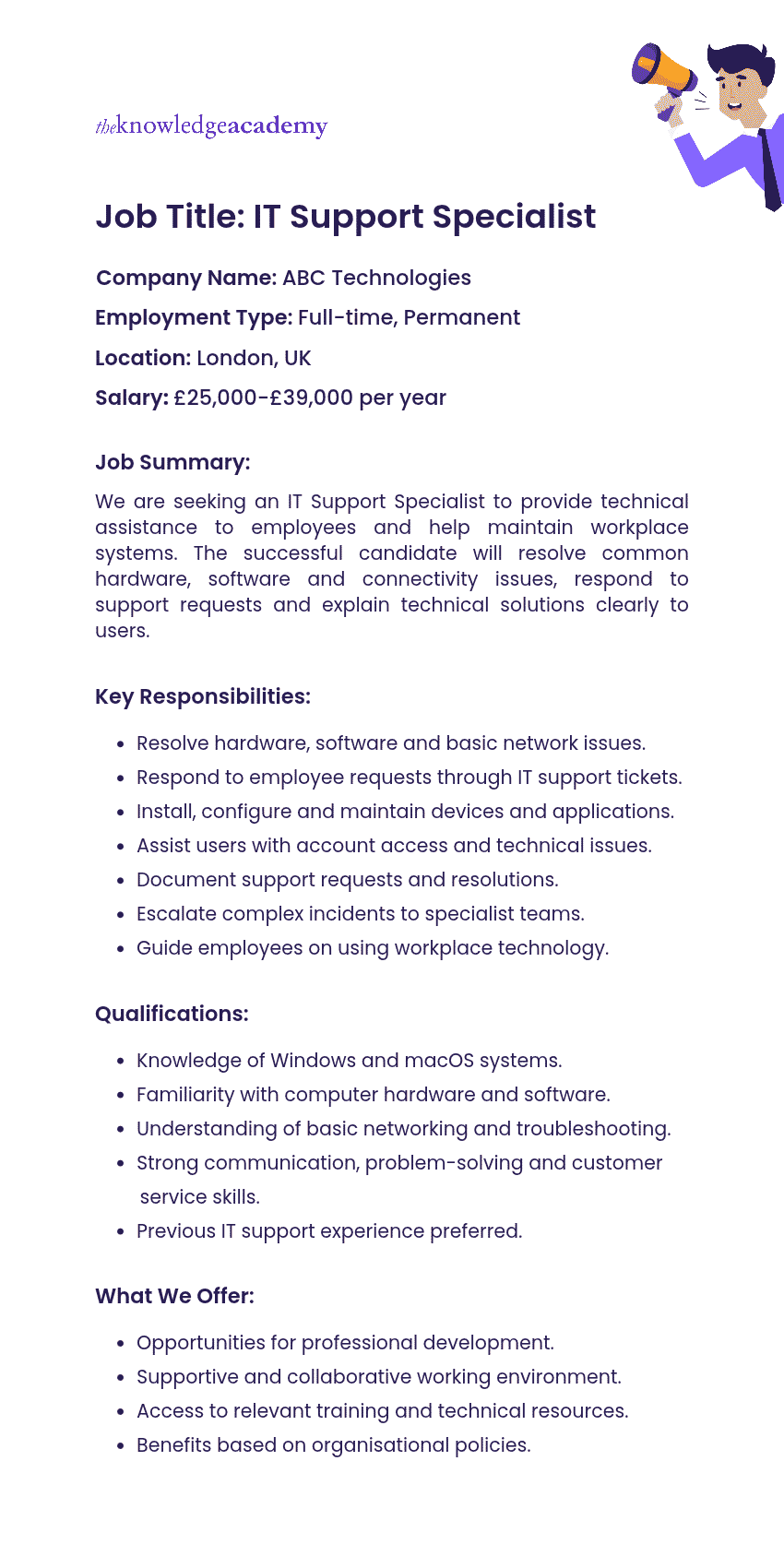
Example 1: IT Support Specialist Job Description
Here's an example of an IT Support Specialist job description:
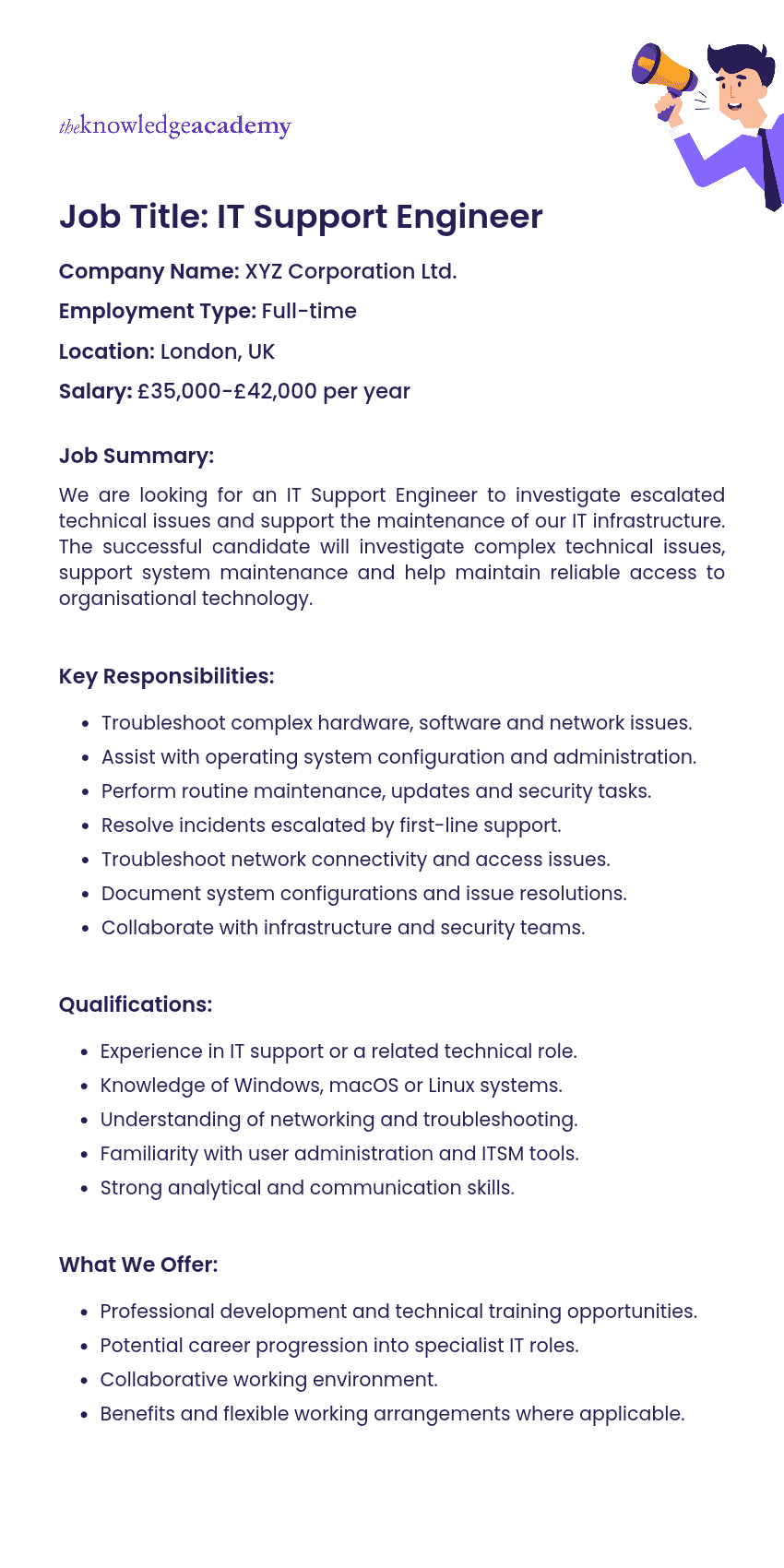
Example 2: IT Support Engineer Job Description
Here's an example of an IT Support Engineer job description:
Average Salary for IT Support Professionals
IT support salaries vary depending on location, experience, technical specialisation and employer requirements. Positions involving advanced troubleshooting, specialist infrastructure support or additional responsibilities may offer different levels of compensation. Here are the average annual salaries in three major locations:
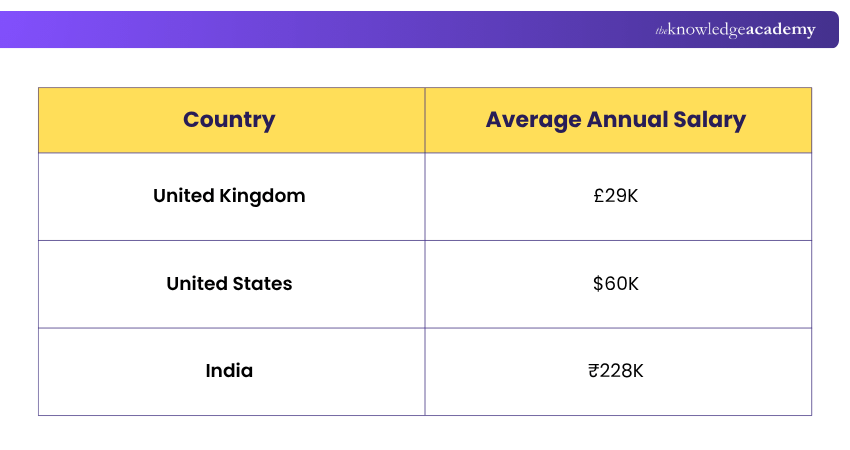
Source: Indeed
An IT support job description outlines the responsibilities, skills and qualifications involved in maintaining workplace technology and assisting users. Understanding these requirements can help you assess available career opportunities and develop relevant technical and interpersonal skills. With practical experience and continued learning, you can build a strong foundation for different roles within IT support.
Build skills to manage service desk teams and operations effectively with our Certified Service Desk Manager (CSDM) Training – Join now!

Vishnu Sankar is a Senior Content Writer with 5+ years of experience across content development, software development, web development and system administration. His technical background and professional training support his expertise in IT and Tech, while his extensive research and writing experience covers Project Management and Health and Safety.
View Detail

 If you wish to make any changes to your course, please


