




We may not have the course you’re looking for. If you enquire or give us a call on 01344203999 and speak to our training experts, we may still be able to help with your training requirements.
What is Microsoft Security? A Complete Guide
ByThe Knowledge AcademyLast updated on: 18 August 2026
This blog explains Microsoft Security’s key solutions, benefits, and Zero Trust approach, along with some useful tips from our expert trainers.
Key Takeaways:
1. Microsoft Security provides solutions for protecting identities, devices, applications, data, and cloud environments.2. Microsoft Defender helps organisations prevent, detect, investigate, and respond to security threats.3. Microsoft Entra focuses on identity and access, while Microsoft Purview helps secure and govern organisational data.4. Microsoft's Zero Trust approach focuses on explicit verification, least-privilege access, and assuming that breaches can occur.5. Microsoft Security Copilot uses AI to assist security teams with tasks such as investigation, threat analysis, and response.
An organisation's digital environment has many entry points: identities, devices, applications, data and cloud workloads. Protecting one while ignoring another can leave gaps for cyber threats.
This is where Microsoft Security steps in as a knight in shining armour, not with one shield, but with several layers of defence. Its solutions protect different parts of the digital environment while helping security teams see and respond to threats more clearly.
From identity to cloud, every layer matters. So, how do Microsoft Defender, Entra, Purview, Sentinel and other security solutions work together? Let's find out!
What is Microsoft Security?
Microsoft Security refers to Microsoft's portfolio of technologies and services designed to protect organisations against cyber threats across their digital environments. It covers multiple areas of cybersecurity, including identity and access management, endpoint security, data protection, cloud security, threat detection, security operations, and compliance.
Instead of relying on a single security tool, organisations can use different Microsoft Security solutions together to protect users, devices, applications, workloads, and information.
For example, Microsoft Entra can help control access, Microsoft Defender can detect and respond to threats, Microsoft Purview can protect sensitive data, and Microsoft Sentinel can help security teams monitor and investigate security incidents.

Microsoft Security in 10 Seconds
Think of Microsoft Security as multiple layers of protection working together:
Identity → Devices → Applications → Data → Cloud → Threat Detection & Response
Each security solution focuses on a different part of the environment, while the broader Microsoft ecosystem helps connect security information and operations.
How Do Microsoft Security Solutions Work Together?
Microsoft Security brings together different solutions that protect specific parts of an organisation's digital environment. For example, Microsoft Entra supports identity and access security, Microsoft Defender helps detect and respond to threats, and Microsoft Sentinel supports security monitoring, investigation and response.
Many of these solutions can integrate and share relevant security signals across supported workflows. This helps security teams connect suspicious activity across identities, devices, applications, data and cloud environments instead of investigating each area completely in isolation.
A simple way to understand this connected approach is through four broad security activities:
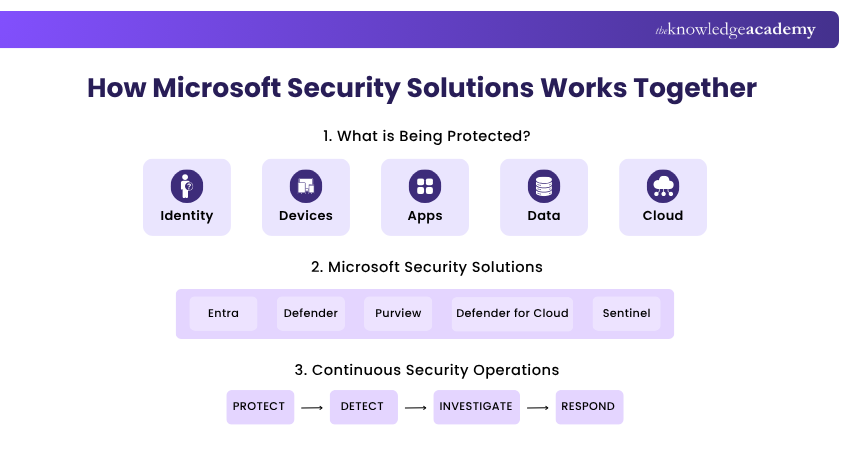
Protect: Security controls help reduce the likelihood of successful attacks by protecting identities, devices, data, applications, and cloud resources.
Detect: Security solutions monitor activity and signals to identify suspicious behaviour, vulnerabilities, and potential threats.
Investigate: When suspicious activity is detected, security teams can examine alerts, incidents, identities, devices, and other available information to understand what happened.
Respond: Security teams can take action to contain threats, protect affected resources, and reduce the potential impact of an attack.
Learn to configure the Azure Sentinel environment with Microsoft Security Operations Analyst SC200 Course – Join now!
What Does Microsoft Security Protect?
Modern organisations operate across far more than office computers. Employees access cloud applications, sensitive information moves between systems, and workloads may run across different environments. Microsoft Security provides capabilities designed to protect several areas of this digital environment.
1) Identities
User and workload identities are often central to accessing organisational resources. Microsoft Security provides identity and access capabilities that help verify users, control permissions, and reduce unauthorised access.
2) Devices
Laptops, desktops, servers, and other endpoints can become entry points for cyber threats. Endpoint security capabilities help organisations identify vulnerabilities, detect suspicious behaviour, and respond to threats affecting devices.
3) Applications
Business applications can contain sensitive information and provide access to important organisational resources. Security controls can help organisations understand application activity, manage access, and detect potential risks.
4) Data
Organisations store sensitive information such as financial records, customer information, intellectual property, and internal documents. Microsoft Security includes data security capabilities that help organisations discover, classify, protect, and govern sensitive information.
5) Cloud Workloads and Infrastructure
Applications, databases, servers, containers, and other resources increasingly operate in cloud environments. Cloud security capabilities help organisations understand their security posture, identify weaknesses, and protect workloads against threats.
Key Microsoft Security Solutions
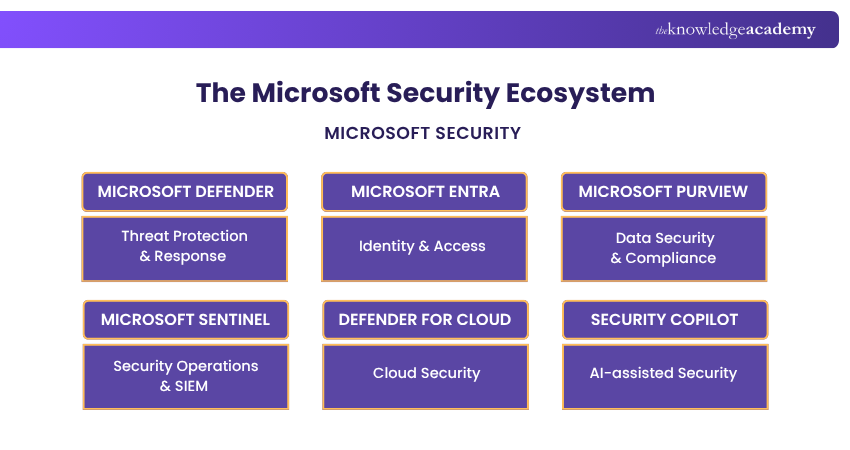
Microsoft provides several security product families, each addressing different cybersecurity requirements. Understanding their primary roles makes the wider Microsoft Security ecosystem much easier to understand.
1) Microsoft Defender and Defender XDR
Microsoft Defender is a family of security solutions designed to help organisations prevent, detect, investigate, and respond to cyber threats. The Defender portfolio provides protection across areas such as endpoints, identities, email, collaboration tools, cloud applications, and other organisational resources.
Microsoft Defender XDR can also correlate security signals across supported Defender products, helping security teams investigate attacks across multiple parts of the environment.
Primary role: Threat prevention, detection, investigation, and response
2) Microsoft Entra
Microsoft Entra is Microsoft's family of identity and network access products. Microsoft Entra ID provides cloud-based identity and access management capabilities that help organisations manage identities, authenticate users, and control access to applications and resources.
Capabilities such as Multi-factor Authentication (MFA), Conditional Access, and identity protection can help organisations reduce risks associated with compromised accounts and unauthorised access.
Primary role: Identity and access management
3) Microsoft Purview
Microsoft Purview provides solutions for data security, data governance, and risk and compliance requirements. It can help organisations discover and understand sensitive data, apply protection controls, manage data-related risks, and support compliance activities.
Capabilities within the Purview portfolio include areas such as Information Protection, Data Loss Prevention, Insider Risk Management, Communication Compliance, and information governance.
Primary role: Data security, governance, risk, and compliance
4) Microsoft Sentinel
Microsoft Sentinel is Microsoft's cloud-native Security Information and Event Management (SIEM) solution. It helps security teams collect and analyse security information, detect suspicious activity, investigate incidents, hunt for threats, and coordinate responses.
Rather than looking at alerts from individual systems separately, security teams can use Sentinel to gain broader visibility into security activity.
Primary role: Security monitoring, analytics, investigation, and response
5) Microsoft Defender for Cloud
Microsoft Defender for Cloud helps organisations improve the security of cloud applications, infrastructure, and workloads. It provides capabilities for assessing security posture, identifying risks, recommending improvements, and protecting workloads against threats.
It can support organisations operating across Azure and other supported cloud and hybrid environments.
Primary role: Cloud security posture and workload protection
6) Microsoft Security Copilot
Microsoft Security Copilot is an AI-powered security solution designed to assist security professionals with cybersecurity tasks. It uses generative AI to help security teams work with security information, investigate incidents, understand threats, and respond more efficiently.
Security Copilot can work alongside other Microsoft Security technologies, allowing security professionals to use natural-language interactions when carrying out supported security tasks.
Primary role: AI-assisted security operations
Learn advanced cybersecurity threat protection techniques with Microsoft Cybersecurity Architect SC100 Training – Register today!
Security Match-Up: Which Solution Does What?
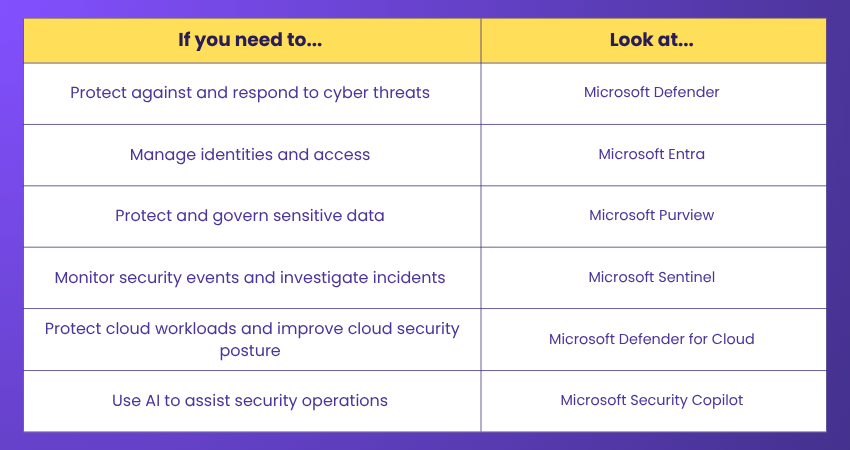
This doesn't mean each product works in isolation. Microsoft Security solutions can share signals and integrate across different security workflows.
How Microsoft Security Supports Zero Trust
Traditional security models often focused heavily on protecting the network perimeter. However, modern organisations have users, devices, applications, and data operating across offices, homes, cloud platforms, and other environments.
Zero Trust takes a different approach. It assumes that access should not automatically be trusted simply because a user or device is inside an organisation's network. Microsoft's Zero Trust approach is based on three core principles:
1) Verify Explicitly
Access decisions should be based on relevant information such as user identity, device, location, service, and other available signals. Authentication should establish that the person or system requesting access is who it claims to be.
2) Use Least-privilege Access
Users and systems should receive only the access required to perform their tasks. Reducing unnecessary permissions can limit what an attacker may be able to access if an account or system becomes compromised.
3) Assume Breach
Organisations should operate with the possibility that a security breach may already have occurred. This encourages continuous monitoring, segmentation, threat detection, and rapid response rather than assuming everything inside a network is safe.
Trainer's Tip
Don't think of Zero Trust as a single Microsoft product that can simply be switched on.It is a security strategy. Organisations apply its principles through identity controls, device security, data protection, access policies, monitoring, threat detection, and other security measures.
Benefits of Microsoft Security
Using connected security technologies can help organisations protect increasingly complex digital environments. Some important benefits of Microsoft Security include:
1) Broader Security Visibility
Security teams can gain visibility into activity across different areas such as identities, devices, applications, data, and cloud environments. Connecting security signals can help teams understand incidents that may otherwise appear to be unrelated.
2) Reduced Identity-related Risk
Microsoft Entra provides identity and access controls that help organisations verify users and manage access to resources. Capabilities such as MFA and Conditional Access can add additional controls around authentication and access decisions.
3) Faster Threat Detection and Response
Microsoft Defender and Sentinel help organisations identify, investigate, and respond to suspicious activity and cyber threats. Security teams can use alerts and incident information to understand attacks and take appropriate action.
4) Strong Data Protection and Governance
Microsoft Purview provides capabilities for understanding, protecting, and governing sensitive organisational information. This can help businesses manage data-related risks and support their compliance requirements.
5) Cloud Security
Microsoft Defender for Cloud helps organisations identify security weaknesses and protect workloads operating across supported cloud environments. This becomes increasingly important as organisations move applications and infrastructure beyond traditional on-premises environments.
6) AI-assisted Security
Microsoft Security Copilot can assist security professionals with tasks such as incident investigation, threat analysis, and security operations. AI does not replace the need for security expertise, but it can help professionals analyse information and carry out supported tasks more efficiently.
Conclusion
We hope this blog has given you a clearer understanding of Microsoft Security and how its solutions work together to protect modern digital environments. From identity and data protection to threat detection and cloud security, Microsoft Security provides a connected approach to managing cyber risks. Combined with Zero Trust principles, these solutions can help organisations strengthen security and respond more effectively to threats.

The Knowledge Academy develops accessible learning content across Project Management, IT, Cybersecurity, Data Science, Business Analysis, HR, Accounting and Finance, Leadership and Health and Safety. Its resources combine subject research with clear explanations to help professionals build practical knowledge across a wide range of disciplines.
View Detail

 If you wish to make any changes to your course, please


