




We may not have the course you’re looking for. If you enquire or give us a call on +44 1344 203 999 and speak to our training experts, we may still be able to help with your training requirements.
What is Microsoft Project Viewer: Everything You Need to Know
ByThe Knowledge AcademyLast updated on: 18 August 2026
Microsoft Project Viewer lets users open and review .MPP files without the full Microsoft Project application. Explore its features, benefits, available options and how to choose a suitable viewer.
The meeting starts in 10 minutes.
The project plan has just arrived.
You download the MPP file.
But there’s one problem: Microsoft Project isn’t installed.
Not exactly ideal timing. You need to review the project plan, but without the right software, accessing the MPP file can become an unexpected hurdle. That’s where a compatible Microsoft Project Viewer can help. It lets you access and review project information without needing the full desktop application.
If you are wondering What is Microsoft Project Viewer, this blog explores what these viewers can do and how to choose the right one for your needs.
Key Takeaways:
1. Microsoft Project Viewers let users open and review supported MPP files without the full Microsoft Project application.2. Viewers can display project details such as tasks, schedules, milestones, dependencies, and Gantt Charts.3. Features such as editing, exporting, cloud access, and collaboration vary between Project Viewers.4. Read-only access can help prevent accidental changes to the original project plan.5. The right Project Viewer depends on file compatibility, required features, platform, security, and budget.
What is Microsoft Project Viewer?
A Microsoft Project Viewer, also called an MPP viewer or MS Project Viewer, generally refers to third-party software that can open and display Microsoft Project (.MPP) files without requiring the full Microsoft Project desktop application.
It is a useful tool for team members, clients and stakeholders to access MPP files without Microsoft Project installed. An MS Project Viewer can display tasks, schedules, deadlines, Gantt charts and resources, while editing capabilities vary by product and are often limited.
Quick Note:
Microsoft does not currently provide a standalone viewer application specifically for opening Project files on a computer without Project installed. The term "Microsoft Project Viewer" commonly refers to compatible third-party viewing tools.
Key Features of Microsoft Project Viewer
Microsoft Project Viewers can offer a range of features that make it easier to access and understand project plans without Microsoft Project. Available features vary between viewers. Here are some of the common features:
1) MPP File Viewing: See the Plan Without the Full Software
At its core, a Microsoft Project Viewer gives you a window into MPP project files without requiring the full Microsoft Project application. Open the file and get straight to the information that matters.
Depending on the viewer, you can explore tasks, milestones, schedules, dependencies and deadlines, turning an MPP file into an accessible project overview.
2) Gantt Charts and Timelines: See How the Project Fits Together
Rows of project data can be difficult to interpret at a glance. Gantt charts, timelines and task views transform that information into a visual picture of the project schedule.
See when tasks start and finish, where milestones sit and how activities depend on one another all without modifying the original project plan.
3) Tasks and Resources: Know Who Does What, and When
A project plan isn't only about dates. Many viewers let you dig into the tasks and resources behind the schedule, including assignments, dependencies, milestones, and resource allocations.
This gives Project Managers, team members and stakeholders a clearer picture of what needs to happen, when it needs to happen and who is involved.
4) Printing and Exporting: Take the Plan Beyond the Viewer
Need a project schedule for a meeting or report? Depending on the tool, you may be able to print Gantt Charts and project views or export information to formats such as PDF or Excel.
This makes important project information easier to distribute and discuss, although available print and export options vary between viewers.
5) Cross-platform Access: Take Your Project View Anywhere
Project plans don't always stay on one computer. Depending on the viewer, MPP files may be accessible through Windows, macOS, Linux, mobile devices or a web browser.
Web-based options add further flexibility by allowing compatible project files to be viewed through a browser without installing desktop software.
6) Cloud and Collaboration: Keep Teams Connected to the Plan
When project files are stored online, selected viewers can provide cloud access, file sharing and collaboration features, helping teams access project information from different locations.
Support varies significantly between products, so check the available cloud integrations, sharing capabilities and access controls before choosing a viewer.
Quick Checklist
Can Your Project Viewer Do This?
Open an MPP? → See the planView a Gantt Chart? → See the scheduleCheck resources? → See who's involvedExport the plan? → Share itOpen it online? → Access it anywhereConnect through the cloud? → Support shared access
The best viewer isn't the one with the most features; it's the one with the features your project actually needs.
Popular Microsoft Project Viewers and Alternatives
Choosing the right Microsoft Project Viewer depends on your project needs, budget, and collaboration requirements. These tools allow users to open, analyse, and share project files without requiring the full Microsoft Project software. Below are some popular options to consider:
1) Project Viewer 365 / Project Plan 365
Project Viewer 365 provides free view-only access to supported Microsoft Project files. Users who need broader project planning and editing capabilities can instead consider Project Plan 365.
2) Seavus Project Viewer
Seavus Project Viewer is standalone software designed to open, view, print and analyse Microsoft Project plans without requiring Microsoft Project to be installed.
Did You Know?
Seavus Project Viewer reports 6+ million installations worldwide and says it is used by more than two-thirds of Fortune 500 companies.
3) Steelray Project Viewer
Steelray Project Viewer is designed for viewing Microsoft Project and Primavera schedules. It includes features such as schedule search, navigation and enhanced printing.
Create professional diagrams and visualise complex ideas effectively with our Microsoft Visio Training - Register today!
Benefits of Using a Microsoft Project Viewer
Microsoft Project Viewers can make project information more accessible to people who do not need full planning or editing functionality. Although capabilities vary between tools, common benefits include easier file access, clearer project visibility and read-only viewing.
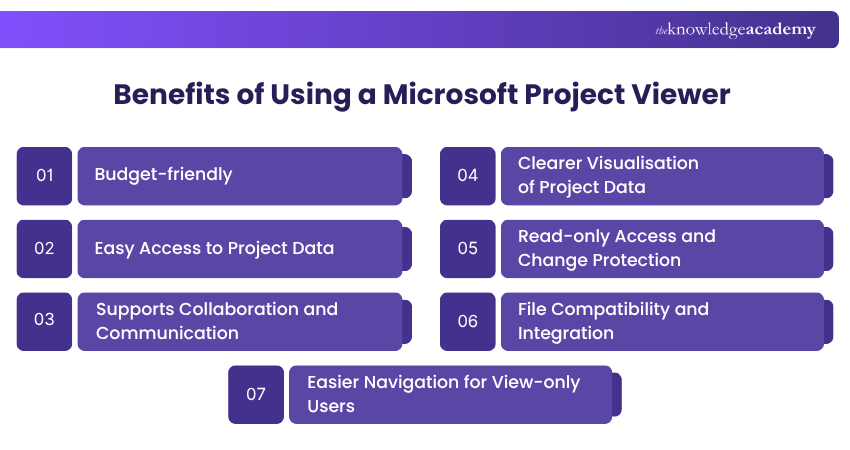
1) Budget-friendly
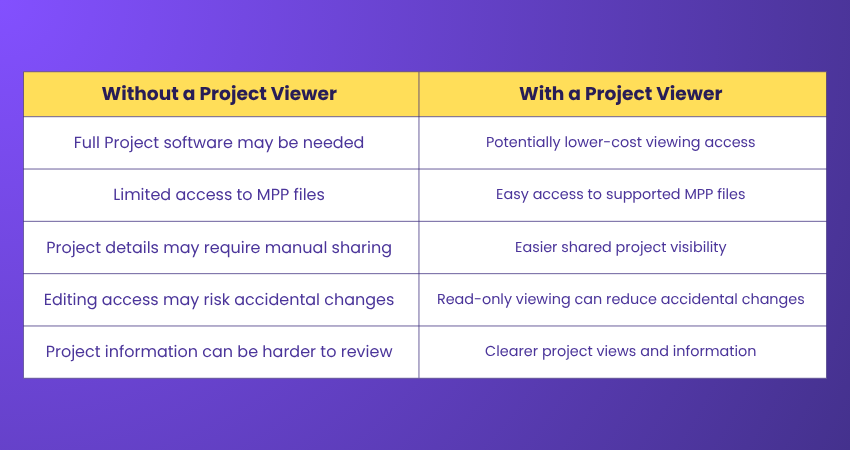
Some Project Viewers are free or may cost less than full project planning software for users who only need viewing functionality. This can reduce unnecessary software costs when editing and advanced Project Management features are not required.
2) Easy Access to Project Data
Project Viewers allow users to open supported MPP files and access project details without requiring the full Microsoft Project application. This makes schedules, tasks, resources and dependencies more accessible to stakeholders who primarily need visibility rather than editing capabilities.
3) Supports Collaboration and Communication
By giving stakeholders and team members access to the same project information, Project Viewers can support clearer communication around tasks, milestones, schedules and responsibilities. This shared visibility can reduce misunderstandings and help teams stay aligned with the project plan.
4) Clearer Visualisation of Project Data
Many Project Viewers present information through Gantt Charts, task sheets, resource views and, in some tools, network diagrams. These visual formats can make schedules, dependencies, milestones and resource information easier to interpret.
5) Read-only Access and Change Protection
Many Microsoft Project Viewers provide read-only access to MPP files, allowing users to examine project information without changing the original plan. This can reduce the risk of accidental modifications when project files are shared with stakeholders who only require viewing access.
6) File Compatibility and Integration
Many Project Viewers support MPP files created in multiple versions of Microsoft Project, making it easier to share project plans across teams. Compatibility varies between tools, so users should check whether a viewer supports the specific Microsoft Project and MPP file versions used by their organisation.
7) Easier Navigation for View-only Users
Many Project Viewers are designed primarily for viewing and analysing existing plans, which can make navigation simpler for users who do not require full Project Management functionality. Some also use views similar to Microsoft Project, providing a familiar experience for existing Project users.
Pro Trainer’s Tip
"Match access to responsibility. If stakeholders only need to check tasks, milestones and schedules, read-only viewing may provide the visibility they need without exposing the project plan to unnecessary changes."
How to Choose the Right Microsoft Project Viewer?
The best Project Viewer depends on what you actually need to do with the project file. Someone who occasionally checks a schedule will have very different requirements from a Project Manager who needs to modify tasks and resources.
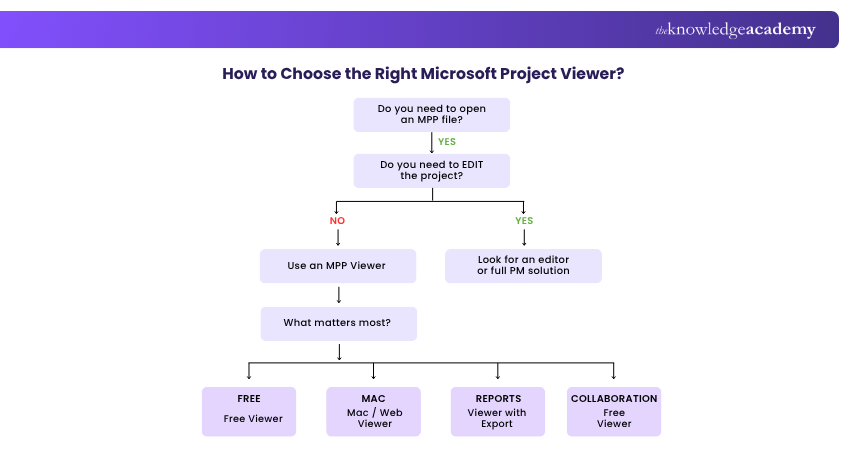
1) Check MPP Compatibility: Ensure the viewer supports the Microsoft Project versions and MPP files your organisation uses.
2) Identify the Features You Need: Look for essential views such as Gantt Charts, task sheets, resource views, timelines, filters, and reports. Some viewers support a broad range of Microsoft Project views and reporting features.
3) Decide Between Viewing and Editing: If you only need to review project plans, a read-only viewer may be sufficient. Choose an editing solution if you need to modify tasks, resources, or schedules.
4) Consider Device Compatibility: Check whether the viewer works across the devices and operating systems your team uses, such as Windows, macOS, mobile devices or web browsers.
5) Evaluate Sharing and Integration: For collaborative teams, consider support for cloud storage, SharePoint, OneDrive or other platforms used to store and share project files.
6) Compare Cost and Usage: A free viewer can work well for occasional viewing, while paid options may be more suitable when teams require advanced reporting, collaboration or enterprise-level functionality.
Conclusion
Microsoft Project Viewers provide a practical way to access and review supported project files without requiring the full Microsoft Project application. They can help stakeholders view schedules, tasks, milestones and other project information, although features vary between tools. Understanding What is Microsoft Project Viewer can help you choose an option suited to your compatibility, access and budget requirements.
Strengthen your Microsoft Access skills with our Microsoft Access Training – Join now!

The Knowledge Academy develops accessible learning content across Project Management, IT, Cybersecurity, Data Science, Business Analysis, HR, Accounting and Finance, Leadership and Health and Safety. Its resources combine subject research with clear explanations to help professionals build practical knowledge across a wide range of disciplines.
View Detail

 If you wish to make any changes to your course, please


