




We may not have the course you’re looking for. If you enquire or give us a call on 01344203999 and speak to our training experts, we may still be able to help with your training requirements.
Microsoft Power Platform Solutions: Explained in Detail
ByThe Knowledge AcademyLast updated on: 19 August 2026
Explore Microsoft Power Platform Solutions, their key components, types, and how to create, import and export Solutions across different environments.
Key Takeaways
1. Microsoft Power Platform Solutions help organise related apps, flows, tables and other components.2. Solutions make it easier to move components between development, testing and production environments.3. Power Platform supports both managed and unmanaged Solutions, each suited to different stages of development and deployment.4. Solutions can be created, imported and exported through the Power Apps Solutions area.5. Understanding dependencies, publishers, and the solution lifecycle can help teams manage deployments.
When working in Power Platform, an app rarely exists on its own. It may rely on flows, tables and other components, all of which need to be managed and moved together. Now, consider what happens when these components are handled separately:
Without Solutions:
App → Moved separately
Flow → Moved separately
Tables → Moved separately
Other Components → Moved separately
With a Solution:
App + Flow + Tables + Components → One organised package
That is the basic idea behind Microsoft Power Platform Solutions. They help bring related components together so teams can manage, move and deploy them more systematically. Let's explore what they are and how they work!
What are Microsoft Power Platform Solutions?
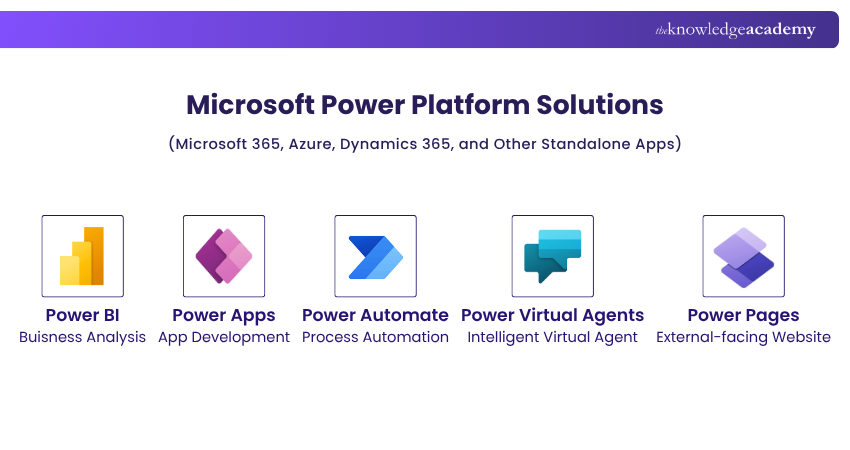
Microsoft Power Platform Solutions are packages used to organise, manage, and transport related application components that are created within Power Platform. A Solution can contain items such as Power Apps, Power Automate flows, Dataverse tables and other customisations, keeping everything needed for a particular application or business process together in one place.
Instead of transferring and managing each component separately, teams can package them into a Solution and import or export them as needed. This provides a more structured way to manage changes and deploy Power Platform applications.
How do Power Platform Solutions Support Application Lifecycle Management?
Application Lifecycle Management, or ALM, refers to the process of managing an application throughout its lifecycle. This can include:
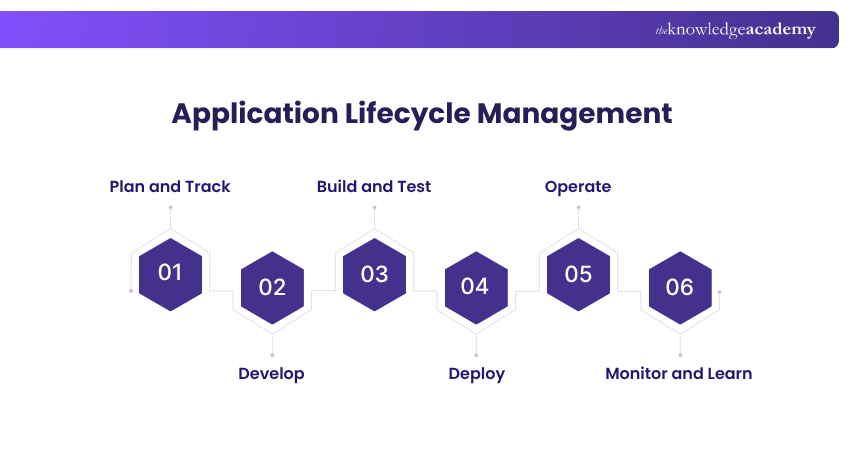
Power Platform Solutions support this lifecycle by helping teams package and move application components between different environments. For example, Developers may work with separate environments for:
a) Development
b) Testing
c) Production
Rather than manually recreating components in each environment, Solutions allow teams to move related application components from development through testing and eventually into production.
Follow the Solution
Consider how a Solution might move through a typical application lifecycle:
1) Development
An application and its components are created or modified in the development environment.
2) Create the Solution
Relevant apps, flows, tables, and other components are added to a Solution.
3) Build and Test
The application components are tested to make sure they work as expected before deployment.
4) Export
The Solution is exported so that it can be moved to another environment.
5) Deploy
The Solution is imported into the appropriate downstream environment, such as testing or production.
6) Operate and Maintain
The deployed application is monitored and improved, with future changes moving through the lifecycle again.
This shows how Solutions support ALM by providing a structured way to move application components between environments throughout their lifecycle.
Types of Power Platform Solutions
Power Platform Solutions can be broadly divided into two types:
1) Unmanaged Solutions
2) Managed Solutions
Understanding the distinction is important because they are typically used at different stages of the application lifecycle.
Unmanaged Solutions
Unmanaged Solutions are generally used during development when applications and their components are still being changed.
They act as the source for customisations and can be exported as either unmanaged or managed Solutions. If an unmanaged Solution is deleted, the Solution itself is removed, but the components and customisations it contains are not automatically removed from the environment.
Managed Solutions
Managed Solutions are generally intended for deployment into environments other than the development environment.
A managed Solution can be produced by exporting an unmanaged Solution as managed. Components within managed Solutions are controlled differently from those in unmanaged Solutions and are not intended to be directly edited in the same way.
Quick Knowledge Check
A team is actively building and modifying a Power App in its development environment. Which type of Solution would generally be more appropriate?
A. Managed SolutionB. Unmanaged SolutionAnswer: B — Unmanaged SolutionUnmanaged Solutions are generally used as the development source, while managed Solutions are typically used when deploying Solutions into downstream environments.
Become familiar with the basics of Power Platform applications and fulfil business needs with Microsoft Power Platform Developer PL400 Training - Join now!
Unmanaged vs Managed Solutions
Now, let's check how Unmanaged Solutions differ from Managed Solutions:
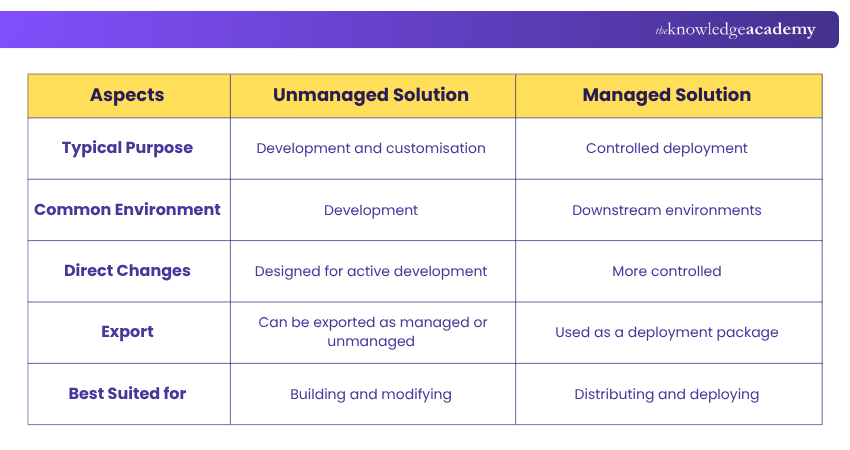
Unmanaged vs Managed Solutions: Which Should You Use?
The choice between unmanaged and managed Solutions depends largely on where the Solution is in its lifecycle.
Use an Unmanaged Solution When:
a) The application is under active development
b) Developers need to modify components
c) The Solution is being maintained as the development source
d) Components still require frequent customisation
Use a Managed Solution When:
a) The Solution is being deployed beyond the development environment
b) Greater control over deployed components is required
c) The application is being distributed as a controlled package
Solution Journey at a Glance
A typical journey might look like:
Develop as Unmanaged↓Build and Test↓Export as Managed↓Deploy to Downstream EnvironmentA Simple Way to Decide: Ask Yourself"Am I still building it?" → Use Unmanaged"Am I ready to deploy it?" → Consider Managed
Rather than asking which Solution type is universally "better," it is more useful to ask which type is appropriate for the current stage of the application lifecycle.
Key Insight: Managed and unmanaged Solutions should not be viewed simply as two different file options. Their distinction becomes more useful when considered in the context of development, deployment, and ongoing Application Lifecycle Management.
Components of Power Platform Solutions
A component is an element that can be included within a Solution. A Solution can contain different components used to build and support an application, including:
a) Canvas apps
b) Model-driven apps
c) Power Automate flows
d) Tables
e) Columns
f) Dashboards
g) Custom connectors
h) Forms and views
i) Other application components and customisations
Components also help teams keep track of important information such as:
a) Dependencies between components
b) Restrictions on customisation through managed properties
Understanding Dependencies
Components within an application may depend on one another. For example, an app might depend on a particular table, while a flow might depend on data or other components used by that application.
Understanding these relationships is important when preparing a Solution for deployment because leaving out a required dependency could affect how the Solution behaves in another environment.
Discover how to create, manage and use Power Apps with Microsoft Power Apps for End Users 55265AC Training – Register today!
How to Create, Import, and Export Microsoft Power Platform Solutions?
Once you understand what Solutions contain, the next step is understanding how they are created and moved between environments. Let's check it out below:
How to Create a Solution in Power Apps?
To create a Solution:
a) Open Power Apps
b) Select the appropriate environment
c) Navigate to Solutions
d) Select New solution
e) Enter the required information, including the display name, name, and publisher
f) Create the Solution
g) Add the required application components
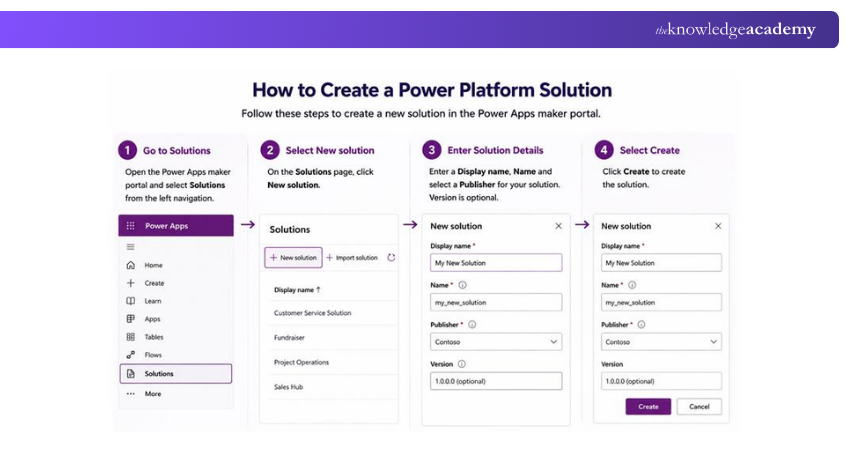
Existing assets such as apps, flows, dashboards, and reports can then be added to the Solution. Once the required components have been added, the relevant customisations can be published.
How to Import a Solution?
To import a Solution:
a) Open Power Apps
b) Choose the appropriate environment
c) Navigate to Solutions
d) Select Import solution
e) Browse for the Solution file
f) Continue through the import process
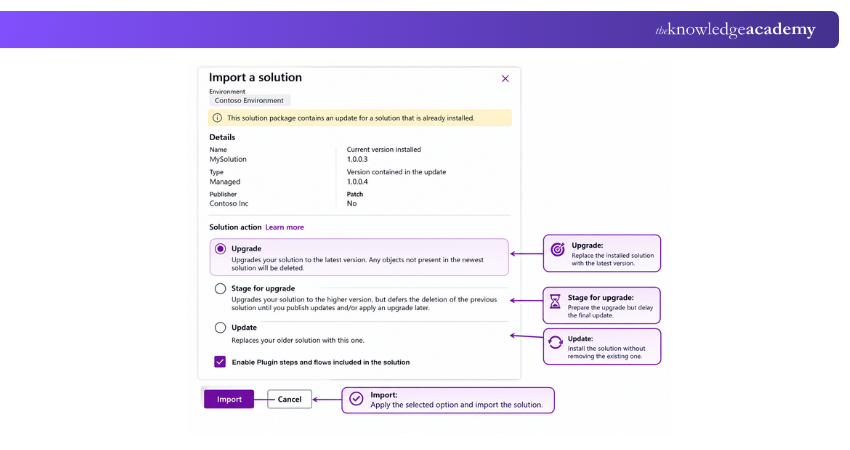
Importing allows a packaged Solution to be introduced into another environment.
How to Export a Solution?
To export a Solution:
a) Open Power Apps
b) Choose the appropriate environment
c) Navigate to Solutions
d) Select the Solution you want to export
e) Ensure the required customisations are published
f) Select Export
g) Enter the appropriate version information
h) Choose the required Solution type
i) Complete the export
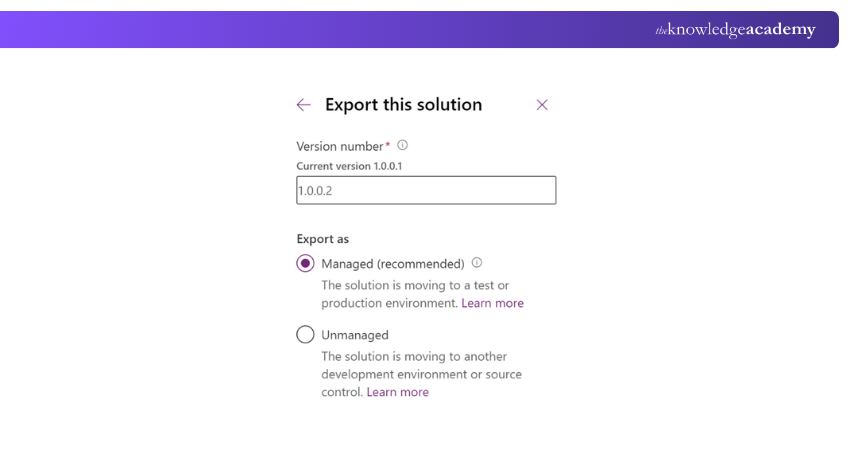
The exported Solution can then be used for movement between environments.
Solution Movement at a Glance
Let's now check how the whole process works in a flow diagram:
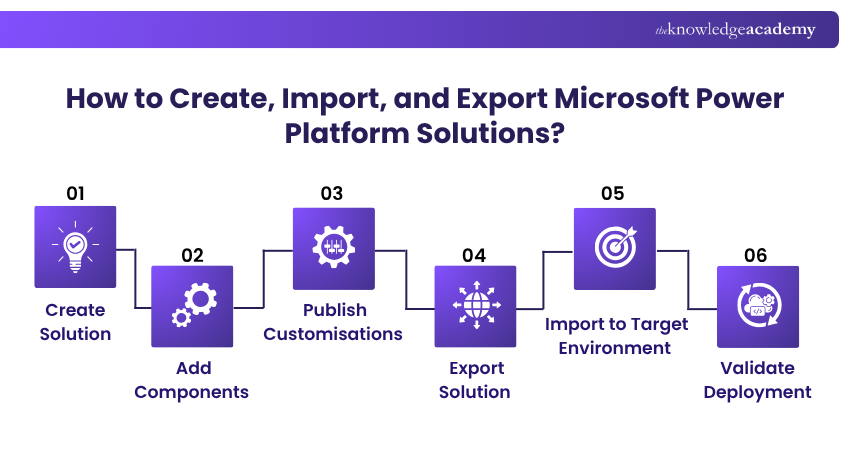
This workflow demonstrates how Solutions provide a practical mechanism for moving application components through different environments.
Best Practices for Managing Power Platform Solutions
Power Platform Solutions can simplify application management, but they still require careful planning. Understanding these best practices can help you effectively manage Power Platform Solutions:
1. Use a Consistent Publisher
A publisher helps identify a Solution and the components associated with it. Establishing an appropriate publisher early can help maintain consistency across Solutions and components.
2. Understand Component Dependencies
Before moving a Solution, identify whether its components depend on other elements. Dependencies can affect whether the Solution works correctly after deployment.
3. Separate Development and Deployment
Use appropriate environments for development, testing, and production rather than making every change within the same environment.
4. Test Before Deployment
Changes should be validated before being introduced into a production environment.
5. Manage Solution Versions
Clear versioning can make it easier to understand which Solution release is being deployed and how it differs from previous versions.
Common Mistakes to Avoid
Some problems can occur when teams:
a) Include unnecessary components in a Solution
b) Overlook component dependencies
c) Use inconsistent publishers
d) Move changes without adequate testing
e) Manage Solution versions inconsistently
f) Make changes in environments that should be controlled
Before Moving a Solution, Check:
□ Are all required components included?□ Have component dependencies been reviewed?□ Is the Solution version correct?□ Is the appropriate publisher being used?□ Have the changes been tested?□ Is the target environment ready?□ Have you selected the appropriate managed or unmanaged approach?
Conclusion
Microsoft Power Platform Solutions provide a structured way to organise, manage and move application components across environments. From choosing between managed and unmanaged Solutions to supporting ALM, they help teams handle development and deployment effectively. Understanding how Solutions work can ultimately make Power Platform applications easier to maintain, update and scale over time.
Transform the way you manage customer and business processes with Microsoft Dynamics 365 Training – Sign up now!

The Knowledge Academy develops accessible learning content across Project Management, IT, Cybersecurity, Data Science, Business Analysis, HR, Accounting and Finance, Leadership and Health and Safety. Its resources combine subject research with clear explanations to help professionals build practical knowledge across a wide range of disciplines.
View Detail

 If you wish to make any changes to your course, please


