




We may not have the course you’re looking for. If you enquire or give us a call on +44 1344 203 999 and speak to our training experts, we may still be able to help with your training requirements.
Home
 Resources
Data, Analytics & AI
What is a Lakehouse in Microsoft Fabric: Features and How to Create it
Resources
Data, Analytics & AI
What is a Lakehouse in Microsoft Fabric: Features and How to Create it
Resources
Data, Analytics & AI
What is a Lakehouse in Microsoft Fabric: Features and How to Create it
What is a Lakehouse in Microsoft Fabric: Features and How to Create it
ByThe Knowledge AcademyLast updated on: 19 August 2026
This blog explores what a Lakehouse in Microsoft Fabric is, how it works, its key features and benefits, and how to create one and load data into it.

Key Takeaways
1. Microsoft Fabric Lakehouse combines flexible data lake storage with warehouse-style analytics.2. Structured and unstructured data can be managed together, with Delta Lake supporting reliable analytical tables.3. Structured and unstructured data can be managed together, with Delta Lake supporting reliable analytical tables.4. Fabric supports multiple ways to load or access data, including pipelines, Dataflow Gen2, notebooks and OneLake shortcuts.5. Fabric supports multiple ways to load or access data, including pipelines, Dataflow Gen2, notebooks and OneLake shortcuts.
Modern organisations often manage data stored in different formats, locations and systems. The challenge is bringing this data together so different teams can work with it effectively.
What if Data Engineers could transform data using Apache Spark while Data Analysts queried the same data using SQL, without creating separate copies? This is where a Lakehouse in Microsoft Fabric comes in. It combines the flexibility of a data lake with the analytical capabilities of a data warehouse in one environment.
In this blog, we'll explore What is a Lakehouse in Microsoft Fabric, how it works, its key features and benefits, and when to use one.
What is a Lakehouse in Microsoft Fabric?
A Lakehouse in Microsoft Fabric is a data architecture that combines the scalability and flexibility of a data lake with the querying capabilities commonly associated with a data warehouse.
It allows structured and unstructured data to be stored and managed in one location. Data Engineers can process the data using Apache Spark, while Data Analysts can query Delta tables using T-SQL through the SQL analytics endpoint.
Instead of maintaining separate copies of data for engineering and analytics, teams can work with the same underlying Delta tables stored in OneLake.

Lakehouse in 10 Seconds
Bring data together → Store it in OneLake → Organise it with Delta Lake → Transform it with Spark → Query it with SQL → Analyse it with Power BI.The Simple Idea: One copy of data can support multiple analytical workloads.
How Does a Lakehouse Work in Microsoft Fabric?
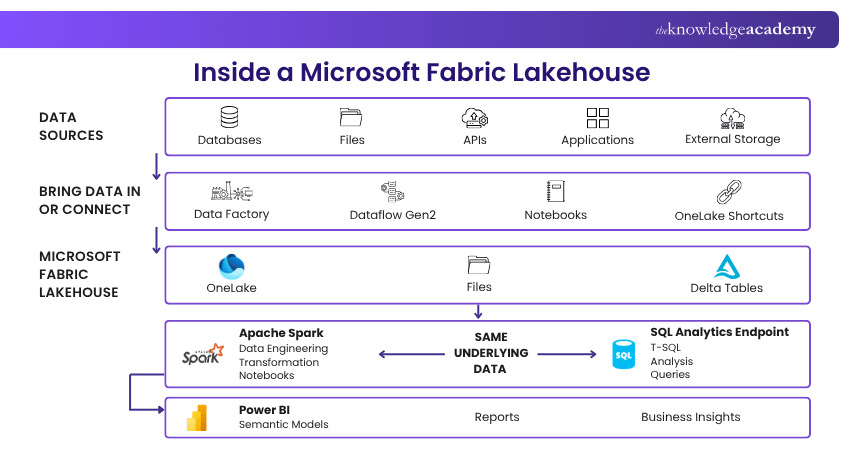
A Fabric Lakehouse brings data storage, processing, querying and analytics into a unified environment. Here is how data typically moves through a Lakehouse:
1. Store Data in OneLake
Data is stored in OneLake, Microsoft Fabric's unified logical data lake. Within a Lakehouse, data is organised into Tables and Files. Tables hold structured data for analysis, while Files can contain structured, semi-structured and unstructured data for processing.
2. Organise Data with Delta Lake Tables
Lakehouse tables use Delta Lake by default, combining Parquet files with a transaction log. This provides capabilities such as ACID transactions, schema enforcement and version history, helping maintain reliable and consistent analytical data.
3. Process Data with Apache Spark
Apache Spark processes Lakehouse data across distributed computing resources, making it suitable for large-scale data workloads. Data Engineers and Data Scientists can use Spark notebooks and jobs to ingest, clean, transform and analyse data using Python, Scala, Spark SQL and R.
4. Query Data Through the SQL Analytics Endpoint
Each Fabric Lakehouse automatically gets a SQL analytics endpoint, allowing users to query Delta tables using T-SQL. This gives Data Analysts a familiar SQL experience for exploring and analysing prepared Lakehouse data without working directly with Spark.
5. Analyse Data with Power BI
Prepared Lakehouse data can be used in Power BI to build semantic models, reports and dashboards. Power BI can also use Direct Lake with supported semantic models, enabling efficient analysis of data stored in OneLake.
Key Features of Microsoft Fabric Lakehouse
A Fabric Lakehouse is more than a location for storing data. Its capabilities are designed to connect different stages of the analytics journey.
1) Unified Data Storage
Structured, semi-structured and unstructured data can be managed within the Lakehouse environment instead of being separated across multiple analytical systems.
2) Open Table Format
Delta Lake is an open-source table format built on Parquet and adds capabilities such as transactional consistency and schema management to lake-based data.
3) Spark and SQL Access
The same Lakehouse can serve users with different technical requirements. Data Engineers can use Spark for complex transformations, while Data Analysts can query Delta tables through the SQL analytics endpoint using familiar T-SQL.
4) OneLake Shortcuts
Not every dataset needs to be physically copied into the Lakehouse. OneLake shortcuts can reference data stored elsewhere in OneLake or supported external storage locations, making that data accessible through Fabric without necessarily creating another copy.
5) Integration Across Microsoft Fabric
A Lakehouse connects with other Fabric capabilities, including Data Factory, Dataflow Gen2, notebooks and Power BI. This allows data ingestion, engineering, analysis and reporting to take place within the broader Fabric ecosystem.
6) Scalable Data Processing
The Lakehouse architecture is designed for large analytical datasets and can support data engineering, Data Science and BI workloads as data requirements grow.
Learn how to resolve inconsistencies and data quality issues in Power BI with the Microsoft Power BI Data Analyst PL300 Training – Join now!
Benefits of Using a Lakehouse in Microsoft Fabric
Why use a Lakehouse instead of maintaining separate systems for data engineering and analytics? Its biggest advantages come from reducing the boundaries between those activities.
1. Reduces Unnecessary Data Duplication
Different analytical workloads can work with the same underlying Lakehouse data instead of requiring a separate copy for every tool or team. OneLake shortcuts can further reduce unnecessary movement by referencing data stored in supported internal or external locations.
2. Supports Diverse Data
Lakehouses can work with structured and unstructured data, making them useful when organisations have information arriving in different formats and from multiple sources.
3. Connects Engineering and Analytics
Spark and SQL access allow different professional roles to work with the same data using tools suited to their responsibilities. This helps create a smoother transition from raw data and transformation to analysis and reporting.
4. Improves Data Reliability
Delta Lake introduces capabilities such as ACID transactions and schema enforcement. These features make lake-based data more dependable for analytical workloads than relying solely on unmanaged collections of files.
5. Simplifies the Analytics Architecture
Microsoft Fabric brings storage, engineering, integration, analytics and BI capabilities into one SaaS environment. This can reduce the need to manage disconnected services for different stages of the data lifecycle.
Did You Know?
Creating a Lakehouse automatically provisions a SQL analytics endpoint.You don't have to create or configure a separate SQL endpoint before analysts can query supported Delta tables using T-SQL.
How to Create a Lakehouse in Microsoft Fabric?
Creating the Lakehouse itself is relatively straightforward. The more substantial work begins afterwards when data is ingested, transformed and organised for analysis.
Step 1: Open Your Fabric Workspace
Go to the Microsoft Fabric workspace where you want the Lakehouse to reside. Ensure the workspace is assigned to Fabric capacity and that you have the required permissions to create items.
Step 2: Select New Item
From your workspace, select New item to view the Fabric items available for creation. This opens the catalogue of items you can create within the workspace.
Step 3: Select Lakehouse
Search for or select Lakehouse from the available item types. This opens the setup window where you can configure your new Lakehouse.
Step 4: Name Your Lakehouse
Enter an appropriate name and confirm the workspace in which it should be created. Choose a clear, descriptive name that reflects the data or workload the Lakehouse will support.
Step 5: Configure Lakehouse Schemas
Lakehouse schemas are enabled by default. Keep this option selected to organise tables into logical groups, or clear it if schema-based organisation is not required.
Step 6: Create the Lakehouse
Create the item. Fabric provisions the Lakehouse and its associated SQL analytics endpoint. You can then begin bringing data into the environment and organising it for engineering and analytical workloads.
Understand advanced concepts in data integration and analysis with our Microsoft Fabric Certification – Join today!
How to Load Data Into a Microsoft Fabric Lakehouse?
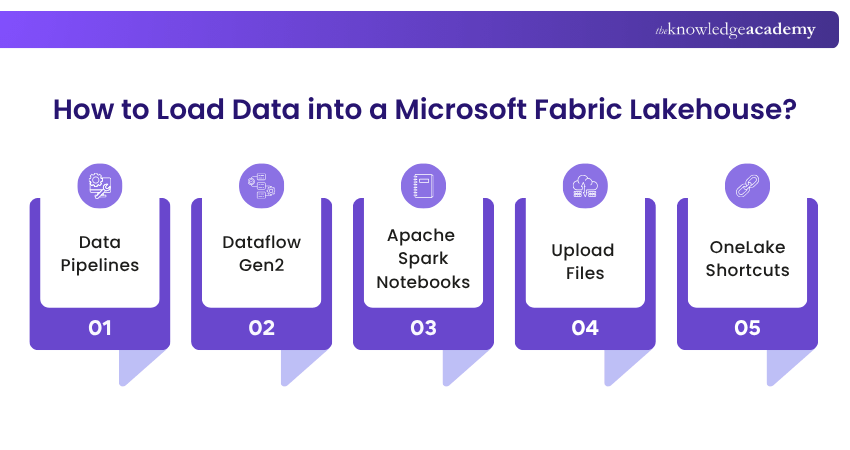
There isn't one compulsory method for getting data into a Fabric Lakehouse. The appropriate option depends on where the data resides and how much transformation or automation is required.
1) Data Pipelines
Fabric Data Factory pipelines can move data from supported sources into the Lakehouse. Pipelines are particularly useful when ingestion needs to be orchestrated, repeated or combined with other activities in a data workflow.
2) Dataflow Gen2
Dataflow Gen2 provides a low-code approach for connecting to, preparing and transforming data before loading it into a destination such as a Lakehouse. This can be useful when users prefer a visual data preparation experience.
3) Apache Spark Notebooks
Notebooks provide greater flexibility for code-based ingestion and transformation. Data Engineers can use Spark to read data, perform transformations and write the results into Delta tables.
4) Upload Files
Files can also be uploaded directly to the Lakehouse Files area, making this approach useful for smaller datasets, testing and exploratory work.
5) OneLake Shortcuts
Sometimes the best way to bring data into your analytical environment is not to move it at all. OneLake shortcuts create references to supported data stored in OneLake or external locations. This makes the data accessible from the Lakehouse while helping avoid unnecessary copies and staging processes.
Trainer's Tip: Copy Less, Connect SmarterBefore copying another dataset into your Lakehouse, ask:"Does this data genuinely need another physical copy?"If the data already exists in a supported OneLake or external location, investigate whether a OneLake shortcut can provide the access you need. Reducing unnecessary copies can simplify data architecture and help teams work from shared data sources.
When Should You Use a Microsoft Fabric Lakehouse?
A Lakehouse is powerful, but that doesn't mean it is automatically the right choice for every analytical workload.
Consider a Fabric Lakehouse when:
a) You need to work with both structured and unstructured data
b) Data Engineering or Data Science workloads require Apache Spark
c) Analysts also need SQL access to prepared Delta tables
d) Multiple analytical workloads need access to shared data
e) You want to implement a medallion architecture or similar layered data design
f) You want to connect data ingestion, transformation and analytics within Fabric
g) You want to reference supported external data through OneLake shortcuts
A Fabric Warehouse may be a stronger fit when the workload is predominantly structured, SQL-first and centred around traditional data warehousing, dimensional modelling and BI.
The two can also work together. A Lakehouse can support data ingestion and engineering, while curated data can serve downstream analytics and BI workloads based on business requirements.
Conclusion
A Lakehouse in Microsoft Fabric brings data storage, engineering and analytics into one connected environment. Understanding What is a Lakehouse in Microsoft Fabric shows how OneLake, Delta Lake, Spark and SQL-based analysis help teams work with shared data, reduce unnecessary movement and turn raw data into valuable insights efficiently.
Understand advanced SQL concepts for efficient database solutions with the Microsoft SQL Server Training – Register now!

The Knowledge Academy develops accessible learning content across Project Management, IT, Cybersecurity, Data Science, Business Analysis, HR, Accounting and Finance, Leadership and Health and Safety. Its resources combine subject research with clear explanations to help professionals build practical knowledge across a wide range of disciplines.
View Detail

 If you wish to make any changes to your course, please


