




We may not have the course you’re looking for. If you enquire or give us a call on 01344203999 and speak to our training experts, we may still be able to help with your training requirements.
What is Computer Vision and How Does it Work?
ByThe Knowledge AcademyLast updated on: 06 October 2026
Explore the fundamentals of computer vision, a powerful branch of Artificial Intelligence (AI) that enables machines to understand and analyse images and videos. Learn how computer vision supports technologies like facial recognition, autonomous vehicles, medical imaging, smart surveillance, and Augmented Reality (AR).
What You Should Know
1. Computer vision enables machines to extract meaningful information from images and videos.2. Modern computer vision commonly uses AI, machine learning and deep learning to recognise visual patterns.3. Key tasks include image classification, object detection, object tracking and facial recognition.4. Computer vision is applied across healthcare, manufacturing, transport, retail, agriculture and smart cities.5. Performance depends on factors such as training data, model design, computing resources and real-world conditions.
Vision is no longer limited to living organisms. Even computers possess this feature now in their own unique, digital way. Welcome to the world of computer vision, where machines can “see” and make sense of images just like we do.
From spotting faces in photos to guiding self-driving cars, this technology is transforming the way machines interact with the world. If you want a deeper look into this concept, this blog is here for you, exploring what computer vision is and how it functions. So read on and embrace the future of image and video recognition!
What is Computer Vision?
Computer vision is a field of Artificial Intelligence (AI) that enables computers to analyse and understand visual information from images, videos, and other digital sources. Modern computer systems can access many images and video data from numerous sources, including smartphones, security systems and traffic cameras. Applications pertaining to computer vision utilise Machine Learning (ML) and deep learning to accurately process data for tasks such as:
1) Object identification
2) Facial recognition
3) Classification
4) Recommendation
5) Monitoring
6) Detection

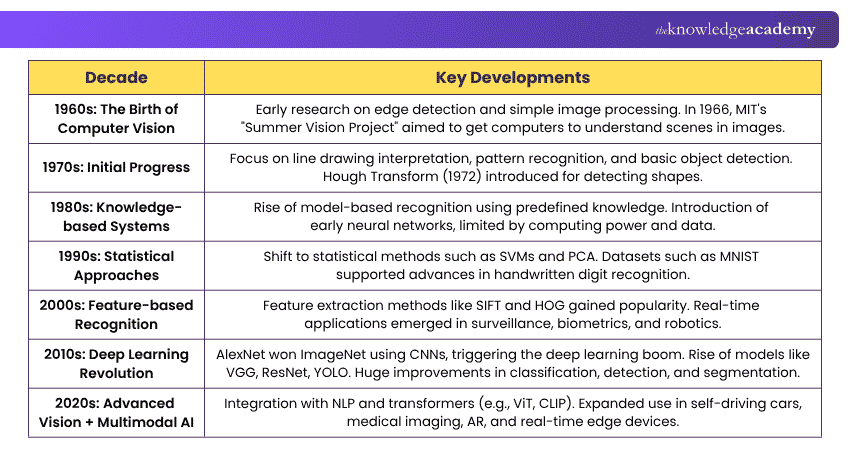
Evolution of Computer Vision
Here’s how computer vision has evolved through the years:
Key Technologies Used in Computer Vision
Computer vision systems use Artificial Intelligence (AI) technology to mimic the human brain's object recognition and classification capabilities. Here are the key technologies used in computer vision:
1) Deep Learning
a) Deep learning refers to a kind of machine learning that employs neural networks.
b) It relies on layers of software modules known as artificial neurons.
c) These neurons work together inside the computer to process data.
d) Deep learning employs mathematical calculations to understand image data.
e) It analyses different parts of the image automatically and, over time, builds a complete understanding of the image.
2) Convolutional Neural Networks
a) Convolutional Neural Networks (CNNs) are deep learning models commonly used to analyse images and other visual data.
b) They process pixel information using filters that detect patterns such as edges, shapes, textures and more complex visual features.
c) A mathematical operation called convolution allows these filters to scan different parts of an image.
d) Early layers may recognise simple features such as edges, while deeper layers learn more complex structures and objects.
e) Gradually, they identify finer details like colour, texture, and internal patterns.
f) The prediction process is repeated over multiple iterations to improve accuracy.
3) Recurrent Neural Networks
a) Recurrent Neural Networks (RNNs) are designed to process sequential data, where information from earlier inputs can influence later outputs.
b) Instead of just one image, RNNs can process a series of images.
c) They are designed to find connections or patterns across multiple images.
d) RNNs can be used to analyse sequential information across video frames, particularly when relationships over time are important.
e) They help understand the relationships and sequences between images.
Trainer's Insight
Computer vision goes beyond recognising what appears in an image. Depending on the task, a system may determine what an object is, where it is, which pixels belong to it or how it moves across video frames.
Empower machines to learn, adapt, and innovate - Sign up for our Machine Learning Course now!
How Does Computer Vision Work?
Computer vision works by capturing visual data, processing it, identifying useful patterns, and using trained models to interpret what appears in an image or video. The process usually involves several stages, from preparing the visual input to producing a final prediction or decision. Here's how it works:
1) Image or Video Input
The process begins when a computer vision system receives visual data from sources such as cameras, scanners, satellites or stored image and video files. This data is converted into a digital format that the system can process.
2) Image Pre-processing
The visual data is then prepared for analysis. This may involve resizing images, adjusting brightness or contrast, reducing noise, or normalising pixel values. Pre-processing helps improve image quality and makes the data more consistent for further analysis.
3) Feature Extraction
The system identifies important visual features such as edges, shapes, colours, textures, and patterns. Traditional Computer Vision methods extract these features manually, while modern Deep Learning models can automatically learn useful features from large amounts of training data.
4) Model Training and Pattern Learning
Machine Learning or Deep Learning models are trained using visual data so they can recognise patterns and relationships. During training, the model compares its predictions with the correct results and adjusts its internal parameters to improve accuracy.
5) Image Analysis and Recognition
Once trained, the model analyses new images or video frames. Depending on the task, it may classify an image, detect objects, recognise faces, identify text, segment different regions, or track movement.
6) Prediction and Output
Finally, the computer vision system produces an output based on what it has identified. For example, it may label an object as a car, highlight the location of a pedestrian, identify an abnormality in a medical scan, or trigger an automated action based on the visual information.
The Importance of Computer Vision
From identifying objects and monitoring quality to analysing medical images and supporting autonomous systems, computer vision helps a wide range of industries. Here’s why it is important:
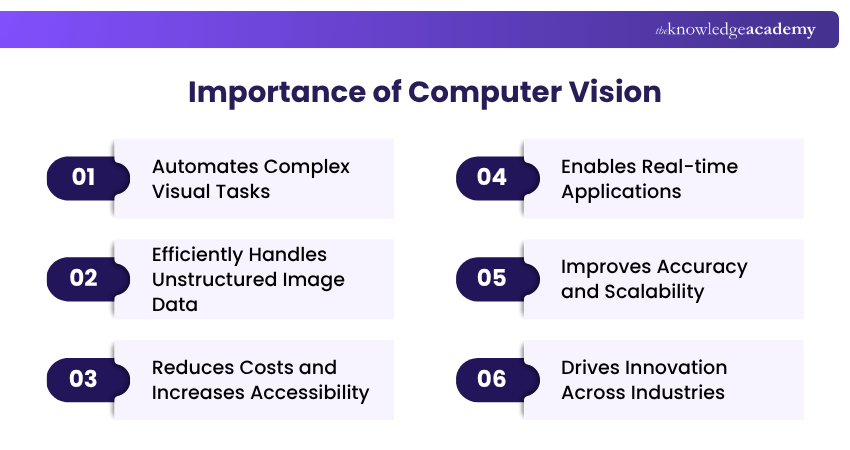
1) Automates Complex Visual Tasks: Computer vision can significantly reduce the amount of manual image inspection and analysis required for repetitive visual tasks. Tasks such as facial recognition that previously required developers to label thousands of image features can now be simply automated.
2) Efficiently Handles Unstructured Image Data: Image data is unstructured and difficult for machines to interpret; traditional methods struggle with organisation and analysis. Today’s computer vision systems efficiently process this complexity using advanced algorithms.
3) Reduces Costs and Increases Accessibility: Previously, vision applications were expensive and only available to big organisations. Advances in cloud computing and AI services have made computer vision tools more accessible to organisations of different sizes.
4) Enables Real-time Applications: With increased computational power, modern computer vision enables real-time applications. This includes live video analysis, streaming content moderation, instant identity verification, improving responsiveness and decision-making.
5) Improves Accuracy and Scalability: Well-designed computer vision systems can process large volumes of visual data efficiently and achieve strong performance for specific tasks.
6) Drives Innovation Across Industries: From healthcare to manufacturing and retail, computer vision transforms industries by providing deeper visual insights and automating visual inspection tasks.
Computer Vision in 30 Seconds
Imagine a camera monitoring a busy road. A computer vision system could:Capture an image → Detect vehicles → Identify their locations → Track their movement → Analyse traffic conditions → Support a traffic-management decisionThe camera provides the visual data, while computer vision extracts information that a system can use.
Deepen your understanding of machines with our comprehensive Deep Learning Course - Sign up now!
Applications of Computer Vision in Various Industries
Computer vision's applications span various industries, where it improves efficiency and enables new capabilities. Below are key applications of computer vision across different sectors:
1) Healthcare
Computer vision can assist healthcare professionals in analysing X-rays, MRIs and other medical images to identify abnormalities such as tumours or fractures. It can also track patient movements or behaviours at home or in hospitals to alert caregivers in case something is wrong.
2) Retail
Stores use computer vision to let people buy items without needing a cashier. Essentially, you can just grab and go. It also watches store shelves and tells staff when items run low or get misplaced.
3) Automotive Industry
Computer vision supports safe driving by helping cars understand the road, signs, people, and other vehicles. It alerts drivers if they’re drifting from their lane or getting too close to other vehicles.
4) Smart Cities
Cameras and computer vision can help manage traffic lights depending on the number of cars on the road. They’re also used in security cameras to spot suspicious activities or unattended objects in public places.
5) Social Media
Computer vision can help social media platforms identify potentially harmful or inappropriate visual content for automated filtering or further moderation.
6) Manufacturing
Computer vision checks products on the factory line to ensure they aren’t broken or missing parts. It also examines machines to spot early signs of trouble and prevent breakdowns.
7) Agriculture
Drones use computer vision to check if plants are healthy or need water or treatment. Robots use it to pick ripe fruits and vegetables, which saves significant time and effort.
Trainer's Insight
Similar-looking computer vision tasks can produce very different outputs. Classification tells you what is present, detection tells you what and where, while segmentation provides more precise pixel-level information.
Become a pro at text wrangling and cleansing of raw data with our Natural Language Processing (NLP) Fundamentals with Python Training - Sign up now!
Computer Vision Tasks
From object detection and object tracking to image classification and content-based image retrieval, computer vision can handle many tasks. Let’s explore them in detail:
1) Object Detection
a) Through object detection, computer vision can detect and locate objects in images.
b) It involves classification to identify, sort and organise visual data.
c) It's commonly employed in industrial and manufacturing settings.
d) Object detection helps you control autonomous systems and monitor production lines.
e) Home security camera systems are a prominent example of this as they use object detection to process live video streams.
f) They detect people and objects in real-time and send alerts to users.
2) Object Tracking
a) Object tracking uses deep learning models to identify and follow specific items.
b) It starts with object detection, where a bounding box is drawn around the item.
c) Each object is assigned an ID to help with tracking across multiple frames.
d) It's used in traffic monitoring to track vehicle movement in cities.
e) Object tracking serves a big purpose in human surveillance for safety and security.
f) It's also applied in medical imaging to follow the movement of specific areas or markers.
3) Image Classification
a) Image classification enables computers to identify and categorise images into specific classes.
b) It helps computer vision recognise and label objects like trees, planes, or buildings.
c) The system assigns a class label based on visual patterns in the image and enables automated understanding of different image types.
d) For example, an image-classification system could categorise photographs as forest, beach, city, or mountain based on their visual content.
4) Content-Based Image Retrieval
a) Content-Based Image Retrieval (CBIR) helps systems search for images based on their visual content rather than relying only on filenames or text descriptions.
b) The system analyses visual characteristics or learned features to determine how similar one image is to another.
c) For example, an e-commerce platform could use a photograph of a shoe to find visually similar products.
d) CBIR is commonly used in areas such as visual search, digital asset management, medical imaging, and e-commerce.
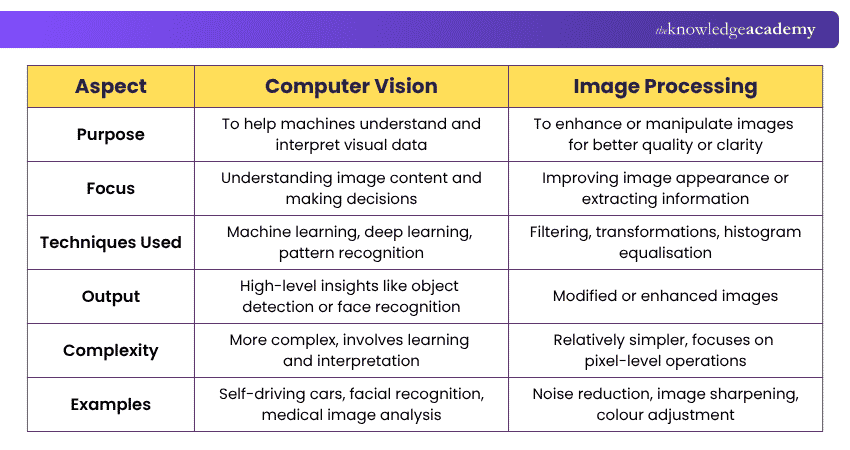
Difference Between Computer Vision and Image Processing
Image processing and computer vision often work together. Image processing can prepare or enhance visual data, while computer vision uses that data to extract information, recognise patterns or support decisions. Here are the main differences between computer vision and image processing:
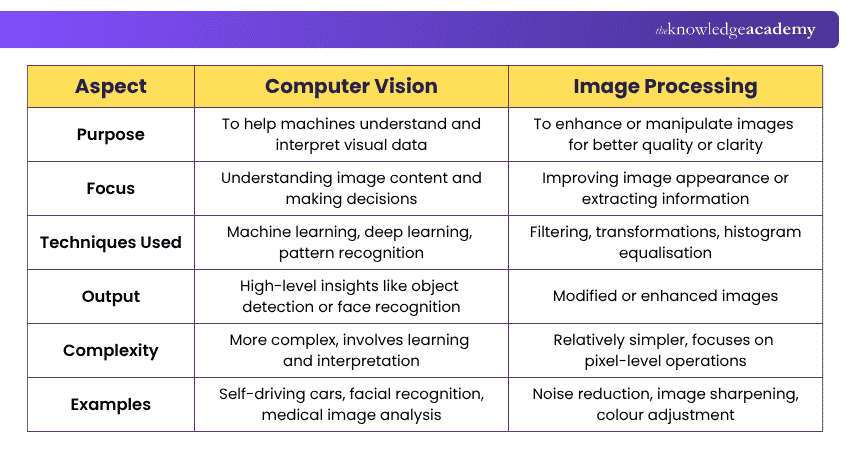
So, computer vision has changed how machines interact with visual information. From identifying objects and tracking movement to analysing medical images and inspecting manufactured products, it enables computers to extract insightful information from images and videos. As machine learning, deep learning and multimodal AI continue to develop, computer vision capabilities are likely to become more sophisticated.
Craft tomorrow's digital brilliance with today's innovation in our Artificial Intelligence Tools Training - Sign up now!

The Knowledge Academy develops accessible learning content across Project Management, IT, Cybersecurity, Data Science, Business Analysis, HR, Accounting and Finance, Leadership and Health and Safety. Its resources combine subject research with clear explanations to help professionals build practical knowledge across a wide range of disciplines.
View Detail

 If you wish to make any changes to your course, please


