


 Top Rated Course

We may not have the course you’re looking for. If you enquire or give us a call on 01344203999 and speak to our training experts, we may still be able to help with your training requirements.
Web App vs Mobile App: What's the Difference?
Richard Harris 24 August 2026Compare Web Apps and Mobile Apps to understand their key differences and determine which option best suits your specific needs.

Training Outcomes Within Your Budget!
We ensure quality, budget-alignment, and timely delivery by our expert instructors.
Table of Contents
KEY TAKEAWAYS
1. Web Apps run primarily through browsers, while Mobile Apps are designed for mobile devices and are typically installed.2. Mobile Apps can provide deeper access to device features, while Web Apps offer broader cross-device accessibility.3. Performance, offline access, updates and maintenance work differently across Web Apps and Mobile Apps.4. Web Apps rely on web servers, while Mobile Apps use device resources and storage.5. The right choice depends on user needs, required functionality, budget, development resources and expected usage.
Deciding between a Web App and a Mobile App can shape how users access, interact with and return to a digital service. While both can deliver similar functions, they differ in areas such as installation, performance, device access, connectivity and maintenance.
Understanding these differences can help businesses and development teams choose an option that suits their users and technical requirements. This blog compares Web App vs Mobile App across the factors that matter most and explains when each option may be the better fit. Let's get started!
What is a Web App?
A Web App is an application accessed through a web browser without requiring installation from an app store. It typically uses technologies such as HTML, CSS and JavaScript and can work across desktops, tablets and smartphones with a compatible browser. Key characteristics include:
1) Accessed through a browser
2) Usually requires no installation
3) Works across multiple devices
4) Updated centrally

What is a Mobile App?
A Mobile App is software designed primarily for smartphones and tablets and is usually downloaded through platforms such as the Apple App Store or Google Play. It can use device features such as GPS, cameras, biometrics and notifications, while some apps also support offline functions. Key characteristics include:
1) Installed on mobile devices
2) Uses device features
3) Supports mobile operating systems
4) Can offer offline access

Myth vs Fact
Myth: Mobile Apps always work without the internet.Fact: Some Mobile Apps support offline functionality, but features that depend on cloud services, live data, authentication or remote servers may still require an internet connection.
Web App vs Mobile App: Key Differences
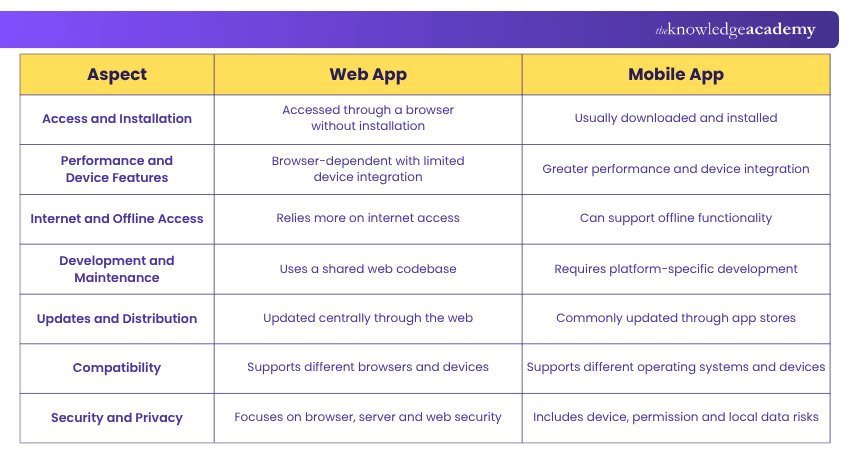
Web Apps and Mobile Apps may serve similar purposes, but they vary significantly in how they are accessed, developed and used. The table below provides a quick comparison of their main differences.
1) Access and Installation
Web Apps can be opened using a web browser, allowing users to start using them without downloading software. Mobile Apps are typically installed on a smartphone or tablet, giving users a dedicated application that can be opened directly from their device.
2) Performance and Device Features
Web Apps can access certain device capabilities, but availability may differ based on the browser and operating system. Mobile Apps can usually integrate more closely with features such as cameras, GPS, biometrics and sensors, which can support richer mobile experiences.
3) Internet and Offline Access
Web Apps commonly depend on an internet connection because much of their data and functionality is delivered through remote servers. Mobile Apps can store more resources locally, allowing selected features to remain available even when connectivity is limited.
4) Development and Maintenance
Web Apps can often use a shared codebase across different browsers and devices, helping simplify development and maintenance. Mobile Apps may require additional work to support different operating systems, although cross-platform frameworks can reduce some duplication.
5) Updates and Distribution
Developers can generally update a Web App centrally, making new changes available when users next access it. Mobile App updates are commonly distributed through app stores and may depend on users downloading or automatically receiving the latest version.
6) Compatibility
Web Apps need to perform consistently across different browsers, screen sizes and devices. Mobile Apps must account for Operating System (OS) versions, device models and hardware differences to maintain a reliable user experience.
7) Security and Privacy
Web Apps must address risks involving browsers, servers, authentication and online data transmission. Mobile Apps introduce additional considerations such as device permissions, local storage and lost or compromised devices, making strong security practices important for both.
Transform your vision into Apps – Join our Android App Development Course now!
Web App vs Mobile App: Which One Should You Choose?
The better option between Web App and Mobile App depends on the experience you want to provide, so consider how often users will access the service, which devices they use, whether hardware features are needed, and how much development and maintenance complexity your organisation can manage.
Choose a Web App When
A Web App may be more suitable when:
1) Users should be able to access the service immediately through a link.
2) The application needs to work across many device types and operating systems.
3) Installing software would create unnecessary friction for users.
4) Centralised updates are important.
5) The required functions can be delivered effectively through modern browser technologies.
6) Reaching users across desktop and mobile devices is a priority.
Choose a Mobile App When
A Mobile App may be more suitable when:
1) Users are expected to interact with the application frequently.
2) Strong integration with cameras, GPS, biometrics or other device capabilities is required.
3) Offline functionality plays an important role in the user experience.
4) Push notifications or operating system integrations are central to engagement.
5) High-performance mobile interactions are important.
6) A dedicated presence on the user's mobile device supports the service.
Build Your App in 30 Seconds
Here’s a quick decision game. Add a point to Web App or Mobile App based on what your users need most:
• Access through different devices → +1 Web App• Use it several times a day → +1 Mobile App• Need camera/GPS/biometrics → +1 Mobile App• Need instant access through a link → +1 Web App• Need features without internet → +1 Mobile AppCount your points → See which approach fits.
Conclusion
The Web App vs Mobile App choice depends on how users need to access and interact with the service. Web Apps offer convenient browser-based access and simpler central updates, while Mobile Apps provide deeper device integration and greater potential for offline use.
Comparing factors such as performance, connectivity, maintenance, compatibility and security can help individuals and organisations select the option that best supports their users and application requirements.
Develop practical skills in Web and Mobile App Development with App and Web Development Training – Sign up today!
Frequently Asked Questions
Can a Web App be Converted into a Mobile App?

Yes, but it is not always a direct conversion. Developers may reuse parts of the existing interface, backend or web technologies while adapting the application for mobile operating systems, app distribution, and device-specific functionality.
What is a Progressive Web App?
A Progressive Web App (PWA) is a Web App that uses supported browser technologies to provide app-like capabilities. Depending on the browser and device, it may support features such as home-screen installation, caching, and limited offline functionality.
Can a Web App and Mobile App use the Same Backend?
Yes. A Web App and Mobile App can connect to the same backend services, databases and APIs while providing different interfaces for their users. This allows an organisation to support both experiences without necessarily duplicating every part of the underlying system.

Richard Harris


Senior Full Stack Developer and Technology Educator
Richard Harris is a highly experienced full-stack developer with deep expertise in both frontend and backend technologies. Over his 12-year career, he has built scalable web applications for startups, enterprises and government organisations. Richard’s writing combines technical depth with clear explanations, ideal for developers looking to grow in modern frameworks and tools.


 If you wish to make any changes to your course, please


