




We may not have the course you’re looking for. If you enquire or give us a call on 01344203999 and speak to our training experts, we may still be able to help with your training requirements.
10 Essential Uses of CorelDRAW: An Overview
ByNilotpal SarmahLast updated on: 21 September 2026
Explore 10 essential uses of CorelDRAW, from designing logos and posters to creating vector drawings and graphics for social media.
What’s Inside This Blog
1. CorelDRAW supports posters, logos, invitations, and other design projects.2. Vector tools help create scalable and precise graphic designs.3. Bitmap tracing converts raster images into editable vector graphics.4. Text tools support creative typography and professional document design.5. File compatibility supports flexible workflows with other design applications.
Are you an Illustrator who often uses vector drawings to create intricate illustrations? Or maybe you design and craft customised logos, posters and invitations? Perhaps you are into bitmap editing and creating graphics for social media? Then CorelDRAW is for you. The Uses of CorelDRAW extend much beyond all the previously mentioned tasks. Want to know more about these uses? Keep reading. This blog will provide an overview of the various uses of CorelDRAW, including creating shapes, posters, invitation cards, and other things.
Uses of CorelDRAW
CorelDRAW has become a go-to tool for designers and creative professionals, supporting projects that range from simple graphics to detailed, complex designs. Here are the ways it's commonly used:
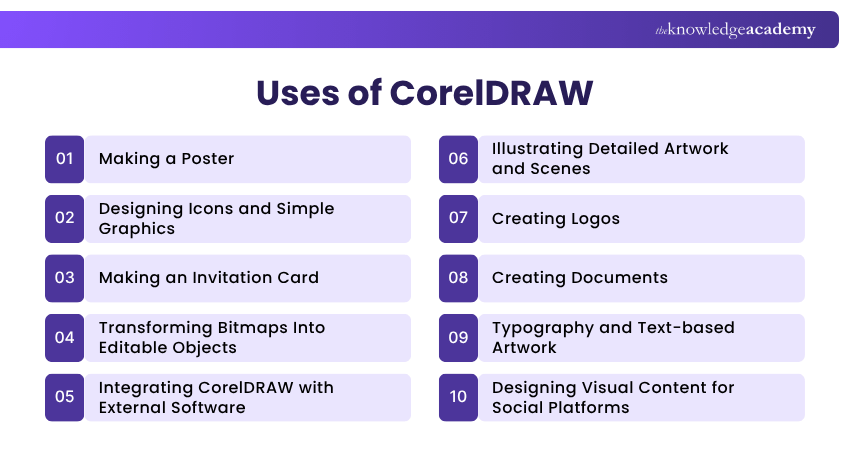
1) Making a Poster
CorelDRAW provides tools for creating and customising posters. With an intuitive interface and rich design elements, the software allows users to unleash their creativity and craft visually stunning posters. CorelDRAW provides precise tools for every design element, from selecting vibrant templates to integrating images and customising text.
The platform's versatility in handling fonts, shapes, and colours ensures that creating a poster is not just functional but also allows artistic expression. CorelDRAW elevates poster design by offering a dynamic and user-friendly environment catering to novice and experienced designers, whether for events, promotions, or artistic endeavours.

2) Designing Icons and Simple Graphics
CorelDRAW's shape tools make it straightforward to design icons, symbols and simple visual assets for everyday use. Precise controls over proportions, alignment and colour allow designers to produce clean, consistent icon sets suitable for apps, websites or presentation materials.
The software's snapping and alignment features help ensure icons stay visually uniform, even across a large set, making it a practical choice for UI design and quick visual assets alongside more detailed illustration work.
3) Making an Invitation Card
Creating invitation cards is effortless, thanks to CorelDRAW's intuitive design features. The software provides a user-friendly platform for crafting personalised and visually captivating invitations. Designers can seamlessly choose from many templates, customise layouts, and infuse thematic elements to match any occasion.
CorelDRAW's font and text tools empower users to add a unique touch, ensuring every invitation is a work of art. From selecting colour schemes to incorporating imagery, the software allows for precise control over every detail, resulting in invitation cards that convey essential information and reflect the designer's creativity and thoughtfulness.
4) Transforming Bitmaps Into Editable Objects
CorelDRAW's ability to convert bitmaps into editable objects is a hallmark feature, offering designers unparalleled flexibility in image manipulation. This innovative capability allows users to refine and enhance bitmap graphics with vector precision. By converting raster images into editable vectors, designers gain greater control over every detail, enabling seamless modifications, scaling, and customisation.
Whether you are tracing logos, sketches or other bitmap elements for use within a broader design context, CorelDRAW empowers designers to elevate the visual impact of their creations with unparalleled precision and adaptability.
Quick Tip:
Use a clear, high-quality source bitmap when tracing. Cleaner source images generally produce better vector results and require less manual adjustment.
5) Integrating CorelDRAW with External Software
Integrating CorelDRAW with external software enhances its versatility and collaborative potential. CorelDRAW supports importing and exporting a wide range of file formats, allowing users to exchange design content with other applications.
Whether exchanging data with image editing tools, collaborating on illustrations with vector-based software, or integrating with publishing platforms, CorelDRAW's adaptability empowers designers to leverage a broader spectrum of tools. This integration streamlines the design process and opens avenues for creative collaboration.
Master the latest animation trends by signing up for our Animation Course now!
6) Illustrating Detailed Artwork and Scenes
Beyond simple shapes, CorelDRAW's vector tools support far more detailed illustrative work, layered scenes, character art, and intricate compositions built from multiple vector elements. Designers can build up complex artwork in stages, adjusting individual paths, curves and layers without losing image quality at any resolution.
This makes it well suited to editorial illustration, concept art and detailed graphics intended for large-format printing, where scalability without quality loss matters most.
7) Creating Logos
Creating logos with CorelDRAW is a journey where precision meets creativity. The software's robust vector tools empower designers to craft distinctive and professional logos. From conceptualisation to execution, CorelDRAW provides an expansive canvas for translating brand identity into visually compelling symbols.
Designers can leverage a rich repository of design elements, fonts, and customisation options to ensure logos resonate with the brand's essence. Whether refining existing concepts or generating entirely new visual identities, CorelDRAW's versatility and precision make it an indispensable tool for logo designers, ensuring logos are not just symbols but powerful representations of brand ethos and uniqueness.
Did You Know?
CorelDRAW supports numerous file formats, including AI, PSD, PDF, SVG, DWG, DXF, PNG and JPEG, making it easier to exchange files across different design workflows.
8) Creating Documents
CorelDRAW combines design and layout tools that go beyond typical word processors, allowing users to build visually polished documents such as brochures, reports and marketing materials. Its layout, typography and image tools give more precise control over how text and visuals sit together on the page than standard document software typically offers.
This makes it a practical choice for anything where visual presentation matters as much as content, such as business proposals, catalogues or client-facing materials, letting the same design skills used for posters and logos carry over into everyday document work.
9) Typography and Text-based Artwork
CorelDRAW's text tools go beyond standard formatting, letting designers manipulate individual characters, apply custom effects and build typography as a visual centrepiece rather than just body copy.
This is especially useful for designing wordmarks, stylised headlines or lettering-based artwork where the text itself is the main design element. Combined with the software's broader design tools, typography can be shaped, warped and blended into a wider composition with full creative control.
10) Designing Visual Content for Social Platforms
CorelDRAW supports the creation of platform-ready visual content, from social posts and stories to shareable infographics and profile assets. Built-in templates and export presets help designers produce content sized correctly for different platforms without manual guesswork.
The ability to work with both vector and bitmap elements in one file also makes it easier to combine brand assets, photography and text into a single cohesive design ready for publishing.
Vector or Bitmap?
Use vector graphics when you need:
a) Logosb) Iconsc) Illustrationsd) Artwork that must scale cleanlyUse bitmap images when working with:a) Photographsb) Pixel-based artworkc) Detailed raster imagery
Need both? CorelDRAW can incorporate bitmap images into vector-based design projects and can trace suitable bitmaps into vectors.
Transform and translate geometric figures by signing up for our Sketchbook Essential Training now!

Nilotpal Sarmah is a Senior Content Writer with 11+ years of overall experience spanning engineering, operations and content development. His technical knowledge and extensive writing experience enable him to simplify specialised topics across IT and Tech, Business Skills, Project Management, Health and Safety, and ISO and Compliance.
View Detail

 If you wish to make any changes to your course, please


