


 Top Rated Course

We may not have the course you’re looking for. If you enquire or give us a call on 01344203999 and speak to our training experts, we may still be able to help with your training requirements.
What is User Authentication: A Complete Guide
William Brown 16 July 2026User Authentication is the process of verifying a user’s identity before granting access to a system or data, ensuring only authorised users are able to log in. Strong authentication reduces the risk of identity theft and security breaches. It also builds user trust by creating a safer and more reliable digital environment.

Training Outcomes Within Your Budget!
We ensure quality, budget-alignment, and timely delivery by our expert instructors.
Table of Contents
One login. One mistake. One security gap. That is all it takes for unauthorised access to happen in today’s digital world. Every time someone signs into a website, app, or system, they trust that their User Authentication and data are being properly protected. When it is weak or outdated, that trust can be broken in seconds.
As cyber threats grow more advanced, simple passwords are no longer enough. To fix this, strong authentication ensures only authorised users can access systems. This blog explains User Authentication, including how it works, its key types, real-world uses, and best practices for improving security while keeping the User Experience (UX) smooth. Let's dive in to strengthen security!
Table of Contents
1) What is User Authentication?
2) Why is User Authentication Important?
3) How User Authentication Works?
4) Types of User Authentication
5) Use Cases of User Authentication
6) How to Improve User Authentication?
7) Common Challenges of User Authentication
8) Best Practices for User Authentication
9) Conclusion
What is User Authentication?
User Authentication is the process of verifying the identity of a user before granting access to a system, application, or resource. When a user attempts to log in, the system requests proof of identity. Those can be your login credentials, like passwords, biometrics, security tokens, or any other form of authentication factors.
Generally, if the provided credentials match what the system expects, then access is granted for your login. If the details are not matched, then your access gets denied. This process helps ensure that only authorised users can securely access sensitive systems and data.
Why is User Authentication Important?
User Authentication is important because it acts as the first line of defence against unauthorised access. Here are the major reasons why you need to implement or follow it:
1) Protects Sensitive Data: User Authentication helps keep personal, financial, and business information safe by allowing access only to authorised users.
2) Prevents Unauthorised Access: It prevents attackers and unauthorised users from logging into accounts and systems they should not have access to.
3) Reduces Identity Theft: By verifying user identity, authentication makes it harder for hackers to pretend to be someone else.
4) Builds User Trust: Users feel more confident using platforms that protect their accounts with strong login security.
5) Supports Legal and Security Requirements: Many laws and standards require proper authentication to protect user data and privacy.
6) Secures Business Systems: Authentication helps ensure systems run safely without misuse or disruption from unauthorised users.
How User Authentication Works?
User Authentication typically follows a structured sequence of steps that begins when a user attempts to access a system. Here is how it works:
1) Login Attempt: The user tries to sign in by entering a username, email, or selecting a login option.
2) System Authentication: The system requests verification such as a password, one-time passcode (OTP), biometric scan, or security token.
3) Details Verification:The system securely checks the provided details against stored records to confirm the user’s identity.
4) Additional Checks: If Multi-factor Authentication (MFA) is enabled, the user is asked to complete extra verification steps.
5) Access Procedure: If all checks are successful, the user is allowed to log in. If not, access is blocked.
6) Secure Session: After successful authentication, a session is created so the user can stay logged in securely until they log out or the session expires.
Types of User Authentication
User Authentication can be classified based on the number and type of verification factors involved. As security needs increase, systems often move beyond single factor authentication procedures. Here are the most common types of User Authentication:
1) Two-factor Authentication (2FA)
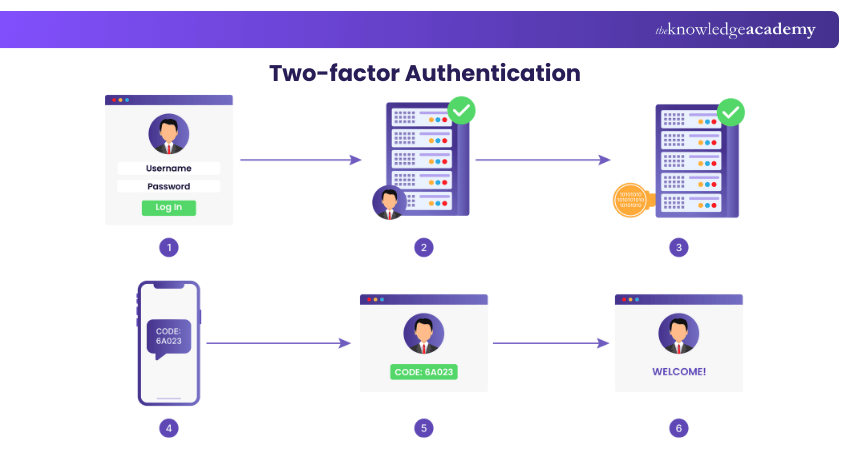
Two-factor authentication uses two different types of verification to confirm a user’s identity. This usually includes a password and an additional step. A common example is entering a password and then typing a one-time code sent to your phone or email. Even if someone knows your password, they still need the second factor.
2) Three-factor Authentication (3FA)
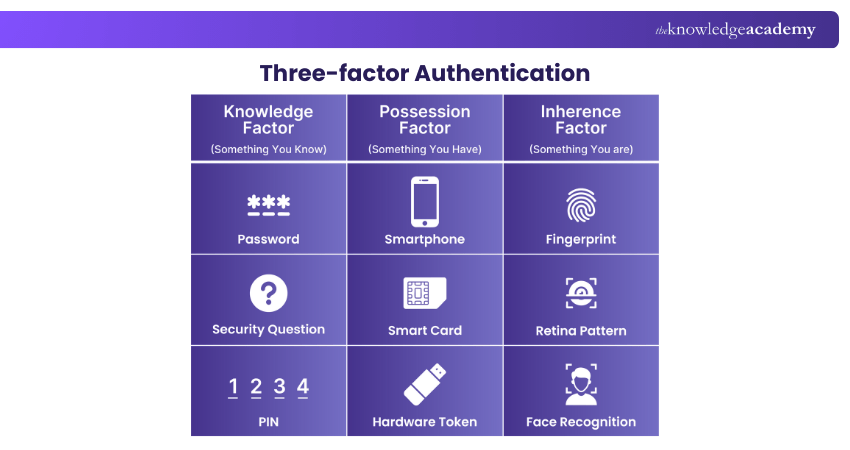
Three-factor authentication adds one more layer of security. It usually combines a password, a physical item, and biometric information. This method is often used in places where security is very important, such as research labs or secure offices.
3) Four-factor Authentication (4FA)
Four-factor authentication includes an extra factor based on behaviour or situation. This could include location checks, time restrictions, or behaviour patterns. For example, a system may allow access only from a specific location or trusted devices. 4FA is usually used in very high-security environments.
Learn how to connect systems and applications with our Enterprise Integration Fundamentals Training – Register today!
Use Cases of User Authentication
User Authentication is used across many industries to protect systems and data. Some of those involve:
1) Financial Transactions
Banks and payment services rely heavily on authentication to keep money safe. Before users can transfer funds or view account details, their identity needs to be verified. Multi-factor authentication is common in banking apps to reduce fraud and protect customer accounts.
2) Healthcare Systems
Healthcare platforms store sensitive patient information, and it is their legal requirement. Authentication ensures that only authorised doctors, employees, and patients can access medical records. This helps protect privacy, meet legal requirements, and prevent data misuse.
3) E-commerce Platforms
E-commerce platforms use authentication to protect user accounts, payment information, and order histories. Secure login systems help prevent account takeovers and fraudulent purchases. It allows users to enjoy personalised shopping experiences safely.
4) Enterprise Security
Businesses use authentication to control access to internal systems, applications, and networks. Employees are always required to log in before accessing company tools and resources. Enterprises often use centralised Identity Management Systems (IMS) to reduce the risk of internal and external security threats.
How to Improve User Authentication?
Improving User Authentication is required to protect systems from unauthorised access and growing cyber threats. As attackers become more advanced, relying on basic login methods is no longer enough. So, the following are some simple yet effective ways to improve your credential systems:
1) Strengthen Password Rules: If passwords are used, ensure they are long, unique, and securely stored to prevent easy guessing or reuse.
2) Use Multi-factor Authentication (MFA): Add extra verification steps such as one-time codes or biometrics to reduce the risk of unauthorised access.
3) Move Towards Passwordless Login: Replace traditional passwords with biometrics, magic links, or security keys to improve both security and usability.
4) Apply Risk-based Authentication: Adjust authentication requirements based on factors like device, location, or behaviour to detect suspicious activity.
5) Educate Users on Safe Login Practices: Train users to recognise phishing attempts and protect their login credentials.
6) Regularly Update Authentication Systems: Review and improve authentication methods to stay protected against new and evolving threats.
7) Monitor and Log Authentication Activity: Track login attempts to quickly detect unusual or suspicious behaviour.
Design information systems that support both users and business goals with our Information Architecture Training – Sign up soon!
Common Challenges of User Authentication
Even though authentication is unavoidable, it comes with challenges that everyone has to manage. Let's check these challenges:
1) Managing Credentials at Scale
Handling login details for large numbers of users can be difficult. Storing, updating, and securing credentials requires strong systems and clear processes.
2) Addressing Evolving Threats
Cyber threats are always changing and evolving with new tricks. Hackers use phishing emails, fake websites, and malware to steal login details. Authentication systems need to be updated regularly to stay ahead of new attack methods.
3) Balancing Security and User Experience
Strong security often means more login steps for users. This can sometimes make users feel inconvenienced. If login processes are too complex, users may avoid using the system. The challenge is to keep security strong while making the login process smooth and simple.
Best Practices for User Authentication
To implement and follow effective User Authentication, below are some of the best practices that you can apply:
1) Adopt Passwordless Authentication
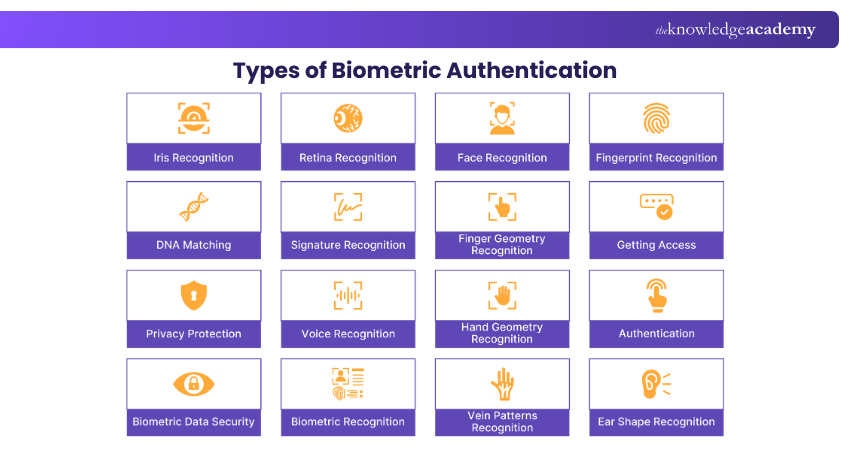
Passwordless authentication eliminates traditional passwords and replaces them with methods such as biometrics, magic links, or hardware keys. This reduces password-related risks and makes login easier.
2) Implement Strong Password Policies
If passwords are used, they should be strong and hard to guess. This includes using longer passwords and avoiding common words.
3) Enforce Multi-factor Authentication (MFA)
MFA should be used wherever sensitive data is involved. It adds an extra layer of security that protects user accounts even if passwords are compromised.
4) Educate Users on Security Hygiene
Users play a critical role in authentication security. They need to know how to recognise phishing attempts and protect their login details. Clear and simple guidance can prevent many security issues.
5) Regularly Audit and Update Authentication Systems
Authentication systems should be reviewed and tested regularly to identify vulnerabilities and outdated components. Regular updates help fix issues and improve protection.
Conclusion
User Authentication is a key part of keeping digital systems safe. It ensures that only the right people can access accounts, data, and services. By using the right authentication types, and following best practices, businesses can strengthen security without sacrificing user experience. A well-designed authentication system not only protects data but also builds trust, reliability, and confidence for users across all digital platforms.
Develop scalable, secure, and future-ready architecture with our Enterprise Architect Training – Explore now!
Frequently Asked Questions
What Can User Authentication Protect Against?

User Authentication protects against unauthorised access, identity theft, account misuse, and data breaches. It prevents attackers from pretending to be legitimate users and accessing sensitive information.
What are the Factors of User Authentication?
User Authentication is based on three key factors. Knowledge is something the user knows, such as a password or a PIN. Possession is something the user has, like a mobile phone or security token. Inherence is something the user is, such as a fingerprint or facial recognition. Using more than one factor improves security.

William Brown


Senior Business Analyst and Strategic Advisor
William Brown is a senior business analyst with over 15 years of experience driving process improvement and strategic transformation in complex business environments. He specialises in analysing operations, gathering requirements and delivering insights that support effective decision making. William’s practical approach helps bridge the gap between business goals and technical solutions.
View Detail

 If you wish to make any changes to your course, please


