


 Top Rated Course

We may not have the course you’re looking for. If you enquire or give us a call on 01344203999 and speak to our training experts, we may still be able to help with your training requirements.
Threads in Java: A Complete Guide to Threads and Multithreading
Richard Harris 25 August 2026Learn how Java Threads work, how to create and manage them, their lifecycle, methods, priorities, benefits, common issues, and role in Multithreading.

Training Outcomes Within Your Budget!
We ensure quality, budget-alignment, and timely delivery by our expert instructors.
Table of Contents
Key Takeaways
1. A Thread represents a path of execution within a Java process2. Java supports multiple Threads to enable concurrent execution of tasks3. Java provides several ways to create and manage concurrent tasks4. Java Threads move through defined states during their lifecycle5. Proper coordination is essential when multiple Threads share resources
A music app plays a song while responding to your taps. A server handles requests from multiple users. A desktop application performs work in the background without making the entire interface wait.
Different applications. Same underlying challenge: more than one piece of work needs attention.
This is where Threads in Java come into the picture.
A Thread represents a path of execution within a Java program. With multiple Threads, an application can organise concurrent tasks instead of forcing every activity through one sequential path.
But creating a Thread is only the beginning. How does it run? What happens when multiple Threads share resources? And what happens when they get in each other's way?
This blog takes you through the complete journey of Threads in Java, from creation to execution, coordination, and completion.
What is a Thread in Java?
A Thread in Java is a path of execution within a program. A Java process can contain multiple Threads, allowing different parts of an application to make progress concurrently.
Threads within the same process share resources such as memory, but each Thread maintains its own execution state. This makes Threads useful when an application needs to handle multiple activities concurrently rather than processing every task sequentially.
When a typical Java application starts, the main() method runs on the main Thread. Additional Threads can then be created to perform other work.
Think of a Java Program as a Kitchen
One chef doing everything:
Prepare → Cook → Plate → Serve
Now add multiple chefs:
Chef 1 → Prepare
Chef 2 → Cook
Chef 3 → Plate
The kitchen is still one operation, but multiple streams of work can progress.
Similarly:
Java Process = Kitchen
Threads = Individual workers
The important difference is that Java Threads share resources within their process, which means they also need to coordinate how those resources are used.

How Do Threads Work in Java?
A Thread does not automatically mean that every task literally executes at the same instant. Threads enable concurrency, while actual parallel execution depends on factors such as available processor cores and scheduling.
When a Thread is started, it becomes runnable and eligible to be scheduled for execution. The JVM and underlying operating system coordinate the scheduling of platform Threads for processor time.
This allows an application to make progress on different activities without processing everything through a single sequential execution path.
One Program. Multiple Paths.
Imagine an application performing three activities:
THREAD 1Handle user inputTHREAD 2Process dataTHREAD 3Perform background workAll three belong to:ONE JAVA PROCESS
This is the fundamental idea behind Threads: divide work into separate execution paths while keeping them inside the same application.
What is the Main Thread in Java?
When a typical Java application starts, the JVM invokes the main() method on the main Thread. This Thread often acts as the starting point from which additional Threads or concurrent tasks are created.
For Example:
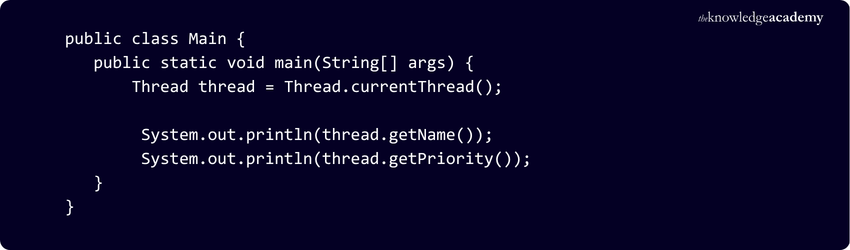
Meet the Main Thread
Think of the main Thread as the application's starting lane:
Application Starts↓main Thread↓main() Executes↓Other Threads Can Be Created
The main Thread gets the application moving; it does not have to perform every task itself.
How to Create a Thread in Java?
Two traditional ways to create and start a platform Thread are extending the Thread class and implementing the Runnable interface. Modern Java also provides higher-level concurrency APIs and virtual Threads for managing concurrent tasks.
1) Extend the Thread Class
Create a class that extends Thread and override the run() method to define the work the Thread performs.
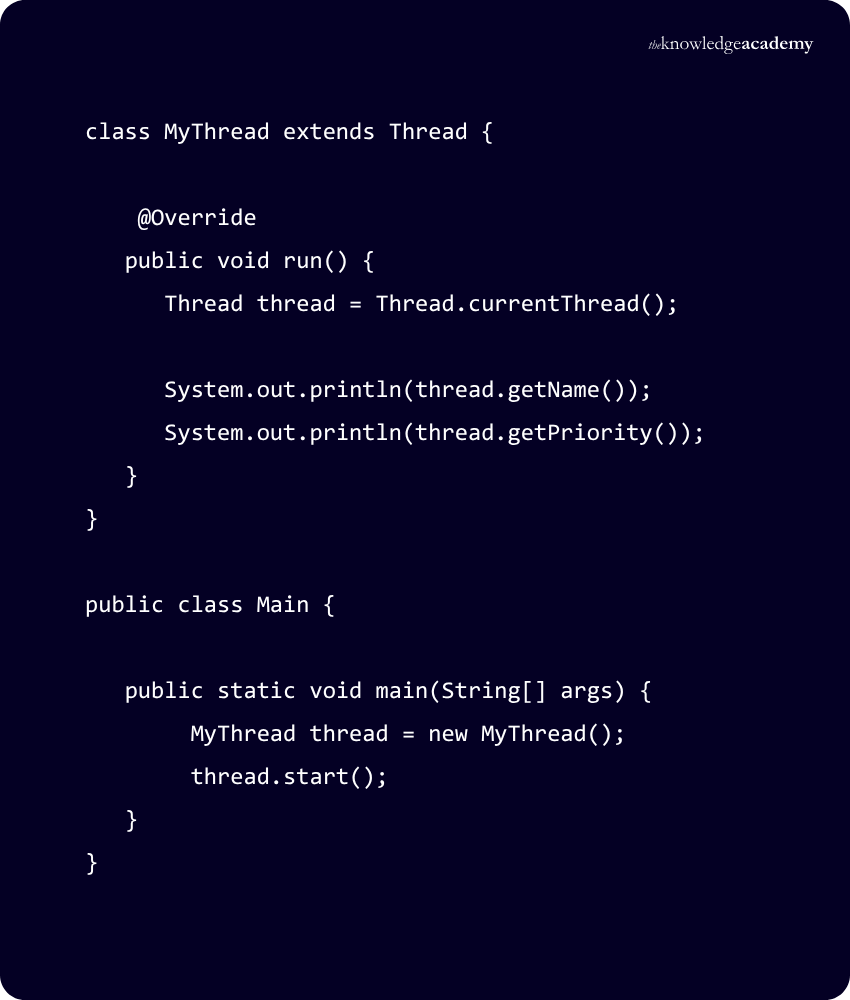
Here, start() starts the new Thread, which then executes the code defined in run().
2) Implement the Runnable Interface
Another approach is to define the task by implementing Runnable and passing the Runnable instance to a Thread.
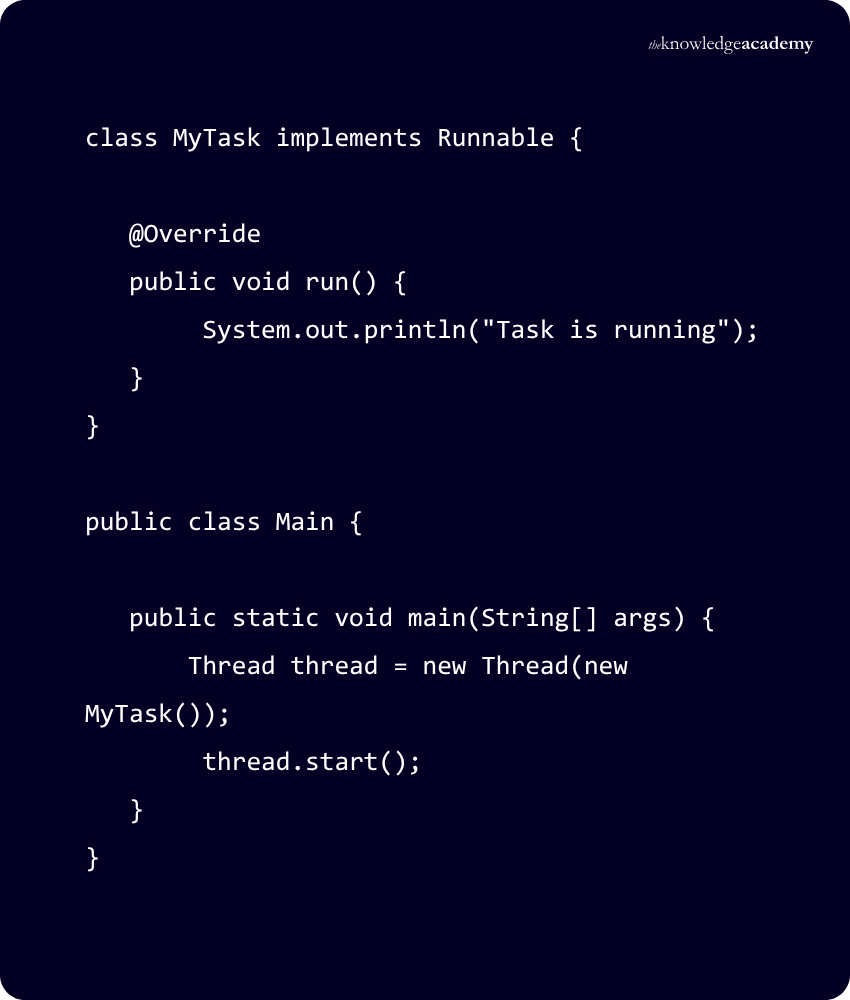
Thread vs Runnable: What Changes?
Using Runnable separates the task to perform from the Thread that executes it.
Extending Thread
Your Class → Thread → start() → run()
Implementing RunnableYour Task → Runnable → Thread → start() → run()One Important Detail: start() ≠ run()run() → Contains the workstart() → Starts a new Thread that executes run()
So:Define with run() → Begin with start()
What is the Java Thread Lifecycle?
A Thread does not simply switch between “running” and “stopped”. During its lifetime, its state changes according to what is happening.
1) NEW: The Thread object exists, but start() has not yet been called.
2) RUNNABLE: The Thread is executing in the JVM, although it may be waiting for operating-system resources such as processor time.
3) BLOCKED: The Thread is waiting to acquire a monitor lock so it can enter or re-enter a synchronised section.
4) WAITING: The Thread waits indefinitely for another Thread to perform a particular action.
5) TIMED_WAITING: The Thread waits for another Thread to perform an action for up to a specific waiting time.
6) TERMINATED: The Thread has completed execution.
The Life of a Java Thread
BORNNEW↓READY FOR WORKRUNNABLE↓BLOCKED | WAITING | TIMED_WAITING↓DONETERMINATED
A Thread's state indicates its current execution condition, such as whether it is runnable, waiting, blocked or terminated.
Learn to build Java applications and work confidently with multiple Threads through our Java Engineer Training - Register today!
Commonly Used Thread Methods in Java
The Thread class provides methods for starting, controlling, inspecting, and coordinating Threads.
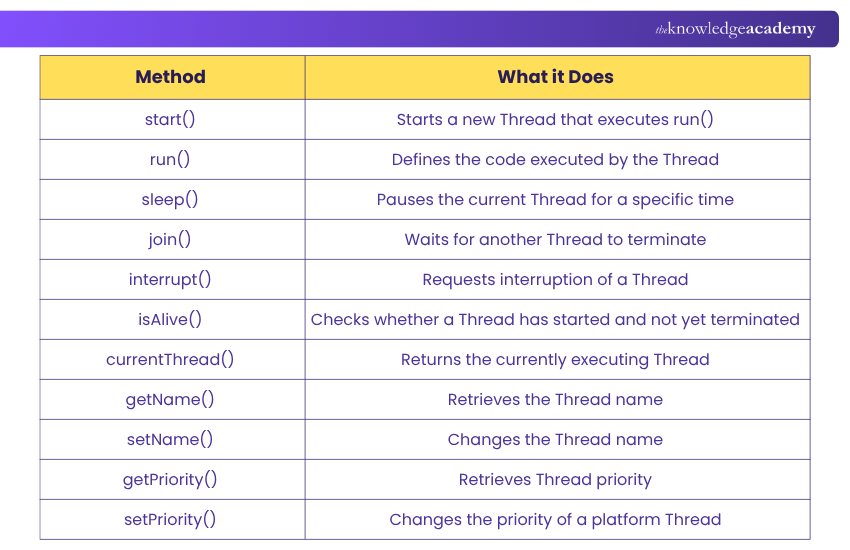
Need Something from a Thread?
Start it? → start()Pause the current one? → sleep()Wait for another? → join()Identify the current one? → currentThread()Check whether it's alive? → isAlive()Request interruption? → interrupt()
What is Thread Priority in Java?
Thread Priority indicates the relative scheduling priority of a Thread. For platform Threads, Java provides priority values from 1 to 10, with 5 represented by NORM_PRIORITY.
Three constants make these values easier to understand:
hread.MIN_PRIORITY // 1Thread.NORM_PRIORITY // 5Thread.MAX_PRIORITY // 10A Thread's priority can be changed using:thread.setPriority(8);and retrieved using:thread.getPriority();
However, priority should not be treated as a guaranteed execution order. Thread scheduling depends on the JVM and underlying platform.
Priority is a Hint, not a Queue Ticket
A common misconception would be:
Priority 10 → Runs first
Think instead:
Higher Priority → Scheduling preference may increase
Therefore, program correctness should not depend on Thread Priority.
Note: Virtual Threads always use NORM_PRIORITY, and setPriority() has no effect on them.
What is Multithreading in Java?
Multithreading is the use of multiple Threads within a program so different tasks can make progress concurrently.
Because Threads within the same Java process can access shared memory and resources, they can communicate efficiently. However, that shared environment also introduces challenges when multiple Threads access or modify the same data.
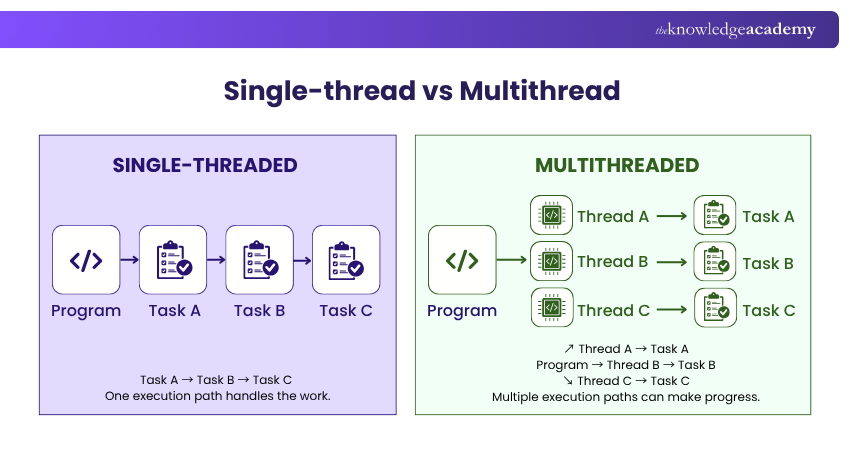
Concurrency vs Parallelism
Concurrency → Multiple tasks can make progress over overlapping periods.
Parallelism → Multiple tasks execute at the same time, typically using multiple processor cores.
Threads enable concurrency; available hardware and scheduling determine whether work also runs in parallel.
Benefits of Threads in Java
Threads help Java applications handle multiple activities efficiently when work can be performed concurrently. Key benefits include:
1) Better Responsiveness: Lengthy work can be separated from activities that need to remain responsive, rather than forcing everything through one execution path.
2) Efficient Resource Sharing: Threads within the same process can access shared memory and resources, making certain forms of communication less expensive than communication between separate processes.
3) Concurrent Task Execution: Different parts of an application can make progress independently instead of always waiting for one another.
4) Better Use of Multi-core Processors: Independent work can potentially execute in parallel when processor resources and the workload allow it.
5) Improved Throughput: For suitable workloads, multiple Threads can help an application complete more work over a given period by allowing independent activities to progress concurrently.
Threads Don't Make Everything Faster
Independent concurrent tasks? → Threads may helpWaiting on I/O? → Concurrency may helpMultiple cores + suitable work? → Parallelism may helpTiny sequential task? → More Threads may simply add overhead
More Threads ≠ Automatically more performance.
Common Problems with Threads in Java
Multiple Threads introduce one major complication: they may share resources while progressing independently. This can create several problems:
1) Race Conditions: Two or more Threads access shared data concurrently, and the outcome depends on the timing or order of their operations.
2) Deadlocks: Threads become stuck because each is waiting for a resource held by another.
3) Starvation: A Thread repeatedly fails to obtain the resources or scheduling opportunities it needs to make progress.
4) Visibility Issues: Changes made by one Thread may not be observed by another in the way a programmer expects without appropriate memory visibility mechanisms.
5) Thread-safety Problems: Code that works correctly with one Thread may behave incorrectly when accessed concurrently without appropriate coordination.
When Threads Collide
SHARED DATA + WRONG TIMING → Race ConditionTHREAD A WAITS FOR B + B WAITS FOR A → DeadlockONE THREAD NEVER GETS A FAIR CHANCE → StarvationONE THREAD DOESN'T OBSERVE AN EXPECTED CHANGE → Visibility Problem
Best Practices for Using Threads in Java
Threads are powerful, but good concurrent programming is less about creating as many Threads as possible and more about managing concurrency safely.
1) Avoid Unnecessary Threads: Create concurrent tasks when they provide a genuine design or performance benefit rather than adding Threads by default.
2) Minimise Shared Mutable State: The more mutable information Threads share, the more carefully access must be coordinated.
3) Use Appropriate Synchronisation: Protect shared resources when multiple Threads can access them concurrently.
4) Don't Depend on Thread Priority: Priority is not a reliable mechanism for guaranteeing execution order.
5) Handle Interruptions Correctly: Design Thread-based tasks so interruption requests are handled appropriately rather than simply ignored.
6) Prefer Higher-level Concurrency Tools When Appropriate: Java's higher-level concurrency APIs and executors can simplify task management, while virtual Threads can support large numbers of concurrent tasks without manually managing large numbers of platform Threads.
Before You Add Another Thread
Ask:
Does this work need to happen concurrently?
Will it access shared state?
How will that state be protected?
How will the task finish or be cancelled?
What happens if something goes wrong?
If those questions do not have clear answers, creating the Thread is probably the easy part.
Conclusion
Threads are powerful, but their value depends on how thoughtfully they are used. The right use of concurrency can keep applications responsive, handle concurrent tasks efficiently and make better use of available resources. Poor coordination, however, can quickly turn that advantage into race conditions, deadlocks, and unpredictable behaviour.
So, when working with Threads in Java, remember one principle:
Don't create a Thread just because you can. Create one because the work has a reason to run concurrently.
Turn Java concepts into practical programming skills with our Java Programming Course – Sign up today!
Frequently Asked Questions
Can a Java Thread be Started More Than Once?

No. A Java Thread can be started only once. Attempting to start the same Thread again throws an IllegalThreadStateException.
What is the Difference Between sleep() and wait() in Java?
sleep() pauses the current Thread for a specified period, while wait() causes a Thread to wait until it is notified, interrupted or, for timed waits, the specified waiting time expires. Unlike wait(), sleep() does not release any monitor locks held by the Thread.
Are Virtual Threads Different from Platform Threads?
Yes. Platform Threads are typically backed by operating system Threads, while Virtual Threads are lightweight Threads scheduled by the Java runtime onto platform Threads. Virtual Threads are designed to support large numbers of concurrent tasks efficiently, particularly tasks that spend significant time waiting for I/O.

Richard Harris


Senior Full Stack Developer and Technology Educator
Richard Harris is a highly experienced full-stack developer with deep expertise in both frontend and backend technologies. Over his 12-year career, he has built scalable web applications for startups, enterprises and government organisations. Richard’s writing combines technical depth with clear explanations, ideal for developers looking to grow in modern frameworks and tools.


 If you wish to make any changes to your course, please


