




We may not have the course you’re looking for. If you enquire or give us a call on 01344203999 and speak to our training experts, we may still be able to help with your training requirements.
Home
 Resources
IT Infrastructure & Networking
What is Star Topology: Key Features, Working, and Advantages
Resources
IT Infrastructure & Networking
What is Star Topology: Key Features, Working, and Advantages
Resources
IT Infrastructure & Networking
What is Star Topology: Key Features, Working, and Advantages
What is Star Topology: Key Features, Working, and Advantages
ByNilotpal SarmahLast updated on: 03 October 2026
A star topoLogy connects each network device to a central hub or switch. It supports straightforward device management, fault isolation and network expansion, although the behaviour and performance of the network depend considerably on the central device used.
The Gist of this Blog
1. Star Topology connects every node to a central device.2. Modern Ethernet star networks commonly use switches.3. Individual link failures usually affect only one device.4. Central-device failure can disrupt the entire network.5. Star networks support straightforward expansion and troubleshooting.
Star Topology is the shining star of network designs. Picture a hub at the centre, like the sun, with every device orbiting around it. It's the reason why our devices stay seamlessly connected. This simple yet powerful structure ensures smooth communication, easy troubleshooting and robust performance.
In this blog, we’ll explore what is a star topology, explore its key features, understand how it works, and discover why it’s a favourite in modern networking. So read on, connect the dots of IT excellence and make the most of this networking powerhouse!
What is a Star Topology Network?
A Star Topology is a network arrangement in which each device connects directly to a central device, typically a switch in modern Ethernet networks. All communication between connected devices passes through this central point.
When a switch is used, it can selectively forward traffic towards the appropriate destination port. A traditional hub, by contrast, repeats incoming traffic across its connected ports.

Key Features of Star Topology
Star Topology is defined by its centralised structure, where every connected device links to a single central networking device. The following features explain how this arrangement works and what distinguishes it from other network topologies.
1) Central Connection Point: Every device connects to one central hub or switch that acts as the main communication point.
2) Dedicated Node Connections: Each device has its own separate link to the central device rather than sharing one physical connection.
3) Centralised Traffic Flow: Data exchanged between connected devices passes through the central hub or switch.
4) Independent End-device Links: Failure of one device or its connection generally does not interrupt communication for the remaining nodes.
5) Expandable Structure: Additional devices can usually be connected when the central device has available ports and sufficient network capacity.
6) Central Device Dependency: If the central hub or switch fails, communication across the connected star network can be disrupted.
Pro Tip: Label each cable and switch port, and maintain a simple device-to-port map. This makes future troubleshooting, replacements, and network changes much quicker.
Types of Star Topology
Star Topology in computer networks can be classified based on the device placed at the centre of the network. Passive and active star configurations are mainly associated with hub-based network designs. Modern Ethernet star networks more commonly use switches as the central device. Each type has distinct characteristics, advantages and limitations:
1) Passive Star Topology (Hub-Based)
Passive Star Topology uses a passive hub as the central device. This hub simply forwards incoming signals to all connected nodes without processing, amplifying, or modifying the data in any way.
Here are its main advantages:
1) Passive hubs are cost-effective, making them suitable for small networks.
2) The design is easy to install or manage, requiring minimal technical expertise.
3) It has low power consumption since the hub does not process or amplify signals.
Here are its main drawbacks:
1) The signal strength weakens over long cable distances, thus limiting its use in large networks.
2) Absence of signal amplification increases the risk of data loss as transmission quality degrades.
3) Network congestion may occur because all the nodes receive the same data.
2) Active Star Topology (Hub-Based)
Active Star Topology uses an active hub as the central device. Unlike passive hubs, active hubs regenerate and strengthen signals before forwarding them. This makes them suitable for larger networks with longer cable runs. Active hubs also function as repeaters, ensuring reliable communication between nodes.
Here are the key benefits of using Active Star Topology:
1) Signal regeneration improves the quality of data transmission and reduces errors.
2) Signal regeneration can help maintain signal quality across supported cable distances.
3) It exhibits improved reliability and performance due to minimal data loss.
Here are some drawbacks to consider:
1) Active hubs are more expensive than passive hubs. This increases setup costs.
2) It's highly dependent on a power source, which can lead to failure during power outages.
3) Maintenance and management are more complex compared to passive star topologies.
3) Switch-based Star Topology
In a switch-based star network, all devices connect to a central Ethernet switch. The switch learns MAC addresses and forwards traffic towards the appropriate destination port, which reduces unnecessary traffic compared with a hub.
Switch-based star networks are commonly used in modern Ethernet LANs because switches support more efficient traffic handling and can provide additional management capabilities depending on the device.
Bridge the gap between devices. advance the backbone of networking with our Interconnecting Cisco Networking Devices Part 1 Course - Sign up now!
How Does Star Topology Work?
In a Star Topology, every node has a separate connection to a central device. Communication passes through this central point, but how traffic is handled depends on whether the network uses a hub or switch. The process can be understood as follows:
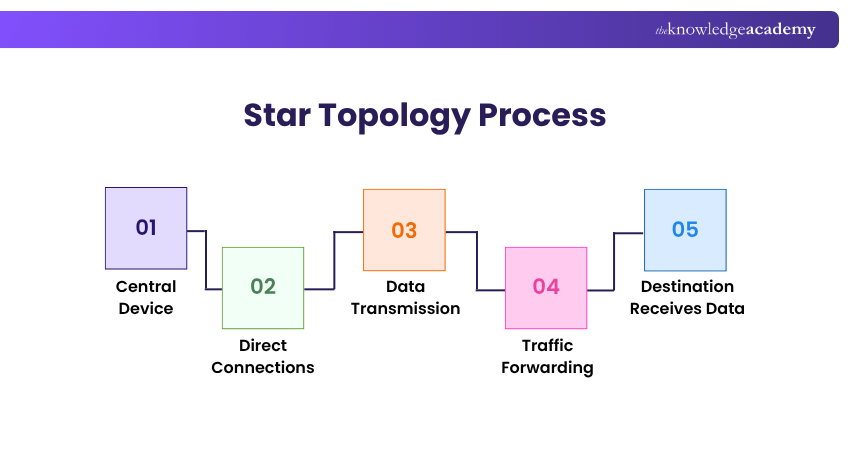
1) Central Device: A hub or switch forms the central connection point for all devices.
2) Direct Connections: Each computer, printer or other node connects separately to the central device.
3) Data Transmission: When one device sends data, it first reaches the central device.
4) Traffic Forwarding: A switch examines destination information and forwards traffic towards the appropriate port. A traditional hub instead repeats incoming traffic to its connected ports.
5) Destination Receives Data: The intended network device receives and processes the transmitted information.
Applications of Star Topology
Star Topology has a wide range of applications in networking due to its effectiveness. Here are some common uses:
1) Educational Institutions: Star Topology is often employed in computer labs within schools and universities to connect multiple nodes efficiently.
2) Home Networks: This topology is commonly used in home networks, providing a clear example of how devices like computers NETWORK, printers, and smart devices are interconnected.
3) Office and Enterprise LANs: Star-based Ethernet designs are commonly used to connect end-user devices to central access switches in local networks.
Advantages of Star Topology
Star Topology offers several benefits, making it a popular choice for various networking needs. For small businesses, its simple management and scalability can make it a practical choice for growing networks:
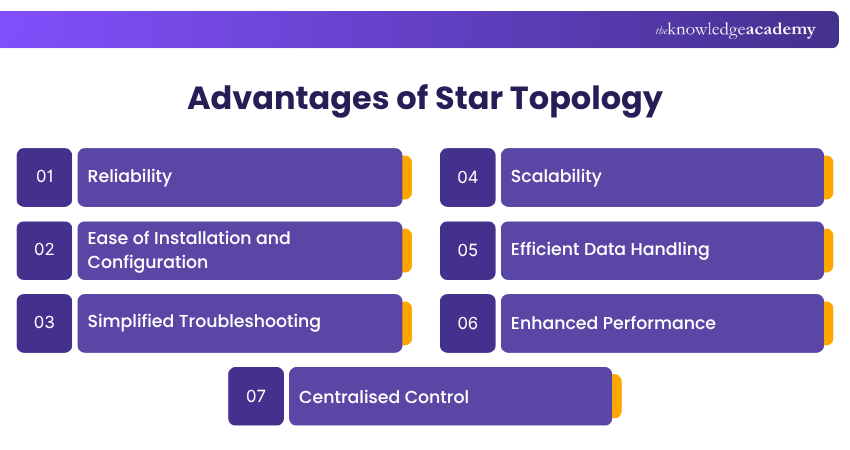
1) Reliability: In a Star Network, the breakdown of one node doesn’t affect the rest of the network. Each device is connected independently to the central hub, so issues can be isolated and resolved without disrupting overall network operations.
2) Ease of Installation and Configuration: Setting up a star network is straightforward. The central hub simplifies the process of adding or removing devices, making it easy to expand or reconfigure the network as needed.
3) Simplified Troubleshooting: Since each device is connected to a central point, identifying and fixing network issues becomes more manageable. Problems can be quickly isolated to individual connections, reducing downtime and maintenance efforts.
4) Scalability: Star Topology allows for easy scalability. Additional devices can usually be added by connecting them to available ports on the central switch, provided sufficient capacity is available.
5) Efficient Data Handling: When a switch is used, it can forward network traffic towards the appropriate destination port instead of sending it across every connection. This supports more efficient communication between connected devices.
6) Enhanced Performance: Switch-based Star Networks can provide dedicated connections for individual devices, reducing shared-medium contention and supporting simultaneous communication. Actual performance still depends on factors such as switch capacity, link speed and overall network traffic.
7) Centralised Control: A central switch can provide a single point for monitoring and managing network connections. Managed switches may also support features such as traffic monitoring, access controls and configuration management.
Disadvantages of Star Topology
Despite its many advantages, Star Topology also has some drawbacks:
1) Central Point of Failure: The most significant disadvantage of a star network is its dependency on the central hub or Switch. If the central switch or hub fails, devices connected through that star segment may lose network connectivity.
2) Additional Cabling and Equipment: A star topology requires a separate link from each endpoint to the central device, as well as the central switch or hub itself. This can increase cabling and equipment requirements.
3) Complexity in Large Networks: As the network grows, managing many cables and connections can become complex and cumbersome. This can result in more maintenance requirements and potential issues with Cable Management.
4) Scalability Limitations: While Star Topology is generally scalable, the central hub's capacity can become a limiting factor. Hubs have a finite number of ports, and once all ports are occupied, additional hubs or switches are required, potentially complicating the network architecture.
5) Performance Bottlenecks: The central switch can become a bottleneck if its switching capacity or uplink bandwidth is insufficient for the network's traffic demands. All data must pass through the hub, which can cause congestion and reduced network performance during peak usage times.
6) Installation Challenges: In environments where devices are spread out over a large area, the need to run individual cables from each device to the central hub can be challenging and time-consuming. This can increase the installation effort and cost, particularly in large or complex installations.
7) Maintenance Requirements: Maintaining the central hub is crucial for the network's overall health. Managed central switches may require firmware updates, configuration management, monitoring and periodic hardware maintenance.
Build your networking skills and boost career growth with GNS3 Training. Register now!
So, what now?
1) Choose the right central network device
2) Check cabling requirements before installation
3) Reserve ports for future expansion
4) Monitor switch health and traffic
5) Use managed switches where appropriate
6) Review network security settings regularly

Nilotpal Sarmah is a Senior Content Writer with 11+ years of overall experience spanning engineering, operations and content development. His technical knowledge and extensive writing experience enable him to simplify specialised topics across IT and Tech, Business Skills, Project Management, Health and Safety, and ISO and Compliance.
View Detail

 If you wish to make any changes to your course, please


