


 Top Rated Course

We may not have the course you’re looking for. If you enquire or give us a call on 01344203999 and speak to our training experts, we may still be able to help with your training requirements.
What is Sales Automation: A Complete Guide for Modern Sales Teams
Scarlett Adams 16 July 2026Sales Automation helps businesses streamline repetitive tasks, improve efficiency, and boost sales performance with better lead management and faster workflows. It allows teams to focus on building relationships and closing deals. By reducing manual work, it ensures consistent communication and productivity across sales operations.
Home
 Resources
Data, Analytics & AI
What is Sales Automation: A Complete Guide for Modern Sales Teams
Resources
Data, Analytics & AI
What is Sales Automation: A Complete Guide for Modern Sales Teams
Resources
Data, Analytics & AI
What is Sales Automation: A Complete Guide for Modern Sales Teams

Training Outcomes Within Your Budget!
We ensure quality, budget-alignment, and timely delivery by our expert instructors.
Table of Contents

Think about a busy sales day. You speak to a lead, plan to follow up later, update a spreadsheet, jump on another call, and before you know it, the day is over, and that follow-up slips through. It is not about lack of effort; it is just too many small tasks at once. This is a situation most sales professionals face, and it can cost real opportunities. That is exactly where Sales Automation steps in, helping you stay organised without the constant pressure.
Instead of trying to remember everything, automation handles follow-ups, reminders, and updates in the background. This gives you more time to focus on real conversations, understand customer needs, and close deals with confidence. In this blog, you will explore how Sales Automation works, its benefits, and how it helps you sell smarter. Let’s dive in!
Table of Contents
1) What is Sales Automation?
2) How to Automate the Sales Process?
3) Tasks That Sales Automation Software Can Handle
4) Advantages of Sales Automation
5) Disadvantages of Sales Automation
6) Examples of Sales Automation
7) Conclusion
What is Sales Automation?
Sales Automation is the use of software and AI to streamline and manage repetitive tasks in the sales process, like data entry, lead follow-ups, and scheduling. Instead of handling these tasks manually, automation tools perform them quickly and accurately, saving time and effort.
By automating routine activities, it improves productivity, ensures consistent communication, and speeds up the sales cycle. This allows sales professionals to focus on building relationships, understanding customer needs, and closing deals.

How to Automate the Sales Process?
Automating the sales process requires a structured approach. It involves understanding your workflow and identifying where automation adds value. By following the right steps, businesses can implement it effectively without disrupting operations. Here are the key steps to get started:
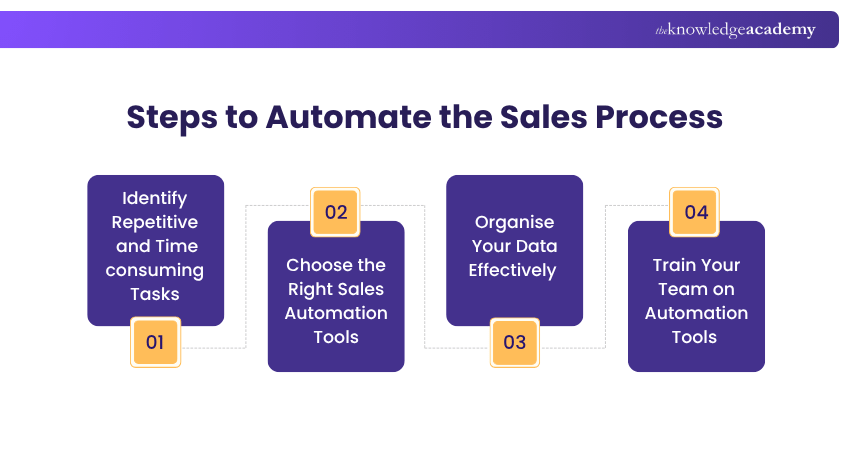
1) Identify Repetitive and Time-consuming Tasks
The first step in sales automation is identifying tasks that consume time and do not require human judgement. These often include sending follow-up emails, updating customer records, scheduling meetings, and tracking leads. Such activities can slow down sales teams when handled manually.
By recognising these repetitive tasks, businesses can determine where automation will have the most impact. This helps teams focus on high-value activities like building relationships and final deals, rather than spending time on administrative work.
2) Choose the Right Sales Automation Tools
Once tasks are identified, the next step is selecting the right tools. Sales Automation tools come in various forms, including Customer Relationship Management systems, email automation platforms, and lead management software. Each tool has a specific purpose within the sales process.
Choosing the right tool depends on business needs, team size, and budget. A good tool should integrate easily with existing systems, be user-friendly, and provide features that align with sales goals. The right choice can significantly improve efficiency and overall performance.
3) Organise Your Data Effectively
Data plays an important role in Sales Automation. For automation to work effectively, customer and lead data must be accurate, well-structured, and up to date. Poor data quality can lead to incorrect communication and missed opportunities.
Organising data involves cleaning existing records, removing duplicates, and standardising information. With well-managed data, automation tools can deliver better insights, improve targeting, and support more personalised interactions.
4) Train Your Team on Automation Tools
Even the best automation tools are ineffective without proper training. Sales teams need to understand how to use automation tools efficiently and integrate them into their daily workflows. Without training, there is a risk of underutilisation or misuse.
Providing training sessions and continuous support ensures that team members are comfortable using these tools. This also reinforces the benefits of automation and ensures smooth adoption across the organisation.
Develop frameworks to automate workflows and optimise performance. Join our AI Automation Course for Operations now!
Tasks That Sales Automation Software Can Handle
Sales Automation software handles tasks that would otherwise require manual effort. By automating these activities, businesses can improve efficiency, maintain consistency, and reduce workload. Below are some key tasks it can manage effectively:
1) Collecting Customer Data
Sales automation tools can automatically collect customer data from various sources such as websites, forms, emails, and social media platforms. This eliminates the need for manual data entry and ensures that information is captured accurately.
With automated data collection, businesses can build comprehensive customer profiles. This helps sales teams understand customer behaviour, preferences, and needs, leading to more useful engagement and better conversion rates.
2) Enhancing Lead Generation
Automation tools can identify potential leads by analysing customer behaviour and interactions. They can track website visits, downloads, and other actions to determine interest levels and generate qualified leads.
This improves the efficiency of lead generation efforts by focusing on high-potential prospects. As a result, sales teams can prioritise their efforts and increase the possibility of converting leads into customers.
3) Creating Messaging
Sales Automation tools can generate and send personalised messages to customers based upon their behaviour and preferences. These messages can include emails, follow-ups, and promotional content tailored to individual needs.
By automating messaging, businesses can maintain consistent communication without overwhelming sales teams. It also ensures that customers receive timely and relevant information, improving engagement and trust.
4. Optimising Workflows
Automation helps streamline sales workflows by connecting different tasks and processes. For example, when a lead is generated, the system can automatically assign it to a sales representative and trigger follow-up actions.
This reduces delays and ensures that no opportunities are missed. Optimised workflows improve team coordination and help maintain a smooth and efficient sales process.
5) Automating Lead Scoring
Lead scoring is the process of ranking leads based upon their likelihood to convert. Sales Automation tools can analyse data such as behaviour, engagement, and demographics to assign scores automatically.
This helps sales teams focus on high-value leads and allocate resources effectively. Automated lead scoring improves decision-making and increases conversion rates by prioritising the right opportunities.
6) Generating Sales Reports
Automation tools can generate detailed sales reports without manual effort. These reports include data on performance, conversions, revenue, and customer interactions.
With real-time reporting, businesses can monitor progress, identify trends, and make informed decisions. This improves transparency and helps teams adjust strategies to achieve better results.
Learn AI techniques to automate customer support and ticketing workflows with our AI Automation Training for Customer Services – Join today!
Advantages of Sales Automation
Sales Automation offers several benefits that can transform the way businesses operate. By reducing manual work and improving efficiency, it allows teams to concentrate on strategic activities that drive growth. Here are some key advantages of automation in sales:
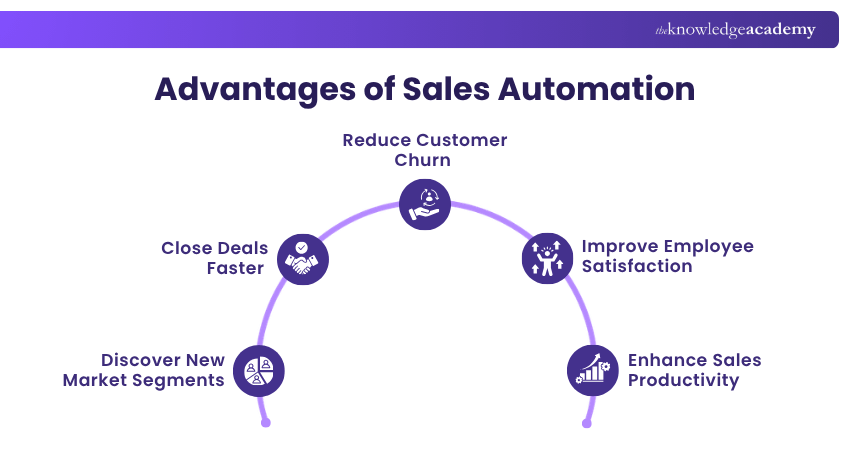
1) Discover New Market Segments
Sales Automation tools analyse large volumes of data to identify patterns and trends. This helps businesses discover new customer segments and opportunities that are not visible through manual analysis.
By targeting these segments, companies can expand their reach and increase revenue across different customer groups effectively. It also enables more precise marketing and sales strategies, leading to improved outcomes.
2) Close Deals Faster
Automation speeds up the sales process by reducing delays in communication and task execution. Follow-ups, reminders, and updates can be handled instantly, ensuring that prospects are engaged at the right time.
This helps shorten the sales cycle and improve conversion rates significantly over time. Faster deal closures allow businesses to generate revenue more efficiently and stay competitive in the market.
3) Reduce Customer Churn
Consistent communication and timely follow-ups play a key role in retaining customers. Sales Automation ensures that customers receive regular updates, support, and engagement throughout their journey.
This helps build stronger relationships and reduces the chances of customers leaving. By maintaining consistent interaction, businesses can improve customer loyalty and long-term retention.
4) Improve Employee Satisfaction
Automation significantly reduces the burden of repetitive tasks, allowing sales professionals to focus on more meaningful work. This leads to greater job satisfaction and improved motivation within the team.
When employees spend more time on strategic activities and less on administrative tasks, they feel more productive and engaged. This contributes to a positive work environment and better overall performance.
5) Enhance Sales Productivity
Sales Automation enhances productivity by reducing time spent on repetitive tasks such as data entry, follow-ups, and scheduling. This enables sales teams to concentrate on high-value activities like engaging with possibilities and closing deals.
By streamlining workflows and automating routine processes, teams can manage more leads without increasing workload. This improves efficiency, ensures faster responses, and helps sales professionals achieve better results with less effort.
Build intelligent dashboards and automated data pipelines for real-time insights with our AI Automation for Reporting Course – Register today!
Disadvantages of Sales Automation
While Sales Automation gives many benefits, it also comes with certain challenges. Businesses need to understand these limitations to implement automation effectively and avoid potential issues. Here are some common disadvantages of automation sales:
1) Technical Limitations
Sales Automation tools rely on technology, which may sometimes face limitations or technical issues. System errors, integration challenges, and software bugs can disrupt workflows and affect performance.
To minimise these risks, businesses should choose reliable tools and ensure proper maintenance. Regular updates and strong technical support can help address these challenges effectively.
2) Risk of Over-communication
Automation can lead to excessive communication if not managed carefully. Sending too many emails or messages can overwhelm customers, reduce engagement, and create a negative experience, affecting brand perception and relationships.
It is important to balance automation with personalisation. Businesses should monitor communication frequency, segment audiences effectively, and ensure messages remain relevant, timely, and valuable.
3) Limited Human Interaction
Automation reduces direct human interaction, which can impact relationship building over time. Customers may feel less connected when communication becomes fully automated, leading to weaker emotional connections and reduced trust in the brand.
To address this, businesses should combine automation with human touchpoints. Personal interactions, such as calls or tailored responses, should be maintained to build trust and strengthen relationships.
4) Reduced Personalisation
Although automation allows for personalised messaging, it may not always capture the nuances of individual customer needs. Over-reliance on automation can result in generic communication.
Businesses should continuously refine their automation strategies and use data effectively. Combining automation with human insights can improve personalisation and customer experience.
5) Expenses for Tools and Software
Implementing Sales Automation requires investment in tools, software, and training. For small businesses, these costs can be a challenge, especially when budgets are limited and resources need to be carefully allocated for growth.
However, the benefits often outweigh the initial investment. By improving efficiency and productivity, automation can deliver a strong return on investment over time and support sustainable growth.
Explore AI techniques that support personalised marketing and audience segmentation with our AI Automation Course for Marketing – Register now!
Examples of Sales Automation
To better understand how Sales Automation works in practice, it is helpful to look at real-world examples. These examples show how businesses use automation to improve efficiency and achieve better results. Here are some common examples of automation in sales:
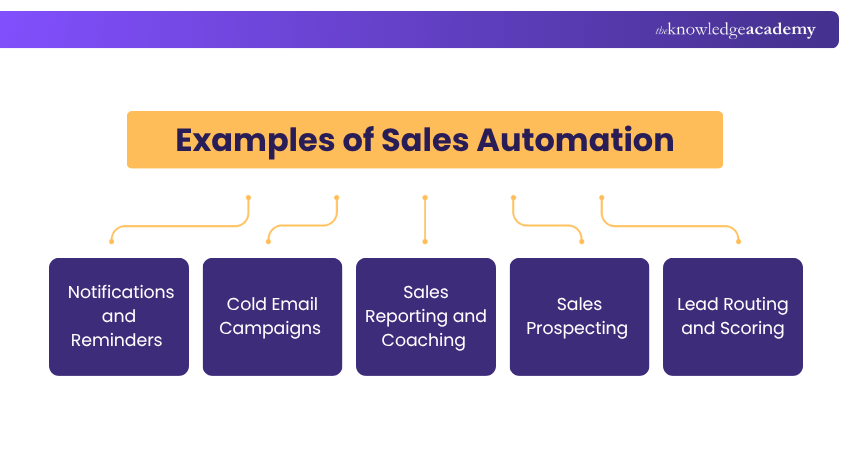
1) Notifications and Reminders
Sales Automation tools can send automatic notifications and reminders for important tasks such as follow-ups, meetings, and deadlines. This ensures that sales representatives never miss critical activities.
By keeping teams organised, reminders improve productivity and accountability across daily sales activities effectively. They also help maintain consistent communication with customers throughout the sales process.
2) Cold Email Campaigns
Automation allows businesses to send cold emails to potential customers at scale. These emails can be personalised based on customer data and behaviour, increasing the chances of engagement.
Automated email campaigns save time and ensure consistency across all customer interactions efficiently. They also allow businesses to track performance and optimise strategies for better results.
3) Sales Reporting and Coaching
Automation tools can identify and qualify potential prospects based on predefined criteria and historical customer behaviour patterns effectively. This helps sales teams concentrate on leads that are more likely to convert.
By automating prospecting, businesses can increase efficiency and improve targeting across multiple customer segments and channels effectively. This leads to better conversion rates and better use of resources.
4) Sales Prospecting
Sales Automation systems can automatically assign leads to the right sales representatives based on criteria such as location, expertise, or workload. This ensures that leads are handled efficiently.
Combined with lead scoring, this process helps prioritise high-value opportunities across different sales stages and customer segments. It improves response times and boosts the chances of successful conversions.
5) Lead Routing and Scoring
Sales Automation systems can automatically assign leads to the right sales representatives based on criteria such as location, expertise, or workload. This ensures that leads are handled efficiently.
Combined with lead scoring, this process helps prioritise high-value opportunities across different sales stages. It improves response times and increases the chances of successful conversions through timely engagement.
Conclusion
Sales Automation helps businesses work smarter by reducing manual tasks, improving efficiency, and enhancing customer engagement. When used effectively, it supports faster decision-making and better results. By balancing automation with human interaction, organisations can create a more productive sales process while maintaining strong customer relationships and long-term growth.
Gain practical experience using modern AI tools and automation techniques with our AI Automation Training – Join now!
Frequently Asked Questions
What are the Top 3 Skills for Sale?

The top three skills for sales include communication, relationship building, and problem-solving. These skills help sales professionals understand customer needs, build trust, and offer suitable solutions effectively.
What is the Difference Between CRM and Sales Automation?
CRM focuses on handling customer relationships and maintaining data, while automation in sales handles repetitive tasks such as follow-ups and lead tracking. Both work together to improve efficiency and customer engagement.
What are the Other Resources and Offers Provided by The Knowledge Academy?
The Knowledge Academy takes global learning to new heights, offering over 3,000+ online courses across 490+ locations in 190+ countries. This expansive reach ensures accessibility and convenience for learners worldwide.
Alongside our diverse Online Course Catalogue, encompassing 17 major categories, we go the extra mile by providing a plethora of free educational Online Resources like Blogs, eBooks, Interview Questions and Videos. Tailoring learning experiences further, professionals can unlock greater value through a wide range of special discounts, seasonal deals, and Exclusive Offers.
What is The Knowledge Pass, and How Does it Work?
The Knowledge Academy’s Knowledge Pass, a prepaid voucher, adds another layer of flexibility, allowing course bookings over a 12-month period. Join us on a journey where education knows no bounds.
What are the Related Courses and Blogs Provided by The Knowledge Academy?
The Knowledge Academy offers various AI Automation Training, including the AI Automation Training for Sales, AI Automation Course for Marketing, and the AI Automation Course for Operations. These courses cater to different skill levels, providing comprehensive insights into Data Extraction.
Our Data, Analytics & AI Blogs cover a range of topics related to Automation in Sales, offering valuable resources, best practices, and industry insights. Whether you are a beginner or looking to advance your Data, Analytics & AI skills, The Knowledge Academy's diverse courses and informative blogs have got you covered.

 If you wish to make any changes to your course, please


