




We may not have the course you’re looking for. If you enquire or give us a call on 01344203999 and speak to our training experts, we may still be able to help with your training requirements.
Power BI Pro vs Premium: A Comparative Analysis
ByThe Knowledge AcademyLast updated on: 26 September 2026
Power BI is a powerful business intelligence tool that helps you analyse data and create stunning reports and dashboards. But which option is right for you: Power BI Pro or Power BI Premium? In this blog, we compare their features, benefits and licensing approaches while also covering the latest changes to Premium capacity through Microsoft Fabric.

Data is the fuel that drives modern businesses, and Power BI is the engine that converts it into insights. Power BI is a cloud-based business intelligence service from Microsoft that lets you connect, analyse, and visualise your data. But how do you choose the right Power BI service for your needs?
A comprehensive understanding of the distinctions between Power BI Pro vs Premium can assist in making an informed choice. Let's learn about it further in the blog!
What is Power BI Pro?
Power BI Pro is a per-user licence that enables users to create, publish, share and collaborate on Power BI content within their organisation.

Features of Power BI Pro
Let’s explore the features of Power BI Pro:
a) Establish connections with a wide array of data sources, spanning both on-premises and cloud environments, and refresh your data as frequently as eight times per day.
b) Use the Power BI Desktop app to create and edit reports with rich visualisations, filters, slicers and custom measures. Dashboards can be created in the Power BI service.
c) Share your reports and dashboards with other Power BI Pro users in your organisation and collaborate using features such as comments and @mentions.
d) Integrate Power BI content with services such as SharePoint, Teams and Power Apps, or use Power BI APIs for supported custom embedding scenarios.
What is Power BI Premium?
Power BI Premium Per User (PPU) is a per-user licence that includes all Power BI Pro capabilities along with additional Premium features and higher usage limits. Power BI Premium Per User (PPU) currently costs £18.50 per user/month, paid yearly, excluding VAT in the UK.
Features of Power BI Premium
Here are the features of Power BI Premium:
a) PPU includes all Power BI Pro licence capabilities, plus additional premium features.
b) Power BI Premium Per User supports up to 48 scheduled refreshes per day and semantic models up to 100 GB.
c) Premium capabilities include advanced features such as XMLA endpoint connectivity and enhanced semantic model capabilities.
d) For capacity-based deployments, Microsoft Fabric F SKUs have replaced Power BI Premium per-capacity P SKUs for new purchases.
Difference Between Power BI Pro and Premium
The primary difference between Power BI Pro and Power BI Premium is how they are licensed and priced. Power BI Pro is a user-based subscription service, which means you pay for each user who needs to create or consume Power BI content. Power BI Premium Per User (PPU) is also licensed per user, while Microsoft Fabric capacity is capacity-based. Fabric capacity provides dedicated resources for workloads rather than licensing the capacity itself per individual user.
Let's look at their differences in the table below:
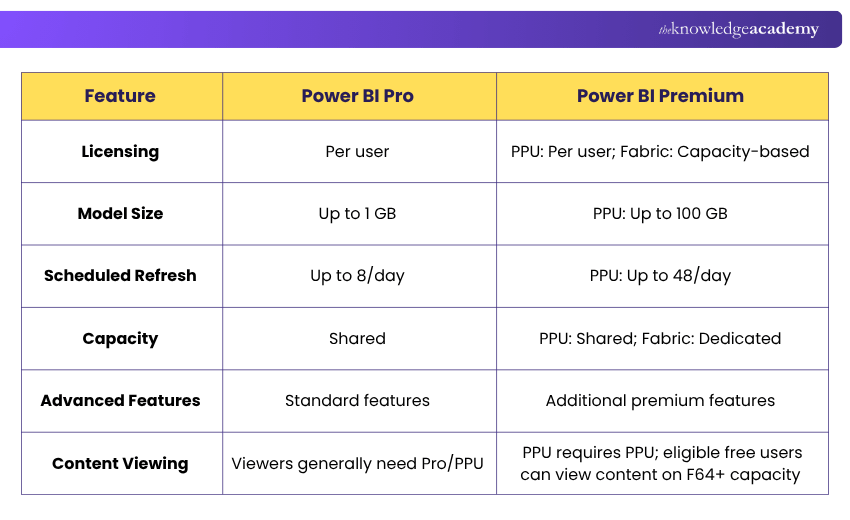
1) Licensing and Cost Structure
The licensing and cost structure of Power BI Pro and Power BI Premium depend on your usage scenario and your number of users. Here are some examples of how to choose the right Power BI service for your needs:
a) Power BI Pro might be the best option for you if your users need standard Power BI capabilities for creating, sharing and consuming collaborative Power BI content without Premium-specific requirements. You can buy Power BI Pro licences for the users who require these capabilities. The current UK list price is £10.80 per user/month, paid yearly, excluding VAT.
b) Power BI Premium Per User might be the best option if users require additional premium capabilities, but your organisation does not need dedicated Fabric capacity. Users accessing content in a PPU workspace generally require PPU licences.
c) Microsoft Fabric capacity may be suitable if your organisation needs dedicated capacity, broader Fabric workloads, or Power BI content distribution at scale. With F64 or larger capacity, eligible users with free licences can consume Power BI content when they have the appropriate viewer permissions. The appropriate capacity should be determined by workload requirements rather than a fixed number of users.
Trainer’s Insight
Don’t choose an option simply because it provides more features. Start by identifying who will create Power BI content, who needs to consume it, which premium capabilities are required and whether the organisation needs dedicated capacity.
2) Functionality and Offerings
The functionality and offerings of Power BI Pro and Power BI Premium also differ in terms of their features and capabilities. Power BI Pro offers the basic and essential features of Power BI, such as data connectivity, report creation, report publishing, report sharing, and report embedding.
Power BI Premium Per User provides additional premium capabilities on top of pro, while Microsoft Fabric capacity provides dedicated capacity and supports broader Fabric workloads. Here are some examples of how the functionality and offerings of Power BI Pro and Power BI Premium can affect your business intelligence needs:
a) Power BI Pro might be sufficient if you need to create simple and interactive reports and dashboards that can be shared and consumed by other Power BI users in your organisation. You can also integrate Power BI content with services such as SharePoint, Teams and Power Apps, or use Power BI REST and JavaScript APIs for supported custom embedding scenarios.
b) Power BI Premium Per User might be suitable if you need larger semantic models, more frequent scheduled refreshes, XMLA endpoint connectivity or other Premium-specific capabilities.
c) If you need to embed Power BI reports and dashboards in external customer-facing applications, Power BI Embedded provides capacity-based embedding options. The licensing requirements depend on the embedding scenario and capacity used.
Bonus Tip
Separate internal Power BI collaboration from external customer-facing embedding when comparing your options. Power BI Embedded serves a different purpose from simply giving internal users pro or PPU licences.
3) Performance and Scalability
The performance and scalability of Power BI Pro and Power BI Premium also vary regarding the resources and limits they impose on your Power BI workloads. Power BI Pro has lower and stricter limits on semantic model size and scheduled refresh frequency compared to Power BI Premium.
Power BI Premium Per User provides higher limits for areas such as semantic model size and scheduled refreshes. Microsoft Fabric capacity provides dedicated capacity, with available resources depending on the selected capacity SKU. Here are some examples of how the performance and scalability of Power BI Pro and Power BI Premium can impact your business intelligence experience:
a) Power BI Pro might be enough for you if you have semantic models that remain within the pro size limits and do not require more than eight scheduled refreshes per day.
b) If you need larger semantic models or up to 48 scheduled refreshes per day, Power BI Premium Per User may be suitable. If your organisation requires dedicated compute capacity or broader Microsoft Fabric workloads, Microsoft Fabric capacity may be more appropriate.
Choosing between Power BI Pro vs Premium depends on who uses it, the features required and your data needs. Power BI Pro supports standard collaboration and sharing, while Premium Per User provides additional Premium capabilities and higher limits. Capacity-based requirements can be considered separately through Microsoft Fabric.
Build reports that reveal insights and support smarter business decisions by joining the Business Intelligence Reporting Training today!

The Knowledge Academy develops accessible learning content across Project Management, IT, Cybersecurity, Data Science, Business Analysis, HR, Accounting and Finance, Leadership and Health and Safety. Its resources combine subject research with clear explanations to help professionals build practical knowledge across a wide range of disciplines.
View Detail

 If you wish to make any changes to your course, please


