




We may not have the course you’re looking for. If you enquire or give us a call on +64 98874342 and speak to our training experts, we may still be able to help with your training requirements.
25 HTML Projects for Beginners and Professionals in 2026
ByRichard HarrisLast updated on: 21 September 2026
Curious about HTML projects? These projects range from simple HTML web pages and forms to more advanced projects that combine HTML with CSS and JavaScript to build interactive web applications. This blog covers various project ideas and examples to help you practise and refine your coding techniques.
Curious about HTML projects? These projects range from simple HTML web pages and forms to more advanced projects that combine HTML with CSS and JavaScript to build interactive web applications. This blog covers various project ideas and examples to help you practise and refine your coding techniques.
Have you ever dreamed of crafting a stunning personal portfolio or designing a sleek e-commerce page? Imagine having a treasure trove of engaging projects to guide you every step of the way. Our curated list of HTML projects is here to transform that dream into reality, taking you from basic layouts to complex applications with hands-on experience and practical insights.
Whether you're just starting your coding journey or looking to sharpen your skills, these projects are tailored to help you succeed. Let's set off on this adventure and delve into the boundless opportunities of HTML projects, uncovering multiple ideas to spark your creativity and boost your coding skills!
HTML Project Ideas
These HTML projects will help you build a strong foundation in HTML and CSS. More advanced projects introduce JavaScript, browser APIs, and external data sources to add interactivity and dynamic functionality. Let's look at some projects that can help you gain practical experience:
1) Personal Profile Page
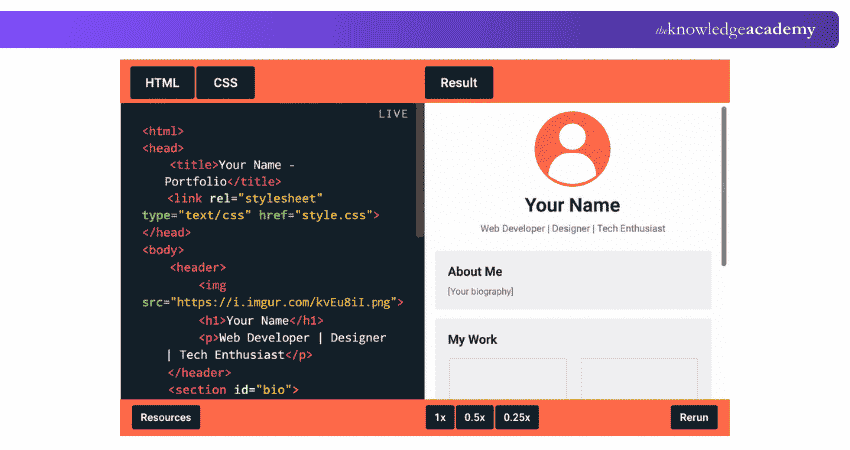
One of the finest ways to embark on your HTML journey is by building a personal profile page. This project enables you to introduce yourself online while learning the fundamentals of HTML. It's not merely about coding; it's about narrating your story through the web. Using an HTML editor can make it easier to write, organise and review your HTML code as you build the page.
Objective
The aim is to create a simple personal profile page featuring your name, photograph, biography, interests and contact links. This project helps beginners practise fundamental HTML elements while building a basic online presence.

2) Responsive Navigation Menu
Implementing a responsive navigation menu is an essential skill in web development, enhancing user experience across different devices. This project concentrates on building a navigation menu that adapts to different screen sizes, helping improve usability across a range of devices.
Objective
The goal is to design a navigation menu that adjusts to various screen sizes. This can include a collapsible "hamburger" menu for smaller screens and a standard horizontal menu for larger screens. HTML and CSS can be used for the structure and responsive layout, while JavaScript may be added for interactive menu behaviour.
3) Simple Survey Form
Developing a basic survey form is an excellent project for practising form creation and styling with HTML and CSS. Form creation is a fundamental web development skill and can be used to design interfaces for collecting user feedback, conducting surveys or gathering information.
Objective
The aim of this project is to create a user-friendly survey form that allows users to answer different kinds of questions. The form will include grouped questions and different types of form controls, including text boxes, radio buttons, checkboxes, and a submit button.
Trainer Insight
When building forms, focus on correct labels, suitable input types and logical structure before styling them. A well-structured form is easier to use, maintain and enhance later.
4) Small Business Page
Designing a homepage for a small business is an excellent project for applying web development skills in a real-world context. This project involves creating a welcoming and informative homepage for a small business, with a focus on presenting key business information clearly.
Objective
The intention is to create a homepage that effectively showcases a small business, providing essential details such as its services, opening hours, location, and contact information. The layout should be professional, welcoming, and consistent with the business's branding.
5) Simple Blog Layout
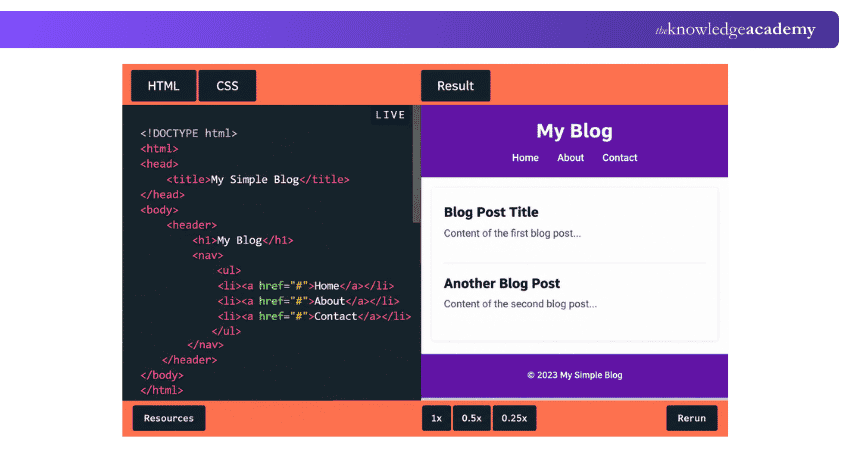
The next step in your HTML journey is to construct a simple blog layout. This project introduces you to more structured page layouts and teaches you how to organise content effectively.
Objective
The objective of this project is to build a basic blog layout, which involves a header, a main content area for blogs, and a footer. This layout provides a useful starting structure for presenting blog articles or posts.
Join our HTML and CSS Course today and start creating beautiful, responsive websites!
6) Event Invitation Page
Designing an event invitation page is a brilliant way to blend creativity with technical skills. This project entails creating a web page that serves as an online invitation for an event, such as a workshop, conference, or party.
Objective
The goal is to design an event invitation page that is visually appealing and informative. This page should provide details about the event, such as the date, time, venue, and a brief description. The emphasis is on using HTML and CSS to present this information in an engaging and well-organised manner.
7) Parallax Website
Developing a parallax website entails using a visual effect where background images move at a slower pace than foreground images, creating a sense of depth and immersion. The effect adds visual movement as visitors scroll through the page.
Objective
The aim of this project is to build a website with a parallax scrolling effect using CSS background techniques, transforms or JavaScript, depending on the implementation. Also, provide a version without the effect for visitors who prefer reduced motion
8) Technical Documentation Page
Creating a technical documentation page involves compiling and presenting detailed information about a specific topic, tool, or technology. This project focuses on structuring content in a clear and accessible manner.
Objective
The goal of this project is to develop a well-organised technical documentation page using HTML and CSS. The page should include sections such as an introduction, detailed explanations, code examples, and a navigation menu to aid users in easily finding the information they need.
9) Restaurant Website
Designing a restaurant website involves creating an online presence for a dining establishment. This project focuses on showcasing the restaurant's menu, location, hours of operation, and contact information.
Objective
The site should include sections for the menu, reservation information or a reservation form interface, along with location and contact details. A functional reservation system would require additional client-side or server-side functionality.
10) Photography Website
Creating a photography website involves designing a platform to display and promote a photographer's work. This project focuses on creating galleries, portfolios, and contact information.
Objective
The goal is to build a photography website that effectively showcases the photographer's portfolio. The site should include image galleries, a biography, and contact details, using HTML and CSS to create a visually stunning and easy-to-navigate layout.
11) Landing Page
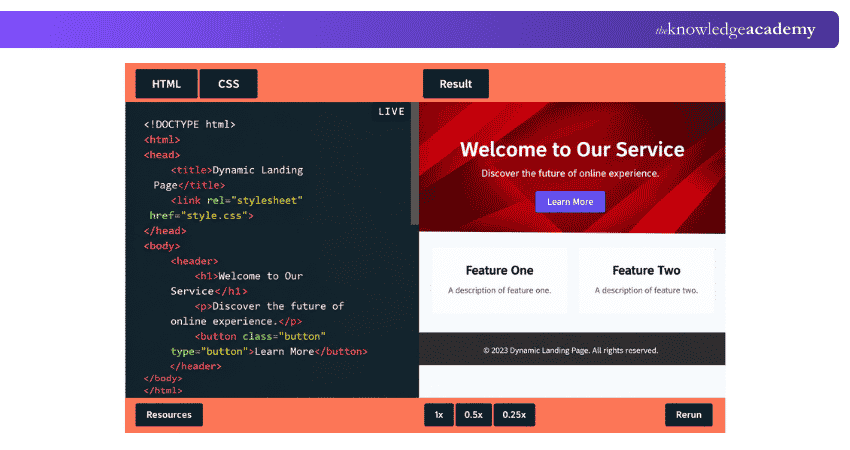
A landing page is a standalone web page designed around a specific goal, such as promoting a product or service, encouraging sign-ups or generating leads. This project will help you learn how to design an effective and visually appealing landing page.
Objective
The goal is to design a single-page layout that presents a product, service, or individual, with an emphasis on encouraging visitor interaction, such as subscribing to a newsletter, downloading a guide, or learning more about the service.
12) Registration Form
Developing a registration form involves creating a structured form to collect user details, such as names and email addresses. This project focuses on HTML form elements, input types, labels and basic HTML validation.
Objective
The aim is to create a registration form that collects details such as a user's name, email address and other required information. The project can introduce HTML form elements, labels, input types, basic HTML validation and CSS styling. A live registration service would also need server-side validation.
Quick Check
Before moving to the next project, ask yourself:
1. Does every form control have a clear label?2. Are suitable input types being used?3. Are required fields identified correctly?4. Can users understand what information they need to enter?5. Does the form remain usable on smaller screens?
13) Information Page
Creating an information page involves designing a web page which provides detailed information on a specific topic. This project focuses on content organisation and presentation.
Objective
The goal is to design an information page that clearly presents detailed content on a chosen topic. The page should include headings, paragraphs, images, and links, using HTML and CSS to ensure a structured and engaging layout.
Develop the expertise to create engaging and responsive websites. Register for our Website Design Course today!
14) Student Grade Calculator
Building a student grade calculator involves creating a tool that calculates results based on marks or scores entered by users. This project focuses on user input handling and basic JavaScript calculations.
Objective
The aim is to create a calculator that accepts marks or scores and calculates totals, percentages or grades based on predefined maximum marks and grading rules. The project will use HTML for inputs, CSS for styling and JavaScript for calculations.
15) Real-time Calculator
Creating a real-time price calculator involves designing a tool that automatically updates the displayed total result as users change the input values.
Objective
The goal is to build a real-time calculator that provides immediate feedback as users enter data. The project will use HTML for the form, CSS for styling, and JavaScript for real-time calculations, ensuring a responsive and interactive user experience.
Mini Challenge: Can You Level It Up?
Choose one simple project from the list, such as a Personal Profile Page, Restaurant Website or Landing Page, and take it beyond the basic version.Your challenge: Add clear navigation, make the layout responsive, provide appropriate alt text for meaningful images, make forms accessible where relevant and add one useful interactive feature with JavaScript.Then ask yourself: Would someone actually be able to use this website comfortably on both mobile and desktop?
16) Online Ticket Booking Website
Designing an online ticket booking interface involves creating a front-end experience where users can select events, seats, and enter booking details. This project focuses on form handling, basic client-side validation and user experience.
Objective
The aim is to create a front-end ticket booking interface where users can select events and seats and enter booking details. HTML provides the structure, CSS handles styling, and JavaScript supports validation and interactivity. A production booking system would also require backend services and data storage.
17) E-commerce Page
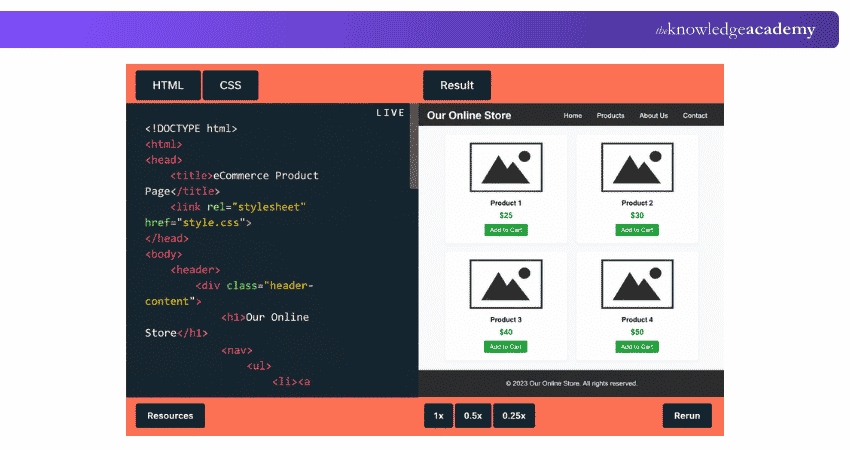
Creating an e-commerce page is an innovative project for Web Developers keen to explore the online retail world. This project concentrates on designing a web page that showcases products, including prices, product descriptions and a shopping cart interface.
Objective
Its goal is to build a user-friendly and visually appealing e-commerce page that effectively displays products, offering users vital product information and a clear browsing experience. The page should feature product images, descriptions, prices and add-to-cart buttons. JavaScript can be introduced if functional cart interactions are required.
18) Online Voting Website
Creating an online voting website involves designing an interface for users to cast votes on various topics or polls. This project focuses on form design, input validation and user experience.
Objective
For a beginner project, HTML, CSS and JavaScript can be used to create a voting interface and perform basic input validation. A real online voting system would require secure server-side authentication, data storage and additional security controls.
19) Medicine Tracker
Developing a medicine tracker involves creating a practical tool for users to manage and track their medication schedules. This project focuses on form input, browser-based data storage and basic notification functionality.
Objective
For a basic browser-based project, JavaScript can manage schedule data, browser storage and browser notifications where supported and permitted. Reliable reminders and more advanced medication tracking would require additional application services. Also, browser notifications should not be relied on as someone's sole medication reminder.
20) Recipe Page
Creating a recipe page involves designing a web page that presents recipes in a clear and engaging manner. This project focuses on content organisation and visual appeal.
Objective
The goal is to design a recipe page that effectively presents recipes with ingredients, instructions, and images. The page will use HTML for content structure, CSS for styling, and possibly JavaScript for interactive elements, ensuring an attractive and easy-to-follow layout.
Enhance your coding toolkit with our comprehensive XML Course – Secure your spot now!
21) Professional Portfolio Page
Designing a professional portfolio page involves creating an online showcase of an individual's work and achievements. Unlike the introductory profile page, this project focuses on presenting work samples and completed projects.
Objective
The aim is to create a professional portfolio page that highlights an individual's skills, projects, and achievements. The site will use HTML for content structure, CSS for styling, and possibly JavaScript for interactive elements, ensuring a polished and professional presentation.
22) Interactive Quiz App
Developing an interactive quiz app involves creating a web application that presents questions and evaluates user responses. This project focuses on interactivity and user feedback.
Objective
The goal is to build an interactive quiz app that presents questions, collects answers, and provides feedback. The project will use HTML for content structure, CSS for styling, and JavaScript for interactivity and scoring, ensuring an engaging and educational experience.
23) Music Player App
Creating a music player app involves designing a web application that plays audio files and provides playback controls. This project focuses on media handling and user interface design.
Objective
The goal is to build a music player app that allows users to play, pause and navigate between audio tracks. The project will use HTML for content structure, CSS for styling and JavaScript for media controls, creating a functional and user-friendly music player.
24) Weather Forecast App
Developing a weather forecast app involves creating a web application that displays weather information based on user input or a location provided with the user's permission. This project focuses on data retrieval and presentation.
Objective
The goal is to make a weather forecast app that provides current and forecasted weather information. The project will use HTML for content structure, CSS for styling and JavaScript to retrieve and display weather data from a weather API.
25) Product Comparison Page
Creating a product comparison page involves presenting multiple products and their key features in a structured format. This project helps learners practise HTML tables, images, links and semantic content organisation while using CSS to improve readability and presentation.
Objective
The aim is to create a product comparison page that presents features, specifications and other relevant details side by side. HTML can structure the comparison content, while CSS can improve readability and visual organisation.
Once you have explored these HTML projects, the next step is to put your skills into practice and gradually increase the complexity of what you build. Start with a project that matches your current level, then progress to responsive layouts, forms and JavaScript-powered applications. Focus on writing clean HTML, testing your pages across different screen sizes and improving each project as your skills grow.
Learn cutting-edge technologies for versatile web solutions with our App & Web Development Training – Join now!

Richard Harris creates technically detailed yet accessible content on full-stack development, software architecture and modern development frameworks. His knowledge of frontend and backend technologies helps developers understand how scalable, efficient and high-performing applications are designed and built.
View Detail

 If you wish to make any changes to your course, please


