




We may not have the course you’re looking for. If you enquire or give us a call on 01344203999 and speak to our training experts, we may still be able to help with your training requirements.
Hardware vs Software: The Battle of Technology
ByVishnu SankarLast updated on: 19 September 2026
Wondering about the differences between hardware vs software? Read this blog to explore their key roles, functions, and how they work together in modern technology. Hardware is the physical part of a device, while software consists of the programs that run on it. Together, they let technology function and innovate. Keep reading.
Curious about the key differences between hardware vs software? These two essential components power the technology we rely on daily. Hardware is a physical device, like computers and smartphones, while software includes the programs and applications that make them work.
Understanding these distinctions helps you appreciate how technology operates, from simple gadgets to advanced systems. Whether you're passionate about technology or simply inquisitive. Read this blog to explore the roles, functions, and significance of hardware vs software in driving modern innovation and functionality.
Understanding Computer Hardware
Hardware is a physical component of a computer that we can touch. These are the primary electronic devices used to build a computer. Examples include the Central Processing Unit (CPU), memory devices, monitor, printer, keyboard, mouse, and motherboard.
Different types of computer hardware include:
a) Input Devices: These devices permit users to enter Data and information into the computer. Examples include the keyboard, mouse, and scanner.
b) Output Devices: These devices display the results of tasks performed by the user. Examples include monitors, printers, and speakers.
c) Storage Devices: These devices are utilised for storing data and are also known as secondary storage. Examples include Hard Disk Drives (HDDs), Solid-State Drives (SSDs), USB flash drives, CDs, and DVDs.
d) Internal Components: These are essential hardware devices within the system. Examples include the CPU and the motherboard.

Understanding Computer Software
Software is a collection of instructions, procedures, and documentation that perform different tasks on a computer system. It includes programs and related data that instruct computer hardware to perform specific operations or provide particular functions.
Different types of computer software include:
a) System Software: This type of software directly interacts with computer hardware to control the computer's internal functions and manage hardware devices like printers and storage devices. Examples of system software include Operating Systems, language processors, and device drivers.
b) Application Software: This software performs specific tasks for users, such as word processing or spreadsheet management. Examples include word processors and spreadsheets. Types of application software include general-purpose software and customised software.
Hardware vs Software: What’s the Difference?
Here is a concise comparison of various aspects of hardware and software. We will highlight their unique characteristics and functions.
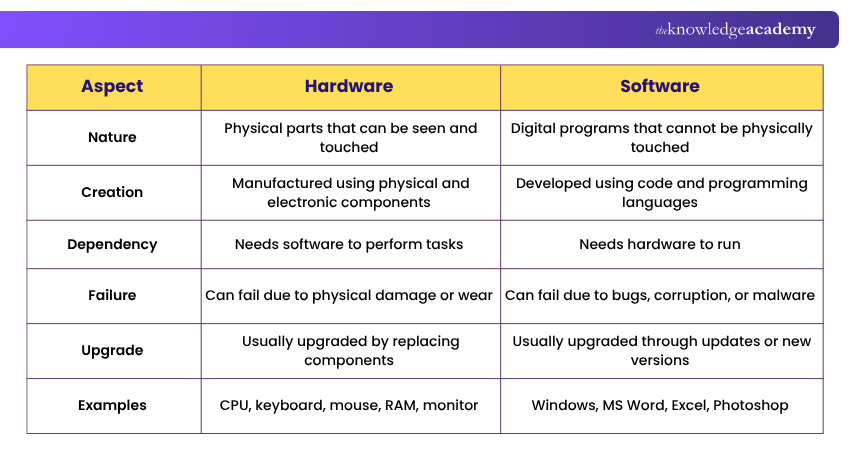
1) Nature
Hardware
a) Hardware is tangible.
b) We can see and touch it.
c) Examples are the monitor and mouse.
Software
a) Software is intangible.
b) We can see it on the screen but cannot touch it.
c) Examples are programs and applications.
2) Dependency
Hardware
a) General-purpose computer hardware typically relies on software to perform programmed tasks.
b) Software provides instructions that direct the hardware's operations.
c) For example, a computer needs an operating system to run.
Software
a) Software cannot run without hardware.
b) It needs a physical device to operate.
c) For example, a program needs a computer to execute.
3) Computer Viruses
Hardware
a) Traditional computer viruses generally target software rather than physical hardware.
b) However, some sophisticated malware can target firmware stored on hardware devices.
c) Such attacks can affect how the device operates without necessarily causing physical damage.
Software
a) Software can be affected by computer viruses.
b) Viruses can corrupt or delete data.
c) They can also disrupt software functions.
Get a comprehensive understanding of Samba as a domain controller with Ubuntu Linux Server Administration Training – Join now!
4) Failure
Hardware
a) Hardware can fail due to physical issues.
b) Examples include voltage fluctuations or broken cables.
c) When hardware fails, it may need repair or replacement.
Software
a) Software can fail due to bugs or viruses.
b) It may crash or not function properly.
c) Software issues can often be fixed with updates or patches.
Trainer’s Tip
When troubleshooting a computer problem, first identify whether the issue is likely to be hardware-related or software-related. Physical symptoms such as overheating, unusual noises, or failed components often point to hardware, while crashes, error messages, or application failures are more commonly linked to software.
5) Durability
Hardware
a) Outdated hardware may need to be replaced when it no longer meets performance or compatibility requirements.
b) Physical hardware components cannot usually be upgraded through software updates, although their firmware may be updated electronically.
c) For example, an old hard drive may need to be swapped out.
Software
a) Outdated software might be updated over the Internet.
b) Updates can add new features or fix issues.
c) For example, updating an operating system to the latest version.
6) Development
Hardware
a) Hardware is manufactured.
b) It involves assembling physical components.
c) Examples include building a computer or a smartphone.
Software
a) Software is developed and engineered.
b) It involves writing code and creating programs.
c) Examples include developing an app or a game.
7) Types
Hardware
a) Hardware categories: Input, output, storage, and internal components.
b) Input devices include keyboards and mice.
c) Internal components include the CPU and motherboard.
Software
a) Software is usually divided into system software and application software.
b) System software includes operating systems.
c) Application software includes word processors and games.
8) Transfer
Hardware
a) Hardware cannot be transferred electrically through a network.
b) It needs to be physically moved.
c) For example, you have to carry a computer from one place to another.
Software
a) Software can be transferred via a network.
b) It can be downloaded or sent over the Internet.
c) For example, you can download an app from a website.
9) Machine-level Language
Hardware
a) The CPU executes instructions in its machine instruction set.
b) Machine instructions are represented in binary form.
c) These instructions control the operations performed by the processor.
Software
a) Software can be written using high-level or low-level programming languages.
b) Compilers, interpreters, assemblers, or other translation mechanisms convert or process code into instructions that the hardware can execute.
c) The CPU then executes the resulting machine instructions.
Learn to recognise and describe functions of basic computer hardware components with our IT Fundamentals Training – Join now!
10) Examples
Hardware
a) Examples of hardware: Keyboard, mouse, printer, CPU, hard disk, Random Access Memory (RAM), and Read-Only Memory (ROM).
b) These are physical components you can touch.
They make up the computer system.
Software
a) Examples of software: MS Word, Excel, PowerPoint, Photoshop, MySQL.
b) These are programs that run on the computer.
c) They perform various tasks and functions.
11) Components
Hardware
a) Hardware consists of ICs, crystals, resistors, diodes, insulators, and boards.
b) These are physical components that make up the computer.
c) Examples include the motherboard and CPU.
Software
a) Software consists of programs, instructions, and associated data.
b) Source code may be written using programming languages and translated or interpreted for execution.
c) Examples include applications such as MS Word or Photoshop.
12) Functioning
Hardware
a) Hardware must be integrated with other physical components to work.
b) It needs to be connected and assembled properly.
c) For example, the CPU must be installed on the motherboard.
Software
a) Software can function after it is installed and launched or started by the operating system, user, or another process.
b) It runs programs and performs tasks.
c) For example, installing an operating system allows a computer to boot into that operating system and provide an environment for running applications.
13) Damage Recovery
Hardware
a) When hardware is damaged, it may need to be repaired or replaced.
b) The appropriate solution depends on the type and extent of the physical damage.
c) For example, a broken hard drive needs to be replaced.
Software
a) Software problems may be resolved through troubleshooting, updates, repairs, recovery, or reinstallation.
b) You don't replace it physically.
c) For example, reinstalling an application can sometimes fix software issues.
14) Vulnerability
Hardware
a) Hardware is largely resistant to traditional viruses, which are designed to target software.
b) However, firmware embedded in hardware devices can, in rare cases, be compromised by sophisticated malware.
c) Such incidents are uncommon compared to software-targeted attacks.
Software
a) Software is vulnerable to viruses.
b) Viruses can corrupt or delete data.
c) Antivirus programs are needed to protect software.
Keep This in Mind
1. Hardware provides physical components and processing capability.2. Software provides instructions that tell hardware what to do.3. Both usually work together to make a computer system functional.4. Firmware sits between hardware and higher-level software, helping control device operations.
Acquire knowledge regarding the installation of OS and service packs with our Computer Hardware Troubleshooting Course – Register now!

Vishnu Sankar is a Senior Content Writer with 5+ years of experience across content development, software development, web development and system administration. His technical background and professional training support his expertise in IT and Tech, while his extensive research and writing experience covers Project Management and Health and Safety.
View Detail

 If you wish to make any changes to your course, please


