


 Top Rated Course

We may not have the course you’re looking for. If you enquire or give us a call on 01344203999 and speak to our training experts, we may still be able to help with your training requirements.
What is Git Rebase? Benefits, Commands, and Examples
Richard Harris 16 July 2026Curious about Git Rebase? It is a powerful tool to streamline a series of commits into a more cohesive history, integrating changes from one branch into another. This blog delves into its fundamentals, benefits, commands, and best practices for effective version control. Read ahead to know more and enhance your skills!

Training Outcomes Within Your Budget!
We ensure quality, budget-alignment, and timely delivery by our expert instructors.
Table of Contents

Are you tired of messy commit histories and endless merge conflicts? This is when Git Rebase can be your best companion. This is more than just a command; it’s a powerful tool for developers who crave a streamlined, linear project history. Do you wonder how exactly it works and when you should use it?
This blog will take you through the attributes of Git Rebase, exploring its powerful features, practical applications, and potential pitfalls. So, ready to dive in and transform your Git experience? Let’s get started!
Table of Contents
1) What is Git Rebase?
2) Benefits and Drawbacks of Git Rebase
3)Commands for Git Rebase
4) How to Perform a Git Rebase?
5) Difference Between Git Merge and Rebase
6) What is Git Pull Rebase?
7) Conclusion
What is Git Rebase?
Git Rebase is a powerful command in Git, a version control system that enables users to integrate changes from one branch into another. Unlike merging, which creates a new commit that combines the histories of the branches, rebasing rewrites the commit history by combining a series of commits to a new base commit.
This process results in a linear and cleaner project history, making it easier to understand and follow.

Benefits and Drawbacks of Git Rebase
Using Git Rebase can streamline your commit history by eliminating unnecessary merge commits, making it easier to follow. However, it can also rewrite commit history, which might cause issues when collaborating with others if not used carefully. Let's explore their merits and demerits in detail:

Rebasing offers a cleaner and more linear project history, which can be particularly useful for maintaining a clear and understandable commit log. However, if not handled properly, it can lead to conflicts and confusion. In such cases, Git Stash can be used to temporarily save changes and resolve issues before proceeding with the rebase.
Develop the confidence to create and manage dynamic websites – register for our Drupal 7 Course now!
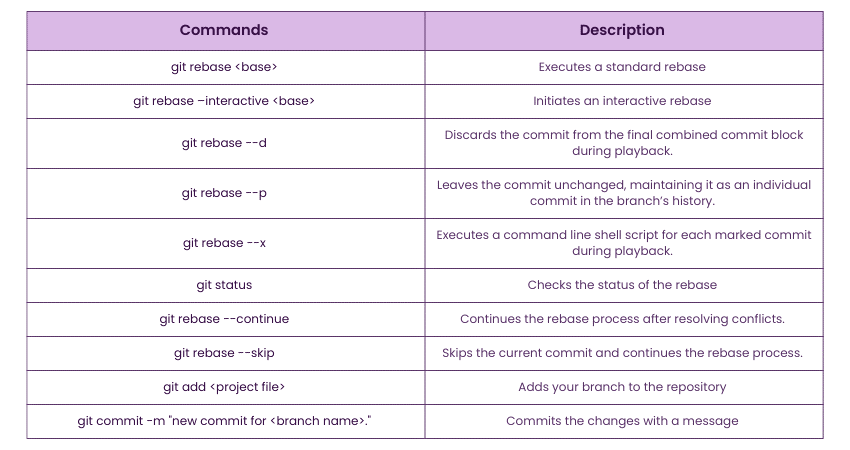
Commands for Git Rebase
Below is an overview of the various commands related to Git Rebase:
How to Perform a Git Rebase?
Performing a Git Rebase can help streamline your commit history and make it easier to follow. Here are the steps to perform this rebase:
1) Preparation: Make sure your working directory is clean and all changes are committed.
2) Starting the Rebase: Initiate the rebase process with git rebase
3) Conflict Resolution: If conflicts arise, Git will pause, allowing you to resolve them
4) Continuing: After resolving conflicts, continue the process with git rebase --continue.
5) Completion: Once all commits are successfully rebased, the process is complete. Verify with git status.
Join our JavaScript and jQuery Training and gain practical experience in creating stunning Web Applications!
Difference Between Git Merge and Rebase
Git merge and rebase are both used to integrate changes from one branch into another, but they do so in different ways. Understanding their differences can help you choose the right strategy for your workflow.

What is Git Pull Rebase?
The ‘git pull –rebase' command fetches changes from a remote branch and then rebases your current branch on top of the fetched branch. When comparing Git Fetch vs Pull, this approach, often preferred over a standard Git Pull command, helps avoid unnecessary merge commits and keeps the project history cleaner.
How to Execute Git Pull Rebase via Command Line?
1) Navigate to Your Repository: Use cd
2) Fetch Changes: Use git fetch to retrieve the latest changes from the remote
3) Pull with Rebase: Execute git pull --rebase
4) Resolve Conflicts: If there are conflicts, resolve them as they appear
5)Continue Rebase: Use Git Rebase --continue until the rebase is complete
Sign up for our Website Design Course and build a portfolio that stands out in the digital world!
Conclusion
Mastering Git Rebase can significantly enhance your version control workflow by maintaining a clean and linear project history. However, it’s important to be aware of situations that may require Resolving Git Merge Conflict when using rebase. By leveraging both Git rebase and merge conflict resolution effectively, you can keep your codebase organised and streamline your development workflow.
Learn from experts and build real-world projects with our App & Web Development Courses – join us now!
Frequently Asked Questions
How do I Rebase my Branch?

To rebase your branch, use the command git rebase , where is the target branch you want to rebase onto. Resolve any conflicts, then use git rebase --continue to complete the process.
Does Rebase Affect all Branches?
No, rebasing only affects the branch being rebased. Other branches remain unchanged. However, if you share a rebased branch before completing the rebase, it can complicate collaboration and lead to potential conflicts.

Richard Harris


Senior Full Stack Developer and Technology Educator
Richard Harris is a highly experienced full-stack developer with deep expertise in both frontend and backend technologies. Over his 12-year career, he has built scalable web applications for startups, enterprises and government organisations. Richard’s writing combines technical depth with clear explanations, ideal for developers looking to grow in modern frameworks and tools.


 If you wish to make any changes to your course, please


