




We may not have the course you’re looking for. If you enquire or give us a call on 01344203999 and speak to our training experts, we may still be able to help with your training requirements.
What is Computer Architecture: Definition, Types and Components
ByNilotpal SarmahLast updated on: 18 September 2026
Computer architecture defines how a computer system is designed and operates, including the CPU, memory, and I/O, and how hardware and software interact to run programs. It helps optimise performance, improve efficiency, and ensure seamless execution of instructions across modern computing systems and applications.

The Main Idea
1. Computer architecture explains how the key parts of a computer system are organised to work together.2. The CPU, memory, storage and input/output units work together to process data and instructions.3. Von Neumann, Harvard and Modified Harvard architectures differ in how instructions and data are organised and accessed.4. RISC and CISC represent different approaches to designing processor instruction sets.5. Emerging developments include specialised AI hardware, quantum computing, neuromorphic computing, memristors and 3D stacked memory.
Think about what happens when you open an application, type a command or save a file. The result appears almost instantly, but behind that simple action, several parts of the computer are working together to process instructions, move data and produce the required output. Computer architecture explains how these elements are designed and organised to work together.
From the CPU and memory to input and output systems, architecture provides the foundation that allows hardware and software to interact. In this blog, we’ll explore what computer architecture is, why it matters, how it works, its major components and architecture types, and the trends influencing modern computer design.
What is Computer Architecture?
Computer architecture is the conceptual design and core operational structure of a computer. It acts as a blueprint for how the system is organised, how its hardware components interact and how instructions are executed. In simple terms, computer architecture means how a computer is built and how it works.
It includes concepts related to the processor, memory and input/output systems, as well as the mechanisms through which instructions and data move across the system. An important concept within architecture is the Instruction Set Architecture (ISA). ISA defines a set of instructions that a CPU can understand and execute and provides an interface between software and hardware.

The Importance of Computer Architecture
Computer architecture plays an important role in determining how computer systems operate and use hardware and software resources. Some key reasons why computer architecture is important include:
1) Improving performance through the efficient use of system resources
2) Supporting system reliability and scalability
3) Enabling technologies such as AI, cloud computing and the Internet of Things (IoT)
4) Supporting security through features such as memory protection and access control
5) Guiding the design and development of modern computing systems
6) Allowing systems to be upgraded or adapted to meet future requirements
Trainer Insight
Modern computer architecture increasingly incorporates specialised hardware for particular workloads. Understanding why different processors and memory designs exist is often more useful than viewing every architecture as a one-size-fits-all solution.
How Does Computer Architecture Work?
Computer architecture works by controlling how data and instructions move and are executed through a computer. When a program runs, the processor fetches, decodes and executes a sequence of instructions. These instructions can be anything like doing calculations, moving data, or saving information. Here's a quick glimpse into how computers process information:
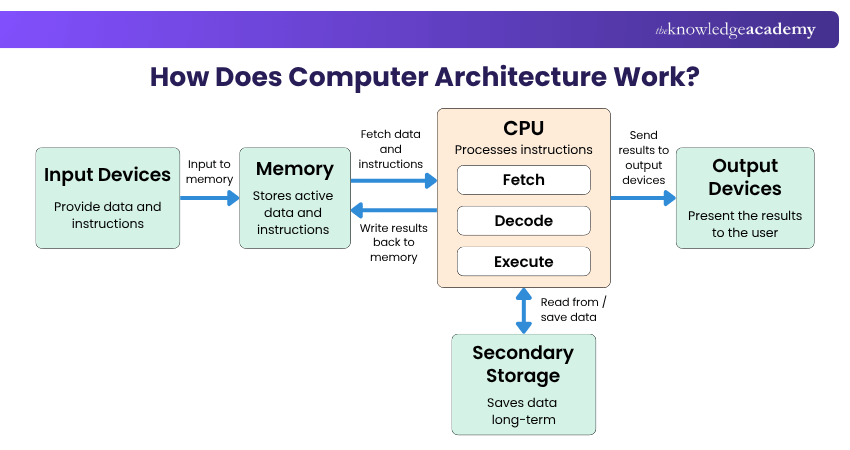
Key Components of Computer Architecture
The key components of computer architecture are as follows:
1) Input Unit
The input unit includes all devices that allow data and instructions to be fed into the computer. Common input devices include a keyboard, mouse, and scanner. This unit converts human-readable data into a machine-readable format.
2) Output Unit
This unit takes processed data from the computer and converts it into a human-readable form. Typical output devices include a monitor, a printer, and speakers.
3) Memory and Storage
Primary memory, such as RAM, holds data and instructions that are actively being used by the processor. Secondary storage, such as Hard Disk Drives (HDDs) and Solid-State Drives (SSDs), retains data for longer-term use. Efficient memory access and administration are critical for performance. Modern systems typically use UEFI firmware to initialise hardware and manage the early stages of the boot process.
4) Central Processing Unit (CPU)
The Central Processing Unit (CPU) is the core of a computer, which is responsible for executing commands and processing data. It includes the Arithmetic Logic Unit (ALU), which handles logical and arithmetic operations; the Control Unit (CU), which manages and directs the activities of the processor and registers, which are small, fast storage areas within the CPU used to temporarily hold data and instructions during processing.
Pro Tip
Avoid looking at the CPU in isolation when understanding system performance. Memory access and data movement also affect how efficiently the components work together.
Major Types of Computer Architecture
Computer architecture can be described using different models and instruction-set approaches. Here are the major types:
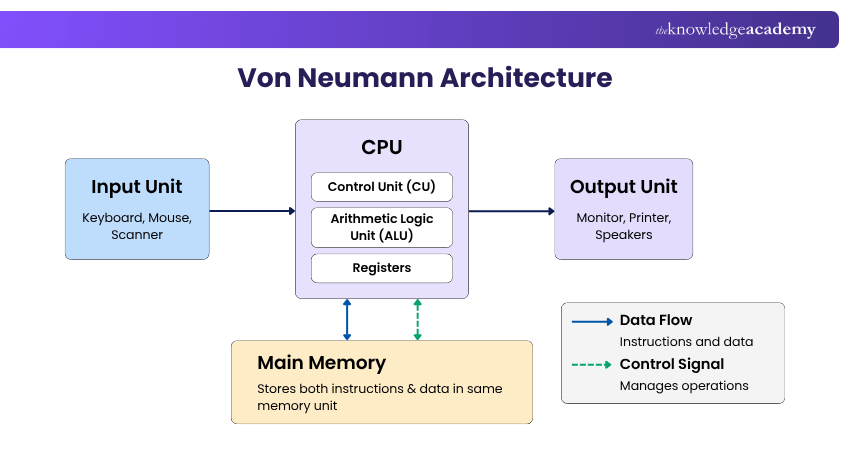
Von Neumann Architecture uses a shared memory for program instructions and data. Instructions are fetched and then executed by the CPU using the same overall memory system. This shared approach simplifies system design, but sharing pathways for instructions and data can limit the rate at which information is transferred between memory and the processor.
2) Harvard Architecture
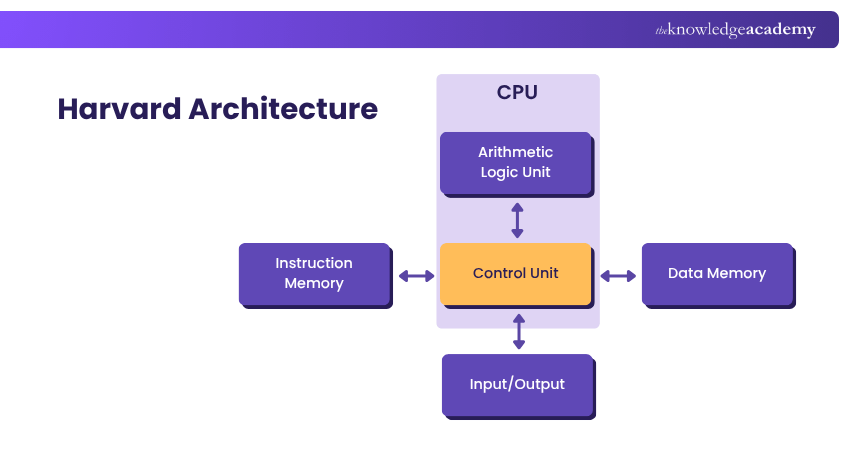
Harvard architecture uses separate memory systems for instructions and data. This separation allows instructions and data to be accessed independently, which can improve the efficiency of data and instruction transfers. It is used in various embedded and microcontroller designs where separate instruction and data paths can support parallel access.
3) Modified Harvard Architecture
Modified Harvard Architecture combines features of Harvard and Von Neumann designs. It typically uses separate instruction and data paths or caches while allowing shared memory or controlled access between instruction and data spaces.
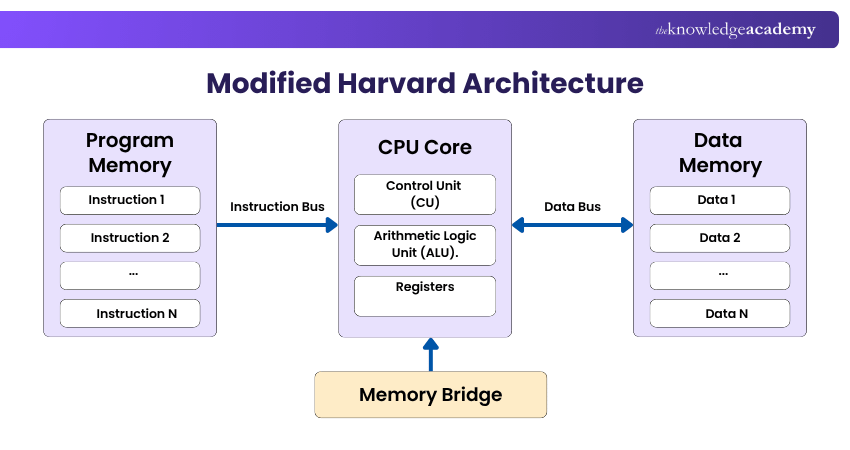
This design supports simultaneous instruction fetching and data access, which can improve processing efficiency. It also provides flexibility for accessing data across memory spaces when required and is commonly used in embedded systems and microcontrollers.
4) RISC Architecture
Reduced Instruction Set Computer (RISC) architectures use a smaller, highly optimised instruction set. The approach emphasises simpler instructions that can be executed efficiently. Many RISC designs use a load/store approach, where memory access is handled through specific instructions. This design can support efficient instruction execution and simplify processor implementation.
5) CISC Architecture
Complex Instruction Set Computer (CISC) architectures provide a larger instruction set, including instructions capable of performing more complex operations. This can reduce the number of instructions needed for some operations because individual instructions may perform more work.
Trainer Insight
Von Neumann and Harvard primarily describe how instructions and data are organised and accessed, while RISC and CISC describe approaches to instruction-set design. They therefore represent different aspects of computer architecture.
Computer Architecture vs Computer Organisation
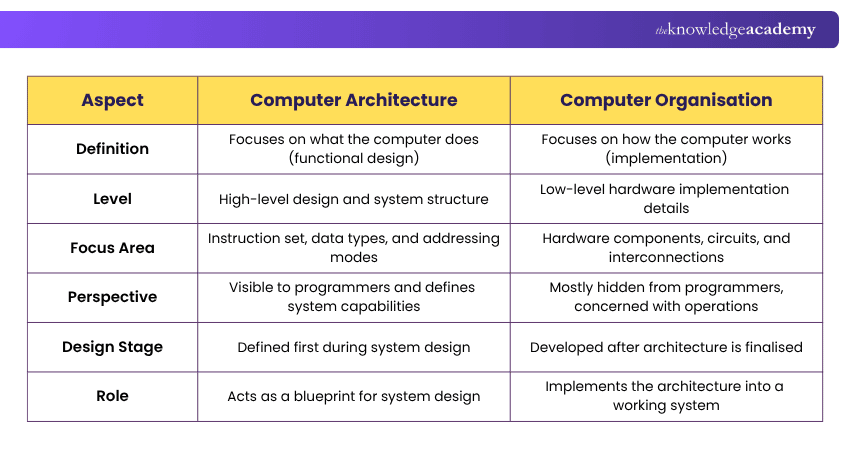
Computer architecture and computer organisation are closely related, but they focus on different aspects of computer system design. Computer architecture focuses on a system's design, functionality and behaviour, while computer organisation concerns how that architecture is implemented through hardware. Here are the key distinctions:
Emerging Trends in Computer Architecture
Computer architecture continues to evolve as computing workloads become more specialised and demanding. Here are some prominent developing areas:
1) Machine Learning and Artificial Intelligence (AI)
Modern computer designs are being customised to speed up Machine Learning (ML) and Artificial Intelligence (AI) tasks. Modern computer designs are being customised to speed up Machine Learning (ML) and Artificial Intelligence (AI) tasks. Specialised hardware like Graphics Processing Units (GPUs) and Tensor Processing Units (TPUs) are designed to accelerate compute-intensive AI workloads, including model training and inference.
2) Quantum Computing
Quantum computing differs significantly from classical computing architecture because it uses qubits rather than conventional bits. It represents a different approach to computation and is being explored for applications including complex simulations and cryptography.
3) Neuromorphic Computing
This model is inspired by the human brain; neuromorphic computing uses architectures to mimic human neural structures. It is being explored for applications such as pattern recognition, sensory processing and energy-efficient AI workloads.
4) Memristors
Memristors are non-volatile elements capable of retaining their resistance state when power is removed. They are being explored in memory and computing architectures where data retention, efficiency and performance are important considerations.
5) 3D Stacked Memory
3D stacked memory places memory components vertically rather than relying entirely on traditional two-dimensional arrangements. The approach can increase bandwidth while reducing latency and power consumption, supporting more compact computing systems.
Quick Check: Test Your Understanding
1) Which component executes instructions?Answer: CPU2) Which architecture separates instruction and data memories?Answer: Harvard Architecture3) What does an ISA define?Answer: The set of instructions a processor can understand and execute.4) Which architecture uses unified main memory with separate instruction and data caches?Answer: Modified Harvard Architecture
So, from Von Neumann and Harvard models to RISC and CISC instruction-set approaches, each concept highlights a different aspect of computer architecture. Understanding these fundamentals also makes it easier to explore emerging developments in modern computing.
Master the skills to identify hardware faults and keep computers running at peak performance. Sign up for the Computer Hardware Troubleshooting Course now!

Nilotpal Sarmah is a Senior Content Writer with 11+ years of overall experience spanning engineering, operations and content development. His technical knowledge and extensive writing experience enable him to simplify specialised topics across IT and Tech, Business Skills, Project Management, Health and Safety, and ISO and Compliance.
View Detail

 If you wish to make any changes to your course, please


