


 Top Rated Course

We may not have the course you’re looking for. If you enquire or give us a call on 01344203999 and speak to our training experts, we may still be able to help with your training requirements.
What is Blue-Green Deployment: All You Need to Know
Richard Harris 16 July 2026Blue-Green deployment is a zero-downtime release strategy that uses two identical environments where traffic switches instantly to enable fast rollbacks. One environment handles live user traffic while the other hosts the updated version. This setup allows teams to minimise deployment risk and service interruptions.

Training Outcomes Within Your Budget!
We ensure quality, budget-alignment, and timely delivery by our expert instructors.
Table of Contents
What if you could deploy new features without worrying about downtime or worried users? For many teams, releases are stressful because even small changes can impact live systems. In such cases, you might need a smarter system to handle your deployments. That's where Blue Green Deployment makes the difference!
It offers a smarter approach by allowing updates to be released safely without interrupting users. In this blog, you’ll learn what Blue-Green Deployment is, how it works, its key benefits, challenges, and when it makes the most sense to use it. Let's dive in!
Table of Contents
1) What is Blue-Green Deployment?
2) How Does the Blue-Green Deployment Process Work?
3) Phases of a Blue-Green Deployment Model
4) Blue-Green Deployment Use Cases
5) CI/CD and Blue-Green Deployments
6) Best Practices for Blue-Green Deployment
7) Blue-Green Deployment vs Rolling Deployment
8) Benefits of Blue-Green Deployment
9) Drawbacks of Blue-Green Deployment
10) What is the Purpose of Blue-Green Deployment in DevOps?
11) What is the Difference Between Blue Green and Canary Deployment?
12) Conclusion
What is Blue-Green Deployment?
Blue Green Deployment is a deployment strategy designed to eliminate downtime and reduce risk during software releases. It works by maintaining two identical production environments, commonly referred to as Blue and Green. The Blue environment runs the current live version of the application and handles all user traffic, while the Green environment hosts the new version which is being prepared for release.
This strategy is widely used in DevOps and continuous delivery to enable smooth software updates, minimise service interruptions, and reduce deployment risks.

How Does the Blue-Green Deployment Process Work?
The process of Blue Green Deployment is straightforward yet highly effective. Here's a step-by-step breakdown:
1) Set Up Parallel Environments: Two identical environments (Blue and Reen) are created.
2) Deploy the New Version to Green: The Green environment gets the updated application.
3) Test the New Version: Quality Assurance (QA) teams and automated scripts validate the functionality in the Green environment.
4) Switch Traffic to Green: Once tested, the live traffic is rerouted from Blue to the Green environment.
5) Monitor for Issues: The Green environment becomes the new live version if everything runs smoothly.
6) Keep or Retire Blue: The Blue environment can be archived or retained for rollback.
By running two environments, businesses can make updates without interrupting User Experience (UX), which is a critical factor for high-availability systems.
Phases of a Blue-Green Deployment Model
The Blue Green Deployment model follows a structured set of phases to ensure smooth, risk-free releases. Each phase plays a key role in preparing, testing, and switching environments without impacting users. Let's check those phases in detail:
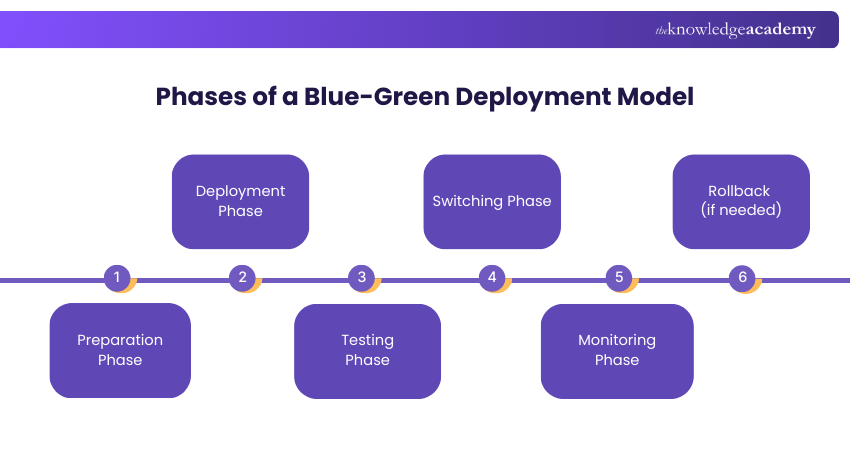
1) Preparation Phase: Infrastructure is duplicated to create parallel environments
2) Deployment Phase: The new software version is deployed in the Green environment
3) Testing Phase: Automated and manual tests ensure that the Green environment is stable
4) Switching Phase: Traffic is rerouted from Blue to the Green environment
5) Monitoring Phase: Performance and user feedback are observed post-switch
6) Rollback (if needed): If issues arise, traffic is reverted to the stable Blue version
Each phase ensures a risk-free deployment experience, making it a favourite strategy for companies prioritising uptime.
Enhance your testing expertise with our Software Testing Training – Sign up now!
Blue-Green Deployment Use Cases
This deployment strategy isn't one-size-fits-all, but it excels in certain scenarios. Let’s explore some key use cases:
1) Rollback Strategies
One of the biggest benefits of Blue-Green Deployment is instant rollback. If something goes wrong in the Green environment, switching back to Blue takes minutes, ensuring minimal service disruption.
Example: LinkedIn quickly rolled back to a stable version after an update caused performance issues.
2) A/B Testing
Companies often use Blue-Green Deployment for A/B testing, where different user segments experience different versions of an application, helping teams make data-driven decisions.
Example: Facebook employs A/B testing to evaluate new UI features before a global rollout.
3) Load Balancing
With Blue-Green Deployment, load balancers efficiently distribute traffic between environments, improving reliability and performance.
Example: Amazon utilises AWS Elastic Load Balancing to manage high traffic and ensure a seamless user experience.
4) Continuous Integration/Continuous Delivery (CI/CD Pipeline)
DevOps teams integrate Blue-Green Deployment within their CI/CD pipelines to ensure frequent, reliable releases with minimal risk.
Example: Spotify uses CI/CD with Blue-Green Deployment for continuous feature rollouts without downtime.
5) Testing in Production
Yes, it sounds risky, but companies like Netflix embrace testing in production using Blue-Green Deployment to simulate real-world traffic on Green before fully switching over.
Example: Netflix simulates real-world traffic on the green environment before switching all users over.
CI/CD and Blue-Green Deployments
CI/CD and Blue Green deployments work together to make software releases faster and more predictable. In a CI/CD pipeline, code changes are automatically built, tested, and prepared for deployment. Blue Green deployment fits naturally into this process by providing two identical environments, allowing new versions to be deployed to the inactive environment without affecting live users.
Once automated tests pass in the CI/CD pipeline, traffic can be switched instantly to the updated environment. By combining CI/CD with Blue-Green deployment, teams can release updates frequently, maintain high reliability, and deliver improvements with confidence.
Learn the basics of unit testing with this JUnit 5 Course – Join now!
Best Practices for Blue-Green Deployment
Let us look at the best practices for Blue-Green Deployment:
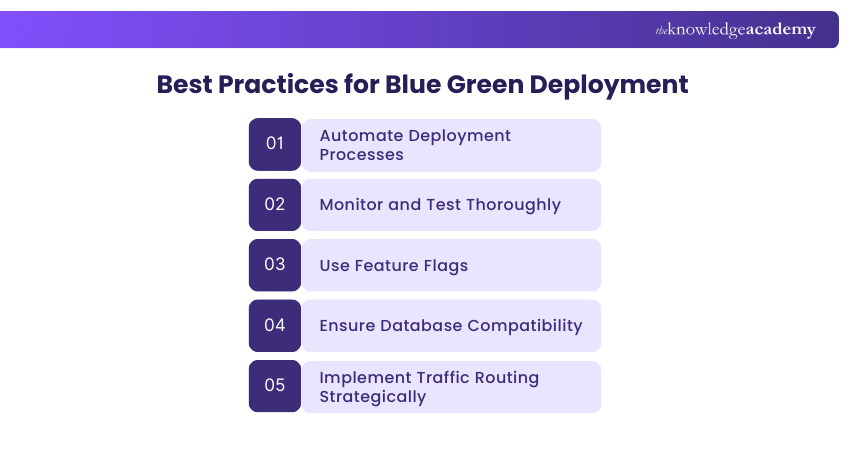
1) Automate Deployment Processes: Automating deployments minimises manual errors and accelerates release cycles.
Example: Netflix uses Spinnaker for automated blue-green deployments, ensuring seamless streaming updates.
2) Monitor and Test Thoroughly: Continuous monitoring helps identify issues before they affect users.
Example: Amazon employs AWS CloudWatch and AWS X-Ray to monitor application performance in real time.
3) Use Feature Flags: Feature flags allow for controlled rollouts and quick rollbacks if necessary.
Example: Facebook utilises Gatekeeper to test new features on a small audience before a full release.
4) Ensure Database Compatibility: Database changes should be backward-compatible to avoid service disruptions.
Example: Twitter implements versioned database schemas to enable both old and new versions to operate concurrently.
5) Implement Traffic Routing Strategically: Gradual traffic shifting helps detect issues early.
Example: Google Search uses traffic shadowing to test updates with real user traffic before a full switch.
Learn to install NUnit and use NUnit attributes in your code with our Unit Testing Course – Join now!
Blue-Green Deployment vs Rolling Deployment
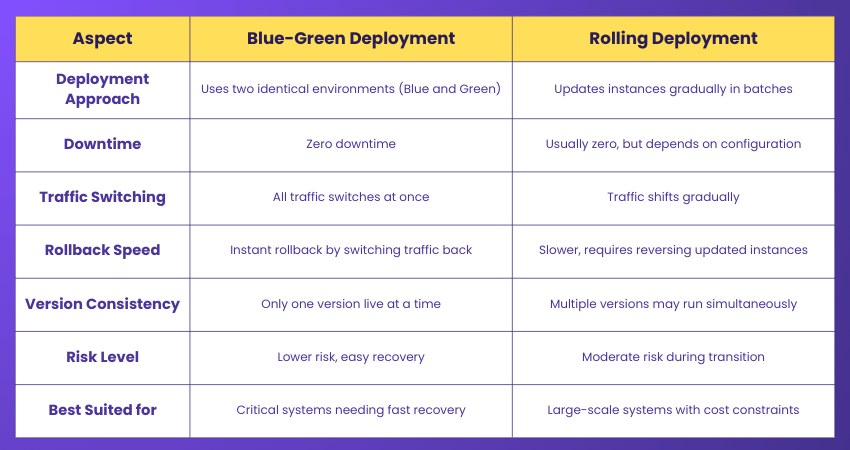
Blue Green Deployment and rolling deployment are both popular strategies for releasing software updates, but they differ in how traffic is managed and how risk is handled. In Blue Green Deployments, two identical environments are maintained, and all traffic switches at once from the old version to the new one.
However, rolling deployment updates the application gradually by replacing instances one at a time while others continue serving users. Let’s check their difference in detail below:
Benefits of Blue-Green Deployment
Here are the following are the benefits of the Blue-Green Deployment:
1) Minimal Downtime: With blue and green environments running simultaneously, traffic switching is instant and seamless. This ensures high availability and prevents service interruptions.
2) Fast Rollbacks: If an issue arises in the green environment, traffic can quickly revert to the blue version, minimising downtime and preventing major disruptions for users.
3) Enhanced Testing and Validation: The green environment allows for real-world testing before impacting users. Developers can verify performance, security, and functionality without affecting live users.
4) Reduced Risk of Deployment Failures: New updates are deployed in isolation, reducing the risk of system-wide failures. If something goes wrong, the stable blue environment remains unaffected.
5) Better User Experience: Users do not experience performance drops or system crashes during deployments. The seamless transition ensures smooth operations, enhancing customer satisfaction.
Drawbacks of Blue-Green Deployment
There are certain drawbacks of blue-green deployment:
1) Infrastructure Cost: Running two identical environments (blue and green) requires additional servers, storage, and network resources, which can significantly increase operational costs, especially for resource-intensive applications.
2) Complex Setup and Management: Managing two parallel environments involves careful orchestration of deployment, monitoring, and traffic routing. Teams need expertise in Automation Tools and cloud infrastructure to handle this effectively.
3) Data Synchronisation Challenges: If both environments interact with the same database, maintaining data synchronisation can be challenging. Schema changes or real-time data updates may lead to inconsistencies, potentially causing data loss or corruption.
4) Not Always Feasible for Large Applications: Monolithic applications with complex dependencies can be difficult to duplicate across two environments. This approach is more suited to microservices architectures, where individual services can be switched separately.
5) Risk of Incomplete Rollbacks: While traffic can be reverted to the blue environment, irreversible database changes can create issues. If a migration or update is applied incorrectly, rolling back to the previous version may not be straightforward.
What is the Purpose of Blue-Green Deployment in DevOps?
The purpose of Blue Green deployment in DevOps is to enable safe, reliable, and zero-downtime software releases. By using two identical environments, teams can deploy new versions without disrupting live users, reducing the risk associated with production changes. This approach ensures service continuity while updates are rolled out.
Another key purpose is to support fast rollbacks and improved release confidence. If a deployment causes issues, traffic can be quickly switched back to the previous environment, minimising impact.
What is the Difference Between Blue Green and Canary Deployment?
Blue-Green Deployment switches all traffic from the old (Blue) environment to the new (Green) environment instantly, ensuring minimal downtime and enabling fast rollbacks. In contrast, Canary Deployment gradually releases updates to a small group of users before a full rollout, reducing risk by monitoring the real-world impact.
Conclusion
Blue-Green Deployment ensures minimal downtime and smooth updates by maintaining two identical environments and shifting traffic seamlessly. It reduces risk, improves User Experience (UX), and speeds up delivery cycles. Whether updating a website or managing a large cloud service, this method keeps users happy, developers stress-free, and deployments smooth.
Gain Expertise in Manual Testing Aligned with Business Goals with our Manual Testing Training – Sign up now!
Frequently Asked Questions
How Does Blue-Green Deployment Compare to Canary Releases?

Blue-Green Deployment switches all traffic at once, ensuring a quick rollback if needed, while Canary Releases gradually shift traffic, allowing controlled testing before full deployment.
Can Blue-Green Deployments be Used with All Types of Applications?
Blue-Green Deployment works best for stateless applications. For stateful applications, additional considerations like database synchronisation and session handling are required to ensure a smooth transition.

Richard Harris


Senior Full Stack Developer and Technology Educator
Richard Harris is a highly experienced full-stack developer with deep expertise in both frontend and backend technologies. Over his 12-year career, he has built scalable web applications for startups, enterprises and government organisations. Richard’s writing combines technical depth with clear explanations, ideal for developers looking to grow in modern frameworks and tools.


 If you wish to make any changes to your course, please


