




We may not have the course you’re looking for. If you enquire or give us a call on + 1-866 272 8822 and speak to our training experts, we may still be able to help with your training requirements.
Microsoft Dynamics 365 Features and Benefits
ByRichard HarrisLast updated on: 17 September 2026
Microsoft Dynamics 365 combines business applications, data and connected workflows to support areas such as sales, customer service, finance and operations.

Consider this scenario:
1) A customer places an order
2) They call support ten minutes later
3) Then they ask your sales team about an upgrade.
That’s three conversations across three departments. But is everyone working with the same information?
When business data sits across disconnected systems, even simple tasks can become complicated. Sales may not see what customer service knows, finance may be waiting for an update and operations may be working with yesterday's information.
This is where the Microsoft Dynamics 365 Features and Benefits come into the picture. By connecting business applications, data and workflows, it can help teams work with greater visibility and coordination.
What is Dynamics 365?
Dynamics 365 is a collection of powerful software applications created by Microsoft to help businesses manage various aspects of their operations more efficiently. It's like a toolkit that includes different tools for tasks like keeping customers satisfied, planning resources and analysing data. These tools are split into smaller apps that can work independently or together as needed.
So, whether a business wants to handle customer relationships better, organise finances, or improve how things flow in the company, Dynamics 365 offers solutions to make it all happen smoothly. It's like having an intelligent helper that understands what businesses need to succeed.

Key Features of Dynamics 365
Dynamics 365 offers a comprehensive suite of capabilities that help organisations streamline operations, improve customer experiences, and drive business growth. Let’s take a closer look at the key features of Dynamics 365:
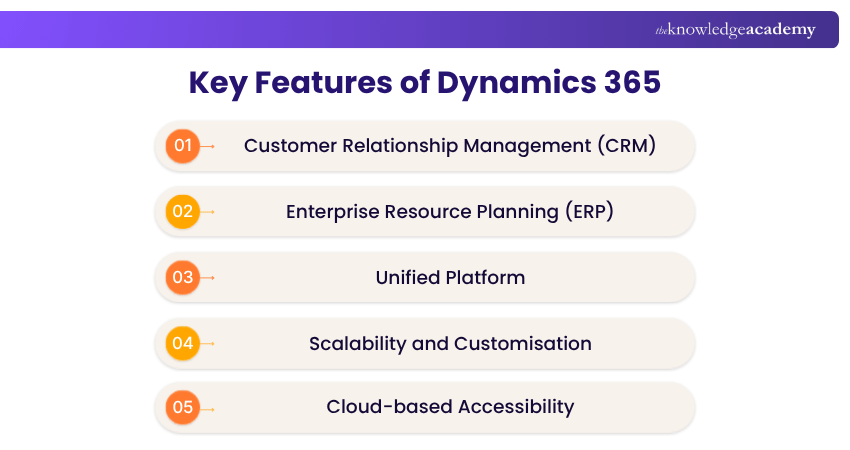
1) Customer Relationship Management (CRM)
Customer Relationship Management is at the heart of Dynamics 365, enabling businesses to manage customer interactions effectively and build long-term relationships. The CRM capabilities include:
a) Sales Management: The sales component of Dynamics 365 helps sales teams manage the entire sales lifecycle, from lead generation to deal closure. It provides tools for tracking customer interactions, managing contacts, forecasting sales performance, and monitoring pipeline activities.
b) Customer Journeys and Marketing Automation: Dynamics 365 Customer Insights - Journeys supports personalised customer journeys, audience segmentation and engagement across channels such as email, text messages and push notifications. These capabilities help organisations respond to customer interactions and deliver more relevant communications.
c) Customer Service: The customer service module equips support teams with tools to deliver exceptional customer experiences. A complete history of customer interactions enables personalised support and faster issue resolution.
2) Enterprise Resource Planning (ERP)
The ERP capabilities within Dynamics 365 help organisations optimise and manage core business processes effectively. It offers the following:
a) Financial Management: The financial management module supports accounting, budgeting, reporting, and compliance activities. It enables businesses to monitor financial performance, manage cash flow, process invoices, maintain ledgers, and generate detailed financial reports for informed decision-making.
b) Supply Chain Management: Dynamics 365 Supply Chain Management helps organisations optimise the movement of goods and services across the value chain. It covers procurement and inventory management to distribution and order fulfilment.
c) Human Resources (HR): Dynamics 365 Human Resources supports workforce management across areas such as employee records, compensation, benefits, leave, talent and performance management.
3) Unified Platform
One of Dynamics 365’s standout advantages is its unified platform, which connects different business applications into a single ecosystem. It offers the following:
a) Data Sharing: Dynamics 365 applications can share information through Microsoft Dataverse and integration capabilities such as dual-write. For example, customer information can move between customer engagement and finance and operations applications when the appropriate integrations are configured.
b) Collaboration: With all departments operating within a connected environment, cross-functional collaboration becomes more effective. Shared access to data improves communication and alignment between teams such as sales, finance, marketing, and customer service.
c) Centralised Management: Microsoft provides administrative tools for managing Dynamics 365 environments, users and settings. However, some security roles, permissions and application-specific configurations are managed within the relevant environments or applications.
Lead the future of logistics and operations with Dynamics 365. Sign up for our Microsoft Dynamics 365 Supply Chain Management - Functional Consultant MB330 Course now!
4) Scalability and Customisation
Dynamics 365 is designed to grow with businesses and adapt to their unique requirements. Its capabilities include:
a) Modular Approach: Organisations can implement only the applications they need and expand their Dynamics 365 environment as business demands evolve. This flexible approach helps optimise costs while supporting future growth.
b) Customisation: The platform can be customised to align with specific workflows, processes, and business objectives. Through configurable fields, workflows, dashboards, and automation tools, businesses can tailor the system to their operational needs with minimal coding effort.
5) Cloud-Based Accessibility
As a cloud-powered solution, Dynamics 365 delivers flexibility, accessibility, and reduced maintenance overhead. Its capabilities include:
a) Remote Access: Users can securely access Dynamics 365 from any location with an internet connection, enabling remote work and fostering collaboration across distributed teams.
b) Service Updates: Microsoft provides regular platform, application and security updates for cloud-based Dynamics 365 services. Update schedules and deployment processes vary across Dynamics 365 applications, and some new features may require configuration or activation.
c) Scalability: The cloud-based platform allows organisations to expand their Dynamics 365 environment as requirements change. Businesses can add applications, users and capabilities according to their needs, subject to the applicable licensing and capacity requirements.
Pro Tip
Before selecting Dynamics 365 applications, map your existing processes and identify where information becomes duplicated, delayed or disconnected. These problem areas can help you determine which capabilities and integrations should be prioritised.
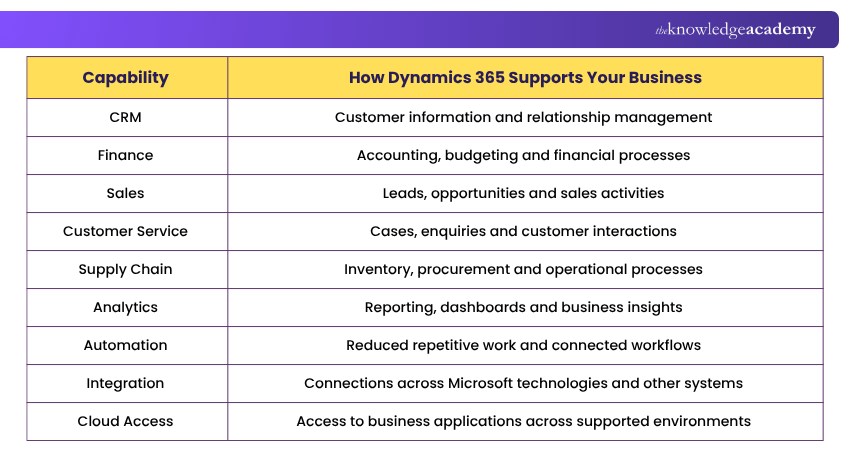
Here are the key Dynamics 365 features at a glance:
Benefits of Dynamics 365
Dynamics 365 offers enhanced productivity, streamlined processes, data-driven insights, improved customer engagement, and potential cost savings. Its flexible design adapts to evolving business needs. Here are its main benefits:
1) Improved Productivity
Automation and connected workflows can reduce repetitive manual activities. Employees may spend less time entering the same information into multiple systems or switching between disconnected processes. This can allow teams to spend more time on customer interactions, analysis and other higher-value activities.
2) Streamlined Business Processes
Connected applications can help information move more consistently between business functions. For example, sales, customer service, finance and operations teams may be able to work with related information instead of maintaining separate versions of the same data. This can support more coordinated workflows and reduce unnecessary duplication.
3) Better Data and Decision-making
Reporting and analytics capabilities can give organisations greater visibility into business performance. Instead of relying entirely on disconnected reports, teams can analyse relevant information and identify patterns or changes that require attention. The quality of these insights, however, still depends on reliable data and appropriate analysis.
4) Improved Customer Experiences
Connected customer information can help sales and service teams understand previous interactions and respond with greater context. This can support more consistent communication across customer touchpoints and help organisations tailor interactions to customer requirements.
Shape the future of ERP with our Microsoft Dynamics 365 Business Central Developer MB820 Training – Sign up today!
5) Greater Flexibility as Business Needs Change
Business requirements do not always remain the same. Dynamics 365 can give organisations greater flexibility to adapt their business systems as processes, teams and operational needs evolve. This can reduce the need to replace an entire platform simply because one area of the organisation changes or expands.
6) Potential Cost and Operational Efficiencies
Cloud-based services can reduce some requirements for maintaining on-premises infrastructure, while automation can reduce repetitive administrative work. However, Dynamics 365 should not automatically be considered a cost-saving solution. Licensing, implementation, integration, customisation, training and ongoing administration should all be considered when assessing its overall value.
Pro Tip
Don't evaluate Dynamics 365 by counting features. A smaller, well-designed implementation can be more useful than deploying functionality teams do not need.
Is Dynamics 365 a Good Fit for Your Business?
Dynamics 365 can support organisations with different requirements, but that does not mean every organisation needs the same applications or configuration. Before choosing the platform, consider the following:
1) Business Requirements: Identify the processes you want to improve and the problems the system needs to solve.
2) Existing Technology: Consider whether Dynamics 365 needs to integrate with Microsoft technologies or other business systems already in use.
3) Scalability: Determine whether your requirements are likely to expand or become more complex over time.
4) Customisation: Assess whether standard capabilities are sufficient or whether significant configuration, integration or development will be required.
5) Budget: Consider more than licensing costs. Implementation, migration, integration, customisation, support and training can also affect the overall investment.
6) Data Requirements: Review the quality, location and structure of existing business data before planning migration or integration.
7) User Adoption: Consider whether employees have the training, support and processes required to use the system effectively.
Unlock the full potential of Dynamics 365 with our comprehensive Microsoft Dynamics 365 Training – supercharge your business today!
Common Challenges When Implementing Dynamics 365
Dynamics 365 can bring different business processes and data together, but successful implementation requires careful planning. The challenges an organisation faces will depend on its existing systems, data, processes and implementation scope. Here are some common areas to consider:
1) Data Migration: Moving information from existing systems into Dynamics 365 can be complex, particularly when data is duplicated, incomplete or stored in different formats. Organisations should clean, map and validate their data before and during migration.
2) Integration Complexity: Dynamics 365 may need to exchange data with existing business applications and services. While integration options are available, connecting multiple or highly customised systems can require additional planning.
3) Customisation Requirements: Dynamics 365 can be configured and extended around business requirements. However, extensive customisation can increase implementation complexity and create additional maintenance requirements.
4) User Adoption: Even a well-configured system may deliver limited value if employees struggle to use it effectively. Clear communication, role-specific training and ongoing support can help users adopt the platform more successfully.
5) Implementation and Ongoing Costs: The overall cost of Dynamics 365 can extend beyond licensing. Organisations may also need to account for implementation, data migration, integrations, customisation, training, administration and ongoing support when planning their investment.
6) Change Management: Implementing Dynamics 365 may change established processes, responsibilities and ways of working. A structured approach to change management can help organisations communicate, prepare employees and manage the transition more effectively.
Trainer Insight
Treat Dynamics 365 implementation as a business transformation project rather than simply a software installation. Clear requirements, reliable data, appropriate configuration and user involvement can significantly influence the success of the implementation.
Master CRM and drive business success with Microsoft Dynamics 365. Sign up for our range of Microsoft Dynamics 365 Courses today!

Richard Harris creates technically detailed yet accessible content on full-stack development, software architecture and modern development frameworks. His knowledge of frontend and backend technologies helps developers understand how scalable, efficient and high-performing applications are designed and built.
View Detail

 If you wish to make any changes to your course, please


