




We may not have the course you’re looking for. If you enquire or give us a call on 01344203999 and speak to our training experts, we may still be able to help with your training requirements.
Benefits of VPN for Online Privacy and Security
ByJohn DaviesLast updated on: 23 October 2026
A Virtual Private Network (VPN) helps protect internet traffic, safeguard sensitive information and support secure remote connections. This blog explores the key advantages of using a VPN, including data protection, safer access to public Wi-Fi and reduced online tracking.
The Gist
1. A VPN creates an encrypted connection that helps protect data as it travels across networks.2. Hiding your public IP address can improve privacy, but websites may still identify you through other tracking methods.3. Remote-access and site-to-site VPNs help organisations connect employees, offices and private network resources.4. VPNs may help with certain content restrictions or activity-based ISP throttling, although results are not guaranteed.5. Choosing a trustworthy VPN provider and following safe online practices are essential for effective protection.
Have you connected to public Wi-Fi at an airport while checking your emails or accessing an important document? Although the network is convenient, you may not know who operates it or how securely it is configured. How can you bring another layer of protection to your connection? A Virtual Private Network (VPN) offers one solution.
It creates an encrypted connection between your device and a VPN server, helping protect traffic from local network monitoring while masking your public IP address from the websites you visit. However, VPNs offer more than personal privacy. This blog explores the key benefits of using a VPN in detail. So, let's get started!
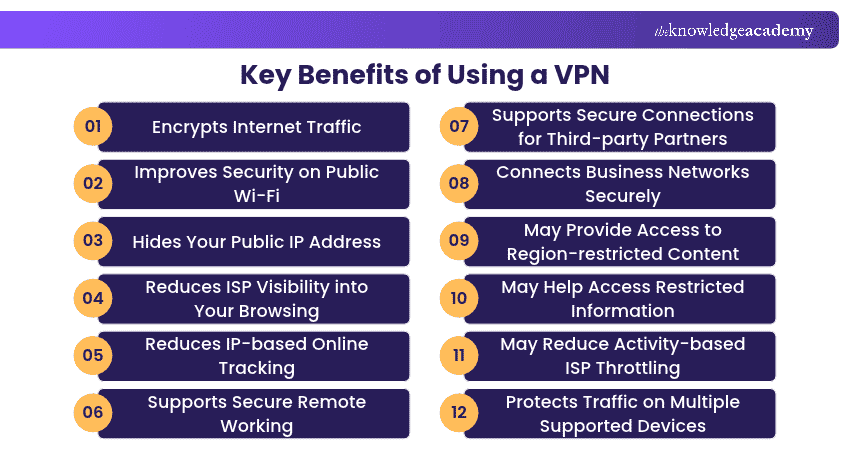
Key Benefits of Using a VPN
VPNs can support online privacy, protected connectivity and access to remote resources. However, their benefits vary depending on the service, network environment and configuration. Here are some important benefits to consider:
1) Encrypts Internet Traffic
One of the primary benefits of a VPN is that it encrypts traffic between the device and the VPN server. This makes the protected data difficult for unauthorised parties monitoring that connection to read. For example, on a shared network, this encryption helps prevent other users from inspecting information transmitted through the VPN tunnel.
This is particularly useful when accessing sensitive information over networks you do not fully control. However, VPN encryption does not automatically protect information after it leaves the VPN tunnel or prevent users from visiting malicious websites.
2) Improves Security on Public Wi-Fi
Public Wi-Fi networks are convenient but may not provide the same level of security as a well-managed private network. A VPN provides an additional encrypted layer that helps protect traffic from interception or monitoring on the local network.
For example, someone working from a hotel or café may use a VPN to reduce the information exposed to other users or the network operator. Although HTTPS already encrypts communication with secure websites, a VPN can provide additional protection for traffic travelling through the local network.
3) Hides Your Public IP Address
When connecting directly to a website, your public IP address is generally visible to that website. A consumer VPN routes traffic through its server, meaning websites typically see the VPN server's IP address rather than your original public IP address.
This can make it harder for websites to infer your approximate location from your internet connection. For example, someone connecting through a VPN server in another city may appear to be accessing a website from that server's location. However, websites can still identify users through account logins, cookies or other methods.
Pro Tip
Check whether your VPN provides Domain Name System (DNS) and Internet Protocol (IP) leak protection. These features help prevent certain connection details from being exposed outside the VPN tunnel.
4) Reduces ISP Visibility into Your Browsing
An Internet Service Provider (ISP) normally carries your internet traffic and may have access to information about your connections. Using a properly configured VPN reduces the visibility your ISP has into traffic carried through the encrypted tunnel. For example, the ISP may observe that you are connected to a VPN server without being able to directly inspect the destinations of individual requests passing through that tunnel.
However, an ISP may still observe connection metadata, including the VPN server address, connection times and traffic volumes. The VPN provider may also have access to information about your activity, making its privacy practices an important consideration.
5) Reduces IP-based Online Tracking
Websites and advertising services may use IP addresses as one signal to understand visitors and their approximate locations. By masking your original public IP address, a VPN can reduce the effectiveness of certain IP-based tracking methods.
For example, a user accessing websites through the same VPN server may appear to be using the server's shared public IP address rather than their home connection. However, VPNs do not automatically block cookies, browser fingerprinting, advertising identifiers or tracking through signed-in accounts.
6) Supports Secure Remote Working
VPNs can help employees establish protected connections when working outside their organisation's premises. A business remote-access VPN may allow authorised users to connect to a company network through an encrypted tunnel. For example, an employee working from home may use an organisation-approved VPN to access internal systems that are not available directly over the public internet.
Trainer's Insight
Choose the right VPN architecture. A consumer VPN typically routes internet traffic through a provider's servers, while an enterprise remote-access VPN connects authorised users to private organisational resources.
7) Supports Secure Connections for Third-party Partners
Organisations can use appropriately configured VPNs to provide authorised suppliers, contractors or business partners with encrypted connectivity to specific internal systems. This can support collaboration with external organisations while helping protect information transmitted over external networks.
For example, a company may allow an external IT maintenance provider to connect through an approved VPN to perform authorised system updates. However, access should be limited to the resources required and protected by suitable authentication, permissions and monitoring.
Gain practical knowledge of system and network protection with Introduction to System and Network Security Course – Sign up today!
8) Connects Business Networks Securely
Organisations with multiple locations may use site-to-site VPNs to create encrypted connections between separate networks. Unlike a personal VPN, a site-to-site VPN commonly connects network gateways rather than requiring each individual employee to establish a separate connection.
For example, a company with offices in London, Manchester and Birmingham might use site-to-site VPN connections to support communication between its private office networks. This arrangement can help protect traffic passing between locations over external networks.
9) May Provide Access to Region-restricted Content
Some websites and online services make content available only in certain geographical regions. A consumer VPN allows users to connect through servers in different locations, which may change the region a website associates with their connection. For example, a user may appear to be connecting from another country when using a VPN server located there.
However, streaming platforms and other services may detect VPN connections or enforce location restrictions using additional methods. Users should also consider applicable laws and service terms before accessing region-restricted content.
10) May Help Access Restricted Information
Some networks or regions restrict access to particular websites, applications or information sources. In certain circumstances, a VPN may help users access information that would otherwise be unavailable through their normal connection. For example, a network may restrict certain online resources based on their destination, while an encrypted VPN tunnel may allow permitted traffic to follow a different route.
However, sophisticated network filtering can detect or block VPN traffic. Some countries also regulate or restrict VPN use. Therefore, a VPN should not be presented as a guaranteed way to bypass censorship, organisational policies or network restrictions.
11) May Reduce Activity-based ISP Throttling
Internet throttling occurs when an ISP deliberately reduces connection speeds under certain conditions. Some throttling policies distinguish between traffic types or applications. Because a VPN encrypts traffic within its tunnel, it may make this type of classification more difficult. For example, a VPN could help in some situations where traffic-specific restrictions depend on information hidden by VPN encryption.
However, it cannot eliminate throttling caused by overall data limits, network congestion or restrictions applied to all VPN traffic. A VPN may also decrease connection speed because of additional routing and encryption overhead.
12) Protects Traffic on Multiple Supported Devices
Many VPN services support different devices and operating systems, including laptops, smartphones and tablets. This allows users to protect eligible network traffic across several devices, subject to the provider's compatibility and connection limits. For example, someone may use a VPN on their laptop while working remotely and on their smartphone when connecting to public Wi-Fi.
Some VPN solutions also support compatible routers, allowing traffic from connected devices to pass through a configured VPN connection. However, protection depends on correct configuration, supported devices and the traffic actually routed through the VPN.
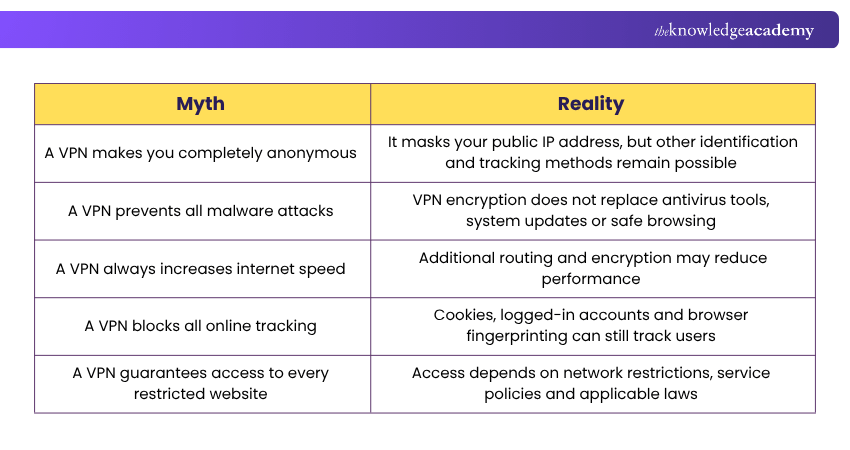
Myth vs Reality: Common VPN Misconceptions
Several misconceptions surround VPNs, particularly regarding privacy, anonymity and online security. The following table clarifies some common myths and explains what VPNs can realistically provide.
So, VPNs offer several benefits, including encrypted internet traffic, improved connection privacy and protected remote access to organisational resources. They can also support communication between business networks and provide flexibility in certain online activities. However, their effectiveness depends on proper configuration, reliable providers and the user's specific requirements.
Stay vigilant and strengthen your cyber resilience with Cyber Security Awareness Training – Join now!

John Davies creates security-focused content that helps organisations understand digital risks and establish appropriate safeguards. His practical explanations connect regulatory expectations, governance principles and security controls with wider organisational priorities.
View Detail

 If you wish to make any changes to your course, please


