


We may not have the course you’re looking for. If you enquire or give us a call on 01344203999 and speak to our training experts, we may still be able to help with your training requirements.
Benefits of Microsoft Copilot: 13 Ways It Can Improve Your Work
ByThe Knowledge AcademyLast updated on: 14 November 2026
Explore how Microsoft Copilot supports more efficient work across Microsoft 365. This blog covers 13 practical benefits, including content creation, data analysis, communication, collaboration and responsible AI use.
In This Blog
1. Microsoft Copilot helps reduce time spent on repetitive workplace tasks.2. Copilot works across Microsoft 365 apps, including Word, Excel, Outlook and Teams.3. It supports content creation, data analysis, email management and meeting follow-ups.4. Copilot can use accessible workplace data to provide more context-aware assistance.5. Clear prompts, careful review and proper data handling help users get better results.
“Have you finished the report?”
“Almost. I still need to analyse the data, summarise the findings and prepare the presentation.”
“Have you tried Microsoft Copilot?”
What if some of those time-consuming tasks could become easier? Microsoft Copilot can assist with drafting content, analysing information and organising everyday work. But how much of a difference can it make? This blog takes a closer look at the benefits of Microsoft Copilot and how it can support your daily tasks. So, read on!
How Can Microsoft Copilot Improve Your Work?
Microsoft Copilot offers AI-powered capabilities that support everyday workplace activities, from managing information to creating content and analysing data. Understanding these benefits can help you identify where Copilot could make your work more efficient.
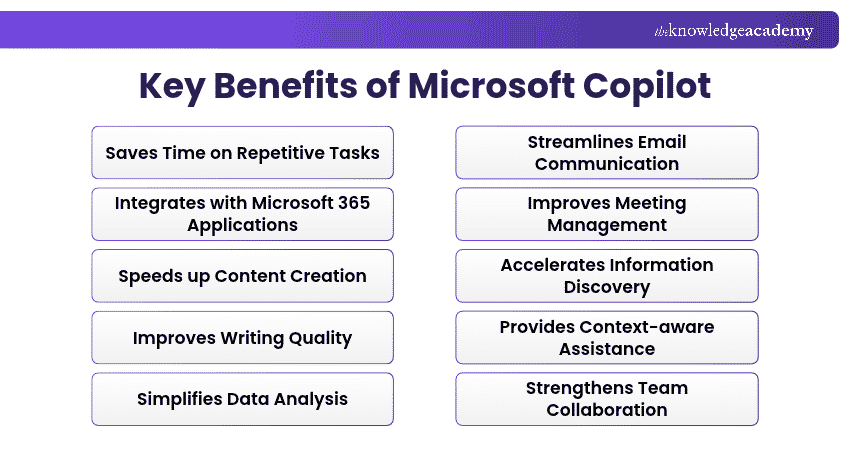
1) Saves Time on Repetitive Tasks
Microsoft Copilot helps reduce the manual effort involved in routine activities such as summarising documents, preparing reports and organising information. By assisting with these tasks, it allows users to dedicate more time to responsibilities requiring critical thinking and decision-making.
For example, instead of manually reviewing a lengthy report, employees can ask Copilot to summarise its key findings and identify important information. This provides a useful starting point for further review.

2) Integrates with Microsoft 365 Applications
One of the key benefits of Microsoft Copilot is its integration with familiar Microsoft 365 applications, including Word, Excel, PowerPoint, Outlook and Teams.
This allows users to access supported AI capabilities directly within their existing workflows, reducing the need to switch between different tools.
For example, employees can use Copilot in Word to work on documents, Excel to explore data and PowerPoint to prepare presentations. Available features depend on their subscription and organisational settings.
Quick Self-Check
Which Microsoft 365 apps do you use most often during your workday? Identifying repetitive tasks in Word, Excel, PowerPoint, Outlook or Teams can help you decide where Copilot may provide the most value.
3) Speeds up Content Creation
Creating reports, presentations and other professional documents can require considerable time, particularly when starting with a blank page.
Microsoft Copilot helps users generate initial drafts, develop content outlines and organise information into structured formats. These suggestions provide a foundation that users can review and improve.
For example, a Marketing Executive can use Copilot to draft a campaign proposal based on specific objectives and audience requirements, then refine the content before sharing it.
4) Improves Writing Quality
Microsoft Copilot helps improve existing written content by suggesting changes to tone, clarity, structure and wording.
Users can request revisions to make their writing more concise, professional or suitable for a particular audience. This is especially useful when preparing business communications and formal documents.
For example, an employee can ask Copilot in Word to rewrite a lengthy project update into a clearer, more concise summary for senior management.
Reviewing the suggestions ensures the final message remains accurate and communicates the intended meaning.
5) Simplifies Data Analysis
Analysing spreadsheets can be challenging when working with large datasets, complex formulas and multiple performance indicators.
Microsoft Copilot in Excel helps users generate formulas, explore data patterns, identify trends and create charts or PivotTables. These capabilities make it easier to examine information and understand important findings.
For example, a Sales Manager can ask Copilot to compare monthly revenue figures, highlight changes in performance and present the results visually.
Users should verify AI-generated formulas, calculations and interpretations before relying on them for business decisions.
Trainer's Pro Tip
When analysing data with Copilot in Excel, specify the metric, period or comparison you want to explore. More precise instructions can help produce more focused and relevant results.
6) Streamlines Email Communication
Managing a busy inbox often involves reading lengthy conversations, identifying important messages and preparing responses.
Microsoft Copilot in Outlook helps summarise email threads, draft replies and suggest improvements to written communication. This can reduce the time spent reviewing discussions and composing routine emails.
For example, an employee returning from leave can use Copilot to summarise a lengthy project-related email thread and identify important decisions or outstanding questions.
This makes it easier to understand the conversation before preparing an appropriate response.
7) Improves Meeting Management
Microsoft Copilot helps users prepare for meetings, follow discussions and identify important outcomes in Microsoft Teams.
Depending on the meeting settings and available features, it can summarise discussions, highlight key decisions and suggest follow-up actions. This helps participants review important information without relying entirely on manual notes.
For example, after a project meeting, a Team Leader can use Copilot to review the main discussion points and identify tasks requiring attention, provided the relevant post-meeting information is available through the organisation's configured meeting features.
Available meeting insights depend on the user's licence, meeting policies, transcription or recap settings, and the meeting content available to Copilot.
Use Copilot across Word, Excel, PowerPoint, Teams, and Outlook with our Draft, Analyse, and Present with Microsoft 365 Copilot MS-4018 Training – Join now!
8) Accelerates Information Discovery
Finding specific information across multiple files and conversations can interrupt work and delay important tasks.
With the appropriate Microsoft 365 Copilot licence and permissions, Copilot helps users locate relevant information, summarise documents and extract important details from supported sources. This reduces the need to manually search through extensive content.
For example, an employee preparing a project update can ask Copilot to find information about recent milestones or outstanding activities from accessible workplace documents.
This provides a faster starting point for gathering information, although important details should still be checked against their original sources.
9) Provides Context-aware Assistance
Microsoft Copilot can use relevant workplace information to generate responses that reflect the user's tasks and working context.
In supported Microsoft 365 experiences, licensed users can receive responses grounded in relevant Microsoft Graph data they are authorised to access, including emails, documents, chats and other organisational information. This can make responses more relevant to their work.
For example, a Project Manager can ask Copilot to prepare a progress summary using accessible project documents and recent updates.
This capability depends on available data, user permissions, licensing and organisational settings.
10) Strengthens Team Collaboration
Effective teamwork depends on sharing information, understanding responsibilities and keeping everyone informed about progress. Microsoft Copilot supports collaboration by helping teams summarise discussions, organise shared information and prepare project updates.
For example, team members can use Copilot in Teams to review important points from a channel discussion and identify decisions or tasks that need attention.
This helps colleagues catch up on relevant conversations and maintain a shared understanding of project activities, particularly when working across different schedules.
11) Supports Creativity and Idea Generation
Developing fresh ideas can be difficult when employees face creative blocks or need to explore several possible approaches. Microsoft Copilot supports brainstorming by generating suggestions, presenting alternative perspectives and helping users develop initial concepts.
For example, a Marketing Team can ask Copilot to suggest campaign themes for a product launch, explore different messaging approaches and develop variations for different audiences.
These suggestions can encourage creative thinking while allowing employees to evaluate and refine ideas using their professional judgement.
12) Supports Learning and Skill Development
Microsoft Copilot can support professional learning by explaining unfamiliar concepts, providing examples and helping users explore new topics. Employees can ask follow-up questions, request simpler explanations or explore how particular concepts apply to their work.
For example, someone learning Excel can ask Copilot to explain how a formula works, provide an example and describe when it might be useful.
This makes Copilot a helpful supplementary learning resource, although users should verify technical information and practise applying what they learn.
13) Supports Enterprise Data Protection
Microsoft Copilot supports enterprise data protection by working with existing Microsoft 365 security, privacy and compliance controls in eligible organisational environments.
It respects existing user permissions, meaning employees can access organisational information through Copilot only when they already have the necessary access rights. Organisations must therefore review and manage existing permissions to prevent unintended access to sensitive information.
For example, a user without permission to view a confidential document should not gain access to its contents simply by asking Copilot about it.
For organisational Copilot experiences covered by enterprise data protection, Microsoft states that prompts, responses and data accessed through Microsoft Graph are not used to train foundation models. Organisations should still maintain appropriate permissions, data governance and security policies.
How to Get the Most Out of Microsoft Copilot?
Understanding how to use Copilot effectively can help you obtain more relevant results and apply its capabilities to everyday work. Here are five practical tips:
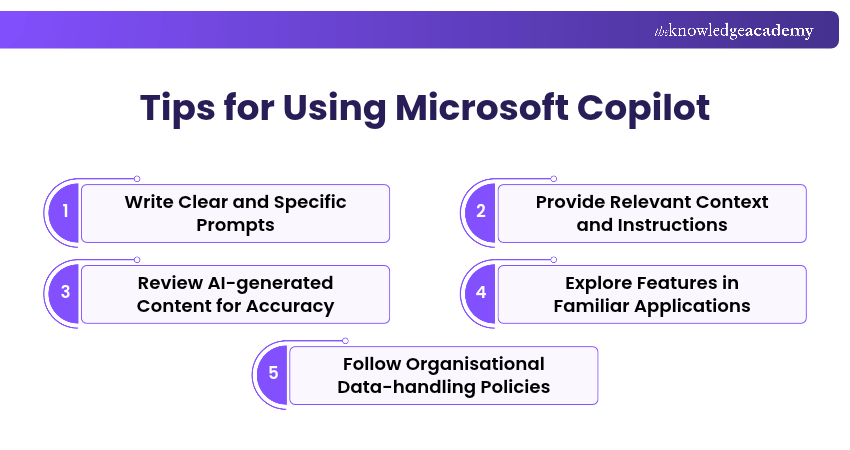
1) Write Clear and Specific Prompts: Explain exactly what you need, whether it is summarising a document, drafting an email or analysing data. Clear instructions help Copilot understand the expected outcome.
2) Provide Relevant Context and Instructions: Include details such as the intended audience, purpose, preferred tone and output format to make responses more relevant to your requirements.
3) Review AI-generated Content for Accuracy: Check facts, calculations, references and recommendations before using Copilot-generated information in professional work.
4) Explore Features in Familiar Applications: Experiment with supported Copilot capabilities in Word, Excel, PowerPoint, Outlook and Teams to identify where they provide the greatest value.
5) Follow Organisational Data-handling Policies: Use Copilot in accordance with your organisation's security requirements and avoid sharing confidential information through unauthorised tools or accounts.
Quick Check:
Copilot gives you a formula, summary or recommendation that looks useful. What should you do before using it in your work?
A. Use it immediatelyB. Check it for accuracy and relevanceC. Share it without reviewingD. Assume the source is always correctAnswer: B. Check it for accuracy and relevance before relying on it.
Microsoft Copilot helps improve workplace productivity by simplifying routine tasks, supporting content creation, analysing data and strengthening communication. By understanding its capabilities and using them responsibly, individuals and teams can work more efficiently, make better use of available information and focus on higher-value responsibilities.
Turn ideas into productive outcomes with our Transform Ideas into Action with Copilot Chat MS4004 Course – Register now!

The Knowledge Academy develops accessible learning content across Project Management, IT, Cybersecurity, Data Science, Business Analysis, HR, Accounting and Finance, Leadership and Health and Safety. Its resources combine subject research with clear explanations to help professionals build practical knowledge across a wide range of disciplines.
View Detail

 If you wish to make any changes to your course, please


