




We may not have the course you’re looking for. If you enquire or give us a call on 01344203999 and speak to our training experts, we may still be able to help with your training requirements.
Benefits of Kubernetes
ByLily TurnerLast updated on: 17 September 2026
Kubernetes helps organisations deploy, scale and manage containerised applications more efficiently through automated scaling, self-healing, portability, improved resource utilisation and more.
Let’s say an application suddenly receives several times its normal traffic while one of its workloads fails and your development team needs to release an important update. Handling each problem manually can quickly become a headache. Kubernetes is designed to automate many of these operational tasks.
It can scale workloads, replace unhealthy containers, distribute traffic and support controlled application updates. However, Kubernetes’ real value comes from helping teams manage containerised applications as their infrastructure and workloads become more complex. We’ll explore this and more such Benefits of Kubernetes in detail in this blog. Let’s dive in!
What is Kubernetes?
Kubernetes, commonly known as K8s, is an open-source platform for orchestrating containerised applications. Containers package an application with the components it needs to run consistently across environments. Kubernetes provides a management layer that helps organisations deploy, scale and operate those containers across clusters of machines.
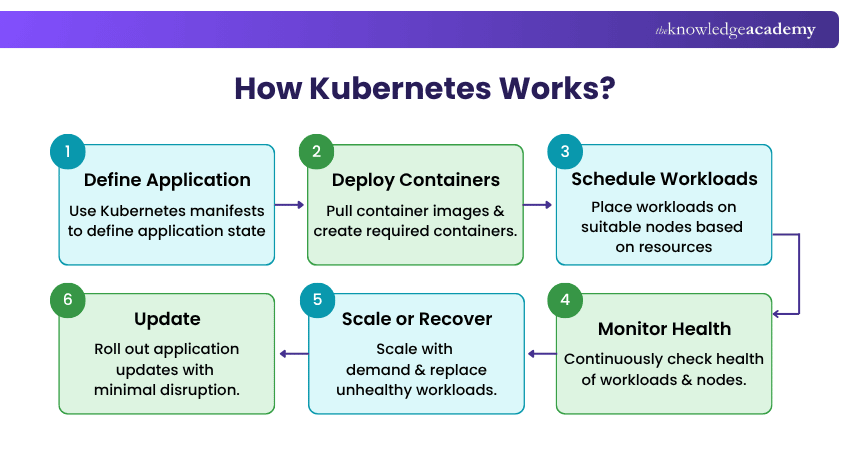
Instead of manually managing individual containers, teams can define how applications should run and allow Kubernetes to help maintain that desired state. It supports capabilities such as workload scheduling, scaling, service discovery, load balancing, health checks, self-healing and controlled application updates.

Top Benefits of Kubernetes
The Benefits of Kubernetes extend beyond basic Container Management. Its automation and orchestration capabilities can help organisations improve application availability, deployment consistency, infrastructure utilisation and operational flexibility. Here are the major advantages:
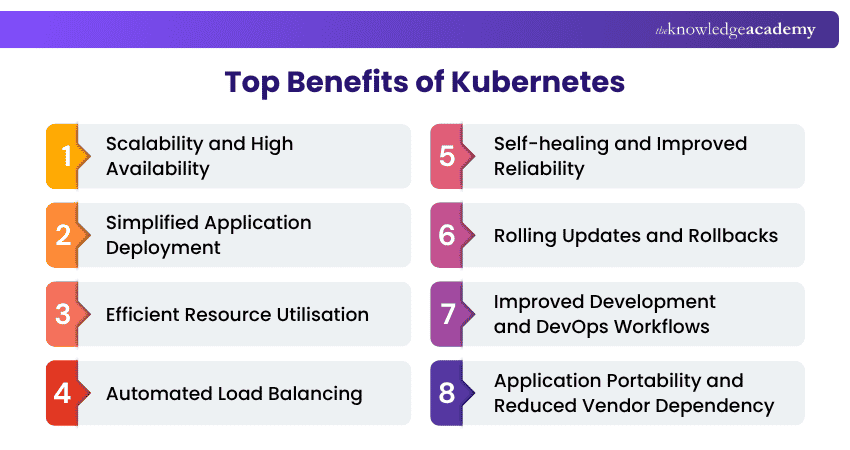
1) Scalability and High Availability
Applications rarely experience exactly the same workload throughout the day. Demand may increase suddenly during product launches, promotions or periods of high user activity. Kubernetes helps applications respond to changing demand by scaling workloads according to defined requirements and available metrics. It can:
a) Increase or decrease the number of running pods
b) Distribute workloads across available nodes
c) Replace workloads when failures occur
d) Help maintain application availability during changing demand
e) Reduce the need for repetitive manual scaling
2) Simplified Application Deployment
Deploying applications manually across different environments can create inconsistencies and configuration errors. Kubernetes uses a declarative approach. Teams define the desired application configuration and Kubernetes works to maintain that state.
This can help:
a) Standardise application deployments
b) Reduce repetitive deployment tasks
c) Improve consistency between environments
d) Support automation within CI/CD workflows
e) Make application changes easier to manage
3) Efficient Resource Utilisation
Infrastructure resources can easily become underused or overprovisioned when workloads are managed manually. Kubernetes allows teams to define CPU and memory requests and limits for workloads. Its scheduler can then consider those requirements when placing workloads across available infrastructure.
Combined with appropriate scaling strategies, this can help organisations:
a) Use computing resources more effectively
b) Reduce unnecessary overprovisioning
c) Match resources more closely to workload requirements
d) Improve infrastructure utilisation
e) Support better cost management
Pro Tip
Review CPU and memory requests, limits and actual utilisation regularly. Kubernetes provides mechanisms for efficient resource management, but teams still need to configure workloads carefully.
4) Automated Load Balancing
Applications running across multiple pods need a reliable way to direct network traffic. Kubernetes Services can provide stable access to groups of pods and distribute traffic across appropriate application instances. This helps:
a) Prevent individual application instances from becoming overloaded
b) Maintain access as pods are created or replaced
c) Support scalable application architectures
d) Reduce manual traffic-management effort
Load balancing therefore works alongside scaling and self-healing to support application availability.
Gain cutting-edge skills to create strong Kubernetes environments with our Architecting with Google Kubernetes Engine Training. Sign up now!
5) Self-healing and Improved Reliability
One of the most useful Kubernetes capabilities is its ability to respond automatically when workloads become unhealthy. Kubernetes continuously evaluates application and infrastructure state. Depending on the failure, it can restart containers, replace failed pods or reschedule workloads. This helps:
a) Detect unhealthy workloads
b) Restart failed containers
c) Replace failed pods
d) Reschedule workloads when necessary
e) Reduce routine manual recovery work
Trainer Insight
Self-healing does not mean an application cannot fail. It should complement resilient application architecture, monitoring, backups and appropriate disaster recovery planning.
6) Rolling Updates and Rollbacks
Updating an application does not necessarily require replacing every running instance at once. Kubernetes Deployments support rolling updates, allowing application instances to be updated progressively. This approach can:
a) Reduce disruption during application releases
b) Maintain application availability while instances are replaced
c) Control how quickly a new version is introduced
d) Support rollback when a deployment needs to be reverted
Real-world Example
Imagine an online retailer releasing a new version of its checkout application during a busy period. Instead of replacing every instance simultaneously, Kubernetes can progressively introduce the new version while keeping application instances available. If the deployment encounters problems, the team can roll back to a previous deployment revision.
7) Improved Development and DevOps Workflows
Kubernetes can provide a consistent platform for deploying containerised applications across development, testing and production environments. It can also integrate with CI/CD processes and wider development tooling. This can help teams:
a) Automate deployment activities
b) Standardise application environments
c) Support frequent application releases
d) Improve collaboration between development and operations
e) Manage microservices-based applications more consistently
8) Application Portability and Reduced Vendor Dependency
Kubernetes can run across different infrastructure environments, including public cloud and on-premises infrastructure. Because teams can use Kubernetes as a common orchestration layer, containerised workloads may be easier to operate consistently across different environments. Potential advantages include:
a) Greater infrastructure flexibility
b) Support for hybrid and multi-cloud approaches
c) More consistent application deployment practices
d) Easier movement of suitably designed workloads
e) Reduced dependence on infrastructure-specific orchestration approaches
However, Kubernetes does not automatically make every application completely portable. Applications may still depend on cloud-specific databases, networking services, storage or other external services.
9) Enhanced Security and Access Control
Kubernetes has mechanisms that organisations can use to strengthen workload and cluster security. These include Role-based Access Control (RBAC), Secrets, Network Policies and workload security controls.
When configured appropriately, these capabilities can help teams:
a) Restrict access to Kubernetes resources
b) Control communication between workloads
c) Manage sensitive configuration data
d) Apply security policies consistently
e) Reduce unnecessary privileges
Security still requires careful configuration and ongoing management. Kubernetes provides security mechanisms, but organisations remain responsible for using them appropriately.
Pro Tip
Apply the principle of least privilege. Give users and workloads only the permissions they require and regularly review access as your Kubernetes environment changes.
10) Improved Observability and Monitoring
Managing distributed applications requires visibility into application and infrastructure health. Kubernetes exposes information that can be used by monitoring, logging and observability tools to understand cluster and workload behaviour. Teams can monitor:
a) Resource consumption
b) Workload health
c) Application availability
d) Logs and events
e) Performance trends
Readiness, liveness and startup probes can also help Kubernetes determine whether containers are ready to receive traffic or require corrective action.
Discover and harness the full potential of Kubernetes on AWS. Sign up for our Running Containers on Amazon Elastic Kubernetes Service EKS Training now!
11) Extensive Kubernetes Ecosystem
Kubernetes has developed a broad ecosystem around areas such as networking, monitoring, security, storage, deployment automation and configuration management. This gives organisations flexibility when building platforms around Kubernetes and allows them to integrate tools according to their technical requirements. A broad ecosystem can also make it easier to extend Kubernetes as infrastructure requirements evolve.
How Does Kubernetes Benefit Different Teams?
The Benefits of Kubernetes extend across different teams involved in building, deploying and maintaining applications. Here’s how it benefits them:
1) Developers
Kubernetes can provide Developers with a more consistent way to deploy containerised applications across environments. This can reduce environment-related issues and support faster, more predictable application releases. Key benefits include consistent environments, easier deployments and support for microservices.
2) DevOps Teams
For DevOps teams, Kubernetes can automate repetitive operational tasks such as deployment, scaling and application updates. It also integrates with CI/CD workflows, helping teams build more automated delivery processes. Key benefits include deployment automation, CI/CD integration and improved collaboration.
3) Operations Teams
Operations teams can use Kubernetes capabilities such as health checks, self-healing, resource management and scaling to maintain application reliability with less routine manual intervention. Key benefits include automated recovery, workload visibility and resource management.
4) Businesses
At an organisational level, Kubernetes can support scalable applications and provide greater flexibility across cloud and on-premises environments. Better resource management can also help businesses use infrastructure more efficiently. Key benefits include scalability, infrastructure flexibility and improved resource utilisation.
KEY INSIGHT
The popular streaming platform Netflix runs many of its microservices on Kubernetes-managed clusters.
When Should You Use Kubernetes?
The Benefits of Kubernetes can be significant, but that does not mean every application requires it. Kubernetes becomes particularly useful as container environments grow in scale and operational complexity. You may consider Kubernetes when:
1) You operate multiple containerised applications or microservices
2) Workloads need to scale according to changing demand
3) High availability and automated recovery are important
4) Applications are deployed frequently
5) Teams use automated CI/CD workflows
6) You require consistent deployment across different infrastructure environments
7) Manual Container Management is becoming difficult
For a small application with limited traffic and simple deployment requirements, a less complex container platform may be sufficient.
Become the driving force behind modern software delivery. Sign up for our DevOps Certification Training today!

Lily Turner transforms complex data concepts into structured resources for aspiring and established data professionals. Her writing demonstrates how analytical methods and emerging technologies can be used to investigate problems, generate insights and support informed decisions.
View Detail

 If you wish to make any changes to your course, please


