




We may not have the course you’re looking for. If you enquire or give us a call on 01344203999 and speak to our training experts, we may still be able to help with your training requirements.
Benefits of Cloud Computing
ByLily TurnerLast updated on: 17 September 2026
Cloud Computing benefits can include scalability, cost flexibility, collaboration, resilience and faster access to technology.
Let’s say an online retailer is preparing for its biggest sale of the year. Suddenly, it needs:
More computing capacity to handle increased website traffic
Reliable access to systems for employees working from different locations
Additional storage as customer and transaction data grows
Backup and recovery capabilities if something goes wrong
The ability to reduce resources again when demand returns to normal
Building physical infrastructure for every temporary peak can be expensive and time-consuming, which is exactly the problem Cloud Computing solves. Instead of owning and maintaining that capacity year-round, organisations can simply access computing resources when they're actually needed.
And scalability is just the beginning. From collaboration and disaster recovery to global reach, let's explore the major Benefits of Cloud Computing and where each one can create real business value.
What is Cloud Computing?
Cloud Computing is a transformative technology that allows users to access and store data, applications and services over the internet. Instead of relying entirely on computing infrastructure located and managed on the organisation's premises, businesses can obtain resources from cloud service providers. It can support activities ranging from data storage and business applications to analytics and Artificial Intelligence (AI).

Key Benefits of Cloud Computing
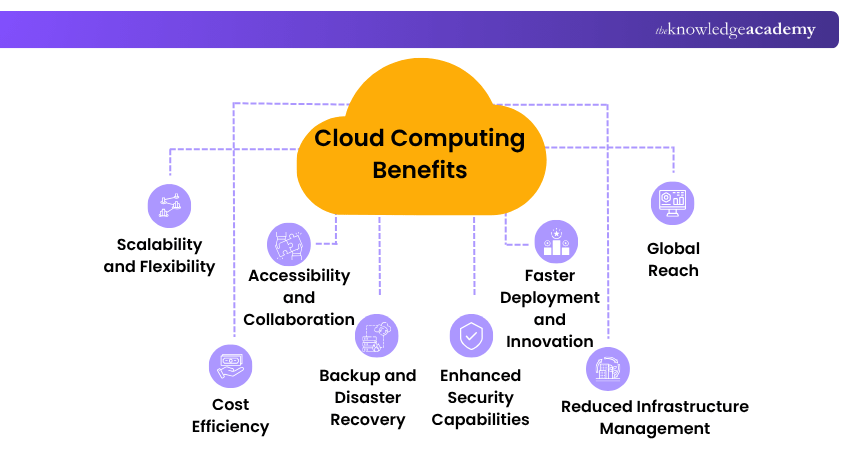
Cloud Computing can provide several operational and strategic advantages when services are selected and managed appropriately. Let’s explore them in detail:
1) Scalability and Flexibility
One of the most significant Benefits of Cloud Computing is the ability to adjust resources as requirements change. For example, an e-commerce business may require additional computing resources during a major sale but considerably less capacity during quieter periods. Cloud infrastructure can allow resources to scale according to these changing requirements.
Example: An e-commerce business can increase cloud resources during a major sale and scale them down when traffic returns to normal.
2) Cost Efficiency
Cloud Computing can reduce the need for large upfront investments in servers and other physical infrastructure. Depending on the service, businesses may pay according to usage or selected capacity. However, Cloud Computing does not automatically make IT cheaper. Costs depend on factors such as usage, architecture, data transfer, storage and resource management.
Example: A startup can use cloud servers instead of purchasing and maintaining expensive physical infrastructure, paying for resources as needed.
Pro Tip
Pay-as-you-go pricing can improve cost flexibility, but unused or oversized resources can increase expenditure. Remove resources that no longer provide value.
3) Accessibility and Collaboration
Cloud-based applications can enable authorised users to access information and services from different locations and supported devices. This can help distributed teams work with shared documents, applications and project information without requiring everyone to be in the same physical location.
Example: A project team across different locations can access shared cloud files, make updates and collaborate without exchanging multiple document versions.
AI and the cloud are the perfect partnership for your business' future. Learn about it in our Certified Artificial Intelligence (AI) for Cloud Professionals Training - Join today!
4) Backup and Disaster Recovery
Cloud services can form part of an organisation's backup, recovery and business continuity arrangements. Data and workloads can potentially be replicated or backed up across infrastructure, helping organisations restore information and services following certain failures or disruptions.
Example: If a company's local systems fail, cloud-based backups can help it restore critical data and resume operations more quickly.
Pro Tip
Do not assume that storing information in the cloud automatically provides complete disaster recovery. Define recovery requirements, maintain appropriate backups and test whether critical systems and data can actually be restored.
5) Enhanced Security Capabilities
Cloud services can provide security capabilities such as encryption, access management, monitoring and security updates. The exact controls available depend on the provider and service selected. Cloud security is also a shared responsibility. Providers protect particular parts of the underlying cloud environment, while customers retain responsibilities that can include identities, permissions, configurations, applications and data.
Example: A business can use cloud-based encryption, access controls and monitoring to help protect sensitive customer information.
6) Faster Deployment and Innovation
Cloud Computing can help organisations provision technology resources without waiting for physical infrastructure to be purchased and installed. Development teams can use cloud resources to build, test and deploy applications while organisations can experiment with services without necessarily establishing equivalent infrastructure internally.
Example: A development team can quickly create a cloud test environment for a new application without waiting for physical servers to be purchased and installed.
7) Reduced Infrastructure Management
Depending on the cloud service model, some infrastructure management responsibilities can shift from the customer to the cloud provider. Some services may also receive platform or software updates automatically, which can reduce manual IT workload and give teams quicker access to patches and improvements.
Example: A business using a managed cloud database can rely on the provider for some underlying infrastructure maintenance, thus allowing its IT team to focus on other priorities.
Pop Quiz
A company moves sensitive customer data to the cloud. The cloud provider encrypts the infrastructure and regularly applies security updates. However, several former employees still have active accounts with access to the data.
What is the most significant security issue?
A) The cloud provider needs stronger encryptionB) The company has inadequate identity and access managementC) The company needs additional cloud storageD) The data should be moved back to on-premises infrastructureCorrect Answer: B) The company has inadequate identity and access management
8) Global Reach
Cloud infrastructure can help organisations deploy services in multiple geographic regions without establishing their own physical data centres in every location. For applications serving users across different countries or regions, placing workloads closer to users can also help address latency and availability requirements.
Example: An online business serving customers in Europe and Asia can deploy its application across different cloud regions to bring services closer to users.
9) Potential Sustainability
Cloud Computing can potentially support sustainability objectives by allowing computing resources to be shared and utilised at scale. However, using cloud infrastructure does not automatically make an organisation environmentally sustainable.
Environmental impact depends on factors such as provider energy sources, data centre efficiency, resource utilisation and workload design. Organisations should therefore evaluate sustainability using measurable information rather than assuming every cloud workload has a lower environmental impact.
Example: An organisation can consolidate workloads onto shared cloud infrastructure instead of operating underused physical servers, potentially improving resource utilisation.
When Should Businesses Consider Cloud Computing?
Cloud Computing can be worth considering when existing technology infrastructure cannot efficiently support changing business requirements. Common situations include:
1) Demand Changes Frequently: Organisations need computing capacity that can increase or decrease according to demand.
2) Teams Work Across Locations: Employees need access to applications and information from multiple locations.
3) Infrastructure Takes Too Long to Provision: Teams need faster access to computing resources for projects, development or testing.
4) Business Continuity Needs Improvement: Organisations want additional options for backup, replication and recovery.
5) International Expansion is Planned: Applications need to support users across different geographic locations.
6) Infrastructure Management is Becoming Complex: Organisations want to use managed services for some technology responsibilities.
Here’s a cloud readiness checklist to help you out with the right decision:
Before moving a workload to the cloud, ask:
What business problem are we trying to solve? Does demand for this workload change significantly? What are our security and compliance requirements? Where can our data be stored? What availability and recovery requirements do we have? Have we compared expected cloud and existing infrastructure costs? Do we have the skills required to manage the cloud environment? How easily could the workload be moved or changed later?
A clear answer to these questions can help organisations evaluate whether cloud adoption is appropriate for a particular workload.
Turn the cloud into your career advantage with our range of Cloud Computing Courses. Register today!

Lily Turner transforms complex data concepts into structured resources for aspiring and established data professionals. Her writing demonstrates how analytical methods and emerging technologies can be used to investigate problems, generate insights and support informed decisions.
View Detail

 If you wish to make any changes to your course, please


