


We may not have the course you’re looking for. If you enquire or give us a call on 01344203999 and speak to our training experts, we may still be able to help with your training requirements.
15 Best Project Scheduling Tools to Consider
ByThe Knowledge AcademyLast updated on: 13 November 2026
Explore 15 project scheduling tools, including Microsoft Planner, TeamGantt, monday.com and Asana. Compare features such as Gantt charts, task dependencies, resource allocation and timeline tracking to find software suited to different project requirements.

What You'll Learn
1. Understand how project scheduling tools help organise tasks, deadlines and project timelines.2. Explore the scheduling capabilities of 15 tools, from Gantt charts to resource planning.3. Learn how milestones, task dependencies and timeline views support project scheduling.4. Discover how to choose suitable software based on project complexity, resources and budget.
Ever felt frustrated with missed project deadlines and chaotic workflows? The right project scheduling software can help you organise tasks, track deadlines and coordinate work more effectively. But with so many options available, how do you find one that fits your project requirements?
From visual timelines and task dependencies to resource planning and reporting, different tools offer different strengths. Whether you're managing a small team or coordinating complex projects, this blog explores 15 project scheduling tools to help you make an informed choice.
15 Best Project Scheduling Tools
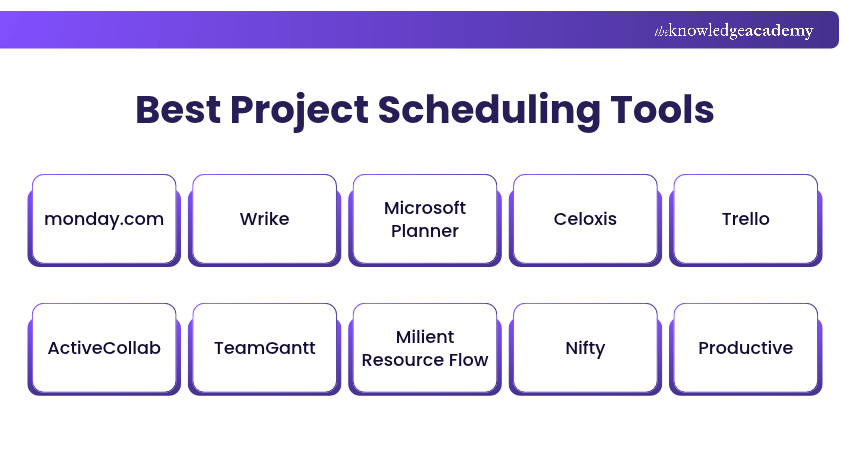
Project scheduling tools help Project Managers organise activities, manage deadlines and monitor progress through a centralised platform. Here are 15 options worth exploring:
1) monday.com
Looking for a user-friendly tool to plan, schedule and track projects? monday.com offers a visual work management platform that helps teams organise tasks and coordinate activities. Its customisable boards allow users to assign responsibilities, set deadlines and monitor progress.
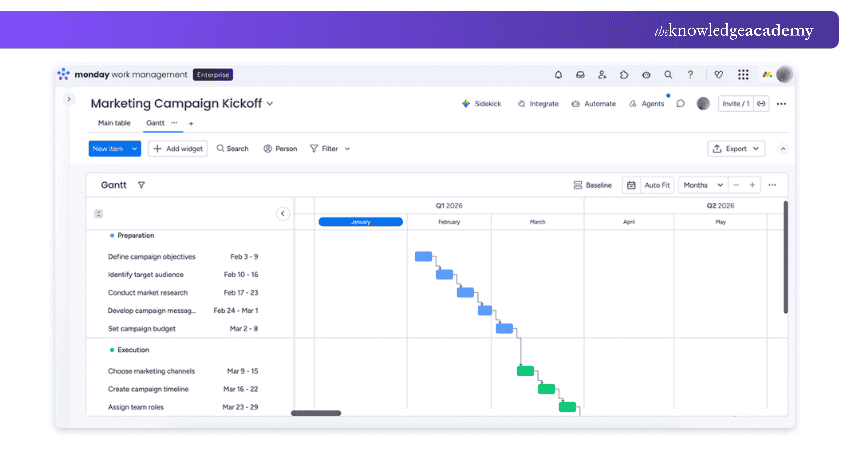
Timeline and Gantt views help teams visualise project schedules, while dependency features on supported plans support the planning of interconnected activities. The platform also provides dashboards, automation and integrations to help reduce repetitive work and improve collaboration.
Key Scheduling Features:
a) Visual timelines and Gantt views
b) Task dependencies and deadlines on supported plans
c) Customisable workflows and dashboards
d) Team collaboration and progress tracking
Best Suited For: Teams seeking flexible, visual project planning with collaborative scheduling features.

2) Wrike
Wrike is a cloud-based project management platform designed to help teams plan, manage and track projects from a central workspace. Its scheduling capabilities include interactive Gantt charts, task dependencies and project timelines.
These features help Project Managers organise activities, identify scheduling conflicts and adjust plans when priorities change. Wrike also offers dashboards, workload management and reporting features, making it useful for teams coordinating several projects simultaneously.
Key Scheduling Features:
a) Interactive Gantt charts
b) Task dependencies and milestones
c) Workload and resource management
d) Project dashboards and reporting
Best Suited For: Teams managing complex projects with interconnected tasks and changing deadlines.
3) Microsoft Planner
Microsoft Planner is a project and task management platform that helps teams organise activities, assign responsibilities and track deadlines. Its premium plans offer advanced scheduling capabilities, including Gantt-style timelines, task dependencies and milestones.
These features help Project Managers understand task relationships, adjust schedules and identify activities that may affect project completion. Microsoft Planner also supports critical path analysis and workload management on eligible plans, making it useful for teams coordinating interconnected project activities.
Key Scheduling Features:
a) Gantt-style timelines
b) Task dependencies and automatic scheduling
c) Critical path analysis and milestones
d) Team workload management
Best Suited For: Teams using Microsoft 365 that need collaborative task management and advanced project scheduling capabilities.
4) Celoxis
Celoxis is a project and portfolio management platform that supports project planning, execution and resource allocation. Its scheduling capabilities help Project Managers create project timelines, manage task relationships and monitor progress against deadlines.
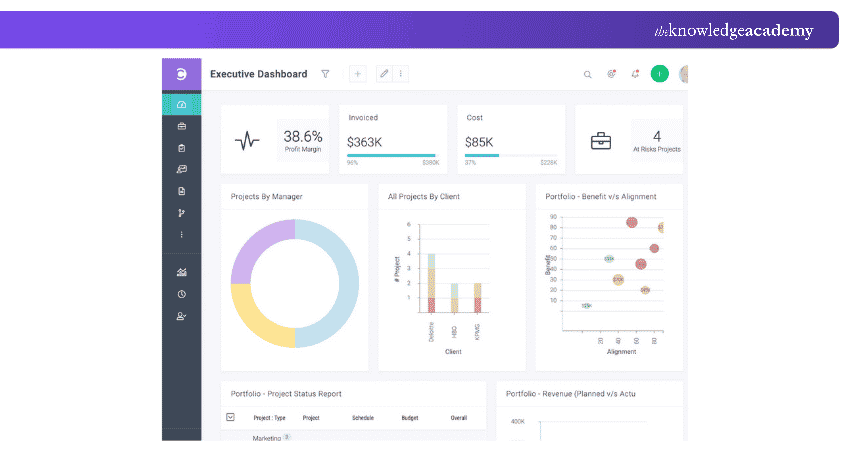
Gantt charts provide a visual representation of scheduled activities, making it easier to understand how project tasks connect. Celoxis also provides resource management and reporting tools, helping organisations coordinate people and activities across multiple projects.
Key Scheduling Features:
a) Gantt charts and task scheduling
b) Task dependencies and milestones
c) Resource allocation and workload planning
d) Project dashboards and reporting
Best Suited For: Organisations managing complex projects that require detailed scheduling and resource coordination.
5) Trello
Trello is a visual work management tool that helps teams organise tasks using Kanban-style boards. Users can create cards, assign responsibilities, set due dates and move tasks between workflow stages. This makes it easy to understand what needs attention, what is in progress and what has been completed.
Trello also offers Calendar and Timeline views on Premium and Enterprise plans, providing additional ways to visualise scheduled work. However, teams requiring advanced dependency management or critical path analysis may need a more specialised scheduling platform.
Key Scheduling Features:
a) Kanban boards and task cards
b) Due dates and task assignments
c) Calendar and Timeline views on Premium and Enterprise plans
d) Workflow automation and collaboration
Best Suited For: Small teams and projects requiring straightforward task planning and visual progress tracking.
Pro Tip
Use your scheduling software to compare planned progress with actual completion dates. Regular reviews can reveal emerging delays, highlight tasks requiring attention and help teams adjust priorities before deadlines are affected.
6) ActiveCollab
ActiveCollab is a project management platform that helps teams plan activities, coordinate assignments and manage client projects. It allows users to organise tasks, establish deadlines and monitor project progress through different views.
Its Timeline view displays activities in a Gantt-style format, helping Project Managers understand task durations and dependencies. The platform also supports team collaboration, file sharing and time tracking, making it useful for organisations managing multiple client deliverables.
Key Scheduling Features:
a) Project timelines and task dependencies
b) Start dates, deadlines and assignments
c) Task rescheduling
d) Time tracking and team collaboration
Best Suited For: Agencies and service teams coordinating tasks, timelines and client deliverables.
7) TeamGantt
TeamGantt is an online project scheduling platform that helps teams plan, organise and track project activities using interactive Gantt charts. It allows Project Managers to set task dates, establish dependencies and track milestones through a visual timeline.
Its drag-and-drop scheduling features make it easier to adjust project plans when deadlines change. TeamGantt also provides critical path visibility, workload management and project baselines with availability depending on the selected plan, helping teams monitor progress and identify potential scheduling conflicts.
Key Scheduling Features:
a) Interactive Gantt charts and timelines
b) Task dependencies and milestones
c) Drag-and-drop task scheduling
d) Critical path analysis and project baselines
Best Suited For: Teams managing projects that require detailed scheduling, task dependencies and timeline tracking.
8) Milient Resource Flow (Formerly Hub Planner)
Milient Resource Flow is a resource management and scheduling platform that helps organisations allocate people across projects. Formerly known as Hub Planner, it provides visibility into team availability, resource bookings and workloads, helping managers identify scheduling conflicts and balance capacity.
Users can plan assignments, adjust resource allocations and monitor work across different projects. The platform also supports resource reporting and time-management capabilities, making it useful for organisations managing shared resources and changing project demands.
Key Scheduling Features:
a) Visual resource scheduling
b) Team availability and allocation
c) Capacity planning and reporting
d) Resource bookings and associated time-management features
Best Suited For: Organisations managing shared resources across multiple projects.
9) Nifty
Nifty, also known as NiftyPM, is a collaborative project management platform that brings project planning, task management and communication into one workspace. Its milestone-based approach helps teams organise work around important deliverables and monitor progress.
Timeline views allow Project Managers to visualise activities and understand how tasks contribute to project deadlines. Nifty also supports task assignments, team discussions and document management, helping teams maintain visibility throughout the project lifecycle.
Key Scheduling Features:
a) Project milestones and timelines
b) Task assignments and deadlines
c) Visual project progress tracking
d) Team collaboration and documentation
Best Suited For: Teams seeking a combination of milestone tracking, scheduling and collaborative project management.
Learn how to plan, track and deliver projects efficiently with industry-leading Project Management Tool Training – Sign up now!
10) Productive
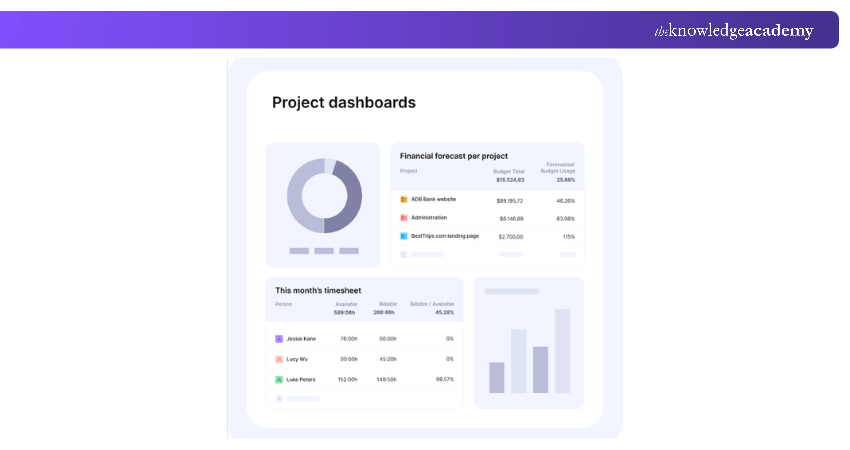
Productive is an agency management platform that brings project planning, resource scheduling, time tracking and budgeting into one system. It helps managers coordinate project activities while considering team availability and workload.
Resource planning features provide visibility into assignments, allowing organisations to understand how available capacity aligns with scheduled work. The platform also connects project operations with budgets and financial reporting, making it useful for businesses managing several client projects.
Key Scheduling Features:
a) Project timelines and task planning
b) Resource scheduling and allocation
c) Workload and availability tracking
d) Time tracking and project budgeting
Best Suited For: Agencies and professional services businesses managing project schedules alongside resources and budgets.
11) Hive
Hive is a collaborative project management platform designed to help teams organise activities and manage workflows. It offers different project views, including Kanban boards, calendars and Gantt-style layouts, allowing users to select an approach that suits their work.
Teams can assign tasks, establish deadlines and monitor progress through a shared workspace. Hive also supports communication and workflow automation, helping teams coordinate project updates without relying on multiple disconnected applications.
Key Scheduling Features:
a) Gantt, Calendar and Kanban views
b) Task deadlines and assignments
c) Project progress tracking
d) Workflow automation and collaboration
Best Suited For: Teams seeking flexible project views and centralised collaboration.
12) GanttPRO
GanttPRO is an online project scheduling tool built around Gantt charts. It helps Project Managers create detailed schedules, organise dependencies and track progress visually. Users can divide projects into smaller tasks, assign durations and establish relationships between activities.
Its automatic scheduling functionality can recalculate dependent task dates when changes occur. GanttPRO also supports milestones, project baselines and critical path analysis, making it particularly useful for projects requiring detailed scheduling control.
Key Scheduling Features:
a) Interactive Gantt charts
b) Task dependencies and automatic scheduling
c) Critical path analysis
d) Project baselines and milestones
Best Suited For: Project Managers handling detailed timelines, interconnected activities and schedule changes.
Trainer's Insight
A project schedule is only realistic when the assigned resources are available. Review team capacity, existing commitments and workload distribution before confirming task dates to minimise over-allocation and scheduling conflicts.
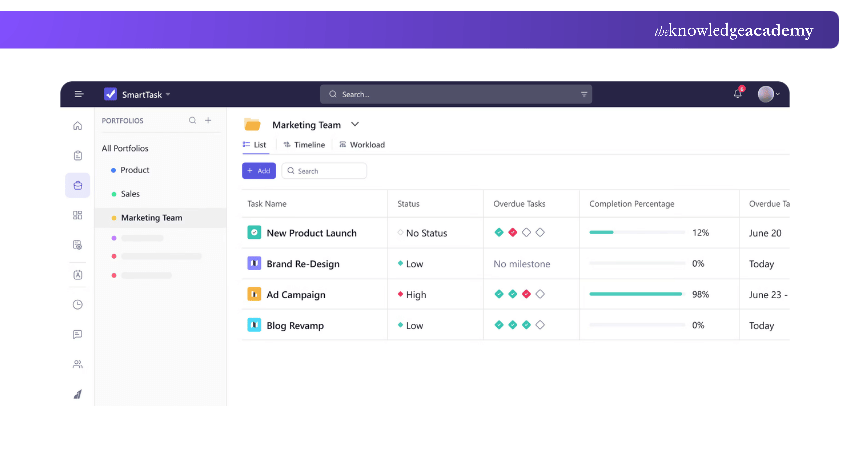
13) SmartTask
SmartTask is a work management platform that combines task scheduling, project tracking and team collaboration. Its timeline and Gantt features help users visualise project activities, monitor dependencies and manage milestones.
Its Gantt and dependency features help teams review task relationships and adjust schedules when project plans change. SmartTask also provides task management, time tracking, collaboration and reporting capabilities, making it suitable for teams that need visibility into project execution.
Key Scheduling Features:
a) Gantt charts and project timelines
b) Task dependencies and milestones
c) Task scheduling and dependency management
d) Progress tracking and reporting
Best Suited For: Teams managing changing project schedules and interconnected tasks.
14) ProofHub
ProofHub is a project management and team collaboration platform that helps organisations plan, organise and complete project activities. Its Gantt charts allow users to visualise tasks, establish dependencies and monitor project schedules.
Project Managers can assign responsibilities, set deadlines and track progress through a centralised workspace. ProofHub also offers Kanban boards, time tracking, communication and reporting features, supporting teams that need to coordinate work without switching between multiple applications.
Key Scheduling Features:
a) Gantt charts and task dependencies
b) Project timelines and deadlines
c) Task assignments and progress monitoring
d) Team collaboration and time tracking
Best Suited For: Teams looking for centralised project scheduling and collaboration.
15) Asana
Asana is a work management platform that helps teams plan projects, coordinate tasks and track deadlines. Its scheduling features include Timeline, Calendar and Gantt views, allowing users to visualise activities in different ways.
Task dependencies help teams identify relationships between activities, while milestones highlight important project checkpoints. Asana also supports automation, project reporting and integrations with other business applications, making it useful for cross-functional teams coordinating multiple workstreams.
Key Scheduling Features:
a) Timeline, Calendar and Gantt views
b) Task dependencies and milestones
c) Configurable dependency-based date adjustments
d) Project reporting and automation
Best Suited For: Cross-functional teams managing project timelines, responsibilities and interconnected tasks.
Project Scheduling Software Selection Checklist
Use this checklist to evaluate whether a scheduling tool meets your project requirements:Define Project Requirements: Identify project size, complexity, deadlines and scheduling challenges.Evaluate Scheduling Features: Check for timelines, Gantt charts, task dependencies and milestones.Assess Resource Management: Determine whether the tool supports workload planning and team availability.Check Collaboration Features: Look for task assignments, progress updates and team communication.Review Integrations: Ensure compatibility with existing business and project management applications.Compare Pricing and Scalability: Consider subscription costs, feature limitations and future requirements.Test Usability: Evaluate the software through a trial or demonstration before making a decision.

The Knowledge Academy develops accessible learning content across Project Management, IT, Cybersecurity, Data Science, Business Analysis, HR, Accounting and Finance, Leadership and Health and Safety. Its resources combine subject research with clear explanations to help professionals build practical knowledge across a wide range of disciplines.
View Detail

 If you wish to make any changes to your course, please


