


 Top Rated Course

We may not have the course you’re looking for. If you enquire or give us a call on +44 1344 203999 and speak to our training experts, we may still be able to help with your training requirements.
What is Google Docs? Features, Benefits, and Uses
The Knowledge Academy 13 July 2026Google Docs is a free online Word Processor from Google that lets users create, edit, and collaborate on documents in real-time from any device. It automatically saves your work to the cloud, so you never lose progress. Teams can work together on the same file at once. Smart suggestions and voice typing make writing faster and easier.

Training Outcomes Within Your Budget!
We ensure quality, budget-alignment, and timely delivery by our expert instructors.
Table of Contents

Gone are the days of saving files to USB drives or emailing endless document versions. It's the age of the Cloud, where your documents follow you everywhere and updates in real-time. This is the exact power delivered by Google Docs. This smart Word Processor lets you write, edit, and collaborate on the spot.
It brings a touch of seamlessness, whether you're drafting a novel, planning a project, or co-editing a report with teammates worldwide. This blog explores What is Google Docs, detailing its standout features, practical benefits, and the clever ways you can use it to simplify your daily workflow. So read on and redefine how you and your organisation work!
Table of Contents
1) What is Google Docs?
2) How is Google Docs Used?
3) Key Features of Google Docs
4) Advantages of Using Google Docs
5) Limitations of Using Google Docs
6) Google Docs vs Microsoft Word
7) Can I Convert a Google Doc into Another Format?
8) What File Types Can Be Opened in Google Docs?
9) Conclusion
What is Google Docs?
Google Docs is a simple online Word Processor that lets you create, edit, and open files in many formats. Its biggest strength is collaboration, as several people can work on the same document at the same time. You can use it on phones, tablets, or computers. All you need is the right app or a web browser with internet access. It is useful for school, work, or personal tasks.
It includes features for giving feedback, making suggestions, and tracking every change. Sharing is quick and easy, and you can also publish or print your files. Google Docs works well with other writing and presentation tools. Updates are frequent, and there is a large online support community. This helps you keep learning and using the latest options.

How is Google Docs Used?
Google Docs is a free online tool by Google. It helps people write, edit, and work on documents from anywhere. All you need is an internet connection. Below are its usages:
a) Creating and Editing: You can start with a blank file or pick a ready-made template. It’s simple to change fonts, adjust text, or organise content into lists and tables.
b) Adding Media: Users can insert images, web links, or charts. There’s also the option to draw or add quick notes. Everything stays in one place.
c) Live Collaboration: Several users can edit the same file at a time. Everyone sees updates instantly. Earlier versions are saved, so nothing is lost.
d) Suggestions and Comments: Instead of direct edits, you can suggest changes. This keeps the original text intact while showing new ideas. Comments help teams stay aligned.
e) Sharing and Permissions: Files can be shared through links or email invites. You choose if others can only read, add comments, or make changes.
f) Privacy and Control: To protect your work, restrict copying, downloading, or printing. These settings help keep your content private.
g) Access from Anywhere: Documents are saved in Google Drive. You can open them on any mobile device like a phone, tablet, or computer. It works on most browsers and has a mobile app too.
h) Google Workspace Integration: Docs connect easily with tools like Sheets, Slides, Gmail, and Calendar. You can also add plug-ins for extra features like citations or diagrams.
i) Common Uses: People use Docs to write papers, plan group work, or take meeting notes. It’s useful for drafting content, organising thoughts, or working with others in real time.
Key Features of Google Docs
Google Docs is a simple yet powerful writing tool. It’s built for easy editing, teamwork, and access on the go. Whether you're writing alone or with others, it helps you stay organised and productive, and the Google Docs Cheat Sheet can be a handy resource for mastering these features. Below given are some of its features:
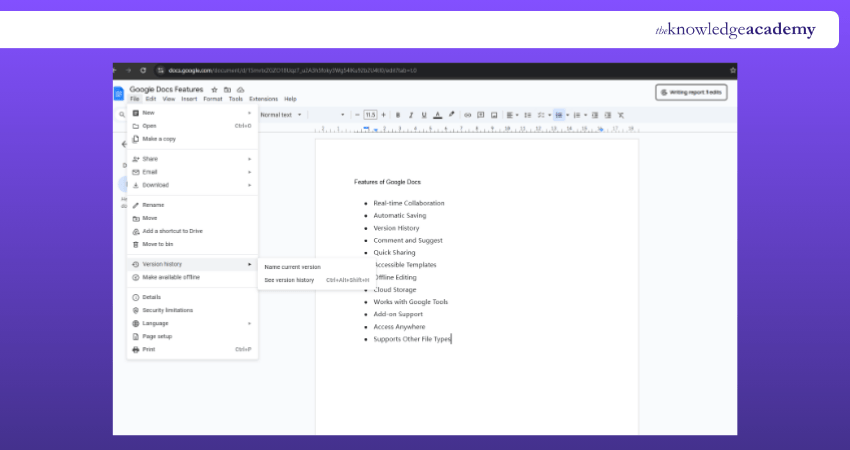
a) Real-time Collaboration: Work together on one document. Everyone sees updates instantly.
b) Automatic Saving: No need to click save. Changes are stored as you type.
c) Version History: Go back to earlier drafts. Restore anything in just a click.
d) Comment and Suggest: Give feedback or suggest edits without changing the text directly.
e) Quick Sharing: Send a link or invite by email. Choose who can view or edit.
f) Accessible Templates: Start fast with templates for letters, CVs, reports, and more.
g) Offline Editing: Keep working without internet. Syncs once you’re back online.
h) Cloud Storage: Files are saved in Google Drive. Open them from any device.
i) Works with Google Tools: Easily connect with Sheets, Slides, Gmail, and Calendar.
j) Add-on Support: Install extra tools for grammar, charts, or citations.
k) Access Anywhere: Use Docs on your phone, tablet, laptop, or browser.
l) Supports Other File Types: Open Word files or save in PDF, .docx, and more formats.
Make your surveys smarter with Google Forms. Sign up for our Google Forms Training now!
Advantages of Using Google Docs
From seamless collaboration to real-time editing, Google Docs offers a smarter way to work together. Whether you're sharing ideas, tracking changes, or accessing files anywhere, it streamlines the entire process. All of this is done without the hassle of traditional software. Below given are some of the merits:

1) Collaboration
Google Docs allows several users to edit a document at once. All of this smoothens out the teamwork. You can create or upload files too. This includes spreadsheets, presentations, or text documents. The best part is that you can share them with any Gmail user. Its live editing feature supports smooth group work among students, staff, and faculty. Sharing videos or images is also simple and quick.
2) Document History
Google Docs tracks every change, showing who edited what and when. You can review past versions or restore older drafts with ease. Automatic saving every few seconds protects your work from sudden shutdowns or browser issues, keeping everything secure.

3) Easy Connections
Google Docs records each edit along with the time and user, letting you trace updates easily. You can revisit or recover earlier versions without hassle. Frequent auto-saves guard your content against power loss, crashes, or accidental closure.
4) Sharing
Google Docs supports group projects, live lectures, and interactive lessons with ease. Speakers often use shared documents for real-time audience input. Students join from any device, contribute to shared files, and build slides together during class. This hands-on method boosts engagement and learning.
Turn your ideas into showstoppers with Google Slides! Sign up for our comprehensive Google Slides Training and elevate your presentations!
Limitations of Using Google Docs
While Google Docs offers many advantages for online Document Management and collaboration, there are some limitations compared to traditional office suites. Here are a few areas where Google Docs may fall short and how to navigate these challenges:
1) Printing
Printing from Google Docs isn’t as straightforward as it is with traditional office software. You can download your document in different formats (such as Word or PDF) and print it from your local computer. Alternatively, you can use the web browser’s standard “print” command, although this may result in unwanted headers and footers appearing on your document.
2) Formatting
While Google Docs supports basic formatting options like headers, footers, various font sizes, around 18 different fonts, subscripts, superscripts, and standard page and paragraph layout options, it falls short in handling complex formatting tasks. Inserting images and hyperlinks is possible, but generating envelopes or mailing labels is cumbersome and not recommended.
3) Editing
Standard right-click functions familiar to most Windows users are limited in Google Docs. Instead, you must rely on toolbar commands like “Edit, Copy” and “Edit, Paste” or use keyboard shortcuts such as "CTRL-C" to copy and "CTRL-V" to paste text.
4) File Formats
To edit documents in Google Docs, they must be converted into Google Docs formats. Uploading a heavily formatted MS Word document can lead to unpredictable results, potentially rendering the document illegible. Google’s conversion process may strip custom layouts, fonts, and formatting. While you can re-convert these files back to Word or Excel upon download, they won’t look exactly like the original.
5) Access
Google Docs is a web-based application, so a live internet connection is required to view, modify, save, or print files. If you need to work offline, you must download your files in Word format and then upload them again once you have an internet connection to share and collaborate with others.
Google Docs vs Microsoft Word
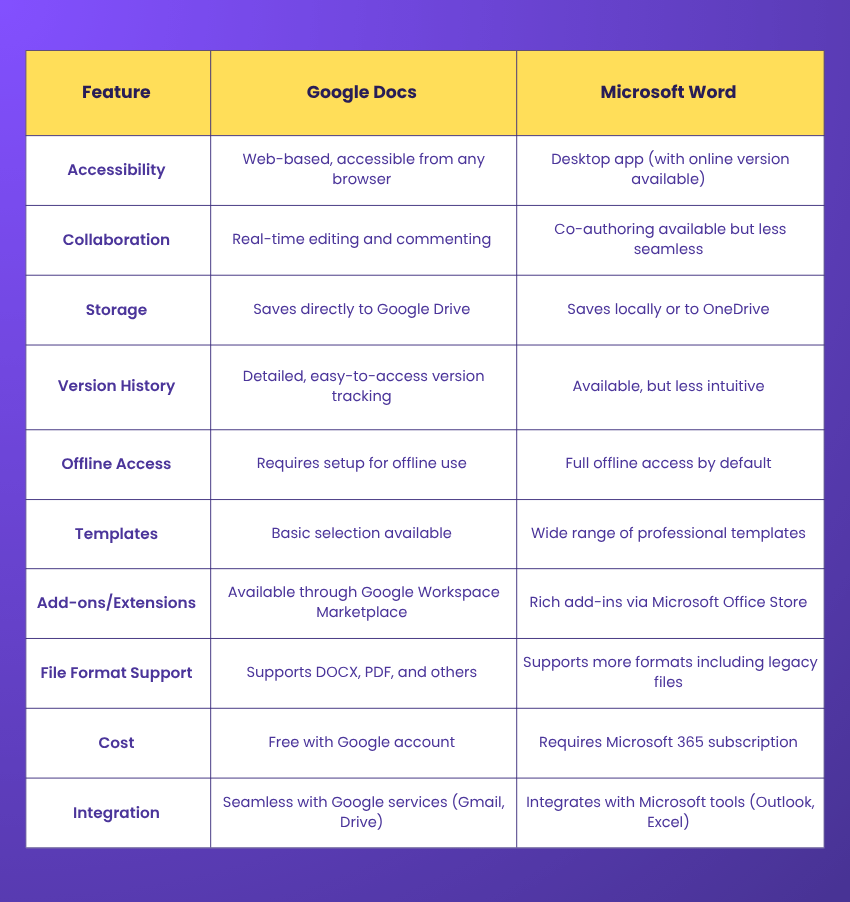
Choosing between Google Docs vs Microsoft Word depends on your needs. The table below highlights key differences to help you decide which platform suits you best.
Understand cloud-based collaboration and data security protocols with our Google G Suite Training – Register today!
Can I Convert a Google Doc into Another Format?
Yes, Google Docs lets you convert documents into various formats like PDF, DOCX, ODT, RTF, TXT, and HTML. Just go to File > Download and choose your preferred format. This makes sharing and compatibility with other tools much easier. You can also email the file directly in your chosen format.
What File Types Can Be Opened in Google Docs?
Google Docs supports DOC, DOCX, ODT, RTF, TXT, and HTML files. Simply upload them to Google Drive and open with Docs to view or edit. It also allows seamless editing without needing the original software. Uploaded files are automatically converted for easy access.
Conclusion
Google Docs is a powerful, flexible Word Processor tool that brings convenience, collaboration, and creativity together like never before. With its easy sharing, real-time editing, and Cloud access, it fits perfectly into modern work and learning environments. Whether you're working solo or with a team, understanding What is Google Docs will help you stay productive, organised, and always connected.
Sign up for our Google Sheets Course and transform your Data Management skills today!
Frequently Asked Questions
Is Google Docs Completely Free?

Google Docs is free to use with a personal Google account. You can create, edit, and share every document online without paying. It includes Cloud storage and real-time collaboration. Business users may need a paid Google Workspace plan for extra features like admin controls and more storage.
What Are the Disadvantages of Google Docs?
Google Docs has a few disadvantages. It relies on internet connection for full functionality, and offline access can be limited or unreliable. Formatting may not always match when converting from Microsoft Word. Advanced features are fewer compared to desktop software. Privacy concerns also exist, as documents are on Google’s servers.

The Knowledge Academy


Global Training Provider
The Knowledge Academy is a world-leading provider of professional training courses, offering globally recognised qualifications across a wide range of subjects. With expert trainers, up-to-date course material, and flexible learning options, we aim to empower professionals and organisations to achieve their goals through continuous learning.


 If you wish to make any changes to your course, please


