


 Top Rated Course


We may not have the course you’re looking for. If you enquire or give us a call on +44 1344 203999 and speak to our training experts, we may still be able to help with your training requirements.
What is Web Page? Definition, Types and Examples
Richard Harris 04 February 2026Curious about What is Web Page? It is a digital document accessible through a web browser, typically part of a website and identified by a unique URL. Having Experience in web designing and learning different types of web pages, their structure, examples, and how they function on the internet – is always useful. Stay tuned to learn more!

Training Outcomes Within Your Budget!
We ensure quality, budget-alignment, and timely delivery by our expert instructors.
Table of Contents
So, how does the internet work when you browse a website, click on a link, or watch a video online? Every piece of content you interact with—whether it’s an article, a shopping page, or a search result—is displayed through a web page. But What is Web Page, and how does it function? A web page is more than just an online document; it's the building block of the internet.
In this blog, you will find answers to What is Web Page, how it works, its different types, and why it matters. Understanding web pages will help you appreciate the technology behind your online experience. Let’s dive in!
Table of Contents
1) What is Web Page?
2) Web Page Characteristics
3) Types of Web Pages
4) Webpage Components
5) How Does a Web Page Work?
6) Web Page vs Website
7) Web Page Examples
8) Conclusion
What is Web Page?
A web page is a single document accessible on the World Wide Web (www), formatted using Hypertext Markup Language (HTML) and other web technologies such as Cascading Style Sheets (CSS) and JavaScript. Each web page is associated by a unique Uniform Resource Locator (URL) and is designed to deliver information to users, including text, images, videos, and other multimedia.

Web pages are hosted on servers and can be accessed via browsers like Google Chrome, Mozilla Firefox, or Microsoft Edge. They are the main framework of websites and can be static (displaying fixed content) or dynamic (displaying updated or personalised content).
Web Page Characteristics
Web pages possess several key characteristics:
1) Unique URL: Each web page is identified by a distinct Uniform Resource Locator (URL), enabling precise access.
2) Hypertext and Hyperlinks: They contain hypertext, which includes hyperlinks to other web pages or resources, facilitating easy navigation.
3) Multimedia Content: Web pages can incorporate several forms of media, like text, images, videos, and animations, to enhance user engagement.
4) Interactivity: Many web pages include interactive elements like forms, buttons, and embedded applications to improve user experience.
Types of Web Pages
Web pages can be broadly classified into two categories:
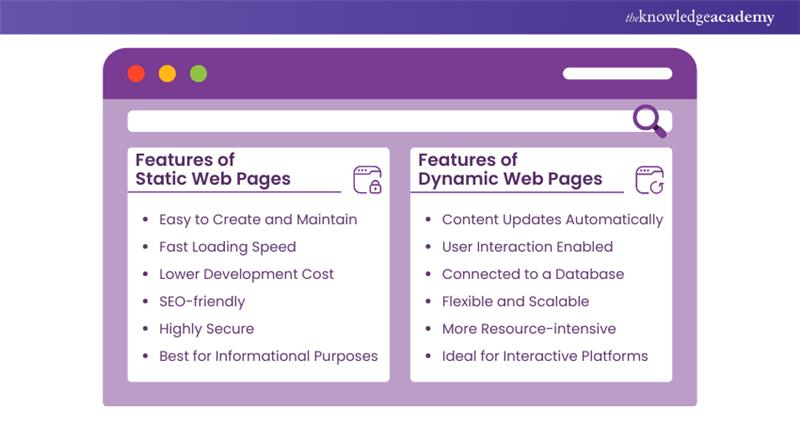
1) Static Web Pages
Static web pages display fixed content that remains unchanged for all users unless manually updated by the webmaster. In Website Design Tips, it is often recommended for informational sites where delivering consistent content is essential without the need for real-time updates.
Features:
a) Easy to Create and Maintain: Requires only basic HTML and CSS knowledge.
b) Fast Loading Speed: Content is preloaded, reducing server processing time.
c) Lower Development Cost: No need for databases or complex backend coding.
d) SEO-friendly: Search engines can easily drag and index the content.
e) Highly Secure: Since there’s no database interaction, the risk of hacking is lower.
f) Best for Informational Purposes: Suitable for pages like About Us, Contact, or Privacy Policy.
Example: An online brochure detailing a company’s services or a personal resume website showcasing a professional’s skills and achievements.
Unlock your creativity in web design with our HTML and CSS Course - Sign up today!
2) Dynamic Web Pages
Dynamic web pages generate real-time, interactive content that changes based on user interactions, database updates, or external inputs. They are commonly used in applications that require personalised or frequently updated information.
Features:
a) Content Updates Automatically: No need for manual modifications.
b) User Interaction Enabled: Allows forms, comments, and personalised experiences.
c) Connected to a Database: Retrieves and displays live data dynamically.
d) Flexible and Scalable: Can handle large volumes of data efficiently.
e) More Resource-intensive: Requires server-side scripting (e.g., PHP, Python, JavaScript).
f) Ideal for Interactive Platforms: Used for social media, e-commerce, and news websites.
Example: A news portal that updates articles automatically or an e-commerce website displaying product availability based on stock levels.
Webpage Components
A typical web page comprises several fundamental components:
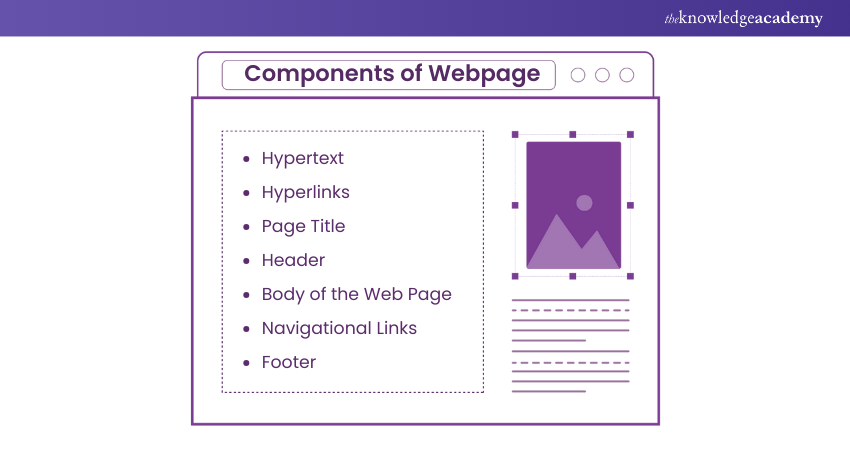
Hypertext
Hypertext includes text with embedded links known as hyperlinks that direct users to other web pages, sections, or external resources. It allows non-linear navigation, making browsing effortless.
1) Commonly used in documentation, research papers, and online articles.
Example: Clicking a word in an online dictionary to view its definition on another page.
Hyperlinks
Hyperlinks are clickable elements (text, images, or buttons) that navigate users to different pages, Websites, or documents.
Types of Hyperlinks:
1) Internal Links: Direct users to another section of the same website
2) External Links: These links redirect users to a different website
3) Anchor links: Jump to a specific section of the same web page
Hyperlinks enhance navigation, interconnectivity, and user engagement.
Example: Clicking “Learn More” in a blog post to open a detailed article.
Page Title
The title appears on the browser and in search engine results, defined using the (title) HTML tag.
1) It has an important role in Search Engine Optimisation (SEO)
2) A well-crafted title boosts search rankings and improves user experience
Example: A page discussing web pages might have the title “What is a Web Page? Definition, Types & Examples.”
Header
The top section of a web page typically includes:
1) Website logo for branding
2) Navigation menu with links to key pages
3) Search bar for easy content discovery
4) Additional elements like contact details or login options
The header ensures consistent branding and easy access to important sections
Example: An e-commerce site header may include categories like “Home,” “Shop,” “About Us,” and “Cart.”
Body of the Web Page
The main content area is where core information is displayed. It can contain:
1) Text content (articles, blog posts, descriptions)
2) Multimedia elements (images, videos, infographics)
3) Interactive features (forms, buttons, user interactions)
The body is crucial as it delivers the primary message.
Example: A news website’s body consists of articles, headlines, and embedded media.
Navigational Links
These links help users move between pages or sections within a website.
Common Navigation Types:
1) Main navigation Bar: Located in the header for quick access
2) Breadcrumb Navigation: Displays the user’s path (e.g., Home > Blog > Article)
3) Sidebar Navigation: Offers links to related content or categories
4) Pagination: Facilitates browsing multi-page content
Enhancing usability, navigation improves accessibility and content organisation.
Example: In an online store, navigation links direct users to categories like “Men’s Clothing,” “Women’s Accessories,” or “New Arrivals.”
Footer
The bottom section of a web page usually contains:
1) Copyright Notice: Protects website content
2) Privacy Policy & Terms of Service: Legal information
3) Contact Details: Includes phone number, email, or address
4) Social Media Links: Icons linking to social profiles
5) Additional Site Links: Quick access to FAQs, careers, or sitemap
The footer provides secondary navigation, legal details, and reinforces brand identity.
Example: A business website footer may include “© 2025 Company Name | Privacy Policy | Contact Us.”
Learn the professional HTML skills with our Introduction to HTML - Sign up now!
How Does a Web Page Work?
Here the following steps of how does a Web Page work:
1) Request: When you type a web address (URL) into your browser and hit enter, your browser sends a request to the server where the website is hosted.
2) Server Response: The server processes the request and sends back the HTML file of the requested page. This file is essentially the blueprint of the web page.
3) Rendering: Your browser reads the HTML file and starts rendering the page. It might also fetch additional resources mentioned in the HTML, like CSS for styling, JavaScript for interactivity, and media files like images or videos.
4) Display: Finally, all these components come together, and the browser displays the web page on your screen, ready for you to interact with!
For a Deeper Dive Into the Process:
a) DNS (Domain Name System): Translates the web address into an IP address the server can understand.
b) HTTP/HTTPS: Protocols for communication between your browser and the server.
c) Cookies and Sessions: Help maintain user state and manage data during browsing sessions.
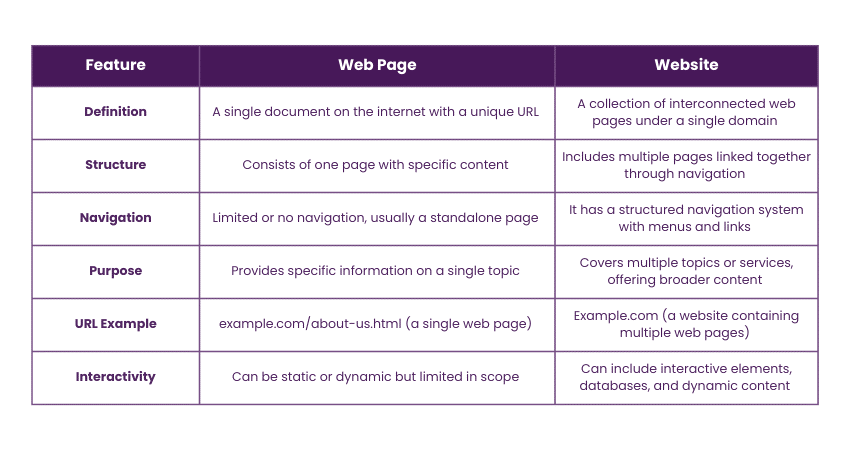
Web Page vs Website
Here the following is the difference between the Web Page vs Website:
Web Page Examples
Here the following are the examples of Web Pages:
Example 1
The web pages on The Knowledge Academy website serve as examples of structured digital content built using web technologies such as HTML, CSS, and JavaScript. Each web page on the site is designed to provide users with information about courses, training schedules, certifications, and educational resources.
Viewing the Source Code
Every web page on The Knowledge Academy website has an underlying code that can be inspected through the HTML source code. This indicates the page's construction at deep levels, including the layout (CSS) and the functional features (JavaScript) of the page.
The Knowledge Academy offers Website Static and Dynamic Web Pages
a) Static Web Pages: Fixed content pages that are updated manually such as About Us, Privacy Policy, and Terms and Conditions.
b) Dynamic Web Pages: Listing of courses, results from searches, and dashboards of users are automatically produced through scripts like PHP and JavaScript devices that modify information according to users and users data in real time.
For instance, a static web page such as course details may be displayed with a .html or .htm extension while database content pages PHP extension .php would pull course details through stored databases.
By mixing static and dynamic web pages, The Knowledge Academy is able to create an effortless yet advanced user interface that allows students to navigate and access training files without hassle.
Example 2
The page of an Amazon product (like this one https://www.amazon.co.uk) is relatable to this website in the sense that it has a lot of dynamic segments; it showcases pricing, user reviews, product details and recommendations all tailored to the person's behaviour and current stock.
Highlighted Features:
a) Dynamic Content: Product prices, availability and reviews are updated frequently.
b) User Engagement: Users are able to leave reviews, pose questions, and also add items to their carts.
c) Multimedia Elements: Screenshots, videos, and 360 degree views of the product are incorporated within the domain.
d) Database-driven: Information presented on the webpage is pulled from Amazon’s DB so users can always see updated information.
On the other hand, an example of a static web page is an Amazon Terms and Conditions or Privacy Policy page. Its web page is altered only when the administrator decides to do so.
Conclusion
Understanding What is Web Page is thus important. It forms the backbone of the internet, offering various structures and functionalities. Every click, every search, every interaction takes us deeper into a world woven together by web pages. From static pages to dynamic content, each web page serves a purpose, highlighting your digital experience and shaping online interactions.
Learn to design stunning websites with our Website Design Course - Register now!
Frequently Asked Questions
What is HTML Used for in Web Pages?

HyperText Markup Language (HTML) is used to format the content of the website. HTML structures and orders the website by using links, images, paragraphs, form and headings.
What are the File Formats of a Web Page?
Common web page file formats include HTML, HTM, PHP, ASP, JSP, CSS, JS, XML, Json, and SVG, each serving different functions in web development.
What are the File Formats of a Web Page?
The Knowledge Academy takes global learning to new heights, offering over 3,000+ online courses across 490+ locations in 190+ countries. This expansive reach ensures accessibility and convenience for learners worldwide.
Alongside our diverse Online Course Catalogue, encompassing 19 major categories, we go the extra mile by providing a plethora of free educational Online Resources like Blogs, eBooks, Interview Questions and Videos. Tailoring learning experiences further, professionals can unlock greater value through a wide range of special discounts, seasonal deals, and Exclusive Offers.
What is The Knowledge Pass, and How Does it Work?
The Knowledge Academy’s Knowledge Pass, a prepaid voucher, adds another layer of flexibility, allowing course bookings over a 12-month period. Join us on a journey where education knows no bounds.
What are the Related Courses and Blogs Provided by The Knowledge Academy?
The Knowledge Academy offers various App & Web Development Training, including the Website Design Course, UI UX Design Course and the HTML and CSS Course. These courses cater to different skill levels, providing comprehensive insights into Top 25 CSS Tricks Every Developer Should Know.
Our Programming & DevOps Blogs cover a range of topics related to Web Development, offering valuable resources, best practices, and industry insights. Whether you are a beginner or looking to advance your Web Designing Skills, The Knowledge Academy's diverse courses and informative blogs have got you covered.

Richard Harris


Senior Full Stack Developer and Technology Educator
Richard Harris is a highly experienced full-stack developer with deep expertise in both frontend and backend technologies. Over his 12-year career, he has built scalable web applications for startups, enterprises and government organisations. Richard’s writing combines technical depth with clear explanations, ideal for developers looking to grow in modern frameworks and tools.


 If you wish to make any changes to your course, please


