


 Top Rated Course


We may not have the course you’re looking for. If you enquire or give us a call on +61 272026926 and speak to our training experts, we may still be able to help with your training requirements.
What are Terraform Modules, and How to Use Them?
Lily Turner 24 February 2026Terraform Modules are an essential component of Infrastructure as Code (IaC) that enables reusability, organisation, and efficiency in managing Cloud resources. The various types of Terraform Modules bring a broad range of benefits, and understanding its best practices can help you harness its advantages to the fullest.

Training Outcomes Within Your Budget!
We ensure quality, budget-alignment, and timely delivery by our expert instructors.
Table of Contents
Why keep redoing everything from scratch when you can reuse a perfectly crafted formula? That's the philosophy behind Terraform Modules in maintaining Cloud infrastructure. A module is a collection of Terraform configuration files that group related resources into neatly packaged configurations and simplify the deployment and maintenance process.
Whether you are managing a small setup or a large-scale Cloud empire, modules help you build everything the smart way. This blog thoroughly explores this concept, outlining its benefits, functions, types, and more. So read on and master the art of modern organisational Infrastructure Management!
Table of Contents
1) What is a Terraform Module?
2) Why use Terraform Modules?
3) Types of Terraform Modules
4) How are Terraform Modules Used?
5) Advantages of Using Terraform Modules
6) What Problems do Terraform Modules Solve?
7) What are the Best Practices in Terraform?
8) When Should I Use Modules in Terraform?
9) Conclusion
What is a Terraform Module?
A Terraform Module is a set of organised configuration files stored in a specific directory. These modules group all the related resources for a particular task, helping to reduce the amount of code needed for similar infrastructure components. They serve as a method for extending Terraform configurations with reusable code and minimises redundant development work. A Terraform module consists of one or more ".tf" files within its own directory.

A typical module structure includes:
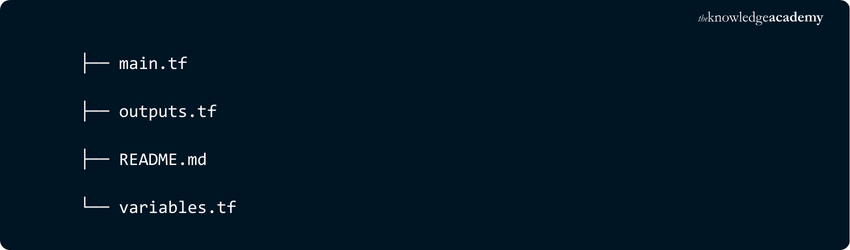
Essentially, any Terraform configuration is already a module. Running Terraform in this directory considers those files as a root module, which serves as the base configuration that can be further expanded.
Why use Terraform Modules?
Terraform Modules are incredibly useful for several reasons:
1) Reusability: Reuse resources to reduce redundancy.
2) Organisation: Break configurations into smaller, manageable pieces.
3) Consistency: Standardise infrastructure components.
4) Simplification: Improve code readability and maintainability.
5) Collaboration: Provide a clear structure to simplify code reviews.
Types of Terraform Modules
Terraform Modules come in four types namely, root, child, local and published. Let’s explore them in better detail:
1) Root Module
The root module comprises all the resources defined in the “.tf” files of a Terraform configuration, making every Terraform configuration inherently a root module. Even a simple “main.tf” file with just a local variable qualifies as a root module. Remember, any Terraform configuration can be reused as a module in other configurations. Modules can call other modules, and those called within another module are referred to as child modules.
2) Child Module
A child module is included in a configuration by calling it within a module block, thereby incorporating all the resources defined in that module. For example:

You can call the same module multiple times and configure each instance as needed.
3) Local Module
A local module is not published in any registry. Instead, it is sourced directly using the file path to the module's directory. This allows you to reuse and manage configurations locally without needing to upload them to a public or private module registry.
4) Published Module
A published module is one that has been uploaded to a Terraform Registry or a Version Control System (VCS) with an associated tag. When sourcing a published module, the URL from the registry or VCS is used.

Gain insights about object storage, telemetry and shared file systems in our Linux OpenStack Administration Training - Sign up now!
How are Terraform Modules Used?
Let’s explore the essential steps you must take to fully utilise the power of Terraform Modules accompanied by examples
1) State Your Intention to Utilise Terraform Modules
Using a Terraform Module involves declaring its usage in your configuration by employing the module block and specifying the required variable values. The module block encapsulates details such as the module's source, version, and meta-arguments. Here, we'll explore how to incorporate Terraform Modules, considering different sources, versions, and meta-arguments.
Module Declaration is given below:
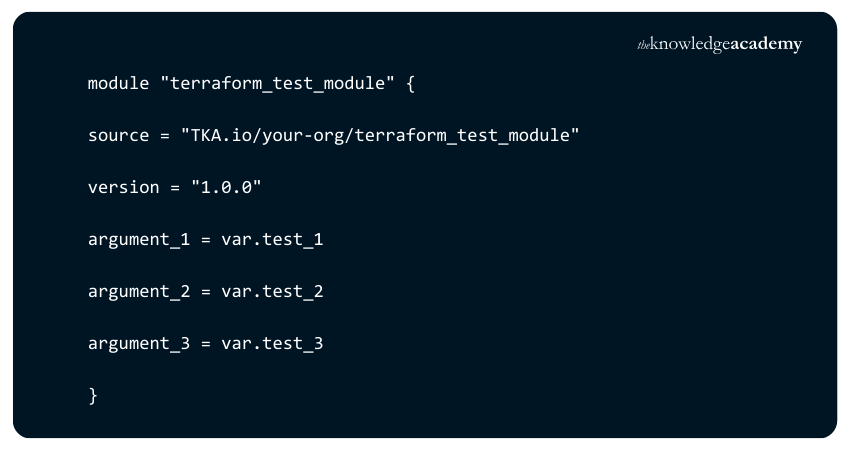
1) Sources: Terraforms modules can be stored locally or remotely and the `source` argument will vary depending on their location. For instance, if the module you want to call is contained in a directory named “terraform-test-module” situated in the same place as your root module directory, the root configuration will look like this:

For a VCS-hosted module, like on GitHub, the source references the repository and version:

Terraform Modules can also be stored in registries, which serve as repositories for published modules. These registries allow you to access modules shared by other Terraform users or store your own—either privately for personal or organisational use or publicly for others to utilise:

2) Versions: Versioning allows you to manage which module changes are applied to your infrastructure. This helps to prevent disruptions caused by unexpected updates or faulty code. As with any software or application update, issues can come up, and the same applies to Terraform Modules if they are not properly controlled. The syntax for version constraints is straightforward. It’s a represented as a string containing one or more conditions:
a) "=" or no operator: Specific version.
b) "!=": Any version except the specified one.
c) ">, >=, <, <=": Comparisons.
d) "~>": Allows only the version number's rightmost part to increment.
Example:

Modules from the same source repository are considered the same version.
3) Meta Arguments: Meta-arguments are unique parameters that modify how Terraform interprets a declared module. Presently, four such meta-arguments are actively employed that are:
a) Count and for_each: Create multiple instances of the same module or resource.
b) Providers: This meta-argument enables you to explicitly specify which provider the module should use. It is particularly useful when managing multiple cloud service accounts, allowing you to create resources associated with a secondary account.

c) depends_on: Terraform generally manages implicit dependencies effectively, but there are cases where they may not be sufficient. If you need to ensure that one resource is created before another, this meta-argument allows you to establish a clear dependency between resources or modules.
Incorporating these elements into your Terraform configuration ensures proper utilisation of modules, offering flexibility, version control, and a clear definition of dependencies. This systematic approach contributes to maintaining a robust and predictable infrastructure.
Gain in-depth knowledge and acquire the skills for easy troubleshooting. Register now for our Microservices Architecture Training!
3) Declare Outputs for Modules
The second step is to declare outputs for the module using the output block. The output block defines the values that the module returns to the caller, such as the ID, the IP address, or the DNS name of the web server. For example, to output the public IP address of the web server module, you can write:

4) Contain Terraform Modules
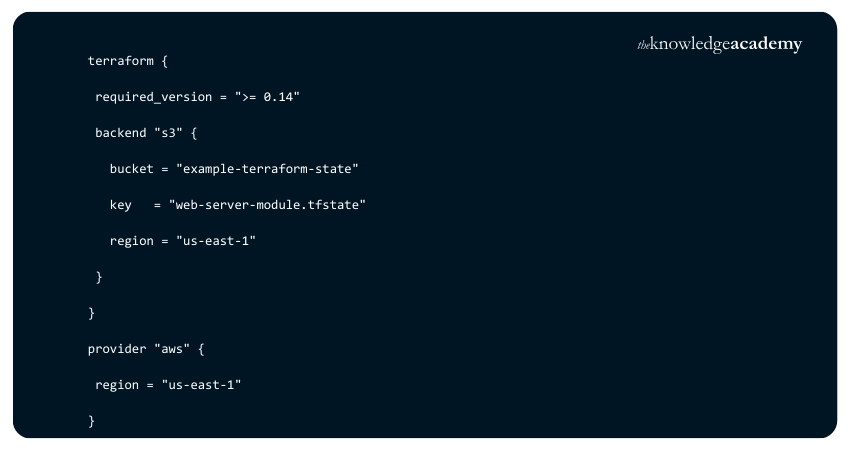
The third step is to contain the Terraform Modules using the Terraform block. The Terraform block specifies the Terraform version, the backend, the providers, and any other settings that apply to the module. For example, to specify that the web server module requires Terraform 0.14 or higher and uses the AWS provider, you can write:
5) Test Modules
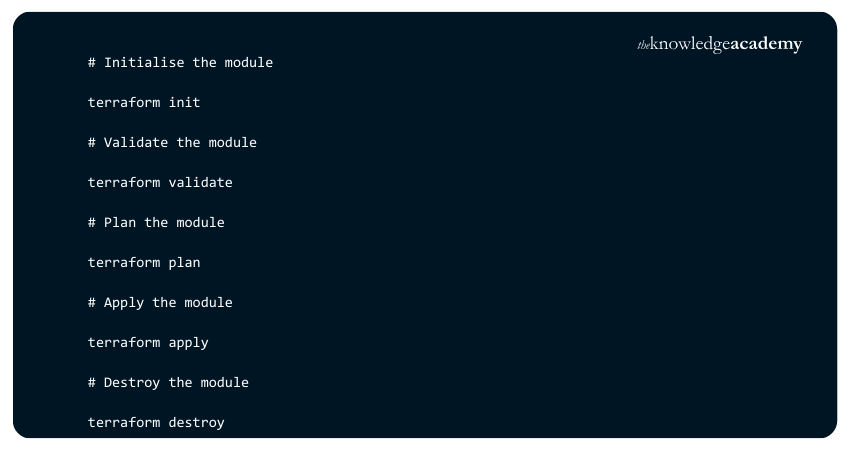
The fourth step is to test the Terraform Modules using the Terraform commands. The Terraform commands allow you to initialise, validate, plan, apply, and destroy the module. For example, to test the web server module, you can run:
Learn more about Terraform with our expert-led course on Terraform Training! Join now!
Advantages of Using Terraform Modules
As made clear by the functionalities and types of Terraform Module highlighted above, these modules bring a whole lot of benefits to the table. Let’s explore the three remarkable benefits:

1) Reusability
Terraform Modules allow you to reuse the same configuration across different environments or projects without duplicating code. This reduces duplication, improves consistency, and simplifies maintenance. For example, you can use the same web server module for development, staging, and production environments by changing only the specific variables.
2) Team Collaboration
Terraform Modules enhance team collaboration by enabling the sharing and distribution of common or complex configurations among team members or across organisations. This boosts productivity, quality, and security, as team members can leverage each other's expertise and best practices. For example, publishing a web server module to a Terraform registry allows other teams to incorporate it into their own configurations.
3) Scalability
Terraform Modules enable you to modularise and organise your infrastructure as code, managing it as a hierarchy of components. This enhances performance, reliability, and flexibility, allowing you to scale your infrastructure as needed. For instance, a web server module can be a building block for a larger module that includes a load balancer, an auto-scaling group, and a database.
What problems do Terraform Modules solve?
Here are the key problems that terrafomr Modules help you solve:

What are the Best Practices in Terraform?
The best practices include:
1) Each module must be stored in its own repository.
2) Include example configurations within each module.
3) Leverage input and output variables.
4) Avoid single-resource modules.
5) Use default values based on data type.
6) Take advantage of dynamic blocks and ternary operators.
7) Ensure thorough testing of your modules.
When Should I use Modules in Terraform?
You should use Terraform Modules to organise your configuration into reusable components, share and collaborate on code, or encapsulate complex resources.
Conclusion
Terraform Modules offer numerous advantages for infrastructure as code, including collaboration, reusability, and scalability. As outlined in this blog, To use a module effectively, you must declare it, define outputs, contain its resources, and thoroughly test it. You can explore a vast collection of ready-made modules in the Terraform Registry or create custom modules tailored to your requirements.
Become an expert in Cloud Computing today – register now with our Cloud Computing Training! Sign up now!
Frequently Asked Questions
What are the Different Source Types for Calling Modules?

The different source types for calling modules in Terraform include local paths, Terraform Registry, version control systems (e.g., GitHub), and HTTP URLs. These sources enable flexible integration and reuse of module configurations across various environments.
What are the Basic Components of a Module?
The basic components of a Terraform Module include main.tf for resource definitions, variables.tf for input variables, outputs.tf for output values, and optionally README.md for documentation. These files define, configure, and document the module.
What are the Other Resources and Offers Provided by The Knowledge Academy?
The Knowledge Academy takes global learning to new heights, offering over 3,000+ online courses across 490+ locations in 190+ countries. This expansive reach ensures accessibility and convenience for learners worldwide.
Alongside our diverse Online Course Catalogue, encompassing 17 major categories, we go the extra mile by providing a plethora of free educational Online Resources like Blogs, eBooks, Interview Questions and Videos. Tailoring learning experiences further, professionals can unlock greater value through a wide range of special discounts, seasonal deals, and Exclusive Offers.
What is The Knowledge Pass, and How Does it Work?
The Knowledge Academy’s Knowledge Pass, a prepaid voucher, adds another layer of flexibility, allowing course bookings over a 12-month period. Join us on a journey where education knows no bounds.
What are related Cloud Computing courses and blogs provided by The Knowledge Academy?
The Knowledge Academy offers various Cloud Computing Courses, including the Cloud Computing Training, Terraform Training, and Linux OpenStack Administration Training. These courses cater to different skill levels, providing comprehensive insights into What is a Data Pipeline Architecture.
Our Cloud Computing Blogs cover a range of topics related to the Terraform Utility, offering valuable resources, best practices, and industry insights. Whether you are a beginner or looking to advance your Cloud Computing skills, The Knowledge Academy's diverse courses and informative blogs have got you covered.

Lily Turner


Senior AI/ML Engineer and Data Science Author
Lily Turner is a data science professional with over 10 years of experience in artificial intelligence, machine learning, and big data analytics. Her work bridges academic research and industry innovation, with a focus on solving real-world problems using data-driven approaches. Lily’s content empowers aspiring data scientists to build practical, scalable models using the latest tools and techniques.
View Detail

 If you wish to make any changes to your course, please


