


 Top Rated Course


We may not have the course you’re looking for. If you enquire or give us a call on +61 272026926 and speak to our training experts, we may still be able to help with your training requirements.
Python Threading: A Beginner-friendly Guide
The Knowledge Academy 25 February 2026Python Threading is a method that enables multiple threads to run concurrently within a single process, ideal for I/O-bound operations. It improves efficiency without the overhead of multiprocessing. Discover its core concepts, real-world use cases, and how to avoid common threading mistakes. Read ahead to know more!

Training Outcomes Within Your Budget!
We ensure quality, budget-alignment, and timely delivery by our expert instructors.
Table of Contents

What is Python Threading?
A thread is an independent execution process within a program. It enables multiple operations to run simultaneously. In Python, threads appear to execute concurrently but actually take turns due to the Global Interpreter Lock (GIL), which allows only one thread to control the interpreter at a time.
While threading is useful for I/O-bound tasks, Central Processing Unit (CPU)-intensive tasks benefit more from multiprocessing. Though it may not boost speed, threading improves code structure and manageability.
a) Threads are well-suited for tasks that wait for external events, such as Input/Output (I/O) operations.
b) Central Processing Unit (CPU)-bound tasks may not benefit from threading due to the Global Interpreter Lock (GIL).
c) The multiprocessing module is better suited for true concurrency in CPU-bound tasks.
d) Using threading can improve the clarity and manageability of a program’s design.
e) Understanding the thread lifecycle helps in effectively utilising threading in Python applications.

Stages of a Thread’s lifecycle in Python

a) New: The ‘new’ stage is where the thread is created and its state before it executes.
b) Ready: The ‘ready’ stage is where the thread is in the queue to be scheduled by the Operating System (OS).
c) Running: The ‘running’ stage is where the thread is being executed.
d) Blocked: The ‘blocked’ stage is where the thread is waiting for an available resource.
e) Terminated: The ‘terminated’ stage is where the thread has successfully completed its execution and is not active.
Why Use Threading in Python?
Python Threading is useful for enhancing the performance of applications that involve I/O-bound tasks. It allows multiple operations to run seemingly at once within the same process, improving efficiency without the overhead of spawning new processes. For example, in web applications, separate threads can handle different API requests simultaneously, leading to faster response times and a smoother user experience.
Key benefits of using threading include:
1) Improved Performance: Ideal for I/O-bound operations like file access, network requests, and user input
2) Efficient Resource Usage: Avoids the high overhead of creating and managing separate processes
3) Simplified Concurrency: Makes it easier to manage parallel tasks within the same application logic
While Python's Global Interpreter Lock (GIL) limits threading benefits for CPU-bound tasks, threading remains a powerful tool for responsive and scalable I/O-driven applications, especially when working with data-heavy operations where understanding What is Data and how it's processed becomes crucial.
Starting a Thread in Python
Starting a thread in Python involves using the threading module, which provides a high-level way to create and manage threads. Here's a basic example to demonstrate how to start a thread:

Here’s an output:
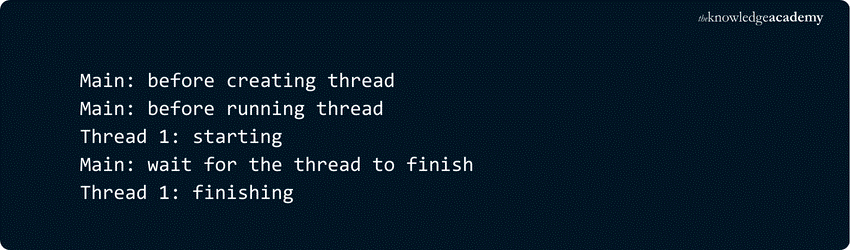
Explanation:
1) Thread Function Definition: A function (‘thread_function’) is defined to simulate a task by logging its start, pausing for 2 seconds, and then logging its completion.
2) Logging Setup: Logging is configured to display timestamps and messages to track the sequence of events.
3) Creating a Single Thread: The main program creates a ‘Thread’ instance to run ‘thread_function’ with a specific argument, preparing it to run concurrently with the main program.
4) Starting the Thread: The thread is started using ‘.start()’, initiating the execution of ‘thread_function’ in a separate thread.
5) Waiting for the Thread to Complete: The main program calls ‘.join()’ to wait for the thread to finish, ensuring it pauses until the thread completes its task.
6) Logging Sequence: Logging statements provide insights into the flow of execution, indicating when the thread starts, runs, and finishes and when the main program resumes.
Gain in-depth knowledge of Python for Machine Learning and the relevant libraries in our comprehensive Python With Machine Learning Training - Sign up now!
Daemon Threads
In computer science, a daemon is an operation that works in the background. In Python Threading, a daemon thread shuts down immediately when the program exits. Think of a daemon thread as running in the background without needing explicit shutdown.
If a program is running non-daemon threads, it will wait for those threads to complete before terminating. However, daemon threads are killed instantly when the program exits.
Consider the output of the previous program. Notice the 2-second pause after ‘__main__’ prints "all done" and before the thread finishes. This pause occurs because Python waits for non-daemon threads to complete. During program shutdown, Python’s threading module walks through all running threads and calls ‘.join()’ on those that are not daemons.
This behaviour is often desired, but there are alternatives. For example, you can create a daemon thread by setting ‘daemon=True’ when constructing the ‘Thread’:

Running the program with a daemon thread produces the following output:
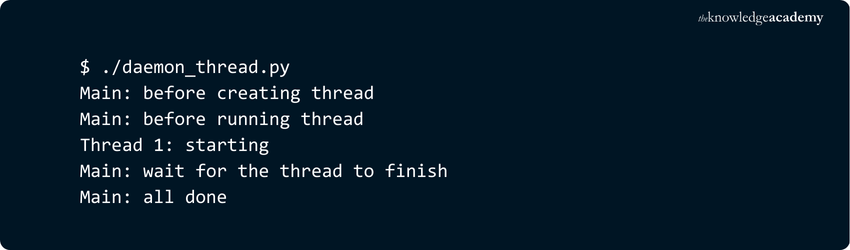
The final line from the previous output is missing because the daemon thread was terminated when __main__ finished.
Join () a Thread
Daemon threads are useful, but sometimes, you need to wait for a thread to finish without exiting the program. To do this, use the .join() method. Uncommenting line twenty in the original code allows the main thread to wait for x to complete:

Whether the thread is a daemon or not, .join() will wait until it finishes, ensuring orderly completion before the program exits.
Learn about templates and controllers by signing up for our Python Django Training now!
Multiple Threading in Python
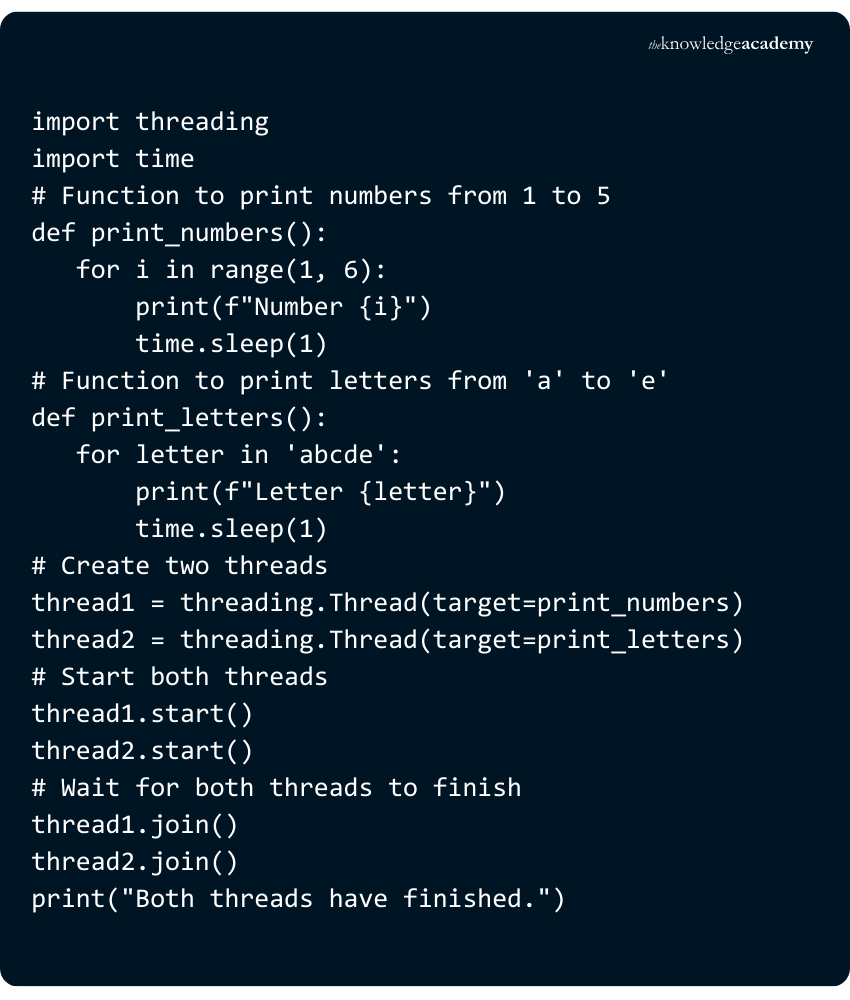
Multiple Threading or ‘Multithreading’ refers to the process of running many threads concurrently. The process is designed to improve the program’s performance. Here is an example to introduce the concept of Multiple Python Threading or ‘Multi-threading’:
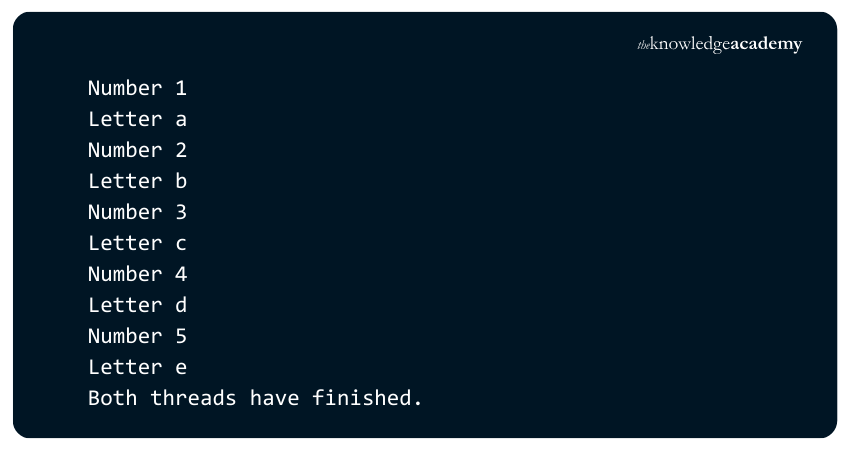
Here’s an output:
Explanation:
1) This example imports the threading and time modules and defines two functions, print_numbers and print_letters. Each function prints a sequence of numbers or letters, incorporating a one-second delay between each print.
2) Two Thread instances, thread1 and thread2, are created, with print_numbers and print_letters assigned as their respective targets.
3) The threads are started using the start() method, and the join() method ensures both complete execution before printing "Both threads have finished."
4) When executed, both threads run concurrently, printing numbers and letters with a one-second delay. The execution order may vary, but both threads continue in parallel until they complete their tasks.
Work with and utilise objects by signing up for our Object-Oriented Programming (OOP's) Course now!
Using a ThreadPoolExecutor
A simpler way to launch multiple threads is by using ThreadPoolExecutor, available in the concurrent.futures module since Python 3.2. The most efficient way to create it is as a context manager with the with statement, which automatically handles the pool's creation and cleanup.

This example creates a thread pool with a maximum of three worker threads and concurrently runs five tasks. Each task simulates some work using time.sleep().
Issues in Python Threading
Python’s ‘threading’ module offers a locking mechanism that is easy to implement and allows users to synchronise threads. A lock can be newly created by calling the Lock() method, which is intended to return the new lock.

1) Python ensures that multiple concurrent threads do not access the critical section simultaneously.
2) The critical section is the part of the program where threads interact with shared resources.
3) Synchronisation prevents threads from interfering with each other when accessing the same resource.
4) Without proper synchronisation, simultaneous modifications can lead to data corruption or loss.
5) For example, multiple threads attempting to modify a list concurrently may result in dropped or corrupted data.
Furthermore, there are two problems that can be encountered during the implementation of executing concurrent programs, which are:
1) Deadlock
A deadlock in Python is quite a time-consuming and hectic problem faced by developers as they design concurrent systems. Deadlock situations can be illustrated by considering the example of the ‘Dining Philosopher’ problem, which was introduced by Dutch Computer Scientist, Software Engineer and Science Essayist Edsger Wybe Dijkstra.
1) The problem involves five philosophers seated at a round table, each needing two forks to eat.
2) There are only five forks available, and each philosopher must acquire both forks simultaneously to eat.
3) Philosophers can only be in one of two states: eating or thinking.
4) The deadlock occurs when all philosophers simultaneously pick up the fork on their left and wait indefinitely for the right fork.
5) No philosopher will release their fork until they finish eating, preventing others from proceeding.
6) This scenario represents deadlock in concurrent systems, where processes compete for limited resources but remain stuck waiting.
Here is a code example to demonstrate the state of deadlock in multi-threading in Python:

Explanation:
a) Two locks, lock1 and lock2, are created using threading.Lock().
b) Two functions, thread1_function and thread2_function, are defined to represent the actions of two threads.
c) thread1_function attempts to acquire lock1 first, then lock2, while thread2_function does the opposite.
d) Two threads, thread1 and thread2, are created and assigned their respective functions as targets.
e) The threads are started using the start() method, initiating concurrent execution.
f) A deadlock occurs as each thread waits for a lock held by the other, preventing further execution.
g) The program hangs or crashes, never reaching the point where "Both threads have finished" is displayed.

2) Race Condition
A race condition is said to happen when more than one thread attempt to access a shared variable simultaneously, resulting in unpredictable outcomes.
a) The value from the shared variable is read by the first thread.
b) Simultaneously, the second thread also reads the value from the same shared variable.
c) Both threads attempt to modify the shared variable at the same time.
d) A race condition occurs, as the final value depends the thread that completes its update last.
e) The thread that modifies the value last determines the final state of the shared variable.
f) This can lead to unpredictable behaviour and inconsistencies in the program.
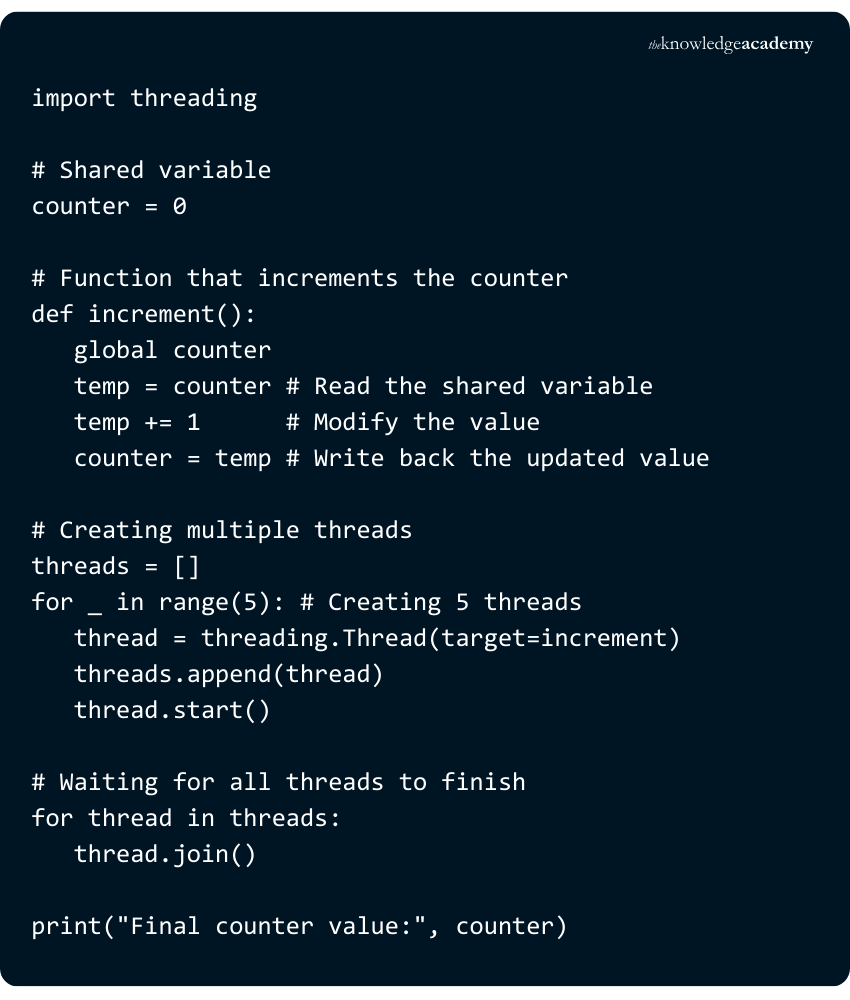
Ideally, the counter should be 5 (if each thread correctly increments the value once). Due to the race condition, some updates may be lost, leading to a final value less than 5. This happens because multiple threads read the same value before any of them update it, causing overwrites. To prevent this, synchronisation methods like threading.Lock() should be used.
Build applications with more speed by signing up for our Data Structure and Algorithm Training now!
Concept of Producer-Consumer in Python Threading
The producer-consumer problem is a fundamental concept in concurrent programming, illustrating the synchronisation challenges between two interdependent processes.

1) Producer-Consumer Problem:
a) A classic synchronisation problem in computer science
b) Involves two main components: The producer and the consumer
2) Producer Role:
a) Generates data or messages
b) Writes messages to a shared resource, such as a buffer or database
c) Operates continuously, often generating messages in bursts
3) Consumer Role:
a) Reads and processes messages from the shared resource
b) Writes processed messages to another resource, like a local disk
c) Must efficiently handle incoming bursts of messages to avoid data loss
4) Message Handling:
a) Messages do not arrive at regular intervals; they come in bursts
b) Requires a mechanism to manage the flow of messages from producer to consumer
5) Pipeline/Buffers:
a) Used to hold messages temporarily
b) Smoothes out message bursts and ensures orderly processing
c) Acts as an intermediary, balancing speed differences between producer and consumer
6) Synchronisation Mechanisms:
a) Ensure that the producer and consumer do not interfere with each other
b) Prevents data corruption and ensures all messages are processed correctly
c) Common mechanisms include locks, semaphores, and conditions
7) Performance Optimisation:
a) Optimises handling of peak loads and irregular message bursts
b) Involves tuning the buffer size, message generation and consumption frequency, and synchronisation mechanisms
c) Ensures the system runs efficiently under varying load conditions
Exploring the Different Objects in Threading
Python offers users more modules to work with in Threading, depending on the use cases they need to work on. Here are some of the other modules involved:
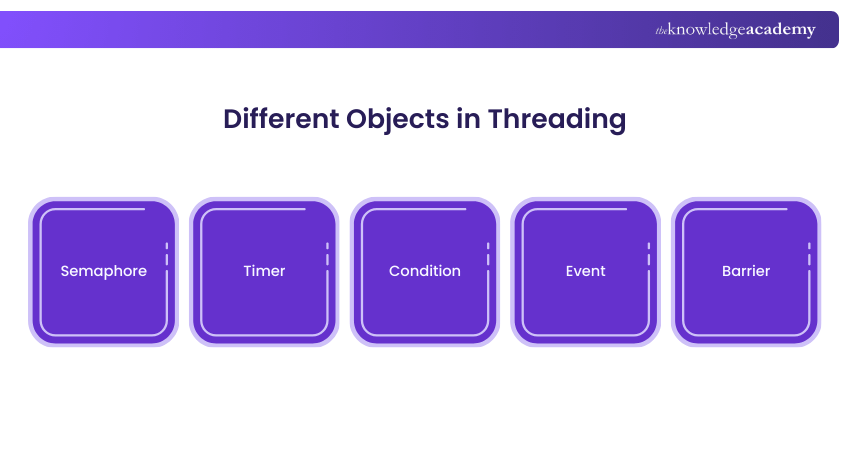
1) Semaphore
A semaphore in Operating System within Python Threading is a counter module designed with several distinct properties, one of which is its atomic counting, meaning that the OS does not swap the thread upon an increment or decrement in the counter. Semaphores basically protect resources that have a limited capacity.
The counter is of two types, namely internal and external, where the internal counter increments upon calling ‘.release()’ and decrements upon calling ‘.acquire()’. If the thread calls the latter when the counter is zero, the thread gets blocked until another thread calls ‘.release()’.
Learn major programming languages and their frameworks by signing up for our Programming Training now!
2) Timer
The Timer module in Python Threading is utilised for scheduling functions that need to be called after a fixed period has commenced. Users need to wait for a few seconds and call a function to create a Timer, which is started by invoking the ‘.start()’ function and terminated by calling the ‘.cancel()’ function.
3) Condition
The Condition object in Python Threading is utilised for the synchronisation of Threads. The condition variable is linked to a shared resource as it is typically coupled with a lock that is specified or generated automatically.
4) Event
The Event object in Python Threading offers users a great mechanism for communication among the threads, wherein one thread signals the initiation of an event and other threads wait for it to occur. The waiting thread is activated once the first thread designed for signal generation produces said signal. The Event object also has an internal flag, which is set to true or false, using the set() and clear() methods accordingly.
5) Barrier
The Barrier object in Python Threading enables a fixed number of threads to wait until they’ve all reached a certain point before continuing. It’s useful for synchronising phases in concurrent tasks, such as splitting a workload into stages and ensuring all threads complete one stage before any move to the next.
Best Practices for Managing Threads in Python
Managing threads effectively is crucial to avoid bugs and ensure performance. Follow these best practices:
1) Use Daemon Threads: Set threads as daemons if they shouldn’t block program exit. This ensures they terminate when the main program ends.
2) Avoid Shared State When Possible: Minimise reliance on shared variables to prevent race conditions and data corruption.
3) Use Thread-safe Structures: When shared state is unavoidable, use Queue, Lock, or other thread-safe modules to manage access.
4) Join Threads Properly: Always join() threads to ensure the main program waits for their completion, preventing unpredictable behaviour.
5) Handle Exceptions Carefully: Wrap thread code in try-except blocks to catch and manage errors gracefully.
6) Limit Active Threads: Use thread pools or limits to avoid system overload from too many concurrent threads.
These practices help ensure your threaded Python applications remain stable, scalable, and easier to debug. Reviewing a well-structured Python Thread Sample can further clarify how to implement these best practices effectively in real-world scenarios, particularly when working with shared resources like files or understanding What is Database handling in multithreaded environments.
How Many Threads can I run in Python?
Python does not impose any limit on the number of threads, but practical constraints depend on system resources and the Global Interpreter Lock (GIL). These can impact performance when handling multiple threads. While most Python applications run with tens to hundreds of threads, multiprocessing is a better option for resource-intensive tasks.
What is the Difference Between Concurrency and Multithreading?
Concurrency refers to a system's ability to handle multiple tasks simultaneously by managing their execution, often through overlapping execution periods. On the other hand, multithreading is a specific implementation of concurrency where multiple
Conclusion
Python Threading isn’t just a technical trick; it’s how you make your programs smarter and more efficient. From juggling tasks to keeping your code responsive, it’s a real game-changer. Once you get the hang of it, Python Threading can turn slow, clunky scripts into smooth-running machines. Give it a try; your future self will thank you.
Transform your data insights with our expert-led R Programming Course. Sign up now to boost your skills!
Frequently Asked Questions
What are Some Common Challenges with Threading in Python?

Common challenges with threading in Python include managing the Global Interpreter Lock and avoiding race conditions and deadlocks. Additionally, ensuring proper thread synchronisation and balancing multithreading complexity with performance gains, particularly for CPU-bound tasks, can be difficult.
What are Some Common Use Cases for Threading in Python?
Python multithreading enhances GUI responsiveness, handles web server requests, speeds up encryption/decryption, processes database queries, and improves audio/video rendering. It also aids in robotics automation and modern game development by managing multiple tasks simultaneously.
What are the Other Resources and Offers Provided by The Knowledge Academy?
The Knowledge Academy takes global learning to new heights, offering over 3,000 online courses across 490+ locations in 190+ countries. This expansive reach ensures accessibility and convenience for learners worldwide.
Alongside our diverse Online Course Catalogue, encompassing 17 major categories, we go the extra mile by providing a plethora of free educational Online Resources like Blogs, eBooks, Interview Questions and Videos. Tailoring learning experiences further, professionals can unlock greater value through a wide range of special discounts, seasonal deals, and Exclusive Offers.
What is The Knowledge Pass, and How Does it Work?
The Knowledge Academy’s Knowledge Pass, a prepaid voucher, adds another layer of flexibility, allowing course bookings over a 12-month period. Join us on a journey where education knows no bounds.
What are the Related Courses and Blogs Provided by The Knowledge Academy?
The Knowledge Academy offers various Programming Training, including Python Course, PHP Course, Python Django Training, R Programming Course and Visual Basic Course. These courses cater to different skill levels, providing comprehensive insights into Python in Excel.
Our Programming & DevOps Blogs cover a range of topics related to Python, offering valuable resources, best practices, and industry insights. Whether you are a beginner or looking to advance your programming skills, The Knowledge Academy's diverse courses and informative blogs have got you covered.

The Knowledge Academy


Global Training Provider
The Knowledge Academy is a world-leading provider of professional training courses, offering globally recognised qualifications across a wide range of subjects. With expert trainers, up-to-date course material, and flexible learning options, we aim to empower professionals and organisations to achieve their goals through continuous learning.


 If you wish to make any changes to your course, please


