


 Top Rated Course

We may not have the course you’re looking for. If you enquire or give us a call on +61 272026926 and speak to our training experts, we may still be able to help with your training requirements.
Microsoft Copilot vs ChatGPT: Which AI Fits Your Workflow?
Pearl Williams 16 July 2026Microsoft Copilot vs ChatGPT are two powerful AI tools, with Copilot designed for Microsoft 365 tasks and ChatGPT for general assistance. Microsoft Copilot is built for productivity inside Microsoft 365 apps, helping with tasks like document creation and Data Analysis. ChatGPT is a versatile AI assistant for general use and learning.

Training Outcomes Within Your Budget!
We ensure quality, budget-alignment, and timely delivery by our expert instructors.
Table of Contents
AI is changing the way we work, but with so many options, how do you choose the right one? Microsoft Copilot vs ChatGPT is a common debate, as both offer smart AI assistance but serve different needs. Copilot is great for Microsoft 365 users, helping with tasks like writing emails, analysing data, and managing documents. Meanwhile, ChatGPT is a more flexible AI tool, well-suited for writing, learning, and general productivity tasks. Let’s explore how Copilot and ChatGPT compare and which one suits you best!
Table of Contents
1) What is Microsoft Copilot?
2) What is ChatGPT?
3) Difference Between Microsoft Copilot and ChatGPT
4) Which is Better, Copilot or ChatGPT?
5) Conclusion
What is Microsoft Copilot?
Developed by Microsoft and launched in February 2023, Copilot is a next-gen AI-powered tool built on Large Language Models (LLMs) designed to be your everyday AI companion, helping you work smarter and faster. In this guide, you'll learn how to use Microsoft Copilot, as Microsoft has seamlessly integrated it into Windows 11, Microsoft 365, and Edge.
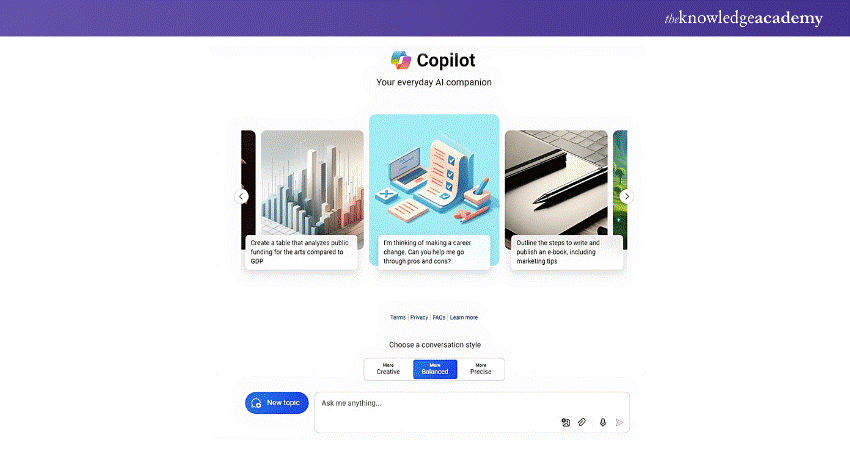
Microsoft Copilot is a renamed and updated version of Bing Chat, an AI chatbot that assists with searching for information, generating content, coding, and more. It works across Microsoft 365 apps like PowerPoint, Teams, Word, Excel, Calendar, and more. By giving simple natural language prompts, you can get faster and more efficient responses whether it’s writing email drafts and articles to scheduling meetings and writing code.
Features of Microsoft Copilot
Here are some of the most important features of Microsoft Copilot that enhance user productivity in unprecedented ways:
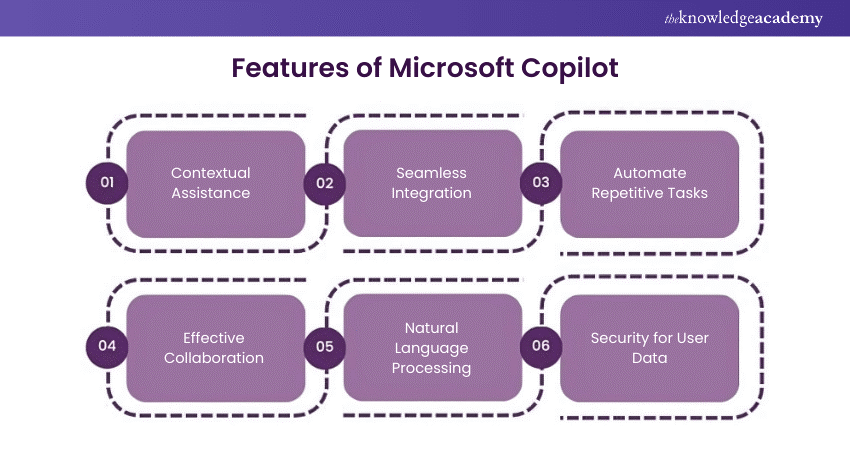
Contextual Assistance
a) Offers personalised help by understanding the user’s previous activities
b) Provides answers and suggestions that are more relevant to each situation
c) Makes it easier to find the information you need
Seamless Integration
a) Works smoothly within Microsoft 365 apps like Teams, Word, and Excel
b) Helps you stay in one place instead of switching between tools
c) Saves time by keeping everything you need in one ecosystem
Automate Repetitive Tasks
a) Handles routine tasks like creating to-do lists and sending emails
b) Frees you up to focus on more important work
c) Reduces the time spent on manual and repetitive activities
Effective Collaboration
a) Helps teams schedule meetings and share documents easily
b) Simplifies project tracking to keep everyone on the same page
c) Enhances communication within departments for better teamwork
Natural Language Processing
a) Let's you ask questions and give instructions in plain language
b) Understands conversational requests without needing special commands
c) Makes using technology more intuitive and user-friendly
Security for User Data
a) Protects data with strong encryption methods
b) Ensures only authorised users can access your information
c) Keeps your files and interactions safe and secure
Multi-modal Capabilities of Microsoft Copilot
a) Understands text, images, and even code for better responses
b) Let's you search using images or visual data
c) Helps simplify complex information by showing charts and graphs
Learn to refine prompts with our ChatGPT Prompt Engineering Certification – Join today!
What is ChatGPT?
ChatGPT is an AI-powered chatbot created by OpenAI and launched in November 2022. It uses Generative Pre-trained Transformer (GPT) language models to generate human-like responses to text prompts. ChatGPT learns from a large amount of data, allowing it to give helpful and relevant answers to different user questions.
Here are some key points about ChatGPT:
a) It has three versions: GPT-3.5, GPT-4, and the latest GPT-4o
b) It can write content, generate images, write code, and analyse data
c) It works on different platforms like websites, messaging apps, and social media
d) It is versatile and easy to use for different tasks
Features of ChatGPT
ChatGPT is an AI-powered chatbot designed to help users with diverse tasks, such as answering questions, providing recommendations, and generating content. Some of the essential features of ChatGPT include:
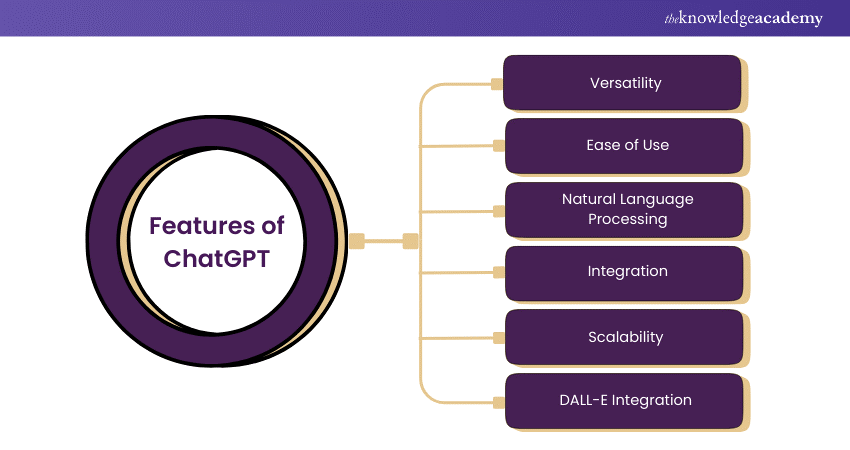
1) Versatility: ChatGPT can be utilised for various tasks, such as answering questions, generating content, codes, and images, analysing data, and providing recommendations.
2) Ease of Use: This Artificial Intelligence (AI) tool is easy to use and is accessible from any device or platform, including web browsers, mobile devices, and messaging apps.
3) Natural Language Processing: ChatGPT is an AI assistant that employs Natural Language Processing (NLP) to evaluate and respond to user queries. This enables users to interact with ChatGPT more naturally and conversationally.
4) Integration: This user-friendly AI chatbot can be integrated with a range of platforms, such as social media, websites, and messaging apps. This enables users to access the tool from their preferred platform.
5) Scalability: ChatGPT can handle a large volume of queries, making it suitable for use in any industry, including finance, e-commerce, education, marketing, IT, and others.
6) Multi-Modal Capabilities of ChatGPT: Much like Copilot, ChatGPT has also been making strides in multi-modal capabilities, enabling more natural interaction with users. Here’s what ChatGPT can currently do:
a) Image Input: You can upload images directly to ChatGPT as prompts. It will analyse the image and craft a response based on its understanding. Imagine feeding it a picture of your messy desk and asking for organisation tips!
b) Voice Input: ChatGPT can accept spoken prompts and questions. This allows for a more conversational and hands-free interaction.
c) Voice Output: ChatGPT can deliver its responses in various AI-generated voices, adding a layer of personality and customisation to the interaction.
d) DALL-E Integration: For paid users, there is limited integration with DALL-E, which allows them to generate images directly within the ChatGPT interface based on text descriptions.
Learn the basics of AI with our ChatGPT Course– Join today!
Difference Between Microsoft Copilot and ChatGPT
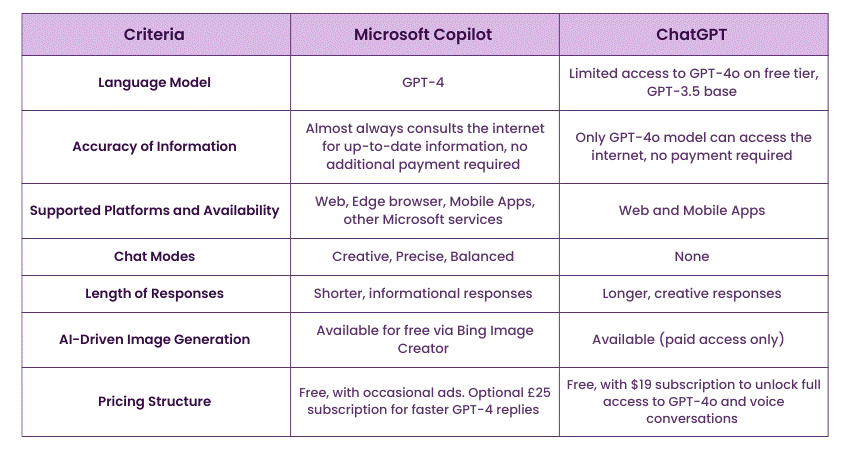
When it comes to AI chatbots, Microsoft Copilot and ChatGPT are two of the most popular options available. While both tools help you accomplish tasks quickly and effectively, there are some key differences between the two. This table summarises the distinctions:
Which is Better, Copilot or ChatGPT?
Both Copilot and ChatGPT are useful, but they serve different purposes. Here’s a simple comparison to help you decide which one is better for your needs:
Microsoft Copilot
a) Works inside Microsoft 365 apps like Word, Excel, Outlook, and Teams
b) Helps with work tasks such as writing documents, analysing data, and managing emails
c) Best for business users who use Microsoft tools daily
d) Requires a Microsoft 365 license to access its features
ChatGPT
a) A general AI chatbot that answers questions writes content, and helps with coding
b) Useful for creative writing, learning, and general knowledge
c) More flexible and can be used for various topics, from casual chats to research
d) Offers both a free version and a paid version for advanced features
Copilot is better if you work with Microsoft 365 and need AI help inside apps like Word, Excel, and Teams. However, choose ChatGPT if you want an AI assistant for general use, creative writing, learning, or answering different types of questions.
Conclusion
We hope you now have a clear understanding of Microsoft Copilot vs ChatGPT and how they serve different needs. Copilot is best for Microsoft 365 users who need AI support inside apps like Word and Excel. ChatGPT is a more flexible AI that helps with writing, learning, and general queries. The right choice depends on whether you need AI for business tasks or everyday use.
Learn to integrate Copilot for daily workflow with our Microsoft 365 Copilot for Teams Training – Join today!
Frequently Asked Questions
Is Copilot Pro Better Than ChatGPT Plus?

Copilot Pro is better for people who use Microsoft 365 apps like Word, Excel, and Outlook because it works inside these tools. ChatGPT Plus is better for general tasks like writing and answering questions on different topics. The best choice depends on whether you need AI for Microsoft work tasks or general use.
How do I Activate Office 365 Copilot?
Follow these steps to activate Office 365 Copilot:
a) Sign in to the Microsoft 365 admin centre.
b) Go to Billing > Licenses and click Copilot for Microsoft 365.
c) Verify users by checking Users Active Users.
d) Send them a welcome email using the Microsoft Copilot for Microsoft 365 setup guide.
e) Enable feedback settings for Microsoft 365 Apps.

 If you wish to make any changes to your course, please


