


 Top Rated Course


We may not have the course you’re looking for. If you enquire or give us a call on +32 35001305 and speak to our training experts, we may still be able to help with your training requirements.
20+ Best SQL Projects For Beginners to Advanced Learners
Richard Harris 22 October 2025SQL Projects are a great way to build practical skills by applying SQL to real-world problems using databases, queries, and reports. They help learners at all levels understand Data Management. It also improves query writing and prepares for roles in Data Analysis, development, research and database administration.

Training Outcomes Within Your Budget!
We ensure quality, budget-alignment, and timely delivery by our expert instructors.
Table of Contents

Learning SQL isn’t just about memorising commands - it’s about solving real problems and working with real data. That’s where SQL Projects come in. They turn theory into action, helping you build systems, analyse trends, and apply your skills in meaningful ways.
Whether you’re a student or a data enthusiast, working on SQL Projects boosts your confidence and deepens your understanding of how databases work. In this blog, we’ll explore a range of SQL project ideas for beginners, intermediate learners, and advanced users. Let’s dive in!
Table of Contents
1) What is SQL?
2) Step-by-step Approach to Selecting SQL Projects
3) SQL Projects for Beginners
4) SQL Projects for Intermediate Learners
5) SQL Projects for Advanced Learners
6) How to Add SQL Projects to Resume?
7) How do I Get SQL Projects for Practice?
8) Conclusion
What is SQL?
SQL, or Structured Query Language, is a powerful and standardised programming language used for managing, manipulating, and retrieving data from relational database systems. Developed in the early 1970s, SQL serves as a bridge between users and databases, enabling efficient communication with databases by executing queries and commands.
SQL operates on relational databases, which store data in structured tables with rows and columns. Users can interact with these databases through the Basic Structure of SQL Queries to perform various tasks, such as creating, modifying, and deleting tables, as well as inserting, updating, and querying data.
SQL Commands include:
a) SELECT (used to retrieve data)
b) INSERT (for adding new data)
c) UPDATE (for modifying existing data)
d) DELETE (for removing data)
SQL also provides capabilities for defining and managing database structures, like indexes, constraints, and views.
Step-by-step Approach to Selecting SQL Projects
Here are the steps to help you choose the right SQL Project for learning or practice:
1) Know Your Skill Level
a) Start with easy projects if you're a beginner
b) Pick familiar topics to avoid confusion
c) Avoid jumping into complex tasks too soon
d) Focus on simple queries before learning advanced ones
e) Grow your skills step by step with practice
2) Identify a Real Problem
a) Choose examples from school, work, or daily life
b) Pick something you're interested in
c) Try to solve a common issue with data
d) Make your project useful and relatable
e) Keep the goal clear and simple
3) Define Your Purpose
a) Decide if it’s for learning, practice, or your resume
b) Know if it’s for a job role, college, or personal growth
c) Focus on gaining new skills or improving old ones
d) Think about what you want to showcase
e) Set small goals for each project
4) Choose a Dataset
a) Use free datasets from trusted websites like Kaggle
b) Make your own simple dataset if needed
c) Ensure the data is clean and organised
d) Choose data with enough variety (like names, dates, numbers)
e) Start small before working with large data
5) List Needed SQL Features
a) Include basic commands like SELECT and JOIN
b) Try to use WHERE, GROUP BY, and ORDER BY
c) Use subqueries or filters for added challenge
d) Test aggregate functions like SUM, AVG, MAX
e) Explore views or stored procedures if you're advanced
6) Start Simple and Scale
a) Choose a project you can complete in a short time
b) Add new features step by step
c) Don’t worry if it’s small; focus on learning
d) Build confidence before trying bigger projects
e) Keep improving the same project as you grow
7) Review and Improve
a) Check if your queries are running smoothly
b) Look for any repeated or slow parts
c) Try to clean and organise your code
d) Ask others for feedback or suggestions
e) Think about what you’d do differently next time
Learn the core of SQL with our Advanced SQL Course - Join today!
SQL Projects for Beginners
Beginners should start with simple projects to build a strong foundation in SQL. Here are the best beginner-friendly SQL Projects to improve basic Database Management and query writing skills:

1) Library Management System
This project helps you create a database for managing books in a library. You can track book details, check-in and check-out records, and member information. It teaches how to use tables, insert data, and perform simple queries. You’ll also learn how to manage book availability using SQL commands.
This is a great beginner project for learning how databases are used in real life. You will also understand how multiple tables interact with each other and help maintain accuracy in data. It's ideal for students looking for real-world examples.
Key Focus:
a) Create tables for books, members, and loans
b) Use SELECT and JOIN to view borrowed books
c) Learn to INSERT, UPDATE, and DELETE records
d) Track overdue books and return dates
e) Understand how real systems store and manage book data
f) Improve record-keeping with simple relationships
g) Explore data integrity with foreign keys
2) Student Database Management System
This project focuses on storing and managing student records in a school or college. You’ll work with data like names, roll numbers, marks, and attendance. It helps you learn how to design a simple database with multiple tables. You’ll use SQL queries to get student results, calculate averages, and find top performers.
This is perfect for understanding how academic data is stored and used. It also gives good practice in handling student performance data. This project is helpful for education and admin roles.
Key Focus:
a) Design tables for student details, subjects, and marks
b) Use queries to find top students in each subject
c) Learn to calculate average marks using SQL functions
d) Practice filtering students by attendance or grades
e) Understand how data is linked across tables
f) Create reports based on subject or class
g) Add rules to handle missing or low data
3) Online Retail Application Database
This project teaches you how online stores manage product and customer data. You’ll create tables for customers, products, orders, and payments. It gives practice in writing queries that track orders and stock levels.
You’ll learn how to handle discount codes, product categories, and purchase history. It’s great for those interested in e-commerce systems. This helps you understand how real businesses run online shops. It’s useful for sales, product, or store database tasks.
Key Focus:
a) Build tables for customers, products, and orders
b) Track items sold and available stock
c) Query customer purchase history
d) Use JOIN to connect orders and payments
e) Understand how databases support online shopping
f) Store details like discounts, codes, and cart items
g) Analyse customer buying behaviour
4) Inventory Control Management System
This project focuses on tracking inventory levels in a store or warehouse. You’ll create tables for items, suppliers, and stock entries. It helps you learn how to manage low-stock alerts and reorder points. You’ll also learn how to update stock automatically when new items arrive or are sold.
This project is useful for learning inventory and supply chain basics. It helps in managing product flow and reducing losses. Ideal for those interested in retail or supply systems.
Key Focus:
a) Create item and stock management tables
b) Monitor stock levels and trigger alerts
c) Record supplier information and delivery logs
d) Use SQL to track in and out stock flow
e) Learn how to keep inventory data up to date
5) Railway System Database Management System
This project helps you build a system to manage train schedules, passenger bookings, and ticket details. You will design tables for trains, stations, timings, and bookings. It gives you hands-on experience with real-time data handling.
You’ll learn how to filter trains based on routes and dates. It's great for understanding transport databases. This project is perfect for learning scheduling and ticketing systems. It also helps in managing journey data smoothly.
Key Focus:
a) Create tables for trains, stations, and passengers
b) Manage bookings and ticket availability
c) Track train timings and routes
d) Use filters to search for available trains
e) Understand how databases work in the transport sector
f) Check seat status based on time and location
g) Add stations and routes to match demand
6) Customer Segmentation
This project helps group customers based on their shopping behaviour. You'll analyse data like purchase history, spending habits, and visit frequency. It’s useful for marketing and sales teams to offer personalised deals.
You’ll work with functions like GROUP BY and HAVING. It helps build logic for analysing customer trends. This project supports targeted marketing decisions. It's also good for learning how businesses increase sales.
Key Focus:
a) Create customer profiles and transaction tables
b) Use SQL to group and segment customers
c) Analyse buying patterns with filters
d) Find high-value and repeat customers
e) Learn how businesses target the right audience
f) Filter customer types by spending range
g) Create loyalty levels or tiers
7) Cooking Recipe Database
This project lets you build a database to store cooking recipes with ingredients and steps. You’ll learn how to structure content with categories and tags. It teaches you how to store long-form text like cooking steps. You’ll also use filters for ingredients and cooking time.
Great for anyone interested in food or blogging platforms. This project teaches data tagging and user search logic. It’s perfect for app or recipe site development.
Key Focus:
a) Create tables for recipes, ingredients, and categories
b) Store and manage long-form instructions
c) Use filters for time, diet, or ingredient type
d) Learn to search recipes by keywords
e) Practice designing user-friendly databases
f) Add tags for cuisine, difficulty, or cooking time
g) Build filter-friendly and search-based layouts
From Basics to Brilliance - Learn the core of SQL with our PostgreSQL Administration Training – join now!
8) Hospital Management System
This project manages patient records, doctor schedules, and appointments. You'll build tables for patients, doctors, staff, and treatments. It helps you understand how health systems store sensitive data. You’ll work with queries to track appointments and history. It’s good practice for healthcare-related roles.
You will also learn how to maintain records securely and avoid data duplication. A perfect project for those interested in healthcare tech.
Key Focus:
a) Create detailed records for patients and staff
b) Schedule and manage appointments
c) Track medical history and treatments
d) Ensure data privacy using proper structure
e) Learn how data flows in a hospital setup
f) Handle emergency and regular visit data
g) Improve reporting on patient outcomes
9) Payroll Management System
This project helps calculate and store employee salaries, bonuses, and deductions. You’ll design tables for employee details, payroll, and attendance. It teaches how to use SQL math functions.
You’ll also build reports for monthly payments. It’s ideal for HR and finance domains. You will understand salary structures and how different allowances work. Great for managing organisation-level payment systems.
Key Focus:
a) Manage employee details and payment records
b) Calculate net salary using SQL formulas
c) Track leaves and bonuses
d) Generate monthly salary slips
e) Understand payroll structure and database flow
f) Record tax deductions and benefits
g) Use data to create pay trends over months
10) Blood Donation Management System
This project keeps track of donors, blood groups, and donation records. You’ll create tables to manage requests, donations, and stock levels. It helps organise data that can save lives.
You’ll also learn to match donor types with patient needs. A great project with a social impact. You’ll understand how donation centres store and update critical data. This project suits NGOs or healthcare workers.
Key Focus:
a) Build donor and request record tables
b) Store blood type and donation history
c) Match blood groups for requests
d) Track donation frequency and stock
e) Learn how such systems help hospitals and NGOs
f) Set reminders for eligible repeat donors
g) Generate location-wise blood stock reports
11) Billing System for a Departmental Store
This project helps track product sales, billing, and customer purchases. You’ll create tables for products, prices, transactions, and receipts. It teaches you to build dynamic billing reports. You’ll also calculate totals and apply discounts.
A great example of store or retail system learning. This helps you understand real-time billing processes. Useful for those looking to enter retail software development.
Key Focus:
a) Create billing and product detail tables
b) Track purchases and transaction history
c) Apply discounts using SQL formulas
d) Generate daily or monthly reports
e) Learn how point-of-sale systems store data
f) Record tax and final invoice totals
g) Track top-selling items and customer spending
12) Bus Booking System Mini Project
This project covers bookings, routes, buses, and passenger details. You’ll learn how transport systems work with time, routes, and fares. It teaches how to update available seats after each booking.
You’ll also build search features for routes and timings. It's a simple but practical project. This can help in designing apps or web-based booking systems. It’s great for transport or travel industry learners.
Key Focus:
a) Design tables for buses, routes, and bookings
b) Search available buses by date and location
c) Update seat availability after bookings
d) Track travel history of each user
e) Learn how bookings work behind the scenes
f) Add filters for bus type or time slot
g) Create printable or exportable booking details
13) Soccer Game Analysis
This project helps analyse matches, teams, and player performance. You’ll track scores, team stats, and win/loss records. It teaches how to handle match data and comparisons. You’ll use SQL to filter by teams or seasons. A great project for sports fans or analysts. You can explore player stats over time or in specific matches. Great for portfolio use in sports analytics.
Key Focus:
a) Create tables for players, teams, and scores
b) Track performance across seasons
c) Compare player stats using queries
d) Use filters to view team performance
e) Learn Data Analysis in sports
f) Build leaderboards by team or goals
g) Store match locations and attendance
14) Road Safety Analysis System
This project stores data on traffic, accidents, and safety measures. You’ll create tables for locations, causes, and incident reports. It teaches you how to spot trends in accident data.
You’ll also work with filters to sort by time or place. It’s a great project for social impact. You will also learn how to use this data for planning safer roads. Ideal for civic or public data enthusiasts.
Key Focus:
a) Build a database for accident and safety records
b) Track causes and locations of accidents
c) Analyse trends by year or region
d) Use SQL to suggest safety improvements
e) Understand how data helps in public planning
f) Generate reports for policy makers
g) Find accident-prone zones using filters
No Experience? No Problem - Build your foundation with our Introduction to MySQL Training – sign up now!
SQL Projects for Intermediate Learners
After learning the basics, learners can move on to projects that involve more detailed data work. Here are some of the ideal SQL projects for intermediate learners to boost their skills and handle more complex tasks:
15) World’s Oldest Businesses Database
This project helps you explore businesses that have been around for centuries. You’ll create tables for company names, countries, founding years, and industries. It teaches how to organise historical data and compare business lifespans.
You’ll also use SQL queries to group companies by age and location. It’s ideal for learning to work with real-world historical datasets. This also improves your ability to sort, rank, and display comparative data across time.
Key Focus:
a) Create tables for business details and founding years
b) Use queries to list the oldest companies by country
c) Group businesses by industry types
d) Sort businesses by age and location
e) Understand data patterns in business history
f) Create reports for top 10 oldest companies
g) Compare industries with longest survival
16) NYC Public School Test Score Analysis
In this project, you’ll analyse test results from New York public schools. You'll store student scores, subjects, school names, and district data. It helps you learn how to work with large datasets and draw insights. You’ll use SQL to compare school performance and spot trends. Great for those interested in education and data. You will also gain experience working with real education-related datasets.
Key Focus:
a) Design tables for test scores and school details
b) Compare performance by subject and district
c) Use filtering to track top and low-performing schools
d) Analyse changes in scores over time
e) Learn how data supports school improvement
f) Identify schools that need attention
g) Group data by region or student type
17) International Debt Statistics Analysis
This project focuses on analysing debt levels in different countries. You’ll store country names, year-wise debt, and categories like government or private debt. It teaches you how to handle global finance data using SQL.
You’ll create queries to find trends, rankings, and changes over time. Perfect for learning how to analyse large financial datasets. This is helpful for students or professionals interested in economics.
Key Focus:
a) Build tables for country-wise debt data
b) Compare debt across years and regions
c) Rank countries based on total debt
d) Filter data by type (e.g. public or private debt)
e) Understand how SQL helps in financial reporting
f) Build charts and group summaries from data
g) Analyse debt-to-GDP ratios over time
SQL Projects for Advanced Learners
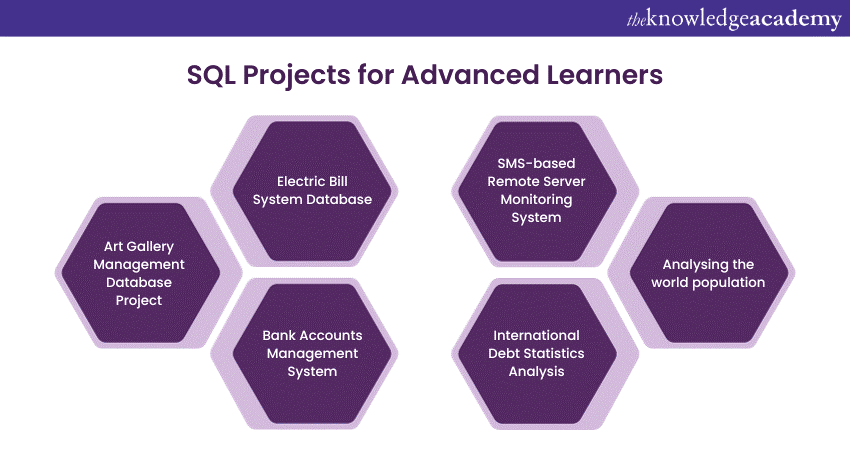
Advanced learners should work on challenging projects that involve large datasets and complex queries. Here are the top SQL Projects for advanced learners who want to apply their skills to real-world data problems:
18) Art Gallery Management Database Project
This project helps you manage an art gallery’s database, including artists, artworks, exhibitions, and sales. You’ll learn how to store detailed records of paintings, track sales, and link artists to their work. It’s a good project for understanding how to manage creative collections. You’ll also explore how SQL supports cataloguing and event planning. This project can also be used to design exhibition reports and artist summaries.
Key Focus:
a) Create tables for artists, artwork, and exhibitions
b) Track sales and artwork status
c) Link artwork to events and artist profiles
d) Filter based on styles, periods, or themes
e) Learn how galleries use data for operations
f) Track high-value or featured art
g) Design visitor reports for each event
19) Electric Bill System Database
This project helps manage electricity usage and billing for households or buildings. You’ll work with customer records, meter readings, bill generation, and payments. It teaches how to use SQL to calculate charges and track unpaid bills. A perfect example of working with billing systems. You’ll also learn how to generate monthly summaries and manage user plans.
Key Focus:
a) Create tables for users, bills, and usage
b) Calculate monthly charges with SQL formulas
c) Track payment status and due dates
d) Generate billing reports by month or area
e) Learn how billing data is structured and used
f) Send alerts for late payments
g) Monitor high-usage patterns
20) Bank Accounts Management System
This project helps you build a database to manage customer bank accounts, transactions, and balances. You’ll learn how to track deposits, withdrawals, and account types. It’s great for understanding financial records and secure data handling. You’ll also use SQL to flag errors or check account history. This project can simulate a small-scale banking system with various account operations.
Key Focus:
a) Create customer and transaction tables
b) Track balances and account activity
c) Filter by account type or date range
d) Check for duplicate or suspicious transactions
e) Learn how banking systems store and manage data
f) Design monthly statement reports
g) Monitor inactive or closed accounts
21) SMS-based Remote Server Monitoring System
This project focuses on storing and reviewing messages sent from remote servers to track system activity. You’ll learn how to manage logs, alert types, and timestamps. It’s useful for building tools that track server health and performance. This project connects SQL with basic monitoring tasks. It's also good for learning how to manage alert history and analyse server uptime.
Key Focus:
a) Create logs for messages, errors, and system updates
b) Use timestamps to filter activity
c) Track server status over time
d) Build queries to detect warnings or failures
e) Understand real-time data tracking with SQL
f) Separate logs by server type or priority
g) Calculate daily or weekly system downtime
22) International Debt Statistics Analysis
This advanced version focuses on large-scale comparisons and forecasting using SQL. You’ll dig deeper into financial patterns, build dynamic views, and work with subqueries. This helps in reporting and decision-making in finance.. It’s perfect for those preparing for data or finance-based roles. You’ll also practise building dashboards and trend summaries.
Key Focus:
a) Use advanced SQL queries for trend analysis
b) Build views and stored procedures
c) Compare debt data using multi-level filters
d) Create reports with grouped and ranked results
e) Understand how to analyse data at a global scale
f) Design dashboards with aggregated metrics
g) Generate forecast models using year-on-year data
23) Analysing the World Population
This project helps you understand population growth, density, and demographics across countries and continents. You’ll create tables for country data, population by year, and age groups. It’s useful for geography, policy, and development studies. You’ll also practise regional comparisons and filtering by time period. It’s perfect for analysing social and global trends.
Key Focus:
a) Build tables for country and population data
b) Track population trends over time
c) Compare regions based on growth rate
d) Use filters for age group and gender
e) Learn how population data is used in research
f) Highlight high-growth areas or age brackets
g) Build tables for urban vs rural statistics
How to Add SQL Projects to Resume?
To add SQL Projects to your resume, include a dedicated section titled "Projects". For each project, briefly describe the purpose, your role, the technologies used (specifically SQL), and any notable achievements. Quantify your contributions, such as improvements in performance or data handling.
How do I Get SQL Projects for Practice?
There are several ways to find SQL Projects for practice. Here are some suggestions:
1) Online Learning Platforms
2) Kaggle
3) YouTube Tutorials
4) SQL practice websites
5) Books and online resources
Conclusion
We hope this blog helped you understand the importance of working on SQL Projects at every learning stage. Whether you're a beginner or more advanced, practising with real projects is a great way to grow your skills. These projects will help you become more confident with databases, queries, and data handling. Start small, keep learning, and soon you'll be ready for real challenges in your career.
Master the first step - begin your SQL journey with our Introduction to SQL Databases Training 10985C - join now!
Frequently Asked Questions
Why Should I Work on SQL Projects?

Working on SQL Projects helps you practise what you’ve learned and understand how SQL works in real situations. It builds your confidence and improves your problem-solving skills. Projects also look great on your CV and help you get ready for real jobs.
What Tools do I Need to Start Working on SQL Projects?
To start working on SQL Projects, you just need a computer and an SQL database tool like MySQL, PostgreSQL, or SQLite. You can also use free tools like MySQL Workbench or online platforms. These tools help you write and test your SQL queries easily.
What are the Other Resources and Offers Provided by The Knowledge Academy?
The Knowledge Academy takes global learning to new heights, offering over 3,000 online courses across 490+ locations in 190+ countries. This expansive reach ensures accessibility and convenience for learners worldwide.
Alongside our diverse Online Course Catalogue, encompassing 19 major categories, we go the extra mile by providing a plethora of free educational Online Resources like News updates, Blogs, videos, webinars, and interview questions. Tailoring learning experiences further, professionals can maximise value with customisable Course Bundles of TKA
What is The Knowledge Pass, and How Does it Work?
The Knowledge Academy’s Knowledge Pass, a prepaid voucher, adds another layer of flexibility, allowing course bookings over a 12-month period. Join us on a journey where education knows no bounds.
What are Related Courses and Blogs provided by The Knowledge Academy?
The Knowledge Academy offers various SQL Courses, including the Introduction to SQL Course, PostgreSQL Administration Training and the Advanced SQL Course. These courses cater to different skill levels, providing comprehensive insights into Data Types.
Our Programming & DevOps Blogs covers a range of topics related to SQL, offering valuable resources, best practices, and industry insights. Whether you are a beginner or looking to advance your SQL Skills, The Knowledge Academy's diverse courses and informative blogs have got you covered.

Richard Harris


Senior Full Stack Developer and Technology Educator
Richard Harris is a highly experienced full-stack developer with deep expertise in both frontend and backend technologies. Over his 12-year career, he has built scalable web applications for startups, enterprises and government organisations. Richard’s writing combines technical depth with clear explanations, ideal for developers looking to grow in modern frameworks and tools.


 If you wish to make any changes to your course, please


