


 Top Rated Course

We may not have the course you’re looking for. If you enquire or give us a call on +32 35001305 and speak to our training experts, we may still be able to help with your training requirements.
Top 12 QuickBooks Features: A Detailed Guide for Users
Olivia Taylor 28 March 2026QuickBooks Features include expense tracking, invoicing, bank reconciliation, financial reporting, multi-currency support, tax compliance, and mobile access. It also automates routine tasks and provides real-time insights to support better financial decisions. Its integration with banks and apps helps reduce errors and save time.

Training Outcomes Within Your Budget!
We ensure quality, budget-alignment, and timely delivery by our expert instructors.
Table of Contents
More than a software, QuickBooks is nothing short of the ultimate financial sidekick that supports you at every stage of your financial journey. From tracking expenses and generating invoices to running smooth payroll, QuickBooks Features and its numerous smart tools make the numbers work for you. In this blog, we’ll explore the 12 best QuickBooks Features that turn cumbersome Bookkeeping into a dynamic and exciting business activity. So read on, embrace QuickBooks’ cutting-edge touch and master your money with unprecedented ease!
Table of Contents
1) What is QuickBooks?
2) Features of QuickBooks
3) How QuickBooks Works?
4) How QuickBooks can Benefit Your Business?
5) Tips for Getting Started or Maximising QuickBooks Usage
6) QuickBooks Online vs Desktop: Which One Is Right for You?
7) QuickBooks and the Future of Financial Management
8) Conclusion
What is QuickBooks?
QuickBooks is a widely used accounting software developed by Intuit, designed to help small and medium-sized businesses manage their finances efficiently. It offers tools for invoicing, expense tracking, bill payments, and financial reporting, making everyday accounting tasks simpler and more organised.
One of its key strengths is automation, such as generating invoices, tracking expenses from linked bank accounts, and producing detailed reports for better decision-making. Its user-friendly design and integration with other systems reduce manual work and help businesses stay on top of their financial performance.
Features of QuickBooks
QuickBooks Features are designed to support mobility and Remote Work. The software has a user-friendly interface that allows users to handle invoices, expenses, and customer data from anywhere.
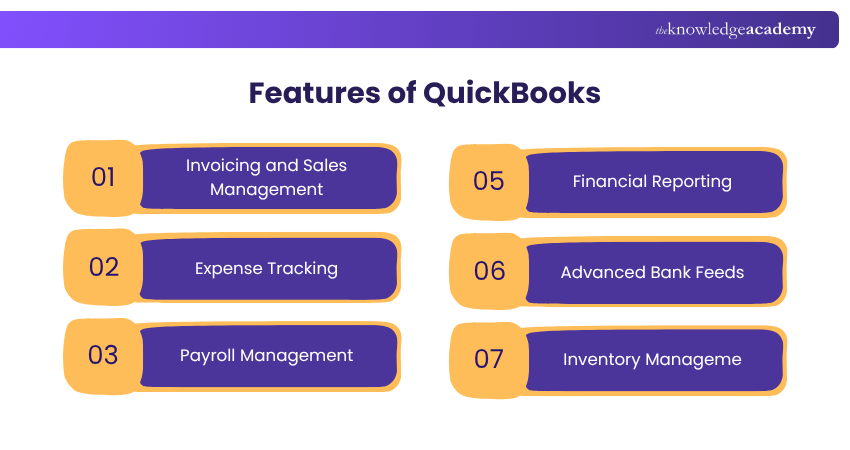
Here, we will outline the top QuickBooks Features list and how they can benefit your business.
a) Invoicing and Sales Management
QuickBooks makes invoicing simple and helps businesses handle sales smoothly. You can generate professional invoices with your logo and custom messages. It also lets you track invoice status, send reminders, and get paid online easily. Here are its key functions:
1) Creating and Sending Invoices: Go to the "Sales" tab and click on "Invoices." Fill in details like customer name, items sold, and payment terms. You can also use ready-made templates to save time and maintain consistency.
2) Tracking Sales and Payments: QuickBooks shows real-time updates on your sales and payments. The dashboard highlights unpaid, paid, and overdue invoices, enabling you to manage your finances more effectively. You can set up automatic reminders for late payments too.
b) Expense Tracking
Tracking expenses is important for understanding your finances clearly. QuickBooks makes it easy by allowing you to upload receipts, connect your bank accounts, and categorise your spending. It also delivers real-time reports, allowing you to monitor your spending, identify cost-saving opportunities, and make informed decisions.
c) Payroll Management
QuickBooks Payroll makes it easy to manage employee payments and taxes. It calculates wages, deductions, and tax amounts for you and can even file tax forms automatically. You can pay your employees through print checks or direct deposit. It also lets employees view their payslips and tax documents online.
QuickBooks integrates well with other tools, such as time tracking and Accounting, and can also be used to pay contractors. Everything is handled in one place, saving you time and reducing errors.
Unlock the power of Sage 50 for greater Accounting clarity! Sign up for our Sage 50 Accounts Training now!
d) Financial Reporting
QuickBooks makes financial reporting fast and easy. It offers one-click access to reports such as Profit & Loss, Balance Sheet, and Cash Flow, providing a clear snapshot of your business’s finances. You can customise the date range, Accounting method (cash or accrual), and level of detail to fit your specific needs.
Reports update in real-time, helping you identify trends, manage costs, and inform decisions with accurate insights. You can also export, email, or schedule reports automatically for teammates or advisors.
e) Advanced Bank Feeds
Advanced Bank Feeds in QuickBooks make it easy to connect your bank and credit card accounts directly to the system. This feature automatically imports transactions, helping you match and categorise them quickly without switching between platforms. It saves time and improves accuracy in financial records.
If your banking details change, such as a new card or account, you can update the connection by disconnecting and reconnecting it through the Banking section. This keeps your data current and ensures smooth and continuous syncing of transactions.
f) Inventory Management
QuickBooks offers exciting Inventory Management features that help businesses stay organised and efficient. You can create purchase and sales orders that automatically update your inventory levels and set alerts to restock items when needed. It also supports tracking up to 100,000 items, adding images, managing serial numbers, and using bin location tracking. You can even connect it to a barcode scanner, making it easier for your warehouse team to monitor stock accurately and in real-time.
g) Customisable Reports
QuickBooks makes it easy to create reports that fit your specific needs, not just standard financial summaries. While regular reports are useful, they don’t always show what truly matters to your business. With QuickBooks, you can build custom reports, for example, to track marketing expenses and filter by account, customer, or date range.
You can group and rearrange data for clarity, save templates, and even schedule reports to be emailed automatically. This way, business owners receive the right information when they need it, making decisions faster and more easily.
h) Automating Invoicing and Bill Payments
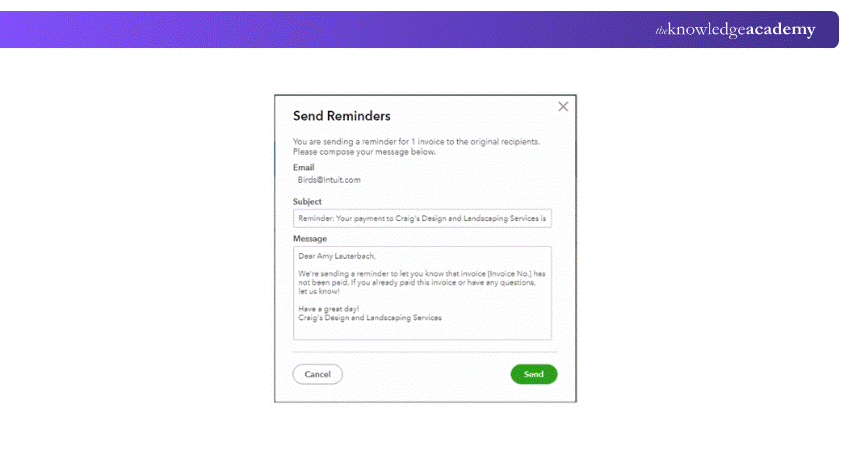
QuickBooks simplifies invoicing and bill payments by automating routine financial tasks. It allows businesses to set up recurring invoices, schedule payments, and send automatic reminders to customers, reducing manual effort and helping maintain steady cash flow.
The system also records payments automatically and matches them with transactions, improving accuracy and saving time. With built-in online payment options and timely reminders, businesses can receive payments faster and manage collections more efficiently.
i) Automated Bank Reconciliation
QuickBooks’ Automated Bank Reconciliation lets you match your books with your bank in just minutes. It imports the transactions from linked accounts and then helps you check off items as you confirm them. Essentially, QuickBooks keeps a running balance so you can see when everything aligns.
Once done, it generates detailed reconciliation reports that highlight cleared, uncleared items and any discrepancies. This speeds up the monthly closing process, identifies errors quickly, and maintains accurate financial records with minimal effort.
j) Multi-currency Support
Thanks to QuickBooks’ multi-currency support, you can manage transactions in different currencies with ease. You can assign currencies to bank accounts, credit cards, customers, and vendors, then create invoices and bills in those foreign currencies.
QuickBooks automatically fetches exchange rates (which are updated every few hours) and converts them into your home currency while tracking gains or losses. It also supports foreign currency deposits, payments, and detailed multi-currency reporting.
k) Track Invoice History
The Track Invoice History feature in QuickBooks allows you to view all important details related to a specific invoice in one place. It provides a clear overview of invoice activity, helping you quickly access key information without searching through multiple sections.
This feature makes it easier to monitor invoice progress, review past actions, and stay organised. By having all invoice-related details centrally available, businesses can manage records more efficiently and respond to queries faster.
l) Cloud-based Accounting
QuickBooks offers cloud-based accounting, allowing users to access their financial data anytime and from any device with an internet connection. This flexibility supports remote work and makes it easier to manage finances on the go.
It also enables real-time collaboration, so team members and accountants can work on the same data simultaneously without relying on manual files or paperwork, improving efficiency and accuracy.
Ride the wave of simpler Accounting with our Wave Accounting Training - Sign up now!
How QuickBooks Works?
When it comes to QuickBooks services, flexibility is a big advantage. For using QuickBooks, you don’t need to sign up for all of them simultaneously. You can begin with a single app (for example, Accounting or Payroll Software) and gradually add more as your needs evolve. Plus, if you outgrow a service, you can remove or upgrade it as necessary. Here’s how a typical QuickBooks setup might look like:
a) Begin with Accounting Software
Start by signing up for the QuickBooks Accounting software. It helps you manage key financial tasks, such as tracking income and expenses, sending invoices, handling taxes, and creating reports. This is the foundation of your business’s financial system, providing a clear picture of your cash flow.
b) Add QuickBooks Live
To make your setup even stronger, add QuickBooks Live. This service connects you with a certified Bookkeeper who can help keep your books accurate and up to date. They’ll help with setup, categorising transactions, and monthly reviews and offer expert advice.
c) Expand as Your Business Grows
As your business grows, you may start hiring employees, freelancers, or contractors. QuickBooks supports all these roles and helps you manage their pay, taxes, and records in one place. You can scale up confidently, knowing your financial system is ready to handle more people.
d) Streamline Payments
To make paying your team simple, sign up for QuickBooks Payroll. It automates salary calculations, tax deductions, and direct deposits. It also keeps you compliant with tax rules. With QuickBooks Payroll, you save time and reduce the risk of payroll errors.
e) Track Billable Hours
QuickBooks Time enables you to track the time spent by employees or Contractors on various tasks and projects. This is useful for accurate billing and smooth Payroll Processing. It also helps you understand how time is being used in your business so you can improve productivity and budget better.
How QuickBooks can Benefit Your Business?
As one of the leading names in the world of Accounting Software, QuickBooks significantly enhances the odds of seamless integration with any other platform your business may use. Here are some the core benefits QuickBooks can offer your business:
a) Financial Statements at Your Fingertips
QuickBooks provides easy access to key financial statements, including balance sheets, cash flow statements, profit and loss (P&L) statements and tax filings. You can print these statements for your accountant or invite them to view the statements directly without needing a login ID or password.
b) Straightforward Inventory Management
Updating expense accounts, annually tracking inventory and calculating taxable income can be cumbersome tasks. QuickBooks automates these tasks, updating the correct expense account and reflecting changes in taxable income as you accept payments for inventory items.
c) Easy Taxation
QuickBooks simplifies tax time by automatically calculating your income and expenses as transactions occur. Payroll taxes are calculated automatically each cycle, reducing the tax liability hassle.
You can print the necessary information for your QuickBooks Accountant or invite them to access and download reports directly. The QuickBooks mobile app allows you to scan and upload receipts in real-time, eliminating the last-minute rush to gather documents for tax filing.
These benefits make QuickBooks a vital tool for streamlining your business processes and ensuring efficient Financial Management.
Train for precision and track every penny with our Bookkeeping Course - Sign up now!
Tips for Getting Started or Maximising QuickBooks Usage
Whether you're just starting with QuickBooks or looking to use it more effectively, here are some simple tips to help you get the most out of it:
1) Try the Free Trial: Use the free trial to explore QuickBooks and see how it works for your business before you pay for a plan.
2) Take Tutorials: QuickBooks offers tutorials to help you learn everything—from sending invoices to managing inventory. These guides make it easy to get started or learn advanced features.
3) Join Community Forums: Connect with other users in QuickBooks forums. You can pose questions, get tips, and learn from their experiences. It's a great way to solve problems and stay up to date.
4) Get Help from a ProAdvisor: A QuickBooks ProAdvisor is a certified expert who can offer one-on-one help. They’ll guide you through setup, improve your workflow, and help you use QuickBooks more efficiently for your business.
QuickBooks Online vs Desktop: Which One Is Right for You?
QuickBooks offers two main versions: Online and Desktop, each suited to different business needs. QuickBooks Online is cloud-based, allowing you to access your financial data anytime and from any device with an internet connection. In contrast, QuickBooks Desktop is installed on a specific computer, meaning access is limited to that device.
QuickBooks Online is ideal for businesses that need flexibility, remote access, and real-time collaboration, as multiple users can work on the same data simultaneously. On the other hand, QuickBooks Desktop is better suited for businesses that require advanced features, detailed reporting, or complex accounting tasks.
Choosing the right version depends on your priorities. If you value accessibility, automation, and teamwork, QuickBooks Online is the better option. However, if your business needs more control, industry-specific tools, or advanced capabilities, QuickBooks Desktop may be the right choice.
QuickBooks and the Future of Financial Management
QuickBooks is leading the way into the future of Financial Management with smart, powerful tools beyond traditional Accounting. It now features Agentic AI agents, which are essentially virtual teammates that automate tasks such as invoice reminders, payment tracking, and bookkeeping chores.
Other updates include auto-matching payroll tax, Amazon Business integration, and a Support Resolution Centre for real-time assistance. With this AI-driven, Cloud-first approach, QuickBooks is helping businesses save time, reduce manual work, and turn Accounting into a strategic advantage.
Conclusion
QuickBooks offers much more than basic Bookkeeping as it’s a full toolkit for smarter, faster Financial Management. With the 12 best QuickBooks Features outlined in this blog, you can simplify tasks, save time, and stay organised. Exploring these tools can help you make the most of your business finances every step of the way.
Start Your Journey to Accounting Confidence with our Accounting Software Training - Sign up now!
Frequently Asked Questions
How can QuickBooks Positively Impact My Business's Bottom Line?

QuickBooks can help you improve your business’s bottom line by simplifying and automating your Accounting and Bookkeeping processes. You can use QuickBooks to track income and expenses, manage inventory, generate reports, pay taxes, and more. By integrating with various apps and tools, QuickBooks can save you time and money.
How Does QuickBooks Prioritise Data Security and Privacy?
QuickBooks prioritises Data Security and privacy using advanced encryption and authentication technologies like SSL, digital certificates, and RSA. QuickBooks also protects your data with password-protected login, firewall-protected servers, and regular backups.
What are the Other Resources and Offers Provided by The Knowledge Academy?
The Knowledge Academy takes global learning to new heights, offering over 3,000+ online courses across 490+ locations in 190+ countries. This expansive reach ensures accessibility and convenience for learners worldwide.
Alongside our diverse Online Course Catalogue, encompassing 17 major categories, we go the extra mile by providing a plethora of free educational Online Resources like Blogs, eBooks, Interview Questions and Videos. Tailoring learning experiences further, professionals can unlock greater value through a wide range of special discounts, seasonal deals, and Exclusive Offers.
What is the Knowledge Pass, and how Does it Work?
The Knowledge Academy’s Knowledge Pass, a prepaid voucher, adds another layer of flexibility, allowing course bookings over a 12-month period. Join us on a journey where education knows no bounds.
What are the Related Courses and Blogs Provided by The Knowledge Academy?
The Knowledge Academy offers various Accounting Software Training, including the QuickBooks Training, the Wave Accounting Training and the Sage 50 Accounts Training. These courses cater to different skill levels, providing comprehensive insights into Inventory Accounting.
Our Accounting and Finance Blogs cover a range of topics related to Accounting Software, offering valuable resources, best practices, and industry insights. Whether you are a beginner or looking to advance your QuickBooks expertise, The Knowledge Academy's diverse courses and informative blogs have you covered.

Olivia Taylor


Chartered Accountant and Financial Training Specialist
Olivia Taylor is a qualified chartered accountant with over a decade of experience in financial management, auditing and corporate reporting. Having worked with leading firms in both the public and private sectors, Olivia brings clarity to complex financial topics. Her writing focuses on helping professionals build confidence in key areas of accounting, compliance and financial planning.
View Detail
Upcoming Accounting and Finance Resources Batches & Dates
Date
 QuickBooks Training
QuickBooks Training
Fri 26th Jun 2026
QuickBooks Training
Fri 18th Sep 2026
QuickBooks Training
Fri 4th Dec 2026

 If you wish to make any changes to your course, please


