


 Top Rated Course


We may not have the course you’re looking for. If you enquire or give us a call on +32 35001305 and speak to our training experts, we may still be able to help with your training requirements.
Kubernetes Namespaces: Usage, Commands & Best Practices
Lily Turner 17 April 2026Kubernetes Namespace acts like a virtual cluster within a Kubernetes cluster, allowing you to divide cluster resources among multiple users or teams. It enables better organisation, access control, and Resource Management and is especially useful where many users or applications share the same infrastructure.

Training Outcomes Within Your Budget!
We ensure quality, budget-alignment, and timely delivery by our expert instructors.
Table of Contents
Think of the Kubernetes cluster as a busy hotel; without room numbers, it’s pure chaos. Kubernetes Namespaces act like those numbers, giving each app its own space, order, and privacy. This blog breaks down how they work, key commands, and smart tips to keep your cluster tidy and calm. In case you are managing multiple teams or environments, Namespaces brings clarity to the chaos. Let’s explore how to keep everything in its place without the mess.
Table of Contents
1) What are Kubernetes Namespaces?
2) Default Namespace in Kubernetes
3) Why are Kubernetes Namespaces Important?
4) When are Kubernetes Namespaces Used?
5) What are the Basic Kubectl Commands Relating to Namespace?
6) How to Create a Kubernetes Namespace?
7) Best Practices for Kubernetes Namespaces
8) How do you Delete a Kubernetes Namespace Safely?
9) How do Kubernetes Namespaces Affect DNS Resolution?
10) Conclusion
What are Kubernetes Namespaces?
Kubernetes Namespaces helps you organise and separate resources within a single cluster. This is incredibly useful as it helps different users or teams to share the same system without causing conflicts. They basically act like mini-clusters inside the main one, letting teams group things together such as pods, services, and deployments.
This setup is great for large organisations, as it improves security and control. Admins can also set limits so one team doesn't use too much Central Processing Unit (CPU) or memory and use Role-based Access Control (RBAC) to control access. Kubernetes includes some default namespaces, but teams can also create their own based on their needs.

Default Namespace in Kubernetes
Kubernetes starts with four default Namespaces:
1) Default: This namespace is for objects that aren't assigned to any other namespace.
2) Kube-system: It's the namespace for objects created by Kubernetes itself, essential for its operation.
3) Kube-public: This is an automatically generated namespace which is accessible to all users(even those not authenticated). It's mainly used for cluster-wide visibility and readability, though it's not mandatory.
4) Kube-node-lease: It contains lease objects for every node. This enables the kubelet to send heartbeats to the control plane, which helps detect node failures.
Keen on gaining in depth knowledge about Kubernetes, refer to our blog on "Kubernetes Architecture"!
Why are Kubernetes Namespaces Important?
Kubernetes Namespaces are important for handling applications in containers and managing resources in a group of computers. Site Reliability Engineers and other professionals use Kubernetes Namespace to organise and manage resources reliably. They serve as a critical organisational tool that offers several key benefits:

Resource Management and Isolation
As applications continue to grow in complexity, managing resources can feel overwhelming. This is where Namespaces come in handy as they allow you to segregate resources, such as pods, services, and storage, into distinct units. Such isolation goes a long way to prevent conflicts and unintended interactions between resources. This is the key to better Resource Management.
Logical Partitioning
Namespaces provide a way to logically partition your Kubernetes cluster. This is especially useful when different teams or projects share the same cluster. Each team can have its own namespace, creating a separation that streamlines management and minimises confusion.
Conflict Resolution
With namespaces, you can avoid naming clashes. Resources in one namespace can share the same name as resources in another since the namespace context makes them distinct. This simplifies resource naming and reduces the need for complex naming conventions.
Enhanced Collaboration
Namespaces show their true power in multi-team environments, as they promote collaboration without interference. Teams can work independently within their designated namespaces, making it much easier to test, develop, and deploy applications without impacting others.
Security and Access Control
Namespaces play a substantial role in access control by allowing Administrators to assign different permissions to different namespaces. This helps you achieve fine-grained control over who can access and modify resources.
Multi-tenancy Support
When many users or groups use a Kubernetes cluster, namespaces help keep things separate. Each group can have its own namespace, so their apps run safely without getting mixed up or interfering with others.
Efficient Resource Allocation
Using Namespaces, you can set resource limits for each group or application. This helps ensure that no single team uses too much, keeping the entire cluster running smoothly for everyone.
Simplified Monitoring and Troubleshooting
Isolating resources in Namespaces makes monitoring and troubleshooting more straightforward. You can focus on the health and performance of each namespace individually, identifying and resolving issues more efficiently.
Advance your DevOps career with our Certified Agile DevOps Professional (Cadop), Sign-up Now!
When are Kubernetes Namespaces Used?
Kubernetes Namespaces serve multiple purposes:
1) Project Separation: Namespaces are used to assign separate namespaces to teams or projects, keeping the resources isolated and access restricted.
2) Sandbox Development: Isolated namespaces allow you to perform safe testing of new features without affecting live environments.
3) Access Control: Namespaces improve RBAC by limiting user access and reducing the risk of unauthorised changes.
4) Resource Management: They help allocate and limit resources, which prevents performance issues and resource conflicts.
What are the Basic Kubectl Commands Relating to Namespace?
Here are the basic kubectl commands related to Kubernetes Namespaces:
Find Current Kubernetes Namespace
To find the current Kubernetes Namespace, you can use the following command:

List all Kubernetes Namespaces
To list all Namespaces in the cluster, including their status and age, you can use the command:

Create a new Kubernetes Namespace:
You can create a new Kubernetes Namespace with the command:

Alternatively, you can create a Namespace using a YAML file. For example, if you have a file named "newspace.yaml," you can create the namespace with:

Switch Between Kubernetes Namespaces:
To interact with a specific Namespace, include the --namespace= option in your kubectl command. However, to set the default namespace for future kubectl commands, you can use the following command to change the context:

Rename a Kubernetes Namespace:
It's not common to rename a Kubernetes Namespace. It's generally recommended to create a new Namespace with the desired name and migrate resources.
Delete a Kubernetes Namespace:
To delete a Kubernetes Namespace, you can use the command:
The deletion is asynchronous, and the Namespace will appear as 'terminating' until it's fully deleted.
How to Create a Kubernetes Namespace?
Creating a Kubernetes Namespace involves a straightforward process that can be accomplished through a series of steps. Here's a more detailed explanation of how to create a Namespace:
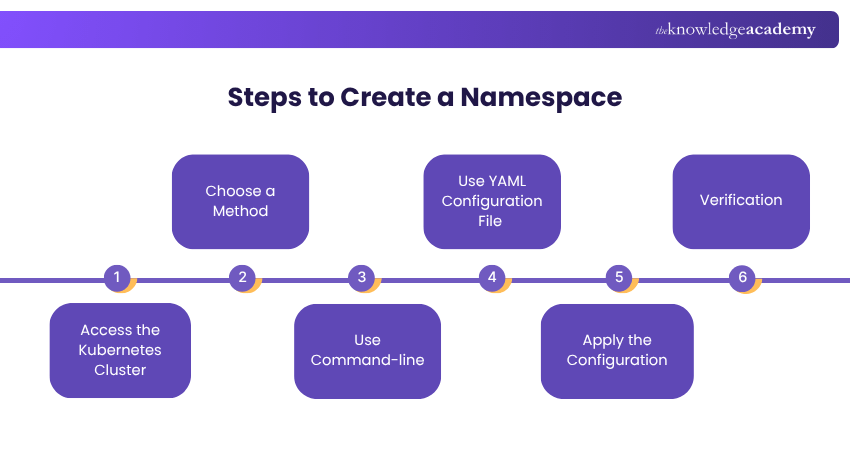
Access the Kubernetes Cluster
To begin, you need to have access to your Kubernetes cluster. This could be through a command-line interface (CLI) like kubectl or through a Graphical User Interface (GUI) provided by your Kubernetes Management tool.
Choose a Method
Decide whether you want to create the Namespace using command-line commands or by defining a configuration file in YAML format. Both methods achieve the same goal, so choose the one that you're more comfortable with.
Use Command-line
a) Open your terminal and make sure you're authenticated with the Kubernetes cluster using kubectl.
b) Run the command: kubectl create namespace.
c) Replace with the desired name for your Namespace.
d) Press Enter to execute the command.
Unlock the power of Kubeflow with our Kubeflow Training! Sign up now and accelerate your ML pipeline!
Use YAML Configuration File
a) Create a new YAML file using a text editor. You can name it something like namespace.yaml.
b) Inside the file, define the Namespace using the following structure:

c) Replace with your chosen namespace name.
d) Save the file.
Apply the Configuration
a) Return to your terminal.
b) Go to the directory where you saved the YAML file if necessary.
c) Run the command: kubectl apply -f namespace.yaml.
d) This command applies the configuration defined in the YAML file to the Kubernetes cluster, creating the Namespace.
Verification
To ensure that the Namespace was created successfully, you can run kubectl get namespaces. This command will show a list of all existing namespaces in your cluster, including the one you just created.
Best Practices for Kubernetes Namespaces
Establishing consistent and well-thought-out naming conventions for Kubernetes Namespaces is crucial to maintain order, clarity, and manageability within your cluster. Here's a detailed exploration of the best practices for naming conventions:

1) Descriptive and Meaningful Names
Choose names that reflect the purpose or function of the Namespace as accurately as possible. A Namespace's name should provide a clear understanding of its contents, making it easier for you and your team to identify its role.
2) Short and Precise
While being descriptive, keep Namespace names concise. Long names can become unwieldy and may lead to errors during command-line operations.
3) Lowercase and Hyphens
Stick to lowercase letters and use hyphens to separate words within the Namespace name. This convention is not only a standard in Kubernetes but also ensures consistency and readability.
4) Avoid Special Characters
Refrain from using special characters, symbols, or spaces in Namespace names. Stick to alphanumeric characters and hyphens to prevent compatibility issues and ensure easy integration with various tools.
5) Resist Abbreviations
While concise, avoid excessive abbreviations that might confuse others or lead to ambiguity. Try to find a middle ground between being clear and keeping things short.
6) Include Environment Indicators
If your cluster supports multiple environments (e.g., development, staging, production), include environment indicators as a prefix or suffix in the Namespace name. For example, "dev-namespace" for development.
7) Separate Projects or Teams
If different projects or teams share the same cluster, consider adding a project or team identifier to the Namespace name. This helps distinguish resources and prevents overlap.
8) Consistent Format
Establish a consistent format for Namespace names across your organisation. This makes it easier for everyone to understand and follow the conventions.
How do you Delete a Kubernetes Namespace Safely?
To keep your Kubernetes environment clean and efficient, it’s important to delete unused Namespaces and their resources properly. Start by identifying and reviewing unused Namespaces, checking their resources, and backing up any important data. Next, delete the internal resources, then the Namespace itself using kubectl delete. Confirm deletion, clean up leftover items like PVCs, and monitor the cluster for issues.
How do Kubernetes Namespaces Affect DNS Resolution?
When a Kubernetes Service is created, it gets a DNS entry like
Conclusion
Kubernetes Namespaces help you organise your cluster, making it easier to manage different teams, projects, and resources. You can keep everything running smoothly by using simple commands and following best practices. Namespaces make your setup more secure, efficient, and easier to scale as your workloads grow.
Unlock the power of Kubeflow with our course on Certified DevOps Professional (CDOP) Course and advance your DevOps capabilities – Sign up now!
Frequently Asked Questions
What is the Purpose of Kubernetes Namespaces in Resource Management?

Kubernetes Namespaces help organise and separate workloads within a cluster. They allow you to set resource limits, control access, and avoid conflicts. This makes it easier to share the cluster between teams or projects while using resources efficiently and safely.
How do You Switch Between Kubernetes Namespaces Using Kubectl?
You can switch between Kubernetes namespaces using the command:
kubectl config set-context --current --namespace=
This updates your current context to the specified namespace, allowing you to run commands within that namespace without switching clusters.
What are the Other Resources and Offers Provided by The Knowledge Academy?
The Knowledge Academy takes global learning to new heights, offering over 3,000+ online courses across 490+ locations in 190+ countries. This expansive reach ensures accessibility and convenience for learners worldwide.
Alongside our diverse Online Course Catalogue, encompassing 17 major categories, we go the extra mile by providing a plethora of free educational Online Resources like Blogs, eBooks, Interview Questions and Videos. Tailoring learning experiences further, professionals can unlock greater value through a wide range of special discounts, seasonal deals, and Exclusive Offers.
What is The Knowledge Pass, and How Does it Work?
The Knowledge Academy’s Knowledge Pass, a prepaid voucher, adds another layer of flexibility, allowing course bookings over a 12-month period. Join us on a journey where education knows no bounds.
What are the Related Courses and Blogs Provided by The Knowledge Academy?
The Knowledge Academy offers various DevOps Certification, including the Certified DevOps Professional Course and the Kubernetes Training. These courses cater to different skill levels, providing comprehensive insights into DevOps Engineer Job Description.
Our Programming & DevOps Blogs cover a range of topics related to Kubernetes, offering valuable resources, best practices, and industry insights. Whether you are a beginner or looking to advance your DevOps skills, The Knowledge Academy's diverse courses and informative blogs have got you covered.

Lily Turner


Senior AI/ML Engineer and Data Science Author
Lily Turner is a data science professional with over 10 years of experience in artificial intelligence, machine learning, and big data analytics. Her work bridges academic research and industry innovation, with a focus on solving real-world problems using data-driven approaches. Lily’s content empowers aspiring data scientists to build practical, scalable models using the latest tools and techniques.
View Detail

 If you wish to make any changes to your course, please


