


 Top Rated Course

We may not have the course you’re looking for. If you enquire or give us a call on +32 35001305 and speak to our training experts, we may still be able to help with your training requirements.
AutoCAD Alternatives: Best Software Options Compared
The Knowledge Academy 14 July 2026AutoCAD Alternatives provide 2D and 3D drafting and design tools like BricsCAD, DraftSight, SketchUp, FreeCAD, and Fusion 360 for users worldwide. They support DWG workflows, advanced modelling, and collaboration. Many tools also offer flexible pricing, cloud features, and cross-platform usability for diverse design needs.

Training Outcomes Within Your Budget!
We ensure quality, budget-alignment, and timely delivery by our expert instructors.
Table of Contents

Are you still relying on AutoCAD when smarter options exist? Explore the world of CAD software, where innovative tools balance performance, usability, and affordability. From 2D drafting to advanced 3D modelling, these solutions help designers, architects, and engineers bring ideas to life, making each AutoCAD Alternative worth exploring.
In this blog, we explore the best AutoCAD Alternatives and highlight powerful, budget-friendly CAD tools. Whether you need flexibility, modern features, or affordable solutions, the right tool can transform your design process. Your next favourite CAD software may be just a scroll away.
Table of Contents
1) What is AutoCAD?
2) 10 AutoCAD Alternatives
3) Are AutoCAD Alternatives Compatible with DWG Files?
4) What is the Best AutoCAD Alternative for Mac Users?
5) Conclusion
What is AutoCAD?
AutoCAD is a computer-aided design (CAD) software developed by Autodesk that helps professionals create accurate 2D drawings and detailed 3D models. It is widely used in fields like architecture, engineering, construction, manufacturing, interior design, and product development, where precision and visual planning are essential.
With advanced drafting tools, automation features, and customisable workflows, AutoCAD enables users to design, edit, and visualise ideas efficiently. It is a reliable solution for producing technical drawings, blueprints, and high-quality digital designs with accuracy and speed.

What Makes Good CAD Software?
Before delving into the alternatives, it's essential to understand what makes CAD Software a good choice for design and drafting purposes. Here are a few key factors to consider:
a) Comprehensive Toolset: Good CAD Software should offer a versatile collection of tools and features that enable you to create accurate and detailed designs. It should include drafting tools, 3D modelling capabilities, measurement tools, and the ability to import and export various file formats.
b) User-friendly Interface: The software must have an intuitive interface that lets you navigate and use the tools efficiently. A clutter-free workspace, customisable menus, and easy-to-access commands create a smoother workflow.
c) Compatibility: Compatibility with other software and file formats is crucial. It should be able to import and export files in common formats, such as DWG and DXF, ensuring seamless collaboration with clients, colleagues, and stakeholders.
d) Advanced Functionality: Look for software that offers advanced features like parametric modelling, rendering capabilities, simulation tools, and the power to handle complex assemblies. These features can elevate your design process and allow you to create an intricate and realistic design.
e) Support and Documentation: Good customer support and comprehensive documentation are vital when using the software. Look for software providers that offer reliable technical support and resources such as tutorials, forums, and knowledge bases.
10 AutoCAD Alternatives
Now, let's explore some of the powerful AutoCAD Alternatives that are popular among professionals in the design and drafting industry. These alternatives showcase a range of features and functionalities to suit different design needs, offering varying approaches to tasks like creating a Layout in AutoCAD.
1) SolidWorks
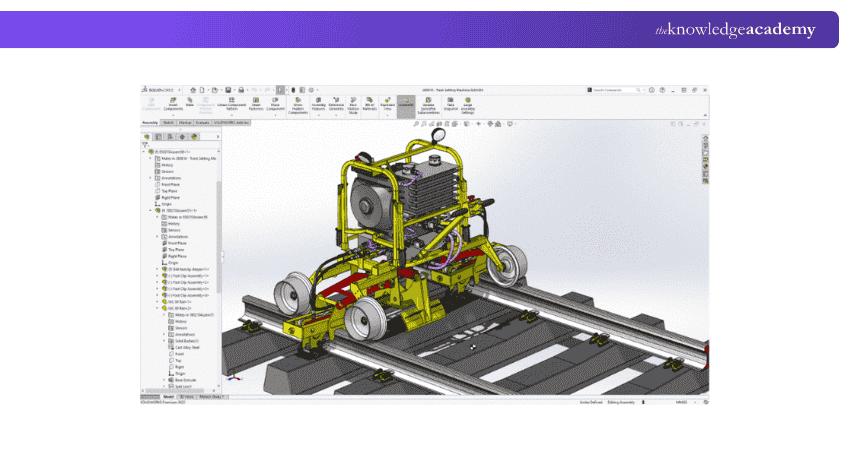
SolidWorks is a powerful CAD Software primarily focused on 3D mechanical design. It offers tools for creating complex parts, assemblies, and detailed drawings. SolidWorks provides advanced features such as parametric modelling, simulation, and analysis, enabling Engineers to virtually design and test their products. SolidWorks best suits Engineers and Designers working on mechanical and industrial design projects. It is widely used in the automotive, aerospace, consumer products, and machinery industries.
Pros
a) Extensive library of pre-built components and materials.
b) Advanced simulation and analysis tools.
c) Parametric modelling for easy design modifications.
d) Integration with other software applications like CAM and CAE.
e) Compatibility with industry-standard file formats.
Cons
a) A steep learning curve for beginners.
b) Limited features for non-mechanical design applications.
Become an expert in electrical design techniques with our AutoCAD Electrical Training – Join today!
2) SketchUp
SketchUp is a versatile 3D modelling software known for its intuitive interface and ease of use. It delivers a versatile set of tools for creating detailed 3D models, including architectural designs (including 3D printed houses), interior designs, and even furniture. SketchUp is best suited for Architects, Interior Designers, and hobbyists who require a user-friendly and efficient tool for creating 3D models.
It excels in quickly visualising and conceptualising architectural designs, including buildings, landscapes, and interiors. SketchUp's extensive library of pre-built models makes it ideal for creating realistic environments and showcasing design ideas to clients.

Pros
a) User-friendly and intuitive interface, making it accessible for beginners.
b) Extensive library of pre-built models and objects
c) Integration with other software and plugins, expanding its functionality.
d) Support for creating both 2D drawings and 3D models within the same environment.
e) Availability of a free version (SketchUp Free) for basic modelling needs.
Cons
a) Not suitable for complex mechanical designs or engineering analysis.
b) Importing and exporting certain file formats may require additional plugins.
c) Plugin compatibility issues can arise with new software versions.
3) Fusion 360
Developed by Autodesk, Fusion 360 is a cloud-based CAD Software that integrates CAD, Computer-Aided Manufacturing (CAM), and Computer-Aided Engineering (CAE) functionalities. It offers a collaborative environment, allowing multiple users to simultaneously work on the same project. Fusion 360 provides powerful parametric modelling tools, rendering capabilities, and simulation features, making it suitable for various design applications.
Fusion 360 suits Designers, Engineers, and Manufacturers across various industries. It is particularly beneficial for small to medium-sized startups and businesses due to its affordable pricing structure and integrated design-to-manufacturing capabilities.

Pros
a) A cloud-based platform allowing access to projects from anywhere with an internet connection.
b) Collaboration-friendly features, enabling real-time collaboration among team members.
c) Parametric modelling capabilities for flexible design modifications.
d) Integrated CAM functionality for a seamless transition from design to manufacturing.
e) Simulation and analysis tools for testing and optimising designs.
f) Generative design capabilities for exploring multiple design iterations.
g) Extensive library of materials and manufacturing processes for accurate design representations.
Cons
a) A learning curve for new users to parametric modelling or cloud-based software.
b) Limited offline functionality due to the Cloud-based nature of the software.
c) Performance may be affected by internet connection speed and reliability.
Learn how to use AutoDesk Fusion 360 and gain skills to create 2D drafts and 3D designs with our Fusion 360 Essential Training – Register today!
4) OpenSCAD
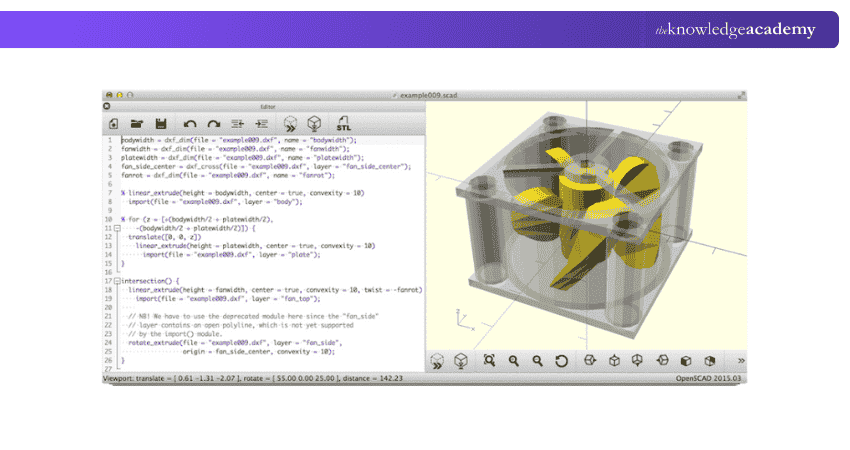
It is a free and open-source CAD Software that focuses on the concept of programming 3D models. Unlike traditional CAD Software that relies on graphical user interfaces, OpenSCAD, as an AutoCAD Alternative, utilises a scripting language to create parametric 3D models. It allows users to describe objects using a textual scripting language. It uses a Constructive Solid Geometry (CSG) approach, which combines basic shapes such as cubes, spheres, and cylinders to create more complex objects.
Users define their designs by writing code, specifying parameters, and manipulating shapes and operations. OpenSCAD is well-suited for users with a programming background or those who prefer a text-based approach to design. It is a unique AutoCAD Alternative that is a niche choice and not suitable for everyone.
Pros
a) Allows for easy modification of designs with parametric modelling
b) Available at no cost and open to customisation and community contribution.
c) Ensures accuracy and consistency in design outputs.
d) Supports the creation of custom libraries and modules for code reuse.
e) Runs on multiple operating systems.
Cons
a) Requires familiarity with a scripting language and programming concepts.
b) Designs need to be rendered to see the final result.
c) It may be less suitable for creating complex curved or organic forms.
d) The text-based approach may be less intuitive for users accustomed to graphical interfaces.
5) LibreCAD
It is a free, open-source 2D CAD Software that provides essential tools for drafting and designing. It offers a set of features to create accurate 2D drawings and models. LibreCAD provides a user-friendly interface with a familiar CAD environment, making it accessible to beginners and experienced users.
It offers a comprehensive set of 2D drafting tools, including lines, arcs, circles, text, and dimensions. Users can easily create and manipulate geometry, apply precise measurements, and arrange objects within layers. If you primarily use AutoCAD for 2D drafting, LibreCAD is one of the best AutoCAD Alternatives for 2D drafting.

Pros
a) LibreCAD is free and can be customised or extended based on specific requirements.
b) The interface resembles traditional CAD Software, making it easy for users to transition from other 2D drafting tools.
c) Supports the popular DWG file format, enabling users to easily import and export files.
d) It allows users to customise menus, shortcuts, and toolbars, adapting the interface to their preferences.
Cons
a) LibreCAD is primarily focused on 2D drafting and lacks advanced 3D modelling features.
b) Creating intricate or complex designs may require additional expertise or complementary software.
c) Due to its focus on 2D drafting, LibreCAD may not be the most efficient choice for large-scale architectural or engineering projects.
Get acquainted with industry-standard 3D tools with our AutoDesk Maya Training – Begin your journey soon!
6) FreeCAD
FreeCAD is an open-source CAD Software that provides a wide range of features for designing in 2D and 3D. It supports parametric modelling, allowing users to generate designs that can be modified easily by changing parameters. FreeCAD offers a modular architecture, making it highly customisable and extensible through plugins.
It is particularly useful for Engineers, Designers, Architects, and hobbyists who work on projects that require precision and flexibility in their design process. With its cross-platform compatibility, FreeCAD is accessible on Windows, macOS, and Linux, making it a cost-effective option and one of the best AutoCAD Alternatives that is free.
Pros
a) Available to download, use, and modify the software without any cost.
b) Its parametric capabilities enable users to create designs that can be modified and updated easily.
c) Offers tools for sketching, 3D modelling, assemblies, and sheet metal design.
d) FreeCAD supports plugins and macros, allowing users to extend its functionality and customise their workflow.
Cons
a) Has a learning curve, particularly for users new to parametric 3D modelling or CAD Software in general.
b) While efforts have been made to improve the user interface, it may still be less polished than some commercial CAD Software.
c) FreeCAD's built-in rendering capabilities are basic.
7) BricsCAD
BricsCAD is a CAD Software that offers a comprehensive set of 3D modelling and 2D drafting tools. It provides compatibility with industry-standard file formats, allowing seamless collaboration with AutoCAD users. BricsCAD offers a user-friendly interface that resembles AutoCAD, making it easy for users to transition from AutoCAD to BricsCAD.
It is well-suited for professionals in various industries who require powerful CAD Software for 2D drafting and 3D modelling tasks. It is commonly used in architecture, engineering, construction, and manufacturing. BricsCAD's compatibility with AutoCAD files and similar interface make it a viable choice for organisations looking to transition from AutoCAD or collaborate with AutoCAD users.

Pros
a) BricsCAD's interface closely resembles AutoCAD, making it easy for users to adapt to BricsCAD quickly.
b) Provides a wide range of 2D drafting and 3D modelling tools, including dimensioning, hatching, parametric modelling, and 3D solid modelling.
c) Supports a variety of third-party applications and plugins.
d) Offers flexible licensing options at a lower cost compared to AutoCAD
Cons
a) There may still be a learning curve for users new to CAD Software.
b) BricsCAD has some limitations in terms of customisation compared to AutoCAD.
8) Onshape
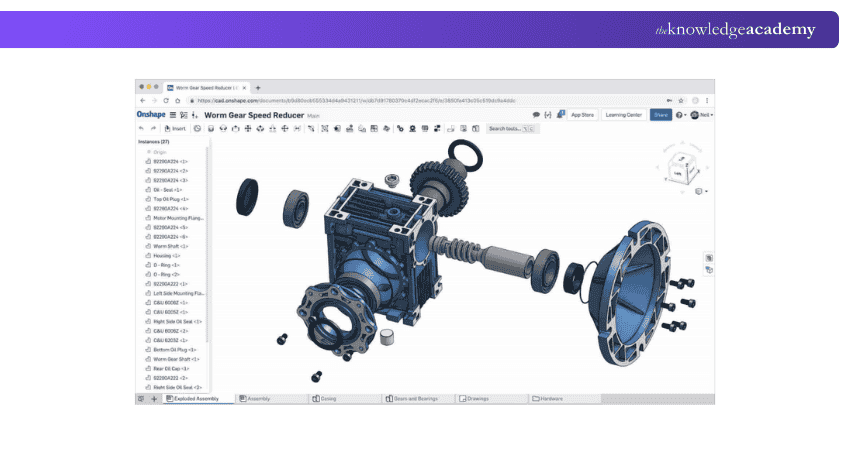
Onshape is a cloud-based CAD Software that emphasises real-time collaboration and Data Management. It allows multiple users to work on the same design simultaneously, facilitating seamless collaboration between team members. It offers a full suite of 3D modelling and design tools, including Parametric Modelling, assemblies, and drawings. With its cloud-based approach, Onshape eliminates the need for complex installations.
Onshape is well-suited for Engineering teams, Design Consultants, and remote collaboration scenarios. It is widely used in industries such as automotive, aerospace, consumer products, and industrial machinery.
Pros
a) Real-time collaboration for seamless teamwork on design projects.
b) The cloud-based platform allows easy access to designs from anywhere.
c) Parametric modelling for flexible design modifications.
d) Version control and history tracking for efficient design management.
e) Integrated data management for streamlined collaboration.
Cons
a) Dependent on an internet connection for accessing and working on designs.
b) Limited offline functionality compared to desktop-based CAD Software.
9) DraftSight
DraftSight is a 2D drafting and design software developed by Dassault Systèmes and a good alternative to AutoCAD. It provides comprehensive tools and features for creating precise and detailed 2D drawings. It offers a comprehensive set of drafting tools, like Layer Management, dimensioning, and annotation capabilities. DraftSight supports the DWG file format, making it compatible with AutoCAD files.
DraftSight is well-suited for professionals, students, and small businesses who primarily work with 2D drafting and require a cost-effective alternative to more expensive CAD Software. It is commonly used in architectural design, mechanical drafting, electrical schematics, and general technical drawing tasks.
Pros
a) Comprehensive 2D drafting tools for precise technical drawings.
b) DWG file compatibility for seamless collaboration with other CAD Software.
c) Cost-effective pricing options for small businesses and individuals.
d) Cross-platform compatibility for accessibility on different Operating Systems.
e) Familiar interface for easy adaptation by users with prior CAD experience.
Cons
a) Limited 3D modelling capabilities compared to more advanced CAD Software.
b) There are fewerextensive features in comparison to some other CAD Software.
c) Limited customisation options compared to some CAD Software alternatives.
d) Documentation and support resources may be less comprehensive.
Discover how to harness the power of 2D drafting with our AutoCAD LT Training – Sign up soon!
10) TurboCAD
TurboCAD is a comprehensive CAD Software offering various 2D drafting and 3D modelling tools. It provides features such as parametric constraints, rendering, and compatibility with various file formats. TurboCAD offers multiple versions tailored to different design needs, including architectural, mechanical, and electrical design.
TurboCAD is well-suited for Architects, Engineers, Designers, and hobbyists who require versatile CAD Software for 2D drafting, 3D modelling, and visualisation tasks. It finds applications in various industries, including architecture, mechanical design, product design, and even woodworking.
Its user-friendly interface, extensive feature set, file compatibility, rendering capabilities, and affordable pricing make it a strong alternative to AutoCAD for users seeking a cost-effective design solution.

Pros
a) Versatile 2D and 3D tools for precise drafting and modelling.
b) File compatibility with various CAD formats for easy collaboration.
c) Rendering and visualisation capabilities for realistic presentations.
d) Parametric constraints for flexible design modifications.
e) Affordable pricing options for different budgets.
Cons
a) There is a learning curve for new CAD users.
b) Interface customisation limitations compared to other CAD Software.
c) Advanced features may be limited to higher-end versions.
d) Varied levels of customer support and documentation availability.
Become an expert in electrical design techniques with our AutoCAD Electrical Training – Join today!
Are AutoCAD Alternatives Compatible with DWG Files?
Many AutoCAD Alternatives support DWG files, allowing users to open, view, edit, and save drawings created in AutoCAD. They handle common features like layers, dimensions, blocks, and annotations, making them suitable for standard 2D and basic 3D design tasks.
However, compatibility may vary when working with advanced features such as complex 3D models, custom plug-ins, or specialised tools. While most alternatives perform well for everyday use, some AutoCAD-specific functions may not transfer perfectly across platforms.
What is the Best AutoCAD Alternative for Mac Users?
The best AutoCAD alternative for Mac users depends largely on individual design requirements and experience level. Popular tools such as BricsCAD, SketchUp, Fusion 360, FreeCAD, and Rhino offer strong 2D drafting and 3D modelling capabilities with reliable performance on macOS.
BricsCAD and Rhino suit professional drafting, SketchUp and Shapr3D are ideal for easy 3D design, Fusion 360 supports advanced engineering workflows, and FreeCAD is a reliable free option for beginners and hobbyists.
Conclusion
Choosing the right AutoCAD Alternative depends on your design goals, budget, and platform needs. With powerful tools available for both beginners and professionals, you can achieve precise drafting and creative modelling without limitations. Exploring the right option helps you work smarter, faster, and with greater design flexibility.
Learn the essentials of AutoCAD to create any design with our AutoCAD Certification – Explore today!
Frequently Asked Questions
Who is the Biggest Competitor of AutoCAD?

Depending on the specific industry and use case, SolidWorks, Autodesk, and Autodesk Revit are often considered AutoCAD’s biggest competitors. Each tool can also serve as a powerful AutoCAD Alternative, offering advanced design, modelling, and industry-specific features for professional users.
Can I Access AutoCAD for Free?
AutoCAD offers a free trial for new users, and students or educators can access a free educational version through Autodesk's education community. However, for long-term use, a paid subscription is typically required.

The Knowledge Academy


Global Training Provider
The Knowledge Academy is a world-leading provider of professional training courses, offering globally recognised qualifications across a wide range of subjects. With expert trainers, up-to-date course material, and flexible learning options, we aim to empower professionals and organisations to achieve their goals through continuous learning.


 If you wish to make any changes to your course, please


