


 Top Rated Course

We may not have the course you’re looking for. If you enquire or give us a call on +1 7204454674 and speak to our training experts, we may still be able to help with your training requirements.
Coda vs Notion: All the Differences You Must Know
The Knowledge Academy 13 January 2026Are you curious about whether to choose Coda or Notion? With countless digital tools available, picking the right one can be daunting. Each platform offers unique strengths and features tailored to different needs. This blog dives into the Coda vs Notion debate, demonstrating their crucial differences, benefits, and standout features.

Training Outcomes Within Your Budget!
We ensure quality, budget-alignment, and timely delivery by our expert instructors.
Table of Contents
Related Courses

Are you torn between Coda vs Notion? With an entire universe of digital tools at your fingertips, navigating the maze to find the perfect one can feel like scaling Everest. Whether you're crafting challenging workflows or simply regulating your daily tasks, the choice between Coda and Notion is pivotal to unravelling your peak productivity. In this blog, we’ll break down the pressing differences, benefits, and standout features of each, helping you choose the right tool that will elevate your workflow and supercharge your efficiency! Dive in and discover which platform truly wears the crown.
Table of Contents
1) What is Coda?
2) Benefits of Coda Over Notion
3) What is Notion?
4) Benefits of Notion Over Coda
5) Coda vs Notion: Key Differences
6) Conclusion
What is Coda?
Coda is a versatile productivity tool that integrates documents, spreadsheets, and apps into a single workspace. It permits users to create custom workflows using building blocks such as tables, buttons, and formulas. Unlike traditional tools, Coda offers the flexibility to build tailored solutions for various needs, integrating data and functionality in one place. This customisability makes it ideal for project management, team collaboration, and personal organisation.
Benefits of Coda Over Notion
When comparing Coda and Notion, Coda offers several advantages that can cater to specific needs and workflows. Known for its flexibility and advanced features, Coda stands out in areas where Notion might fall short. Here are some key benefits of Coda over Notion:
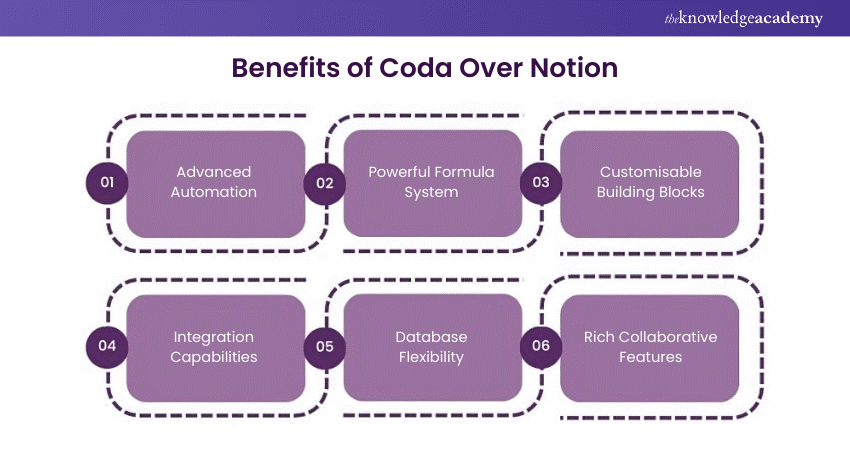
a) Advanced Automation: Coda excels with its advanced automation capabilities. Users can create custom workflows with buttons, triggers, and automated actions that streamline repetitive tasks. This level of automation enhances productivity by reducing manual effort and integrating processes seamlessly.
b) Powerful Formula System: Coda's formula system is more advanced than Notion's, allowing users to build complex calculations and logic directly into their documents. This powerful feature enables users to create highly customised solutions and perform intricate data manipulations.
c) Customisable Building Blocks: Coda offers a variety of building blocks, such as tables, buttons, and views, which users can combine to create tailored solutions. This flexibility allows for creating sophisticated documents and applications that can adapt to diverse needs and workflows.
d) Integration Capabilities: Coda provides robust integration options with various external tools and services. Users can connect Coda to other applications via APIs, enabling seamless data synchronisation and improving workflow efficiency.
e) Database Flexibility: Coda’s databases are highly flexible, allowing users to easily create and manage complex data structures. The ability to define relationships and automate data management offers a level of control that can be particularly beneficial for detailed project tracking and reporting.
f) Rich Collaborative Features: Coda’s collaborative features include real-time editing, comments, and task assignments. These tools facilitate effective teamwork and communication, making it easier for teams to coordinate projects and track progress collectively.

What is Notion?
Notion is a versatile productivity tool that integrates notes, tasks, databases, and calendars into a single workspace. It offers a highly customisable platform with an intuitive interface, enabling users to create and organise content seamlessly. Additionally, Notion supports rich content creation and collaboration features, permitting teams to work together in real-time and effectively handle different aspects of their tasks and projects.
Benefits of Notion over Coda
When choosing between Notion and Coda, you’ll discover that Notion offers several advantages that make it a better fit for your needs. Its emphasis on user experience (UX) and comprehensive features characterises it in the productivity tools ecosystem. Here are some elementary benefits of Notion over Coda:
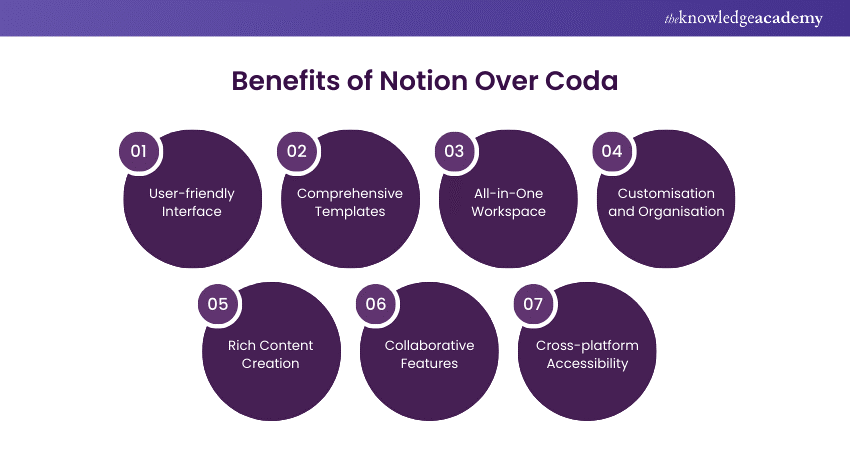
a) User-friendly Interface: Notion boasts an intuitive and visually appealing interface. Its design emphasises simplicity and ease of use, making it accessible even for those who aren’t tech-savvy. This clean, user-friendly approach allows users to get started quickly without facing a steep learning curve.
b) Comprehensive Templates: Notion provides an extensive library of pre-built templates that cater to a wide range of needs, from project management to personal productivity. Notion Templates streamline the setup process and offer a solid starting point for various workflows.
c) All-in-One Workspace: Both Coda and Notion serve as all-in-one tools, but Notion excels at seamlessly integrating notes, tasks, databases, and calendar features into one cohesive workspace. This integration allows users to manage different work and personal life aspects within a unified platform.
d) Customisation and Organisation: Notion offers a high degree of customisation for organising content. Users can create pages and sub-pages with a flexible layout, enabling detailed and personalised organisation. This customisation helps users structure their workspace according to their specific needs and preferences.
e) Rich Content Creation: Notion supports robust content creation capabilities, including rich text formatting, multimedia embedding, and interactive elements within pages. This feature enables users to create detailed and engaging documents and notes.
f) Collaborative Features: Notion excels in collaborative features by providing real-time editing and commenting. This capability enhances team collaboration, allowing multiple users to work on documents simultaneously and provide feedback directly within the platform.
g) Cross-platform Accessibility: Notion is accessible across various platforms, including web, desktop, and mobile devices. Its consistent user experience across these platforms ensures users can access and update their content from anywhere, boosting productivity and flexibility.
Elevate your projects’ performance with Trello Training– register now!
Coda vs Notion: Key Differences
Choosing between Coda and Notion requires evaluating various features that adhere to user needs and preferences. Both platforms offer powerful capabilities but differ in specific areas, making one more suitable than the other depending on your requirements. Here’s a detailed comparison of their key differences:
a) User-friendliness
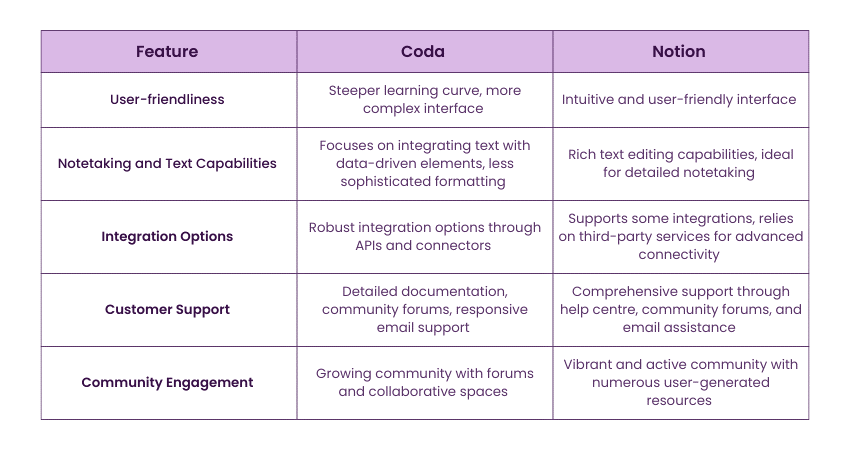
Notion stands out with its intuitive, user-friendly interface, which appeals to both tech-savvy and less experienced users. Its clean design simplifies navigation and content creation, making it easy to set up and use. In contrast, Coda presents a steeper learning curve due to its extensive customisation options and complex features. New users might initially find Coda’s interface more challenging but will appreciate its flexibility once they master it.
b) Notetaking and Text Capabilities
Notion excels in notetaking and text management with its rich text editing capabilities. It allows for extensive formatting, multimedia embedding, and organisation into nested pages, making it ideal for detailed and structured notetaking. The Coda also supports text entry but focuses more on integrating text with data-driven elements. Its note-taking capabilities offer less sophisticated formatting compared to Notion, as it prioritises functional documents and data interaction.
c) Integration Options
Integration capabilities are crucial for seamless workflow management. Coda provides robust integration options with various external tools and services through APIs and built-in connectors. This flexibility lets users automate workflows and synchronise data efficiently. Notion supports some integrations but generally relies on third-party services for more advanced connectivity. Users seeking extensive integration features will find Coda’s options more comprehensive.
d) Customer Support
Effective customer support resolves issues and maximises tool use. Notion offers comprehensive support through a detailed help centre, community forums, and email assistance. Its resources are well-organised and accessible. Coda also delivers strong customer support, focusing on detailed documentation, community forums, and responsive email support. Both platforms are effective, but users might find Notion’s support resources slightly more user-friendly.
e) Community Engagement
Community engagement enhances the user experience by providing additional resources and shared knowledge. Notion boasts a vibrant and active community with numerous user-generated templates, forums, and online resources. This engagement fosters shared learning and innovation. Coda's community is growing and includes forums and collaborative spaces, but it is less extensive compared to Notion’s, resulting in fewer shared resources.
Experience the Power of Airtable with Airtable Training- join today!
f) Collaboration Features
Collaboration features are crucial for team productivity and project management. Notion shines with real-time editing, task management, and comment functionalities that enhance teamwork. It supports seamless communication within shared documents and projects. Coda also offers robust collaboration tools, including real-time updates and task assignments, but its features might be less intuitive compared to Notion’s straightforward approach.
g) Data Management and Tables
Coda excels with its customisable tables and complex data models, catering to users who need advanced data management. It allows for intricate relational databases and automated data interactions. Notion supports tables and databases but with fewer customisation options and less advanced data manipulation. Users seeking extensive data management capabilities might prefer Coda’s flexibility and depth.
h) AI-driven Tools
AI-driven tools can significantly enhance productivity by automating tasks and providing intelligent insights. Coda has begun integrating AI-driven features to streamline workflows and offer advanced data analysis. The Notion is gradually incorporating AI but focuses more on improving existing functionalities rather than introducing new AI-driven tools. Users interested in cutting-edge AI features might find Coda’s offerings more advanced.
i) Cost Efficiency
Cost efficiency is a main consideration when choosing productivity tools. Notion offers a free tier with essential features and reasonably priced paid plans for individuals and teams. Its cost-effectiveness appeals to budget-conscious users. Coda also provides a free version with advanced features available in paid plans. Although Coda’s pricing is competitive, Notion’s structure might be more accessible, especially for smaller teams or individual users.
j) Organisation and Navigation
Effective organisation and navigation are vital for managing workflows efficiently. Notion excels with its flexible page hierarchy, customisable views, and intuitive layout. Users can efficiently structure their workspace to fit their needs. Coda offers robust organisational tools but might require more setup to achieve the same level of ease. Its advanced features can create a more complex workspace that might take additional effort to navigate.
Enhance efficient team communication with Slack Training – register now!
Conclusion
Choosing between Coda vs Notion, or exploring other Notion Alternatives, hinges on selecting the tool that best aligns with your workflow. Notion's intuitive interface and extensive templates provide simplicity and structure for everyday tasks. On the other hand, Coda's advanced automation and flexible data management are ideal for handling complex requirements. By grasping these key differences, you can choose the platform that optimises your productivity and efficiency, ultimately transforming your work experience and streamlining your daily tasks.
Transform your team’s productivity with Asana Training – sign up today!
Frequently Asked Questions
Does Coda Have Databases?

Yes, Coda features robust databases. It offers customisable tables with advanced data management capabilities, including relational databases and complex data interactions. This flexibility allows users to build intricate data structures and automate workflows within their documents.
How to Import Notion Into CODA?
First, export Notion pages as CSV files to import Notion into Coda. Then, open Coda and create a new document. Use Coda’s import feature to upload the CSV files, which will convert your Notion data into Coda tables. Adjust the data as needed to fit Coda’s structure and functionality.
What are the Other Resources and Offers Provided by The Knowledge Academy?
The Knowledge Academy takes global learning to new heights, offering over 3,000+ online courses across 490+ locations in 190+ countries. This expansive reach ensures accessibility and convenience for learners worldwide.
Alongside our diverse Online Course Catalogue, encompassing 19 major categories, we go the extra mile by providing a plethora of free educational Online Resources like Blogs, eBooks, Interview Questions and Videos. Tailoring learning experiences further, professionals can unlock greater value through a wide range of special discounts, seasonal deals, and Exclusive Offers.
What is The Knowledge Pass, and How Does it Work?
The Knowledge Academy’s Knowledge Pass, a prepaid voucher, adds another layer of flexibility, allowing course bookings over a 12-month period. Join us on a journey where education knows no bounds.
What are the Related Courses and Blogs Provided by The Knowledge Academy?
The Knowledge Academy offers various Project Management Tool Courses including Notion Training, Trello Training, and Airtable Training. These courses cater to different skill levels, providing comprehensive insights into Building a Project Management Career.
Our Project Management Blogs cover a range of topics related to project planning, execution, and team management, offering valuable resources, best practices, and industry insights. Whether you are a beginner or looking to advance your project Management skills, The Knowledge Academy's diverse courses and informative blogs have got you covered.

The Knowledge Academy


Global Training Provider
The Knowledge Academy is a world-leading provider of professional training courses, offering globally recognised qualifications across a wide range of subjects. With expert trainers, up-to-date course material, and flexible learning options, we aim to empower professionals and organisations to achieve their goals through continuous learning.

Upcoming Project Management Resources Batches & Dates
Date
 Notion Training
Notion Training
Fri 3rd Apr 2026
Notion Training
Fri 22nd May 2026
Notion Training
Fri 24th Jul 2026
Notion Training
Fri 27th Nov 2026

 If you wish to make any changes to your course, please


