


 Top Rated Course

We may not have the course you’re looking for. If you enquire or give us a call on +852 2592 5349 and speak to our training experts, we may still be able to help with your training requirements.
DevOps Roadmap: Steps, Benefits & Key Considerations
Lily Turner 18 November 2025Learning the DevOps Roadmap helps you streamline workflows, boost collaboration, and accelerate software delivery with proven strategies and essential tools. It typically starts with learning scripting languages, like Python, and progresses to version control systems, CI/CD pipelines, containerisation tools, and orchestration platforms.

Training Outcomes Within Your Budget!
We ensure quality, budget-alignment, and timely delivery by our expert instructors.
Table of Contents

Imagine building a bridge between developers and operations that’s exactly what a DevOps Roadmap does. It’s more than just a plan; it’s a strategic pathway that connects teams, aligns goals, and streamlines workflows to ensure faster releases, greater collaboration, and consistent, high-quality outcomes.
Think of it as a detailed map guiding your organisation through the complex world of Software Development, where every step is intentional, every tool is optimised, and every process is refined for success. In this blog, we’ll explore the DevOps Roadmap in depth, covering its key steps, benefits, essential tools, and more to help you transform operational chaos into a smooth, profitable rhythm.
Table of Contents
1) What is DevOps?
2) Benefits of DevOps
3) Comprehensive DevOps Roadmap
4) DevOps Tools and Technologies
5) Key Considerations for a DevOps Roadmap
6) Can I Become a DevOps Engineer Without Experience?
7) How Long Does it Take to Become a DevOps Engineer?
8) Conclusion
What is DevOps?
DevOps combines Software Development (Dev) and IT operations (Ops) to streamline your workflows and deliver software faster and more reliably than ever. It cultivates collaboration between teams. It achieves this by integrating coding, testing, deployment, and monitoring into a continuous process to ensure consistent quality.
A complete DevOps Roadmap is fully focused on automation, Continuous Integration, and Continuous Delivery (CI/CD). Tools such as Jenkins, Docker, and Kubernetes streamline tasks, monitor applications, and manage infrastructure as code. This reduces errors and elevates the scalability factor while ensuring stable production environments.

Benefits of DevOps
Here are the top Benefits of DevOps:
1) Improved Teamwork: DevOps helps the development and operations teams work together more closely by improving their communication and through shared responsibilities.
2) Faster Software Updates: Thanks to Automation and continuous delivery, DevOps can speed up how quickly new apps and updates reach the userbase.
3) More Reliable Systems: Regular testing and monitoring helps you catch problems early. This makes the software more stable and dependable.
4) Higher Efficiency: Automating tasks and employing standard methods reduces the chances of mistakes and makes the entire process smoother.
5) Easier to Scale and Adapt: DevOps is important because it supports flexible systems that can quickly adjust to new business needs and grow with the company.
Comprehensive DevOps Roadmap
DevOps brings together Software Development (Dev) and IT operations (Ops) to make software delivery quicker and more reliable. This Roadmap outlines the key skills you need to become a skilled DevOps Engineer.
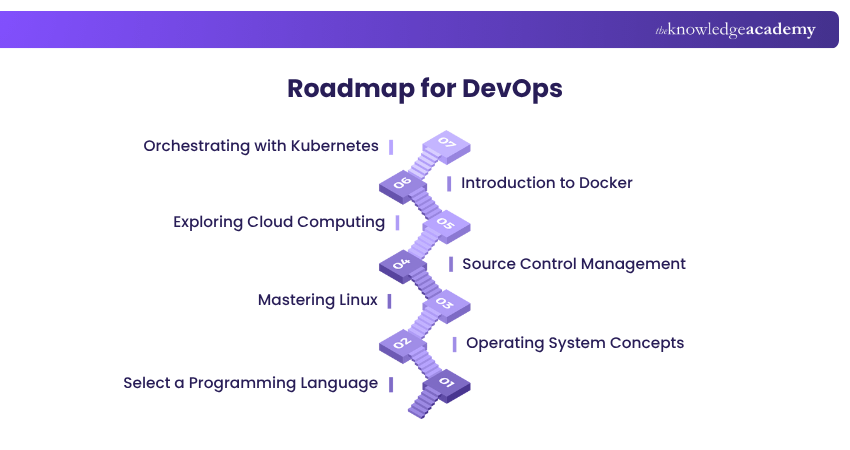
1) Select a Programming Language (Week one)
The first step in learning DevOps is to pick the right Programming Language. It'll help you effectively write scripts, automate tasks and manage infrastructure. Here's what you need to consider:
1) Python: Python is popular in DevOps because of its simplicity and flexiblity. You can start by learning the basics like data types, loops, functions, and how to handle errors. You can also explore libraries like Flask and Django for web and automation tasks.
2) Go (Golang): Go is fast and perfect for building large systems. You should focus on learning how to use functions, data types, error handling, and goroutines for multitasking.
3) Bash/Shell Scripting: Bash is key for working on Linux servers. You must learn how to write scripts to automate tasks, manage files and run common commands.
4) JavaScript: If you’re using Node.js, JavaScript can be useful. Make sure you get comfortable with things like Async Programming, callbacks, and working with APIs.
Take a week to explore these languages. Once you know the basics, learning DevOps tools will be much easier.
Attain in-depth knowledge of DevOps principles and practices. Sign up for our DevOps Foundation Certification now!
2) Operating System Concepts (Week two)
Understanding Operating Systems (OS) is vital for anyone pursuing a career in DevOps. A solid grasp of OS concepts empowers professionals to manage servers, troubleshoot issues, and automate tasks effectively. This week focuses on three key areas: Operating Systems, Virtualisation, and Networking Protocols. Let’s explore them in detail:
Operating Systems
Operating Systems are the control centre of a computer, helping manage both hardware and software smoothly. Here are some key topics that you must understand:
1) Processes and Threads: Learn how the OS runs programs and manages tasks at the same time using processes and threads.
2) CPU Scheduling: Learn how the OS determines which program gets to use the CPU and for how long, ensuring everything runs smoothly.
3) Memory Management: Understand how the OS handles memory. Learn how it gives space to programs and keeps everything organised using techniques like paging and virtual memory.
4) Disk Management: Find out how the OS stores and organises data on hard drives, helping keep files safe and easy to access.
Virtualisation
Virtualisation plays an important role in DevOps by allowing you to run multiple applications or operating systems on a single physical machine. Here are the main areas to learn:
1) Server Virtualisation: This lets you run many servers on one machine, making better use of the hardware.
2) Storage Virtualisation: It combines storage from different devices into one virtual space, making it easier to manage.
3) Network Virtualisation: It combines physical and software network components into a single system, making network management easier.
4) Application Virtualisation: It runs apps in separate spaces, which helps avoid conflicts and keeps everything working smoothly.
Understanding virtualisation enhances resource utilisation and scalability in DevOps systems.
Networking Protocols
Networking protocols define how data is transmitted and received across networks, ensuring smooth communication. Essential protocols include:
1) HTTP/HTTPS: Protocols for transferring web pages securely.
2) TCP/IP: Core protocols for internet communication, enabling data transfer across networks.
3) FTP/SFTP: Protocols for secure file transfers between systems.
4) DNS: Converts domain names into IP addresses. It enables network navigation.
5) SMTP: Protocol for sending and receiving emails.
6) SSL/TLS: Secure protocols for data encryption during transmission.
7) SSH: Ensures secure remote login and network communication.
Proficiency in these protocols is crucial for configuring networks, maintaining security, and ensuring seamless communication in DevOps environments.
Explore unlearning behaviours and psychological safety fundamentals with our DevOps Leader Certification Course – Register today!
3) Mastering Linux (Weeks two to three)
Linux is essential in DevOps for managing servers, automating tasks, and ensuring system stability. This section covers command line operations, scripting, networking, and security.
Command Line Basics
1) File Navigation: ls, cd, pwd
2) File Operations: cat, touch, vim
3) System Monitoring: top, ps, df
4) Process Management: kill, nice
5) User Management: adduser, passwd
6) Permissions: chmod, chown
Bash Scripting
1) Scripts: Write and run basic scripts
2) Variables: Store and manage data
3) Control Statements: if, while, for
4) Functions: Reusable code blocks
5) Error Handling: Manage exit codes
Package Management
1) Debian Systems: apt, dpkg
2) Red Hat Systems: yum, rpm
Networking
1) IP Configuration: ifconfig, ip
2) Diagnostics: ping, netstat
3) File Transfers: scp, rsync
Security
1) User Management: Manage accounts
2) Permissions: Assign access levels
3) SSH: Secure connections
4) Firewall: iptables, ufw
Learning these Linux fundamentals builds a solid DevOps foundation.
4) Source Control Management (Week four)
To understand DevOps, you need to know how Source Code Management (SCM) works. SCM helps you keep track of changes in your code using tools known as Version Control Systems (VCS). In DevOps, learning Git and GitHub is key for managing code smoothly.
Git & GitHub
Git is a potent version control system that helps Developers manage code changes without overwriting each other's work. GitHub is a platform for storing Git repositories and collaborating with others. Here are the key topics:
1) Install Git: Setting up Git on your computer.
2) Git Basics: Learning commands like git, init, git add, git commit, and git log.
3) Repositories: Creating, clone, and manage repositories on GitHub.
4) Git Workflow: Understand how files move through the Git lifecycle.
Branching and Merging: Branching allows Developers to work on new features or fixes without changing the main codebase. Merging brings these changes back to the main branch.
1) Creating Branches: Use git branch and git checkout to create and switch branches.
2) Merging Branches: Use git merge to combine changes.
3) Handling Conflicts: Learn how to resolve merge conflicts.
Working with GitHub: GitHub makes collaboration easier through pull requests and code reviews.
1) Forking Repositories: Create a personal copy of a project to work on.
2) Pull Requests: Propose changes and discuss them with the team.
3) Code Reviews: Review and give feedback on code changes.
Advanced Git Commands: Once you understand the basics, move on to advanced Git commands for better Project Management.
1) Rebase: Use git rebase to simplify commit history.
2) Cherry-Pick: Apply specific changes from one branch to another using git cherry-pick.
3) Stashing: Temporarily save changes with git stash.
4) gitignore: Exclude specific files or folders from being tracked.
Learn how to containerise applications efficiently using Docker tools. Join our Docker Course now!
5) Exploring Cloud Computing (Weeks five to seven)
Cloud computing delivers IT resources like servers, storage, databases, and software over the internet. This approach allows businesses to access services on demand, reduce costs, and scale operations quickly.
AWS
AWS is a powerful Cloud platform that offers various services. Key areas to explore:
1) IAM: Manage user permissions and access.
2) EC2: Run virtual servers for applications.
3) S3: Store and backup data.
4) ELB: Distribute incoming traffic across multiple servers.
5) CloudWatch: Monitor application performance.
6) Auto Scaling: Adjust server capacity based on demand.
7) SQS: Send and receive messages between systems.
8) SNS: Send notifications to multiple recipients.
Azure
Azure is Microsoft’s Cloud platform with tools for app development, data storage, and networking. Key services include:
1) VMs: Create and manage virtual machines.
2) Azure Storage: Store and access data securely.
3) Azure Networking: Connect apps and services.
4) Azure Functions: Run code without managing servers.
5) Azure Monitor: Track app performance and alerts.
6) Azure DevOps: Manage code, build, and deploy apps.
GCP
GCP offers Cloud services powered by Google’s infrastructure. Important services:
1) Compute Engine: Run virtual machines.
2) Cloud Storage: Store files and data.
3) Cloud SQL: Manage relational databases.
4) Cloud Functions: Execute the code in response to events.
5) Cloud Monitoring: Monitor system performance.
6) Cloud Build: Build and deploy apps using CI/CD pipelines.
6) Introduction to Docker (Weeks eight to nine)
You’ve covered a lot so far, and now it’s time to learn about one of the most essential tools for DevOps Docker. Docker is an open-source platform that enables Developers to package software and its dependencies into lightweight containers. It’s widely used in the DevOps ecosystem because it offers several key benefits:
1) Portability: Easily move applications between environments.
2) Scalability: Efficiently manage resources and scale applications.
3) Collaboration: Supports team-based development.
4) Consistency: Ensures the same environment in development, testing, and production.
Here are the key topics you should focus on to understand Docker:
1) Docker Introduction: What Docker is and how it works?
2) Docker Installation: How to set up Docker on your system?
3) Docker Commands: Basic commands for managing containers.
4) Dockerfile: Create a file that defines how to build a Docker image.
5) Docker Images: Pre-configured templates for containers.
6) Docker Engine and Storage: Core components of Docker and how they work.
7) Docker Compose: Tool for running multi-container applications.
8) Docker Containers: How to create, manage, and remove containers?
9) Docker Registry: Store and share Docker images.
10) Docker Swarm: Orchestrate and manage multiple containers.
A good grasp on these topics will give you a solid foundation in Docker and how it simplifies application deployment in a DevOps workflow.
7) Orchestrating with Kubernetes (Weeks 10 to 12)
An open-source tool that manages containers across different environments, ensuring reliable deployment and scalability.
Here are the reasons to use Kubernetes:
1) Automation: Deploys and manages containers.
2) Scalability: Adjusts resources based on demand.
3) Availability: Ensures uptime even during failures.
4) Portability: Consistent across environments.
5) Efficiency: Optimises resource usage.
Key Components:
1) Pods: Smallest unit containing containers.
2) Nodes: Machines running apps.
3) Clusters: Group of nodes.
4) Deployments: Manage app updates.
5) Services: Expose apps to the network.
6) Namespaces: Organise resources.
Getting Started:
1) Set Up Cluster: Install Minikube or Kind.
2) Deploy App: Define settings in a YAML file.
3) Manage Pods: Use kubectl commands.
4) Scale Apps: Adjust replicas as needed.
5) Update Apps: Roll out new versions without downtime.
Kubernetes simplifies application management, ensuring consistency and scalability.
Learn to streamline development and deployment processes for faster releases. Join our Kubernetes Training now!
DevOps Tools and Technologies
DevOps uses various tools to automate processes, manage code, and ensure smooth collaboration between teams. Here are key tools and their purposes:
1) Version Control: This is about tracking code changes, managing project history, and encouraging teamwork. Here are the tools to consider:
1) Git: Open-source version control system.
2) GitHub: Hosts Git repositories with collaboration features.
3) Bitbucket: Integrates with Jira for Project Management.
2) CI/CD: These tools automate building, testing, and deploying applications. The key tools are:
1) Jenkins: Open-source automation server for continuous integration.
2) CircleCI: Cloud-based CI/CD with fast testing.
3) Travis CI: Integrates seamlessly with GitHub for deployment.
3) Containerisation & Orchestration: This involves packaging applications and managing containers. The tools to consider are:
1) Docker: Runs apps in isolated containers.
2) Kubernetes: Manages container clusters for scaling.
3) OpenShift: Enterprise Kubernetes platform with Developer tools.
4) Configuration Management: This involves automating server setup, configuration, and updates. The key tools to consider are:
1) Ansible: Automates repetitive tasks using playbooks.
2) Chef: Manages server configurations as code.
3) Puppet: Centralised server configuration management.
5) Monitoring & Logging: This is about tracking system performance, detecting issues, and analysing data. The popular tools to consider are:
1) Nagios: Monitors network and server uptime.
2) Prometheus: Collects metrics and triggers alerts.
3) Splunk: Provides data analytics and visualisation.
6) Cloud Platforms: These platforms help deploy, manage, and scale applications in the Cloud. Some of the most prominent tools in this category are:
1) AWS: Offers EC2 for computing, S3 for storage.
2) Azure: Provides Azure DevOps for CI/CD.
3) Google Cloud: Includes Compute Engine for virtual machines.
7) Testing Tools: These tools automate the testing process to maintain quality and stability. Popular tools in this category are:
1) Selenium: Web application testing automation.
2) JUnit: Unit testing for Java applications.
3) JMeter: Performance and load testing for web services.
8.Collaboration & Communication: This is about facilitating project tracking, messaging, and documentation. The best tools that help you achieve this includes:
1) Slack: Real-time communication for teams.
2)Jira: Manages tasks, bugs, and projects.
3) Confluence: Centralised documentation and knowledge sharing.
Using these tools ensures streamlined workflows, effective communication, and faster deployments in DevOps environments.
Understand CI/CD pipelines, tools, and application release automation with our DevOps Engineering Foundation Course – Register now!
Key Considerations for a DevOps Roadmap
Creating a DevOps Roadmap requires careful consideration of several big factors that can influence the success of your implementation. This section explores these key aspects, offering valuable insights and practical guidance.
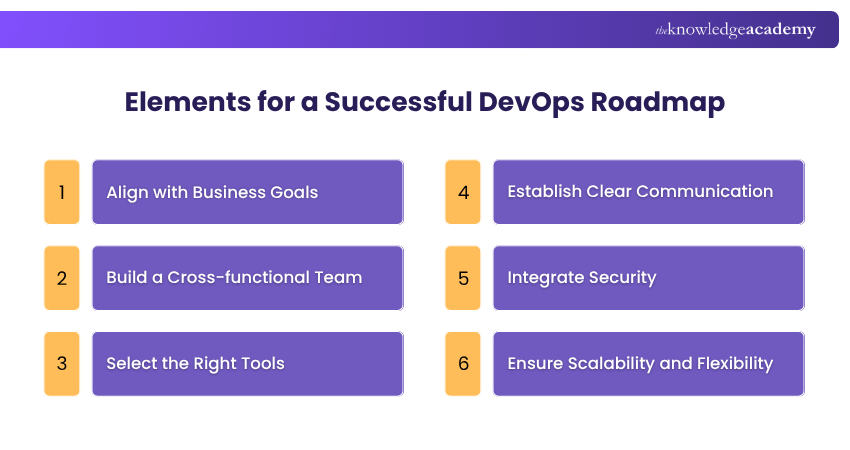
1) Align with Business Goals: Ensure DevOps practices align with business objectives like faster delivery, customer satisfaction, and operational efficiency. This approach keeps the roadmap focused on tangible value and strategic goals.
2) Build a Cross-functional Team: Form a team with members from development, operations, QA, and security to foster collaboration and a unified approach to software delivery. This encourages shared ownership and diverse problem-solving.
3) Select the Right Tools: Choose tools based on scalability, integration, and compatibility with existing systems. Key tools include CI/CD platforms, monitoring solutions, and configuration management systems.
4) Establish Clear Communication: Set up effective communication channels through Project Management tools, messaging platforms, and regular stand-ups to keep teams aligned and informed.
5) Integrate Security: Embed security in every stage of the DevOps lifecycle. Implement secure coding, vulnerability scanning, and incident response processes to address risks proactively.
6) Ensure Scalability and Flexibility: Design DevOps practices to accommodate growth and change. Use Cloud platforms, containerisation, and Infrastructure-as-Code to maintain flexibility and scalability.
Can I Become a DevOps Engineer Without Experience?
Yes, you can become a DevOps Engineer without experience. Start by learning Linux, networking, and scripting languages like Python. Practice using Git, Docker, and Kubernetes. Work on projects, contribute to open-source, and showcase skills on GitHub. Certifications can also validate your knowledge and boost your profile.
How Long Does it Take to Become a DevOps Engineer?
Becoming a DevOps Engineer typically takes 2 to 4 years, depending on your background. This includes earning a relevant degree, gaining experience in IT or Software Development, and building skills in automation, cloud, CI/CD, and collaboration tools.
Conclusion
A well-defined DevOps Roadmap is more than just a plan, it’s a strategic path to seamless collaboration, faster releases, and consistent quality. By aligning tools, teams, and processes, you can unlock the full potential of DevOps, driving continuous improvement and operational excellence.
Master fast coding and smart deployment! Sign up for our Certified Agile DevOps Professional (CADOP) Course now!
Frequently Asked Questions
What are the Five Pillars of DevOps?

These are the five pillars of DevOps:
1) Culture: Promote shared responsibility
2) Automation: Streamline testing, deployment, and infrastructure to reduce errors
3) Measurement: Track metrics to monitor performance
4) Collaboration: Align teams using tools
5) Continuous Improvement: Regular feedback to refine processes and adapt
What is CI/CD in DevOps?
CI/CD in DevOps stands for Continuous Integration and Continuous Deployment. It automates the process of integrating code changes, testing them, and deploying to production, ensuring faster, more reliable software delivery with minimal manual intervention.
What are the Other Resources and Offers Provided by The Knowledge Academy?
The Knowledge Academy takes global learning to new heights, offering over 3,000+ online courses across 490+ locations in 190+ countries. This expansive reach ensures accessibility and convenience for learners worldwide.
Alongside our diverse Online Course Catalogue, encompassing 19 major categories, we go the extra mile by providing a plethora of free educational Online Resources like Blogs, eBooks, Interview Questions and Videos. Tailoring learning experiences further, professionals can unlock greater value through a wide range of special discounts, seasonal deals, and Exclusive Offers.
What is The Knowledge Pass, and How Does it Work?
The Knowledge Academy’s Knowledge Pass, a prepaid voucher, adds another layer of flexibility, allowing course bookings over a 12-month period. Join us on a journey where education knows no bounds.
What are the Related Courses and Blogs Provided by The Knowledge Academy?
The Knowledge Academy offers various DevOps Certification, including the Certified DevOps Professional (CDOP), DevOps Engineering Foundation Course, and the DevSecOps Foundation Certification Course. These courses cater to different skill levels, providing comprehensive insights into Git Rebase.
Our Programming & DevOps Blogs cover a range of topics related to DevOps, offering valuable resources, best practices, and industry insights. Whether you are a beginner or looking to advance your DevOps skills, The Knowledge Academy's diverse courses and informative blogs have got you covered.

Lily Turner


Senior AI/ML Engineer and Data Science Author
Lily Turner is a data science professional with over 10 years of experience in artificial intelligence, machine learning, and big data analytics. Her work bridges academic research and industry innovation, with a focus on solving real-world problems using data-driven approaches. Lily’s content empowers aspiring data scientists to build practical, scalable models using the latest tools and techniques.
View Detail
Upcoming ISO & Compliance Resources Batches & Dates
Date
 SAFe® DevOps Certification
SAFe® DevOps Certification
Thu 2nd Jul 2026
SAFe® DevOps Certification
Thu 8th Oct 2026

 If you wish to make any changes to your course, please


