


 Top Rated Course


We may not have the course you’re looking for. If you enquire or give us a call on +358 942454206 and speak to our training experts, we may still be able to help with your training requirements.
What is Sage Accounting Software: A Quick Overview
Olivia Taylor 04 March 2026Sage Accounting Software helps small to medium businesses manage invoicing, cash flow, taxes and expenses with Cloud tools, real-time insights and integrations. It's widely popular for its user-friendly interface and scalability. It automates numerous routine tasks and ensures compliance with tax regulations.

Training Outcomes Within Your Budget!
We ensure quality, budget-alignment, and timely delivery by our expert instructors.
Table of Contents

When it comes to small businesses, start-ups and sole traders, managing finances can be one of the biggest challenges. But with a tool like the Sage Accounting Software, navigating this maze of spreadsheets and stress can become smooth sailing. This Cloud-based software is designed to simplify everything from invoicing and expenses to VAT submissions and payroll.
With its intuitive tools, Sage makes complex financial tasks effortless by saving time and reducing errors. In this blog, we’ll explore how the Sage Accounting Software transforms financial management into an efficient and engaging experience that keeps your business on track. So read on!
Table of Contents
1) What is Sage Accounting?
2) Key Features of Sage Accounting Software
3) What is Sage Accounting Used for?
4) What Does Sage Accounting do?
5) How Sage Benefit Businesses?
6) Is Sage Accounting the Same as QuickBooks?
7) Is Sage Accounting Software Hard to Learn?
8) Conclusion
What is Sage Accounting?
Sage Accounting is a leading Cloud-based finance and accounts software. It is designed for small businesses, start-ups and sole traders. It simplifies essential tasks such as Bookkeeping, invoicing, expense tracking, cash flow management, bank reconciliation, inventory control, and handling multi-currency transactions.
Formerly known as Sage One, it also supports payroll management, generates detailed financial reports, and enables online tax submissions. Accessible online via the Cloud, Sage Accounting is user-friendly and requires no installation.

Key Features of Sage Accounting Software
To fully grasp the Sage Accounting Software, it’s important to explore its key features and see how it supports your business in many areas. Finance lies at the heart of every successful organisation, and as transactions grow, accuracy, efficiency and organisation become essential. Here are its key features:
1) Financial Tracking and Reporting
1) Sage Accounting Software offers robust financial tracking and reporting features.
2) It can record income and monitor expenses with ease.
3) It generates insightful reports that provide a complete view of your finances.
4) It can identify financial trends and patterns for better understanding.
5) It uses reports as a foundation for informed decision-making.
6) It can steer your business towards profitability with clarity on financial standing.
2) Invoicing and Billing
1) Sage Accounting Software manages invoices and billing to maintain smooth cash flow.
2) It streamlines invoice generation and management, thus reducing manual work.
3) It can accelerate the payment cycle for quicker revenue collection.
4) It creates professional, branded invoices with ease.
5) It allows the simple addition of line items to invoices.
6) It enables the quick sending of invoices to clients with just a few clicks.
Make sure your journey to financial fluency is smooth and seamless. Our Bookkeeping Course will help you out - Sign up now!
3) Inventory Management
1) Managing stock levels, orders and reordering can be challenging for businesses.
2) Sage’s inventory management feature simplifies and streamlines this process.
3) It monitors stock levels effectively to avoid any disruption.
4) It tracks inventory movement for better visibility and control.
5) It can optimise replenishment orders to ensure smooth operations.
6) It prevents the issues of minimum stock shortages or overstocking.
7) It maintains a balance between supply and demand with ease.
4) Expense Tracking
1) The Sage Accounting Software enables businesses to categorise expenses more accurately.
2) It can record different types of expenditures systematically.
3) This smooth categorisation provides better financial clarity.
4) It helps businesses identify spending trends with ease.
5) It supports effective resource allocation across operations.
6) This process can assist in planning and preparing for future growth.
5) Integration Capabilities
1) Sage software is highly reliable due to its integration features.
2) It seamlessly connects with e-commerce platforms, payment gateways and CRM systems.
3) It ensures smooth data flow across multiple applications.
4) It eliminates duplication and minimises the chances of errors in records.
5) It provides a complete, unified view of business operations.

What is Sage Accounting Used for?
Sage Accounting is used to support solopreneurs, start-ups and small businesses in managing their financial activities. It streamlines key processes such as invoicing, expense tracking and payment reconciliation. It brings an easy and efficient solution for handling everyday accounting needs.
What Does Sage Accounting do?
Sage Accounting can perform the following functions:
1) Sage Accounting can manage cash flow, sales invoices and purchase invoices with ease.
2) It can quickly track what you’re owed, manage late payments and schedule supplier payments.
3) It can capture and track expenses and receipts using the AutoEntry module.
4) It can speed up processes with automated bank reconciliation.
5) It can create and send personalised invoices for a more professional touch.
6) It can generate and manage purchase invoices effectively.
7) It can simplify VAT management with accurate calculations.
8) It can send quotes and estimates directly to clients.
9) It can manage and submit Construction Industry Scheme (CIS) requirements.
10) Sage Accounting can reconcile accounts to make sure you only pay what you owe.
11) It can also file returns securely online with Her Majesty's Revenue and Customs (HMRC).
Your shortcut to smarter bookkeeping starts here with our up-to-date QuickBooks Training - Register now!
How Sage Benefit Businesses?
If you are a business owner, adopting the Sage Accounting Software can greatly benefit your organisation. It's also important to have valuable insight into the Advantages and Disadvantages of Sage Accounting Software. Let’s take a closer look at some of its key benefits:

1) Time Efficiency
Manual financial processes are a time-consuming endeavour and prone to human errors. Sage Accounting automates a plethora of tasks, from invoice generation to bank settlements. With the help of Sage Accounting Software, you can reduce manual intervention, businesses save valuable time and allocate resources more strategically. Employees can focus on valuable tasks instead of time-consuming data entry and become productive and innovative.
2) Accurate Financial Insights
Informed decisions rely on accurate data. Sage Accounting’s reporting capabilities offer businesses real-time insights into their financial health. It can make comprehensive reports like profit and loss reports and balance sheets to provide a clear view of company performance.
These financial insights enable businesses to identify areas of strength, pinpoint weaknesses, and make data-driven decisions that drive growth and sustainability.
3) Reduced Errors and Compliance
Financial errors can have uncontrollable consequences. Sage Accounting’s automation reduces the risk of human error in calculations, data entry, and reconciliation. Additionally, the software adheres to regulatory standards and tax requirements, ensuring businesses stay compliant. This safeguards against penalties and legal complications, contributing to a secure financial environment.
4) Enhanced Collaboration
Effective Financial Management often requires cross-departmental collaboration. Sage Accounting’s multi-user integrated access allows different teams to work simultaneously on financial tasks. This fosters communication, breaks down silos, and ensures everyone has access to the up-to-date financial data. Collaborative financial decision-making leads to more well-rounded strategies.
5) Scalability
As businesses evolve, their financial needs evolve too. Sage offers different versions that cater to various business sizes, ensuring a seamless transition during growth. Sage Accounting’s scalability enables businesses to add advanced features as they expand, accommodating their changing requirements without disrupting operations.
6) Cost Savings
While investing in Sage involves initial costs, the long-term benefits are substantial. Automation reduces labour costs associated with manual processes. Moreover, the accuracy of financial data prevents costly errors. Informed Decision-Making through Sage Accounting insights contributes to better resource allocation, optimising expenditure and boosting profitability.
Embrace the power of Sage and simplify every salary cycle. Sign up for our Sage Payroll Course now!
Is Sage Accounting the Same as QuickBooks?
Both Sage Accounting and QuickBooks are useful for various accounting needs. But there are some key differences. The comparison is outlined below:
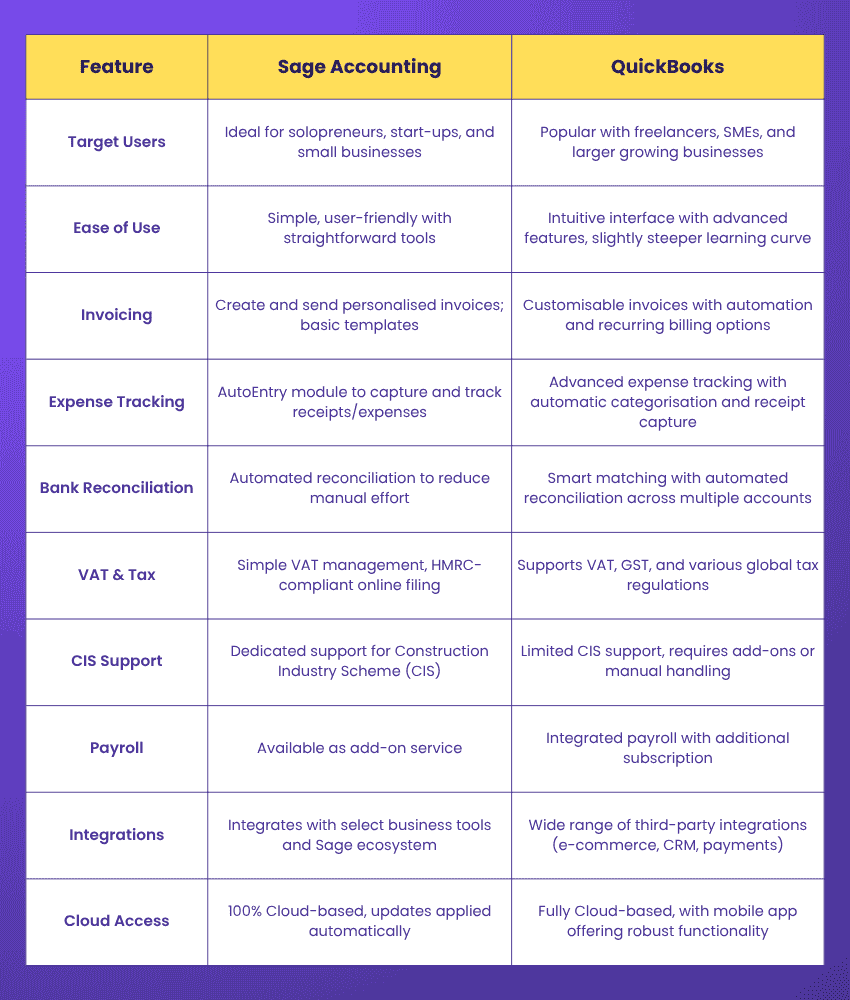
Is Sage Accounting Software Hard to Learn?
Sage is designed to be user-friendly, but like any other finance system, it can seem complex at first without the proper support. With structured training, most users can quickly gain confidence, manage daily tasks and explore key features with ease.
The intuitive Cloud-based interface makes navigation simpler, while regular use can help reinforce learning. For small businesses, start-ups and sole traders, Sage offers a smooth learning curve with practical functionality.
Conclusion
Sage Accounting Software transforms Financial Management into a smooth, stress-free experience for a wide range of businesses. From invoicing to inventory, it brings speed and compliance to your fingertips. With its Cloud-fuelled efficiency, Sage Accounting ensures that you stay ahead, make smarter decisions and keep your business finances running seamlessly towards the future.
Simplify your spreadsheets and number with the power of Accounting Software. Sign up for our Accounting Software Training now!
Frequently Asked Questions
Is Sage Accounting and Sage 50 the Same?

No, Sage 50 and Sage Accounting are not the same. Sage Accounting is a Cloud-only solution, while Sage 50 can be installed on-premise or accessed through the Cloud. Sage 50 delivers more advanced features and greater flexibility, whereas Sage Accounting offers simpler, budget-friendly tools ideal for basic accounting needs.
Does Sage Accounting do Payroll?
No, Sage Accounting doesn't include payroll by default. But you can add payroll management as an optional feature. This helps you to auto-sync the payroll data seamlessly into Sage Accounting for more efficient financial management.
What are the Other Resources and Offers Provided by The Knowledge Academy?
The Knowledge Academy takes global learning to new heights, offering over 3,000+ online courses across 490+ locations in 190+ countries. This expansive reach ensures accessibility and convenience for learners worldwide.
Alongside our diverse Online Course Catalogue, encompassing 17 major categories, we go the extra mile by providing a plethora of free educational Online Resources like Blogs, eBooks, Interview Questions and Videos. Tailoring learning experiences further, professionals can unlock greater value through a wide range of special discounts, seasonal deals, and Exclusive Offers.
What is The Knowledge Pass, and How Does it Work?
The Knowledge Academy’s Knowledge Pass, a prepaid voucher, adds another layer of flexibility, allowing course bookings over a 12-month period. Join us on a journey where education knows no bounds.
What are the Related Courses and Blogs Provided by The Knowledge Academy?
The Knowledge Academy offers various Accounting Software Training, including the Sage 50 Accounts Training, QuickBooks Training and the Wave Accounting Training. These courses cater to different skill levels, providing comprehensive insights into Inventory Accounting.
Our Accounting and Finance Blogs cover a range of topics related to Sage Accounting Software, offering valuable resources, best practices, and industry insights. Whether you are a beginner or looking to advance your Accounting Software skills, The Knowledge Academy's diverse courses and informative blogs have got you covered.

Olivia Taylor


Chartered Accountant and Financial Training Specialist
Olivia Taylor is a qualified chartered accountant with over a decade of experience in financial management, auditing and corporate reporting. Having worked with leading firms in both the public and private sectors, Olivia brings clarity to complex financial topics. Her writing focuses on helping professionals build confidence in key areas of accounting, compliance and financial planning.
View Detail

 If you wish to make any changes to your course, please


