


 Top Rated Course

We may not have the course you’re looking for. If you enquire or give us a call on +32 35001305 and speak to our training experts, we may still be able to help with your training requirements.
What is a Rootkit? Definition, Types, and Techniques
John Davies 18 April 2026A Rootkit is a type of malicious software designed to gain unauthorised access to a system and hide its presence to avoid detection by security tools. Rootkit allow attackers to gain unauthorised access, manipulate files, and breach security tools. It is crucial to understand their types and techniques to prevent cyber threats.

Training Outcomes Within Your Budget!
We ensure quality, budget-alignment, and timely delivery by our expert instructors.
Table of Contents

Ever felt like something is wrong with your system, but you just can’t see it? That’s the kind of mystery behind the question, What is a Rootkit. It’s a type of malware designed to stay hidden while giving attackers deep control over your system. Unlike typical threats, Rootkits work silently in the background, making them especially dangerous and difficult to detect.
Understanding What is a Rootkit is essential in today’s cybersecurity landscape. As threats become more advanced, knowing how Rootkits operate can help you protect your data and systems more effectively. In this blog, we’ll break down their types, techniques, and how they impact security.
Table of Contents
1) What is a Rootkit?
2) How Do Rootkits Work?
3) Types of Rootkits
4) Symptoms of Rootkit Infection
5) Common Rootkit Techniques
6) Tips for Preventing a Rootkit Attack
7) Examples of Rootkit Attacks
8) Conclusion
What is a Rootkit?
A Rootkit is a type of malicious software designed to gain unauthorised access to a computer system while remaining hidden from users and security tools. It allows attackers to control the system, modify files, and monitor activities without being detected. Rootkits often operate at a deep system level, making them particularly difficult to identify and remove.
Once installed, a Rootkit can create backdoors, steal sensitive information, or disable security software to maintain access. They are commonly used in advanced cyberattacks to maintain long-term control over compromised systems. Because of their stealthy nature, Rootkits pose a serious threat to both individuals and organisations.

How Do Rootkits Work?
Rootkits work by secretly installing themselves deep within a system and gaining privileged access to hide their presence. They manipulate system processes and security tools to remain undetected while allowing attackers to control the system.
a) Gain Unauthorised Access: Exploit vulnerabilities to obtain administrator or root-level permissions.
b) Hide Their Presence: Modify system files and processes to avoid detection by security software.
c) Maintain Persistent Control: Create backdoors to ensure long-term access to the system.
d) Intercept System Activity: Monitor keystrokes, data, and system operations
e) Disable Security Measures: Interfere with antivirus or monitoring tools to stay active.
Types of Rootkits
Rootkits come in different forms, each designed to target different parts of a system. By understanding the main types, it helps in identifying their behaviour and applying the right measures. Let’s explore each type below:
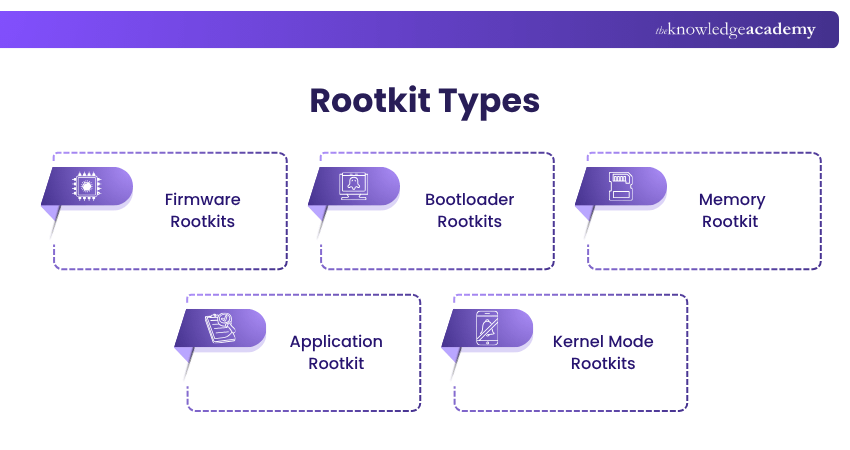
1) Firmware Rootkits
A Firmware Rootkit targets a computer’s BIOS or UEFI firmware, giving attackers control at a low system level making them exceptionally difficult to detect. This Rootkit type infects the firmware to compromise the integrity of the system’s boot process They manipulate data, monitor network traffic, and maintain access even after OS reinstalls.
2) Bootloader Rootkits
This type of rootkit infects the bootloader, the code that loads the operating system during startup. It replaces the legitimate bootloader with a malicious version. This infection occurs at an early stage. They are particularly dangerous because they can persist through operating system reinstalls and are difficult to remove without reformatting the entire system.
3) Memory Rootkit
This rootkit type resides in a computer’s RAM to perform malicious activities without being stored on the hard drive. These Rootkits are transient but can still cause significant harm during their brief existence. They often consume system resources, leading to performance degradation and making them challenging to detect.
4) Application Rootkit
An Application Rootkit replaces legitimate system files with malicious versions. These infected applications appear to function normally, making detection a challenge for traditional security tools. They also grant attackers persistent access to the system each time they are used. To detect them, advanced antivirus tools can help identify and remove them.
5) Kernel Mode Rootkits
A Kernel Mode Rootkit operates at the core of the operating system. For this reason, it gains high level privileges. It modifies the operating systems kernel to hide processes, files, and system activity from security tools. Such a deep level access makes it extremely cautious, making it very difficult to remove this Rootkit.
Turn cyber risks into controlled opportunities and lead smarter decisions with Cyber Security Risk Management Training - Sign up now!
Symptoms of Rootkit Infection
It is a challenging task to identify and remove Rootkit infections due to their stealthy nature. Below, we have given certain symptoms that indicate its presence in systems:
1) Unstable System:
If systems have frequent crashes, unexpected restarts or the infamous “Blue Screen,” it can indicate the presence of a Rootkit infection.
2) Performance Degradation:
When a system slows down significantly, including delayed boot times and sluggish application responses, it may suggest the presence of a Rootkit.
3) Unusual System Behaviour:
If there are unexpected changes in the system settings, such as altered desktop backgrounds or unexpected messaging errors, it is indicative of Rootkit infection.
4) Disabled Security Software:
If installed anti-viruses or anti-malware programmes functioning are being unresponsive without any grounded explanation, it can be a sign of Rootkit infecting the system.
5) Unusual Network Activity:
Unexpected network traffic, such as unexplained data transfers or unfamiliar IP connections, may indicate that a rootkit is facilitating unauthorised communication within the system.
Common Rootkit Techniques
Rootkits use various techniques to infiltrate systems, maintain persistence, and evade detection. Understanding these methods is crucial for identifying and mitigating rootkit threats effectively.
1) Kernel Mood Rootkits
This Rootkit operates within the kernel space of an OS, granting the highest level of access privilege and control over system resources. It intercepts system calls, alters kernel functions, and conceal presence by manipulating core system components. This enables them to hide processes, files, and network connections from monitoring tools.
2) User-mode Rootkits
This type of rootkit operates within the user space of an operating system, where standard applications run. It exploits vulnerabilities in applications to gain elevated privileges. Once installed, it hides by intercepting calls, modifying applications, or masking files and processes from user-level monitoring tools.
3) Bootkits
A bootkit is a complex type of rootkit that infects the system’s boot process, specifically targeting the Master Boot Record (MBR) or Volume Boot Record (VBR). It is activated before the operating system loads, allowing control at the earliest stage of startup. This makes it extremely difficult to detect and remove, often requiring specialised tools.
4) Hypervisor-based Rootkits
This rootkit operates beneath the operating system by embedding itself into the hypervisor layer, which manages virtual machines. This allows it to control and monitor all virtual machines running on the host system. It intercepts and manipulates system operations, exploits hardware virtualisation features, and gains control without modifying the guest operating system.
Stay alert and build awareness to prevent everyday cyber risks with Cyber Security Awareness Training – Join now!
Tips for Preventing a Rootkit Attack
For the prevention of Rootkits, it requires a proactive security approach. While identifying Rootkits are challenging due to their stealthy nature, but implementation of the following strategies can reduce the risks:
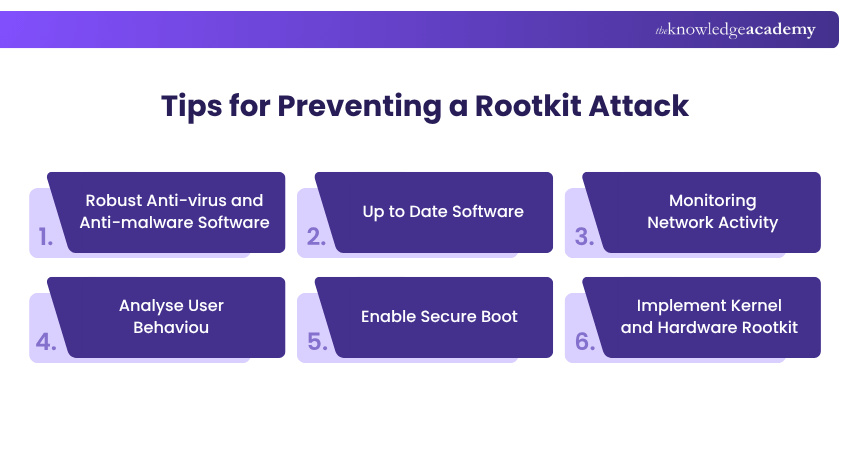
1) Robust Anti-virus and Anti-malware Software:
By integrating security solutions with anti-Rootkit capabilities, it helps to detect and remove malicious software. With regularly updating these tools, it enables the system to defend against evolving Rootkit threats.
2) Up to Date Software:
It is crucial to regularly update software and apply security patches for the benefit of operating systems. It ensures applications close vulnerabilities in advance that Rootkits may exploit.
3) Monitoring Network Activity:
Through implementation of network monitoring, it helps to detect unusual traffic patterns, like unexpected transferring of data or connections to unrecognised IP addresses, that are indicators of Rootkit activity.
4) Analyse User Behaviour:
By establish baseline user activity profiles and monitor deviations, such as logins at unusual time or from unexpected locations, it helps to prevent accounts from getting compromised.
5) Enable Secure Boot:
It is important to activate secure boot in BIOS/UEFI settings to prevent unauthorised operating systems or modified bootloaders from loading during system startups.
6) Implement Kernel and Hardware Rootkit:
It can have significant impact for protecting systems by utilising Kernel Address Space Layout Randomisation (KASLR) and hardware-based security features like Trusted Platform Module (TPM) to enhance system defences and minimise data security.
Act fast and respond smarter to cyber incidents with Incident Response Training - Join now!
Examples of Rootkit Attacks
Through understanding real-world examples, it will help recognising their potential impact and reinforce the importance of security measures:
1) Gamer Attacks Targeting Microsoft Digital Signature
This is a common trend where cybercriminals exploit Microsoft’s digital signature mechanisms to distribute Rootkits targeting gamers, particularly in China. These malicious drivers can bypass security measures on Windows systems, allowing attackers to deploy second-stage malware into memory.
2) Spicy Hot Pot Attack
A Chinese advanced threat group, known as Zirconium developed this sophisticated Rootkit in 2020. This malware was delivered through spear-phishing campaigns targeting well-recognised organisations. It utilises kernel mode filter drivers to intercept and manipulate system calls. This rootkit maintains persistent access, enabling long-term system compromise.
3) The Sony BMG Copy Protection Scandal
In 2005, Sony BMG faced a serious backlash after it was found out certain music CDs contained hidden software that functioned as a Rootkit. This software secretly installed itself on user’s Windows Systems without disclosure. It cloaked its presence and collected data on users listening habits and transmitted the information back to Sony BMG, raising privacy concerns.
Conclusion
Rootkits are stealthy and dangerous malware that infiltrate systems at various levels, from applications to firmware. By understanding their types, techniques, and real-world examples, preventive measures can be undertaken to mitigate them. Through proactive security measures and user vigilance persistent threats can effectively defended.
Build powerful cybersecurity skills to stop cyberthreats today with Cyber Security Training - Join now!
Frequently Asked Questions
What is a Rootkit vs Trojan?

Rootkit is a malware designed to conceal its presence and give attackers persistent, stealthy control over a system. On the other hand, Trojan is a malware disguised as a legitimate software to trick users into installing it. Trojan delivers the malware; a Rootkit conceals and maintains it for long term access.
What is a Rootkit in Computer?
Rootkit in a computer is a malicious software that provides attackers with hidden, unauthorised access to a system. It manipulates files, processes, and system operations while evading detection by security tools for allowing persistent control over an infected system.
What are the Other Resources and Offers Provided by The Knowledge Academy?
The Knowledge Academy takes global learning to new heights, offering over 3,000+ online courses across 490+ locations in 190+ countries. This expansive reach ensures accessibility and convenience for learners worldwide.
Alongside our diverse Online Course Catalogue, encompassing 17 major categories, we go the extra mile by providing a plethora of free educational Online Resources like Blogs, eBooks, Interview Questions and Videos. Tailoring learning experiences further, professionals can unlock greater value through a wide range of special discounts, seasonal deals, and Exclusive Offers.
What is The Knowledge Pass, and How Does it Work?
The Knowledge Academy’s Knowledge Pass, a prepaid voucher, adds another layer of flexibility, allowing course bookings over a 12-month period. Join us on a journey where education knows no bounds.
What are the Related Courses and Blogs Provided by The Knowledge Academy?
The Knowledge Academy offers various Cyber Security Training, including Malware Analysis Training, Incident Response Training, and Cyber Security Risk Management Training. These courses cater to different skill levels, providing comprehensive insights into Incident Response.
Our IT Security & Data Protection Blogs cover a range of Rootkit, offering valuable resources, best practices, and industry insights. Whether you are a beginner or looking to advance your Cybersecurity skills, The Knowledge Academy's diverse courses and informative blogs have got you covered.

John Davies


Cyber Security Governance & Assurance Specialist
John Davies is a cybersecurity expert specialising in governance, risk management, and compliance. With over 15 years in the field, he has led enterprise-wide security programmes across finance, healthcare and public sector organisations. His content provides practical guidance on building secure environments, managing risk and aligning with regulatory frameworks.

Upcoming IT Security & Data Protection Resources Batches & Dates
Date
 Malware Analysis Training
Malware Analysis Training
Fri 21st Aug 2026
Malware Analysis Training
Fri 20th Nov 2026

 If you wish to make any changes to your course, please


