


 Top Rated Course


We may not have the course you’re looking for. If you enquire or give us a call on +32 35001305 and speak to our training experts, we may still be able to help with your training requirements.
What Are Python Arrays? Definition, Types and Functions
Richard Harris 21 November 2025A Python array stores same-type items in contiguous memory, and you can work with arrays using either Python’s built-in array module or NumPy. Understand how arrays differ from lists, explore key operations, and enhance your coding efficiency with structured data management in Python. Master arrays to code smarter!

Training Outcomes Within Your Budget!
We ensure quality, budget-alignment, and timely delivery by our expert instructors.
Table of Contents

If you are learning Python, you must have heard the phrase “Python Array” quite frequently. Being a beginner, you might be aware of the literal meaning of an array, but did you know that Python Arrays have a lot of different features and use cases as compared to other programming languages? If not, this blog is just the right thing for you.
We will be discussing what Python Arrays are, how they work and how they are different from regular Arrays. By the end of this blog, you will be able to use Arrays in your Python programs to handle and manage data seamlessly and make your programs more efficient.
Table of contents
1) What are Python Arrays?
2) Importance of Array in Python programming
3) Types of Arrays in Python
4) Declaring and Initialising Array in Python
5) Accessing Elements in Python Arrays
6) Modifying Arrays
7) What are NumPy arrays?
8) Conclusion
What are Python Arrays?
An Array is a Data Structure that allows you to store and manage multiple items of the same data type in a programming language. You can think of an Array as a series of elements, where each element contains a piece of data, such as a number, a text, or an object.
The main feature of an Array is that it stores the elements in adjacent memory locations, which means that you can access any element in the Array by its index, which is a numerical position that starts from zero. This feature allows you to retrieve and modify the data in the Array quickly and easily without having to search through the entire Array. This makes Arrays one of the fastest Data Structures in Python programming for storing data.
Arrays are essential for programmers and Data Analysts who use Python. Python is an extremely popular and powerful programming language that supports multiple data types and operations, including ways to structure data using features like Python Dataclasses for more complex objects. Unlike simple variables that can hold only one value, Arrays allow you to store multiple elements of the same data type in a sequential and organized way. To get started with working on Arrays, make sure you know How to install Python on Mac to begin coding with ease.

Importance of Array in Python programming
At its core, an Array is a powerful and flexible data structure that enables you to organise and manage collections of items in a programming language. Think of them as a sequence of elements, much like a Python String, where each element contains a specific piece of data—be it integers, strings, or even more complex objects.
What sets them apart from other data structures is their ability to store elements of the same data type in contiguous memory locations. This property enables swift and direct access to any specific element within the array, which is a key distinction when comparing Python lists vs arrays, particularly in terms of memory efficiency and access speed. This makes data retrieval and manipulation lightning-fast.
Arrays are a fundamental component for developers and data enthusiasts in Python programming. Unlike simple variables that can hold only one value, these components allow you to store multiple elements of the same data type in a contiguous and ordered manner. But the most important question is – How is it significant to Python? Let’s find out:

a) Arrays allow efficient storage and management of multiple elements of the same data type. This ensures smooth data handling for tasks involving large datasets.
b) With Arrays in Python, accessing specific elements is fast and direct. They are stored in contiguous memory locations, resulting in quicker data retrieval.
c) These components streamline numerical computations. This makes them ideal for mathematical operations, statistical analysis, and scientific calculations.
d) Python Arrays facilitate data analysis tasks by providing a structured and organised approach to handle complex datasets. This enables easy manipulation and processing. It also comes in handy for Python Data Visualisation.
e) For image processing applications, Arrays in Python are storing pixel data and performing pixel-level operations efficiently.
f) They also optimise memory usage by efficiently allocating memory for fixed-size elements. This helps reduce memory overhead compared to other data structures.
g) Arrays enhance the performance of various algorithms and speed up overall code execution.
h) As mutable data structures, they allow developers to modify, add, or remove elements as needed. This provides flexibility in handling changing data.
i) These components provide a clear and intuitive way to represent structured data. This helps simplify the implementation of algorithms that require organised datasets. This helps improve the effectiveness of complex tasks like Python Automation Testing.
j) Utilising Arrays enhances code readability. This makes it easier for developers to understand and maintain the logic behind data manipulation and computations.
Enhance your coding skills with our comprehensive Python Course- Join Now!
Types of Arrays in Python
There are different types of Python Arrays depending on how data is managed and stored, namely, there are two important Arrays: Static Arrays and Dynamic Arrays. Each Designed for distinct use cases and needs.
(Image Suggestion)
1) Static Array
A Static Array is an array with a size fixed at the time of creation. All elements must be of the same data type. The size cannot be changed after declaration. Static arrays are memory-efficient and fast. They can be used when the amount of data is known beforehand.
Example:
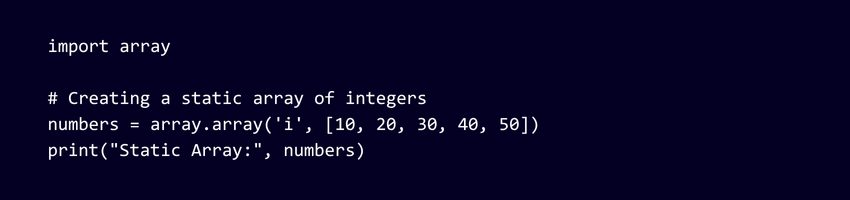
Output:

2) Dynamic Array
A Dynamic Array is an array whose size can change as per our needs. The size is not fixed. We can add or remove elements as we wish. In Python, lists are used as dynamic arrays, as they automatically handle memory allocation and indexing, due to which they can be resized dynamically.
Example:
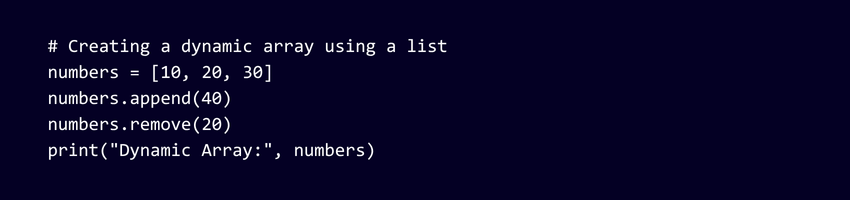
Output:

Declaring and Initialising Array in Python
In Python, declaring and initialising Arrays is a fundamental step in effectively utilising these powerful Data Structures. So, let’s explore two common methods to declare and initialise these components in Python:
1) Creating Arrays using the "array" module
The “array” module in Python provides a straightforward approach to creating Arrays. To use this module, you first need to import it into your code. Then, you can declare an Array by specifying the type of elements it will contain. For example, to create an Array of integers, you would use:

In this example, an Array is declared with the name “my_array” with the type ’ i representing integers. Then it is initialised with values [1, 2, 3, 4, 5].
2) Creating Arrays using the " NumPy" library
The "NumPy" library is a powerful extension for numerical computing in Python. It offers an advanced Array implementation. As a result, it supports multidimensional Arrays and various mathematical operations. To use "NumPy," you need to install it first and then import it into your code. Here's how you can create an Array using "NumPy":

In this example, "my_array" is created using "NumPy" with the same values as before.
Dive into the world of programming with our Programming Courses- Register Now!
Accessing elements in Python Arrays
Accessing elements in Python Arrays is a fundamental skill that allows developers to retrieve specific data efficiently. These components store elements in contiguous memory locations. As a result, they enable direct access to individual items based on their index. Here's how you can access elements in Python Arrays:
Learn all about What are Comments in Python and improve your programming practices. Check out our blog for more insights.
1) How to find the Length of an Array in Python?
To find out the exact number of elements contained in an array, use the built-in len() method. It will return the integer number that is equal to the total number of elements in the array you specify. For example:
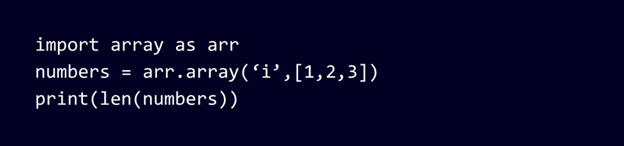

In the example above, the array contained four elements: 1, 2, 3 and 4 – so the length of numbers is 4.
2) Array indexing and how to access individual items in an Array in Python
An Array is a Data Structure that can be used to store several items of the same data type in a programming language. In Python, you can create an array by importing the Array module and using the array() function. For example, you can create an Array of integers by writing:

The first argument of the array() function is the type code, which specifies the data type of the elements in the Array. The second argument is a list of the elements that you want to store in the Array. In this case, the type code is 'i', which means the elements are integers, and the list is [10, 20, 30].
In order to access an element in an Array, you can try using the index number of the element, which is a numerical position that starts from zero. You can write the name of the Array followed by square brackets and the index number inside. For example, you can access the first element in the numbers Array by writing: numbers[0]
This will return the value 10, which is the first element in the Array. Similarly, you can access the second element by writing:
numbers[1]
This will return the value 20, which is the second element in the Array. You can also use negative index numbers to access the elements from the end of the Array. For example, you can access the last element in the numbers array by writing:
numbers[-1]
This will return the value 30, which is the last element in the Array.
3) How to search through an Array in Python?
There are different ways to search through an Array in Python, depending on what you are looking for and how the Array is structured. If you want to find out if an element is contained in the Array or not, you can use the in operator, which returns a Boolean value. For example, you can write:
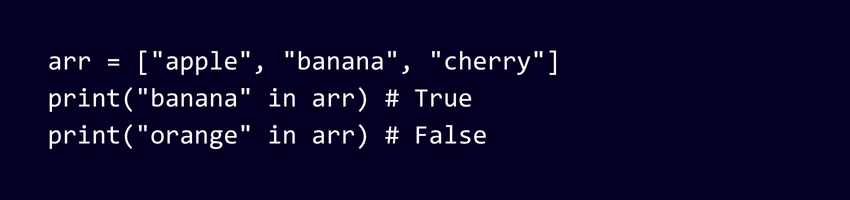
4) How to loop through an Array in Python?
One way to loop through an array in Python is by using the for loop with the in operator. The for loop allows you to iterate over a sequence of items, such as a list, a Python tuple, or an array. The in operator checks if an item is contained in a sequence and returns a boolean value. For example, you can write:
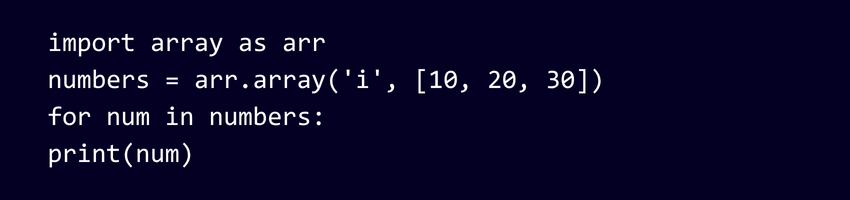
Entering this code will loop through each element in the numbers Array and print its value. The output will be:

5) Slicing of an Array
Slicing Operation of an Array is a technique that allows you to extract a subset of elements from an Array and make a new Array from them. You can specify the indices that are considered the start and the end. Moreover, you can use the step size to select the elements you want. For example, if you have an Array called arr, you can slice it by writing:
arr[start:end:step]
This will return a new Array with the elements from index start (inclusive) to index end (exclusive) with a step size of step. If you omit the start or end index, it will default to the beginning or end of the Array, respectively. If you omit the step size, it will default to 1. For example, if you have an Array with the values [1, 2, 3, 4, 5], you can slice it in different ways:
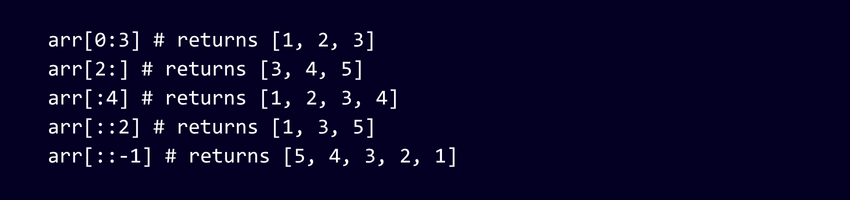
Slicing of an Array is useful for accessing and modifying specific elements, creating subarrays, reversing Arrays, and more.
Build smarter coding solutions with our Python Scripting Training – Get Started Today!
Modifying Arrays
Python Arrays are mutable data structures, which means you can modify their elements after they have been created. Being able to change, add, or remove elements is a powerful capability that allows developers to manipulate data dynamically. Here's how you can modify Arrays in Python:
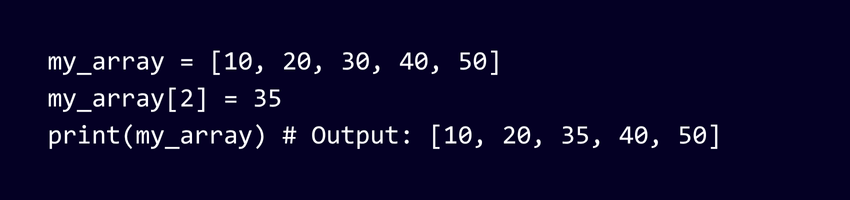
1) Changing Individual Elements
To change the value of a specific element in the Array, simply assign a new value to its corresponding index. For example:
2) Adding Elements
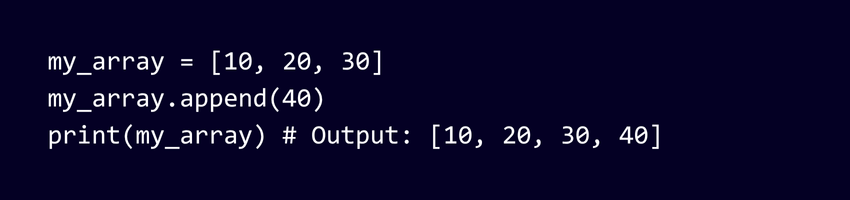
You can add elements to Arrays using various methods, such as append(), insert(), or Array concatenation. For instance:
3) Removing Elements
Removing elements can be achieved using methods like remove() or pop(). For example:

Boost your coding skills with the Python Guide – Download today!
What is NumPy Array?
A NumPy array is a powerful data structure provided by the NumPy library, designed to store and manipulate large numerical datasets efficiently. Unlike Python lists, NumPy arrays are homogeneous, meaning all elements share the same data type, which allows for faster computation and optimised memory usage.
At its core, the NumPy array, known as a ndarray, supports multi-dimensional data and enables vectorised operations, making complex mathematical and statistical tasks simpler and quicker. It forms the backbone of many data science, AI, and machine learning applications built in Python.
Example:
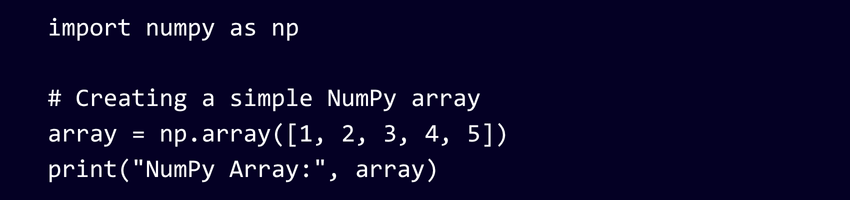
Output:

Conclusion
Python arrays can make your code stronger and easier to understand. The different functions in Python arrays can help you store your data for useful calculations in a variety of ways. So, if you are handling simple data or have an algorithm that involves complex numerical data, start using arrays today and take your coding skills to an advanced level.
Learn to build robust and scalable web applications with our Python Django Training- Sign Up!
Frequently Asked Questions
What Role Does Python Array Play in Python Programming?

Python Array is a data structure that stores multiple values of the same type in a contiguous memory location. It is useful for performing math and logic operations on large data sets efficiently and conveniently. It can be created by importing the array module, which provides methods and attributes to manipulate the array elements. It has advantages such as less memory consumption, faster and easier access, arithmetic operations on the whole array, and conversion to other data types.
How do You Check if Two Arrays are Equal in Python?
Follow the following steps to check whether the two arrays are equal in Python:
1) Check if the arrays are of different lengths; if so, they are not equal.
2) Sort the arrays and compare them element by element, which can be done with sorted(a) == sorted(b).
3) Use a frequency map to count each element and compare them.
What are related courses and blogs provided by The Knowledge Academy?
The Knowledge Academy takes global learning to new heights, offering over 3,000+ online courses across 490+ locations in 190+ countries. This expansive reach ensures accessibility and convenience for learners worldwide.
Alongside our diverse Online Course Catalogue, encompassing 19 major categories, we go the extra mile by providing a plethora of free educational Online Resources like Blogs, eBooks, Interview Questions and Videos. Tailoring learning experiences further, professionals can unlock greater value through a wide range of special discounts, seasonal deals, and Exclusive Offers.
What is The Knowledge Pass, and How Does it Work?
The Knowledge Academy’s Knowledge Pass, a prepaid voucher, adds another layer of flexibility, allowing course bookings over a 12-month period. Join us on a journey where education knows no bounds.
What are the other resources and offers provided by The Knowledge Academy?
The Knowledge Academy offers various Programming Courses, including Python Django Training, Object Oriented Programming (OOPs) Course and Python with Machine Learning Training. These courses cater to different skill levels, providing comprehensive insights into Iteration in Programming.
Our Programming & DevOps Blogs cover a range of topics related to Python, offering valuable resources, best practices, and industry insights. Whether you are a beginner or looking to advance your Programming skills, The Knowledge Academy's diverse courses and informative blogs have you covered.

Richard Harris


Senior Full Stack Developer and Technology Educator
Richard Harris is a highly experienced full-stack developer with deep expertise in both frontend and backend technologies. Over his 12-year career, he has built scalable web applications for startups, enterprises and government organisations. Richard’s writing combines technical depth with clear explanations, ideal for developers looking to grow in modern frameworks and tools.


 If you wish to make any changes to your course, please


