


 Top Rated Course

We may not have the course you’re looking for. If you enquire or give us a call on 44 1344 203 999 and speak to our training experts, we may still be able to help with your training requirements.
What is Google Cloud Shell? A Complete Guide
Lily Turner 15 July 2026Google Cloud Shell is a powerful Cloud-based development environment that simplifies and streamlines the coding process, offering Developers several benefits. It offers a pre-configured virtual machine with various tools and the Google Cloud SDK, enabling you to manage your Google Cloud projects directly from the browser.

Training Outcomes Within Your Budget!
We ensure quality, budget-alignment, and timely delivery by our expert instructors.
Table of Contents

What if you could open your browser and dive straight in to manage your Cloud resources instead of wrestling with installations and configurations? This is made possible by the Google Cloud Shell. It's like having a fully equipped development environment at your fingertips. This web-based command-line tool offers you instant access to Google Cloud resources, pre-loaded with essential tools and a ready-to-use virtual machine.
In this blog we’ll explore, What is Google Cloud Shell in detail, showing how it makes deploying apps, managing Kubernetes, or automating workflows so seamless. So read on, unlock Google Cloud's full potential and supercharge your workflow!
Table of Contents
1) What is Google Cloud Shell?
2) Controlling resources using Google Cloud Shell Editor
3) What is the Difference Between Google Cloud Console and Shell?
4) What is Google Cloud Shell Used for?
5) Conclusion
What is Google Cloud Shell?
Google Cloud Shell is a web-based, interactive shell environment that you can access through your web browser. It provides you with a pre-configured virtual machine with a variety of developer tools, utilities, and the Google Cloud SDK, enabling you to manage your Google Cloud projects directly from your browser.
Let’s take a look at some of its key features:
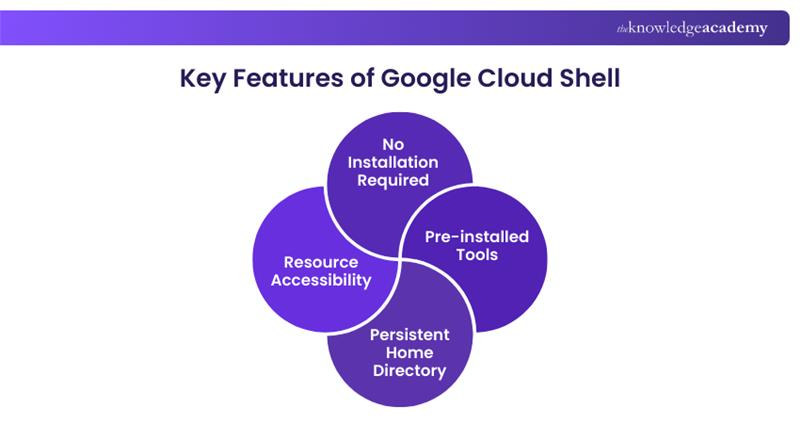
1) No Installation Required: Unlike traditional development environments, Google Cloud Shell eliminates the need for local installations, saving time and resources.
2) Pre-installed Tools: Google Cloud Shell comes pre-configured with essential tools and utilities, including the Google Cloud SDK and various programming languages.
3) Persistent Home Directory: Your files and configurations are stored securely, ensuring continuity across sessions.
4) Resource Accessibility: Google Cloud Shell provides seamless access to GCP resources, allowing users to manage and control them with ease.

Controlling Resources Using Google Cloud Shell Editor
Google Cloud Shell Editor is a powerful web-based code editor that allows Developers to efficiently manage and control their GCP resources. With its intuitive interface and pre-installed tools, Cloud Shell Editor streamlines the process of interacting with GCP resources directly from the Google Cloud Console. Here, we will explore how to effectively control your GCP resources using the Shell Editor:
Accessing Google Cloud Shell Editor
The first step is very simple; all you need to do is sign into your Google Cloud Console with your GCP credentials. In the top-right corner, click on the shell icon to launch Google Cloud Shell. Let’s now move on to getting familiarised with the interface.
Gain a deeper understanding of digital data transformation and the importance of a data-driven culture in our Google Cloud Digital Leader Training - Sign up now!
Get Familiarised With the Google Cloud Shell Editor Interface
The Cloud Shell Editor interface consists of various components designed to enhance your development experience. Here’s how it can enhance your development experience:
1) Code Editor: The primary area where you write and edit your code. It comes with syntax emphasising intelligent code completion and version control integration with Git.
2) Terminal: The built-in terminal gives you direct access to the Google Cloud SDK and other essential command-line tools. Use this to execute GCP commands and manage your Google Cloud Functions and resources efficiently.
3) Web Preview: Preview your applications directly from Google Cloud Shell Editor without the need for separate deployments.
Managing GCP Resources
With Google Cloud Shell Editor, you can perform various tasks to manage your GCP resources effectively. Let’s explore how it achieves that:
1) Creating New Resources: Use the Cloud Shell Editor's code editor to write configurations for your GCP resources and deploy them with just a few clicks.
2) Modifying Existing Resources: Easily make changes to your GCP resources by editing the corresponding code in the Cloud Shell Editor.
3) Viewing Resource Status: Check the status of your GCP resources directly from the Cloud Shell Editor's terminal using the Google Cloud SDK commands.
Unleash your App Development prowess on the Google Cloud Platform with our Developing Applications With Google Cloud Platform Training – Sign up now!
One-click Deployments
One of the most convenient features of Google Cloud Shell Editor is the ability to perform one-click deployments. Whether you're deploying a web application, a function, or any other GCP resource, Cloud Shell Editor streamlines the process. It saves you time and effort. Here's how you can achieve that:
1) Write the necessary code or configurations for your resource in the code editor.
2) Use the terminal to execute the appropriate deployment command (e.g., gcloud app deploy for Google App Engine).
3) Cloud Shell Editor will handle the deployment process for you, and you'll be able to access your application or resource from the provided URL.
Scripting and Automation
Google Cloud Shell Editor enables scripting and automation, making it easy to perform repetitive tasks and enhance your workflow. You can create shell scripts or use popular scripting languages like Python or Node.js to automate various operations on your GCP resources. Here's how you can create shell scripts:
1) Write the script in the Cloud Shell Editor's code editor.
2) Execute the script from the terminal with the appropriate command.
3) Sit back and let Cloud Shell Editor do the rest.
Transform your projects with Google Cloud AI tools! Discover powerful solutions and innovations to enhance your AI capabilities and drive success.
Monitoring and Debugging
Monitoring and debugging are essential aspects of Resource Management. Cloud Shell Editor simplifies troubleshooting by providing easy access to logs and real-time debugging, helping you resolve issues and optimize GCP resources.
1) Use the terminal to fetch and view logs for your applications and services.
2) Employ debugging tools and commands from the Cloud Shell Editor to identify and resolve issues quickly.

Resource Quota Management
While using Google Cloud Shell Editor, it's crucial to keep an eye on your resource quotas to avoid any interruptions in your operations. GCP resources come with certain quotas, limiting the number of resources you can create or use within a specific period. Here's how you can perform Resource Management:
1) Use the terminal to check your current resource quotas.
2) Plan your resource usage accordingly to stay within the allocated quotas.
Google Cloud Shell Editor is an invaluable tool for Developers and IT professionals working with the Google Cloud Platform. By providing an interactive and feature-rich code editor, along with a fully functional terminal, it simplifies the process of managing and controlling GCP resources.
Empower your Cloud journey with our Google Cloud Platform Fundamentals Training – Sign up today!
What is the Difference Between Google Cloud Console and Shell?
Google Cloud Console offers a web-based Graphical User Interface for managing Google Cloud resources. Google Cloud Shell is a Command-line Interface (CLI) accessible through a web browser. It offers a Linux shell environment for interacting with your Cloud resources.
What is Google Cloud Shell Used for?
Uses of Google Cloud Shell include:
1) Managing Google Cloud resources
2) Code development
3) Version control
4) Kubernetes Management
5) Secure access
6) Cloud storage access
Conclusion
Google Cloud Shell is a game-changer for Developers, offering a ready-to-use, Cloud-based command-line tool for managing resources seamlessly. With built-in tools, secure access, and no setup required, it simplifies cloud operations. It’s important to understand What is Google Cloud Shell to harness its true power in streamlining workflows and expanding productivity.
Soar above the competition with our specialised Google Cloud Training Courses – Sign up now!
Frequently Asked Questions
What is the Storage Limit for Google Cloud Shell?

Google Cloud Shell offers 5 GB of free persistent disk storage. This is mounted as your $HOME directory on the virtual machine instance. This storage remains accessible across different projects.
How Long Does Google Cloud Shell Last?
A Google Cloud Shell session lasts until it is terminated by the user or automatically after a period of inactivity. The inactivity timeout is typically 20 minutes, but this can vary.

Lily Turner


Senior AI/ML Engineer and Data Science Author
Lily Turner is a data science professional with over 10 years of experience in artificial intelligence, machine learning, and big data analytics. Her work bridges academic research and industry innovation, with a focus on solving real-world problems using data-driven approaches. Lily’s content empowers aspiring data scientists to build practical, scalable models using the latest tools and techniques.
View Detail

 If you wish to make any changes to your course, please


