


 Top Rated Course

We may not have the course you’re looking for. If you enquire or give us a call on +31 208081674 and speak to our training experts, we may still be able to help with your training requirements.
What is a Bill of Materials (BOM)? Types, Components, and Examples
Lily Turner 22 April 2026A Bill of Materials (BOM) is a detailed list of parts, materials, and components needed to build or manufacture a product, including quantities and reports. It acts like a product recipe, helping teams plan, source, and assemble efficiently while reducing errors, saving costs, and improving overall production workflow.
Home
 Resources
IT Infrastructure & Networking
What is a Bill of Materials (BOM)? Types, Components, and Examples
Resources
IT Infrastructure & Networking
What is a Bill of Materials (BOM)? Types, Components, and Examples
Resources
IT Infrastructure & Networking
What is a Bill of Materials (BOM)? Types, Components, and Examples

Training Outcomes Within Your Budget!
We ensure quality, budget-alignment, and timely delivery by our expert instructors.
Table of Contents

Ever tried assembling furniture without instructions? You’d likely miss a screw or mix up parts. That’s what building a product without a Bill of Materials (BOM) feels like, confusing, risky, and costly. A BOM is like a master recipe, listing every part, material, and tool needed to build a product, from smartphones to skateboards.
In this blog, we’ll explore what a Bill of Materials (BOM) is, why it matters, and the different types, structures, and display formats. We’ll also cover its key components, steps to create one, major benefits, common limitations, and a real-life example to help you understand it all clearly.
Table of Contents
1) What is a Bill of Materials (BOM)?
2) Different Types of Bills of Materials (BOMs)
3) Common Bills of Materials (BOMs) Structures
4) Types of Bills of Materials (BOMs) Display Formats
5) Components of Bill of Materials (BOM)
6) Steps to Create a Bill of Materials (BOM)
7) What are the Benefits of Using a Bill of Materials?
8) What are the Limitations of a Bill of Materials?
9) Example of a Bill of Materials (BOM)
10) Conclusion
What is a Bill of Materials (BOM)?
A Bill of Materials (BOM) is a complete list of everything you need to make a product. It involves all the raw materials, parts, and small pieces, plus how many of each are needed. In simple words, it tells you exactly what you need to build something.
A BOM also gives basic instructions on how to get and use those items. Some people call it a product plan, part list, or recipe, especially in industries that make things like food, chemicals, or drinks.

Different Types of Bills of Materials (BOMs)
There’s no single type of Bill of Materials (BOM) that fits all businesses. Different types are used in different ways. Let’s explore the most common ones to help you choose the right one.
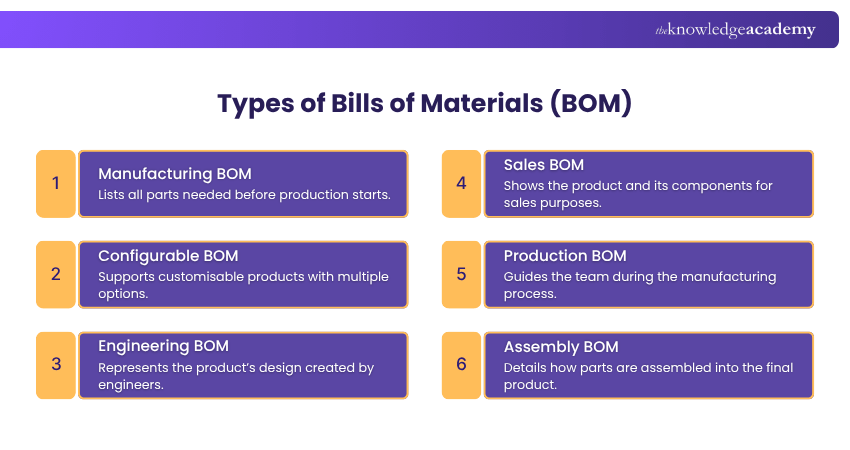
1) Manufacturing BOM
This type is used in factories. It shows all the parts, materials, and small parts (called subassemblies) needed to build the final product. It is prepared before the start of manufacturing to ensure smooth production.
2) Configurable BOM
This BOM is for products with many options, like phones with different colours or storage capacities. It’s created using software and makes it easy to build different versions without redesigning from scratch.
3) Engineering BOM
This type is made by engineers. It defines the product design and structure and is often created using Computer-aided Design (CAD) software. It is part of the design and planning stage.
4) Sales BOM
This BOM is used during sales. It represents the product as sold to the customer and includes both finished products and components. Sales teams use it to help customers understand what they are purchasing.
5) Production BOM
This BOM is used for manufacturing semi-finished products or assemblies that are later used in the final product. It helps production teams manage the steps and resources needed to prepare intermediate assemblies.
6) Assembly BOM
This type shows how different parts and subassemblies are combined into the final product. It is especially useful when items are shipped in pieces and need to be assembled later by the customer or assembly team.
Recognise the importance of financial accounting in Material Management. Join our SAP Finance and Controlling FICO Training now!
Common Bills of Materials (BOMs) Structures
These are two common structures for BOMs:
Single-level Bill of Materials
This is the easiest type of BOM. It is just a simple list that shows all the parts and how many of each are needed to make one product. But it does not show how the parts are connected. So, it is not good for big or complicated products. If something breaks, it’s hard to find out which part is the problem.

Multi-level Bill of Materials
This type is more detailed. It shows how parts are grouped and how they fit together. It also shows big parts (called parent parts) and the small parts inside them (called child parts). It takes more time to make but it is better for complex products. It also helps you find problems and plan better.

Types of Bills of Materials (BOMs) Display Formats
There are two simple ways to show a Bill of Materials (BOM): Explosion and Implosion.
1) Explosion View
This starts with the finished product and then breaks it down into all the parts needed to make it. It goes from top to bottom, showing each part and how it fits in. The more you go down, the more details you see.
2) Implosion View
This starts with the parts and shows how they come together to make the final product. It goes from the bottom up and clearly shows the finished product at the end.
Learn to evaluate material prices in purchasing, stock, and invoices. Join our SAP Material Management Training now!
Components of Bill of Materials (BOM)
These are the components of the Bill of Materials (BOM):
1) Product Materials
This shows what materials are used to make the product, such as wood, metal, plastic, or rubber. Selecting the right materials ensures durability and proper performance.
2) Product Measurements
It gives the size and weight of the product, such as height, width, depth, and overall weight. This helps when choosing the right packaging and storage. It also helps workers know how much space is needed for the product.
3) Overall Project Cost
This part shows how much each item costs and the total cost to make the full product. It helps businesses plan their spending. It also helps set the right price for selling the product.
4) Product Identification and Description
Each part has a name or number, and a short note to explain what it is. This helps people quickly find the right part. It also prevents mistakes by making sure everyone uses the correct item.
5) Technical Features and Specifications
This gives extra details about each part, like dimensions, colour, power rating, or function. These details help the team understand the purpose of each part and ensure the product meets quality standards.
Steps to Create a Bill of Materials (BOM)
Making a BOM needs clear steps. These are the steps to create a Bill of Materials.
Step 1: Define the Product Structure
Start by showing what the full product looks like. Then break it into big parts, and then into small parts. This helps everyone see how the product is built. For example, if you are making a phone, you can list the screen, battery, and circuit board as big parts.
Step 2: List All Parts and Their Quantities
Write down all the parts needed to make the product, including the name, part number, quantity, and source. For example, a chair may need four legs, one seat, and 12 screws. This helps avoid buying too few or too many items.
Step 3: Include Specifications
Give more details about each part. Say the size, the material, how heavy it is, or how it should work. For example, you can say the bolt must be 10 mm wide and made of strong steel. This helps people pick the right parts.
Learn to manage supply chains and control production processes. Join our SAP Supply Chain Management Training now!
What are the Benefits of Using a Bill of Materials?
There are many good reasons to use a BOM:
1) Helps You Plan Better: A BOM shows all the parts you need, so you can get them before you start. This stop delays and keeps work going smoothly.
2) Controls Stock: It helps you buy just the right amount, not too much, not too little. This saves space and money.
3) Shows the Total Cost: A BOM lists prices of all parts. This helps you know how much money you will spend to make the product.
4) Saves Time: Since you already know what you need, there are fewer surprises. This helps you finish the product faster.
5) Keeps Everyone on the Same Page: All teams, like design, buying, and production, use the same list. This avoids mistakes and confusion.
6) Reduces Waste: You only use the parts you need. This means less waste and better use of materials.
7) Fixes Problems Faster: If something goes wrong, the BOM helps you find the problem part quickly. That means faster repairs.
What are the Limitations of a Bill of Materials?
These are the limitations of a Bill of Materials:
1) Easy to Make Mistakes: If the product has many small parts, it’s easy to make mistakes in the list. One small error can cause big problems in making the product.
2) Hard to Use with Software: Old-style BOMs are just lists. They don’t work well with new computer systems like Enterprise Resource Planning (ERP) Software, which could make the job easier and faster.
3) No Time Information: Many BOMs don’t say how long it takes to get parts or build the product. This can make planning slow or confusing.
4) Needs Constant Updates: If the product changes or is improved, the BOM must also be changed. If not updated, people may use wrong or old information.
5) Doesn’t Show Delays: The BOM assumes everything will go smoothly. But if a part is late or missing because of supply problems, the BOM doesn’t warn you.
Example of a Bill of Materials (BOM)
Let’s say you want to make a wooden chair. Here is a very simple example of a Bill of Materials (BOM):
You will need:
1) 1 seat made of wood. It is 40 cm by 40 cm. It costs £10.
2) 4 legs made of wood. Each leg is 45 cm long. All four cost £12.
3) 8 screws made of metal. Each screw is 5 cm long. They cost £2.
4) 1 bottle of wood polish. It is 250 ml. It costs £5.
This list helps you know what to buy, how many you need, and how much money you will spend. It makes building the chair easy.
Conclusion
A Bill of Materials (BOM) is a simple but powerful tool that helps teams build products the right way. It lists all the parts, materials, and costs clearly, so everyone stays on track. From planning and budgeting to reducing mistakes, a BOM makes work faster and easier. No matter the product, using a Bill of Materials helps bring every idea to life smoothly.
Become SAP-certified and acquire jobs with attractive salaries. Join our SAP Training now!
Frequently Asked Questions
What is the Difference Between a Bill of Materials and a Bill of Quantities?

A Bill of Materials (BOM) is used to make products. It lists all the parts and materials needed, like for a phone or chair. A Bill of Quantities (BOQ) is used in building work. It shows what materials, work, and money are needed to build things like houses or roads. BOM is for products, BOQ is for buildings.
Who is Responsible for the Bill of Materials?
Engineers usually make the first Bill of Materials (BOM). Then, production teams use it to build the product, and purchasing teams order the parts. Project Managers check that everything is correct. So, many teams work together to make and use the BOM to build the product the right way.
What are the Other Resources and Offers Provided by The Knowledge Academy?
The Knowledge Academy takes global learning to new heights, offering over 3,000 online courses across 490+ locations in 190+ countries. This expansive reach ensures accessibility and convenience for learners worldwide.
Alongside our diverse Online Course Catalogue, encompassing 19 major categories, we go the extra mile by providing a plethora of free educational Online Resources like Blogs, eBooks, Interview Questions and Videos. Tailoring learning experiences further, professionals can unlock greater value through a wide range of special discounts, seasonal deals, and Exclusive Offers.
What is The Knowledge Pass, and How Does it Work?
The Knowledge Academy’s Knowledge Pass, a prepaid voucher, adds another layer of flexibility, allowing course bookings over a 12-month period. Join us on a journey where education knows no bounds.
What are the Related Courses and Blogs Provided by The Knowledge Academy?
The Knowledge Academy offers various SAP Training, including the SAP Production Planning Training, SAP Finance and Controlling FICO Training, and SAP Supply Chain Management Training. These courses cater to different skill levels, providing comprehensive insights into Brand Affinity.
Our IT Infrastructure & Networking Blogs cover a range of topics related to Bill of Materials, offering valuable resources, best practices, and industry insights. Whether you are a beginner or looking to advance your IT Infrastructure skills, The Knowledge Academy's diverse courses and informative blogs have got you covered.

Lily Turner


Senior AI/ML Engineer and Data Science Author
Lily Turner is a data science professional with over 10 years of experience in artificial intelligence, machine learning, and big data analytics. Her work bridges academic research and industry innovation, with a focus on solving real-world problems using data-driven approaches. Lily’s content empowers aspiring data scientists to build practical, scalable models using the latest tools and techniques.
View Detail
Upcoming IT Infrastructure & Networking Resources Batches & Dates
Date
 SAP Production Planning Training
SAP Production Planning Training
Mon 21st Sep 2026
SAP Production Planning Training
Mon 7th Dec 2026

 If you wish to make any changes to your course, please


