


 Top Rated Course

We may not have the course you’re looking for. If you enquire or give us a call on +352 20 33 17 60 and speak to our training experts, we may still be able to help with your training requirements.
How to Delete Adobe Account? A Complete Guide
Richard Harris 13 February 2026Is your Adobe Account gathering virtual dust? If it’s time to bid farewell, this blog on How to Delete Adobe Account has you covered. In this blog, we’ll help you through the steps, address common challenges, and help you streamline your online presence. Ready to simplify your digital life and move forward? Let’s dive in and begin!

Training Outcomes Within Your Budget!
We ensure quality, budget-alignment, and timely delivery by our expert instructors.
Table of Contents

Feeling overwhelmed by the sheer number of digital accounts you’ve accumulated over the years? Among them, your Adobe Account might have been a gateway to creativity, but perhaps now you're ready to move on. Simplifying your digital life or switching software? Learn How to Delete Adobe Account to manage your online presence efficiently.
Before you hit that delete button, have you thought about the potential consequences? In this blog, we’ll guide you through the steps on How to Delete your Adobe Account and discuss the challenges you might encounter along the way, Adobe Captivate helps create interactive content for better decision-making. Ready to take control of your digital footprint? Let’s dive in!
Table of Contents
1) What is Adobe?
2) Steps on How to Delete Adobe Account
3) How to Cancel Adobe Subscriptions?
4) Issues Faced During Adobe Account Deletion
5) Manage Additional Privacy Choices
6) Conclusion
What is Adobe?
Adobe is a renowned software company that is famous for its creative and multimedia tools, such as Adobe Photoshop, Adobe Illustrator, Adobe Premiere Pro, and Acrobat. These programs are widely used by professionals for creating, editing, and sharing digital content. Adobe’s software has become essential in fields like Graphic Design, Photography, and video production.
In addition to its creative suite, Adobe offers services like Adobe Cloud, enabling users to store and collaborate on projects online. This combination of powerful tools and cloud-based services has solidified Adobe's reputation as a leader in the digital content creation industry.
Steps on How to Delete Adobe Account
Deleting your Adobe Account is an easy process, but it’s important to follow every step carefully to ensure a smooth transition. Here’s how you can do it:
Step 1: Log in to Your Adobe Account
Start by visiting the Adobe website and logging into your account with your credentials. Ensure that you have access to the email associated with your Adobe Account, as this will be necessary for verification purposes.

Step 2: Navigate to the Privacy Settings
After logging in, go to the account settings. Here, locate the ‘Privacy’ or ‘Security & Privacy’ section, where you’ll find options related to managing your data and account settings.

Step 3: Initiate the Deletion Process
In the privacy settings, look for the option to delete your account, usually labelled as “Delete Account.” Click on it to begin the deletion process. Adobe will warn you about the consequences of deleting your account, such as slipping out of access to your subscriptions, products, and any saved data.

Step 4: Manage Subscriptions or Group Memberships
Before Adobe allows you to delete your account, you must cancel any active subscriptions or remove yourself from any group memberships. This step ensures that no ongoing services are disrupted unexpectedly.
Step 5: Choose a Reason and Verify Deletion
Adobe asks you to provide a reason for deleting your account, which can help them improve their services. Afterwards, you’ll need to verify your identity, typically through a confirmation email or two-factor authentication, to proceed with the deletion.

Step 6: Finalise the Deletion
Finally, review the details of your deletion request. If you’re certain about deleting your account, confirm the process. Adobe will then proceed with the account deletion, which may take a few days to complete fully. During this period, you might still receive notifications related to your account.

Master Adobe XD and elevate your design skills with our comprehensive Adobe XD Course – register today and innovate!
How to Cancel Adobe Subscriptions?
If you are considering deleting your Adobe Account but want to keep certain subscriptions or services, you might prefer cancelling specific subscriptions instead. Here's how you can do that:
1) Log in to Your Adobe Account: Access your account through the Adobe website.
2) Go to Plans & Subscriptions: Navigate to the 'Plans' or 'Plans & Subscriptions' section within your account settings.
3) Select the Subscription to Cancel: Choose the subscription you want to cancel and adhere to the on-screen instructions. Adobe may offer alternatives or incentives to retain your subscription.
4) Confirm the Cancellation: Review the cancellation details and confirm to proceed. You will get a confirmation email once the cancellation is complete.
Join our Adobe Acrobat Training and gain the skills needed to create, edit, and manage PDFs effortlessly!
Issues Faced During Adobe Account Deletion
Deleting an Adobe Account may not always be a smooth experience, and users often face several issues. Some common problems include:
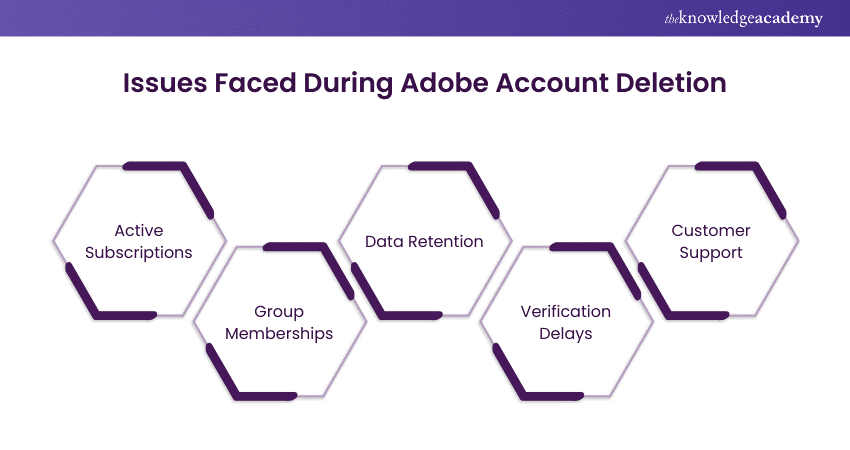
1) Active Subscriptions: Users may find that they cannot delete their account due to active subscriptions. In such cases, you must cancel all active subscriptions before proceeding.
2) Group Memberships: Being part of an Adobe group (such as an enterprise account) can also prevent deletion. Ensure that you have left any groups or transferred ownership if necessary.
3) Data Retention: Adobe retains certain data even after account deletion for legal and compliance reasons. Users concerned about their data privacy should review Adobe's data retention policy before initiating the deletion.
4) Verification Delays: Sometimes, the verification process (e.g., receiving a confirmation email) can be delayed, leading to frustration. Ensure that your email settings allow for Adobe notifications, and check spam folders if you do not receive the email promptly.
5) Customer Support: In some cases, users may need to contact Adobe customer support to resolve issues that prevent account deletion. This can be time-consuming, especially if the support team needs more information or faces technical challenges.
Join our Adobe Courses today and master the tools that creative professionals rely on worldwide!
Manage Additional Privacy Choices
Privacy choices refer to a way through which an individual is in apposition to determine how firms collect, process and disseminate personal information. In response to increasing privacy concerns, companies thus, increase levels of transparency and provide more of the option for more self-governance tools to be given to the users of the service.
Opt out of Targeted Marketing
Marketing targeting means utilising your individual information that has to do with your browsing history, geographical location, and preferences to advertise. Although this can improve your web experience, some users would possibly wish not to be followed to promote advertisements.
How to Opt Out:
a) Look for an “Unsubscribe” option in promotional emails from Adobe to stop receiving marketing emails.
b) Update your preferences in Adobe’s privacy settings on their website.
c) Use opt-out tools like the Digital Advertising Alliance (DAA) or the Network Advertising Initiative (NAI) to limit personalised advertising.
Why Opt Out?
Choosing not to receive more relevant advertisements is beneficial because it helps limit the amount of your data used to monitor your behaviour for Marketing purposes, this way you limit different brand’s access to your information.
Opt Out of Sale of Information
In some states such as in California under the new CCPA regulation, consumers have the do not sell my data right where they can prevent business from sharing their data to other parties. The information shared may contain such aspects as names and contacts and the website they frequently browse.
How to Opt Out:
a) Look for a “Do Not Sell My Information” link on Adobe’s website or in their privacy policy.
b) Adjust your account settings to turn off the sharing of personal data.
Why Opt Out?
It protects the sales of one’s personal data from third parties who may misuse or breach the information or fail to respect your desired privacy practice.
Stand out in your Adobe XD interview with these expert Adobe XD Interview Questions and Answer—grab your copy today!
Conclusion
Deleting your Adobe Account is an important step in managing your online presence. By following this guide on How to Delete an Adobe Account, you can ensure a smooth process, avoid common pitfalls, and confidently take control of your digital footprint. Streamline your digital life and take control with confidence.
Transform your creative projects with Adobe After Effects - join our Adobe After Effects Course and elevate your skills now!
Frequently Asked Questions
Is it Safe to Delete Adobe?

Yes, it's safe to delete your Adobe Account. However, be sure to cancel any active subscriptions and back up important data first. Remember, deletion is permanent and cannot be undone.
Does Uninstalling Adobe Deactivate It?
Uninstalling Adobe software doesn't automatically deactivate it, as deactivation is tied to your Adobe account and license, not the application itself. To deactivate, log into your Adobe account and manually deactivate the license under Plans & Products. This ensures the license becomes available for use on another device.
What are the Other Resources and Offers Provided by The Knowledge Academy?
The Knowledge Academy takes global learning to new heights, offering over 3,000+ online courses across 490+ locations in 190+ countries. This expansive reach ensures accessibility and convenience for learners worldwide.
Alongside our diverse Online Course Catalogue, encompassing 19 major categories, we go the extra mile by providing a plethora of free educational Online Resources like Blogs, eBooks, Interview Questions and Videos. Tailoring learning experiences further, professionals can unlock greater value through a wide range of special discounts, seasonal deals, and Exclusive Offers.
What is The Knowledge Pass, and How Does it Work?
The Knowledge Academy’s Knowledge Pass, a prepaid voucher, adds another layer of flexibility, allowing course bookings over a 12-month period. Join us on a journey where education knows no bounds.
What are the Related Courses and Blogs Provided by The Knowledge Academy?
The Knowledge Academy offers various Adobe Courses, including Adobe Illustrator Training, Adobe Premiere Pro Course, Adobe XD Course, Adobe Analytics Training and Adobe Acrobat Training. These courses cater to different skill levels, providing comprehensive insights into Best Adobe Captivate Alternative.
Our Office Applications Blogs cover a range of topics related to Adobe, offering valuable resources, best practices, and industry insights. Whether you are a beginner or looking to advance your Office Applications skills, The Knowledge Academy's diverse courses and informative blogs have got you covered.

Richard Harris


Senior Full Stack Developer and Technology Educator
Richard Harris is a highly experienced full-stack developer with deep expertise in both frontend and backend technologies. Over his 12-year career, he has built scalable web applications for startups, enterprises and government organisations. Richard’s writing combines technical depth with clear explanations, ideal for developers looking to grow in modern frameworks and tools.

Upcoming Office Applications Resources Batches & Dates
Date
 Adobe Illustrator Training
Adobe Illustrator Training
Thu 27th Aug 2026
Adobe Illustrator Training
Thu 17th Dec 2026

 If you wish to make any changes to your course, please


