


 Top Rated Course

We may not have the course you’re looking for. If you enquire or give us a call on +800 312616 and speak to our training experts, we may still be able to help with your training requirements.
Sage vs QuickBooks: Pros, Cons, and Key Features
Olivia Taylor 26 March 2026Sage vs QuickBooks comparison highlights QuickBooks for small business ease and automation, while Sage offers scalable solutions from accounting to ERP. QuickBooks is ideal for startups with simple needs and quick setup, whereas Sage suits growing firms that require advanced reporting, inventory management, and broader financial control.

Training Outcomes Within Your Budget!
We ensure quality, budget-alignment, and timely delivery by our expert instructors.
Table of Contents
Running a business is hard enough without struggling to manage your finances. From tracking expenses to sending invoices and understanding your cash flow, the right accounting software can make all the difference. That is why the Sage vs QuickBooks choice matters, as both are trusted tools designed to simplify financial management.
But which one works best for you? Whether you are just starting out or scaling your business, choosing between them can feel confusing. This QuickBooks vs Sage comparison breaks it down simply, helping you understand what each offers so you can pick the right solution. Let’s read on!
Table of Contents
1) What is Sage?
2) What is QuickBooks?
3) Key Features of Sage and QuickBooks
4) Sage vs QuickBooks: Key Differences
5) What are the Pros and Cons of QuickBooks?
6) What are the Pros and Cons of Sage?
7) What are the Products From Sage and QuickBooks?
8) Sage vs QuickBooks: Which is Better?
9) Conclusion
What is Sage?
Sage is a global provider of accounting, payroll, and Business Management Software, developed by The Sage Group. It offers a range of cloud-based solutions designed to help businesses manage finances, streamline operations, and improve overall efficiency. One of its key offerings, Sage Intacct, is a modern cloud-based Enterprise Resource Planning (ERP) platform built for growing businesses with advanced financial needs.
It automates complex processes like revenue recognition, expense tracking, and multi-entity consolidation, while providing real-time insights and detailed reporting. Known for its reliability and strong industry recognition, Sage helps organisations scale confidently and make informed, data-driven decisions.

What is QuickBooks?
QuickBooks is a cloud-based and desktop accounting software developed by Intuit, designed to help small to medium-sized businesses manage their finances efficiently. It simplifies tasks such as tracking income and expenses, creating invoices, processing payroll, and generating financial reports, making it ideal for startups and freelancers.
It offers versions like QuickBooks Online for easy access and integrations, and QuickBooks Enterprise for more advanced features. Known for its user-friendly interface, QuickBooks is best suited for simple financial needs, though growing businesses may require more advanced solutions over time.
Key Features of Sage and QuickBooks
Sage and QuickBooks offer many tools designed to simplify Financial Management, but they differ in their offerings. Here is a short comparison of the functionalities and features of Sage and QuickBooks.
Key Features of Sage
Sage is a potent Accounting Software that caters to a range of business sizes, from small startups to giant enterprises. It hosts a wide array of features that cover various aspects of Financial Management.
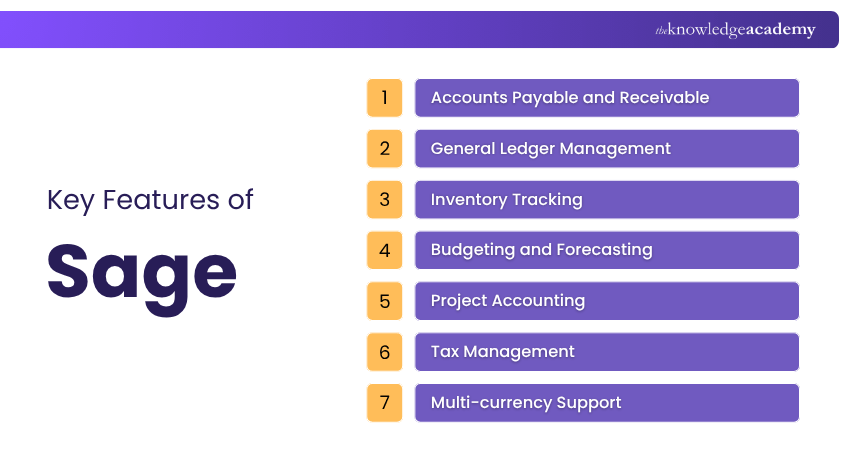
1) Accounts Payable and Receivable: Sage provides powerful tools for managing both accounts payable and accounts receivable. Users can efficiently handle vendor invoices, track payments, and manage customer invoices, streamlining the payment and collection processes.
2) General Ledger Management: The general ledger serves as a central repository for every financial transaction, and Sage excels in its Management. Businesses can keep records that are correct and up-to-date records of their financial activities.
3) Inventory Tracking: It provides advanced tools for businesses that manage inventory. Users can monitor stock levels, track item movement, and generate detailed reports.
4) Budgeting and Forecasting: The software allows businesses to create Budgets and forecasts to plan their financial activities effectively. These tools provide valuable insights into future revenue and expenses, aiding in decision-making.
5) Project Accounting: Project-based businesses benefit from the software’s Project Accounting features. It enables tracking expenses and revenues associated with specific projects, ensuring profitability analysis.
6) Tax Management: It offers Tax Management tools that simplify tax calculations and reporting. Users can generate accurate tax returns, minimising errors and ensuring compliance.
7) Multi-currency Support: The software ensures accurate currency conversions and reporting for businesses operating in multiple countries or dealing with foreign customers and suppliers.
Key Features of QuickBooks
QuickBooks is popular because of its user-friendly interface and is geared towards small to medium-sized businesses. It presents a range of features to streamline financial tasks.
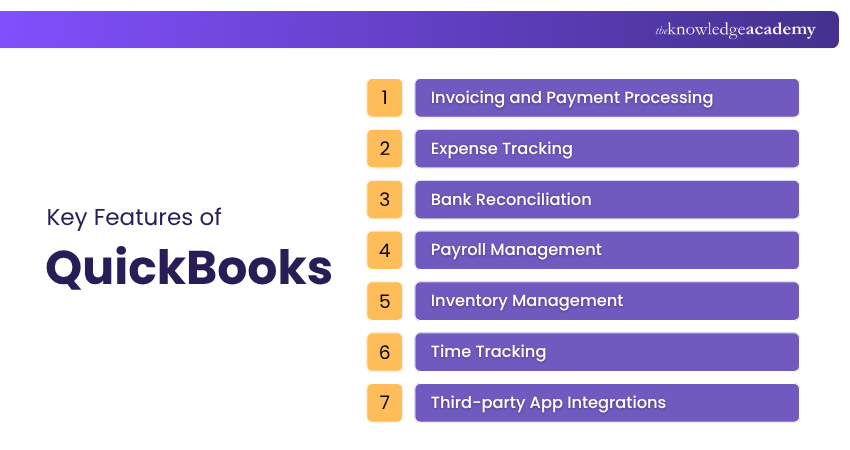
1) Invoicing and Payment Processing: QuickBooks makes it easy for users to create and send professional invoices to clients. Integrated payment processing options allow businesses to receive payments faster.
2) Expense Tracking: Users can track business expenses effectively using QuickBooks. It allows for easy categorisation of expenses, simplifying tax reporting and budgeting.
3) Bank Reconciliation: The software automates the bank reconciliation process, matching transactions from bank statements to those recorded in the software. This ensures accuracy in financial records.
4) Payroll Management: QuickBooks provides payroll features to calculate salaries, manage deductions, and generate payslips, though availability may vary by region or plan.
5) Inventory Management: It provides basic Inventory Management tools suitable for businesses with simple inventory needs. Users can see how much stock they have and get alerts when they run out.
6) Time Tracking: For businesses that bill clients based on hourly rates, it offers time tracking features to monitor billable hours accurately.
7) Third-party App Integrations: It offers a wide range of integrations with third-party applications, extending its functionality. Users can connect with various business tools to enhance productivity.
Upgrade your accounting skills with our Tally Training – Register today!
Sage vs QuickBooks: Key Differences
Now that you have an overview, let’s take a closer look at the QuickBooks vs Sage comparison in detail. The following points highlight their key differences to help you choose the right solution:
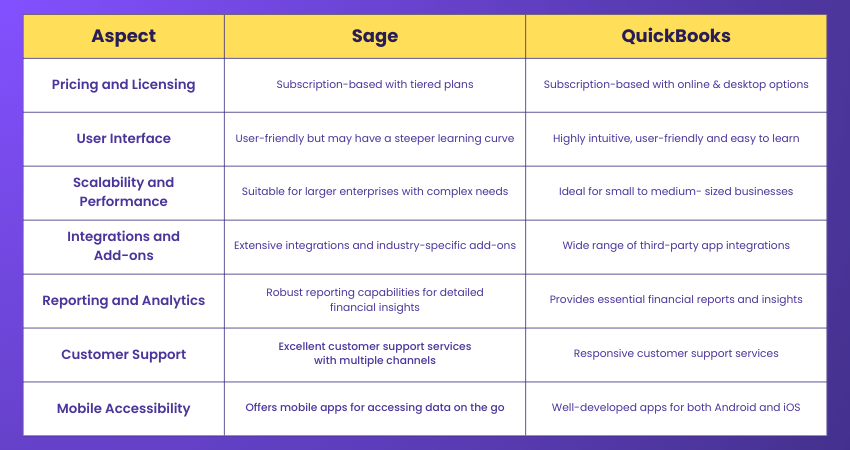
Pricing and Licensing
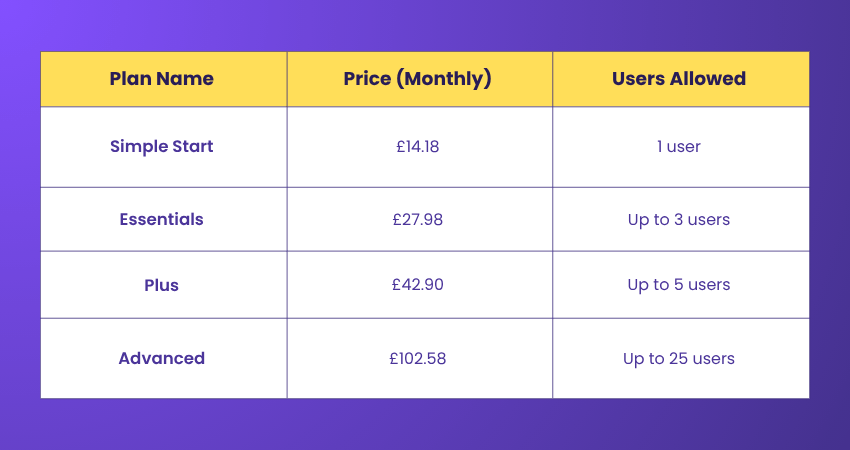
Pricing is often an important consideration for businesses of all sizes. Sage and QuickBooks employ different pricing models that cater to various needs. QuickBooks pricing in the UK is as follows, and pricing may vary by region:
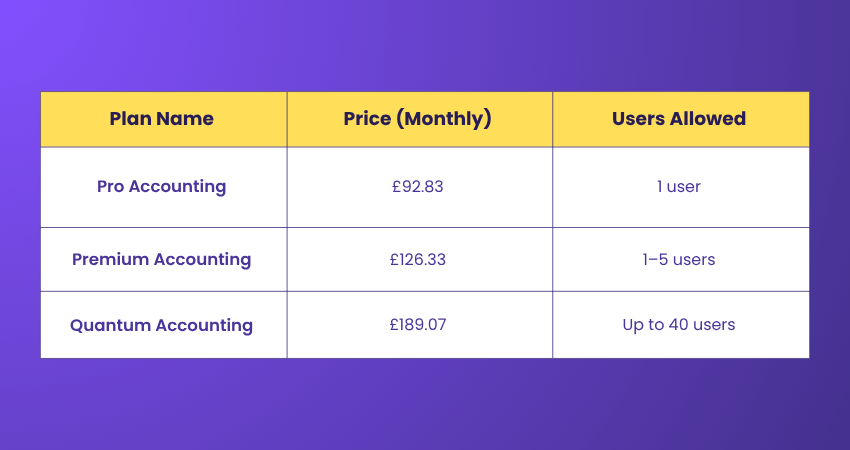
Sage utilises a subscription model with tiered plans, where advanced options are more expensive but better suited for larger enterprises. QuickBooks also offers subscription plans, both online and desktop, and is generally more affordable, making it ideal for small and medium businesses.
1) User Interface and Ease of Use
The User Interface (UI) plays a big role in how quickly people can learn and use software. Sage is praised for its user-friendly design, though its many features may feel overwhelming at first. With time, users enjoy its powerful tools.
QuickBooks, however, is simpler and easier to navigate. It suits users with little accounting knowledge, offering a straightforward setup and design that makes it popular with small business owners managing their own finances.
2) Scalability and Performance
As businesses expand, their accounting needs become more demanding, making scalability and performance important. Sage is built for larger companies that handle big data and complex financial tasks with ease. It maintains strong performance as the business grows.
QuickBooks works well for small to medium-sized businesses, but it has its limitations. With larger data volumes or advanced needs, it may slow down and require add-ons or upgraded plans to keep up.
3) Integrations and Add-ons
Integrating with other business tools and using add-ons can greatly improve accounting software. Sage provides a wide range of integrations and specialised add-ons to the Sage Accounting Software, which makes it flexible and suitable for industry-specific needs.
QuickBooks also connects with many third-party apps and offers a large library of add-ons, allowing businesses to customise the software. In Financial Management, having real-time reports and detailed analytics is key to better decision-making.
4) Reporting and Analytics
Sage offers robust reporting features, empowering businesses to generate detailed financial reports, such as cash flow analyses, profit and loss statements, and balance sheets, providing insight into the Advantages and Disadvantages of Sage Accounting Software. They provide insights into your company's financial health, facilitating strategic planning and growth.
QuickBooks also provides a wide range of reporting capabilities, allowing users to generate essential financial reports and gain insights into their business performance. While it may not be as comprehensive as Sage's reporting, QuickBooks still offers sufficient data for small to medium-sized businesses to make informed decisions.
Streamline your financial processes with our Sage 50 Accounts Training – Join now!
5) Customer Support
Robust customer support is essential when dealing with any software, especially when managing critical financial data. Sage is well-regarded for its dedicated customer support services. They provide various support channels, including phone, live chat, and email, ensuring that users can quickly resolve any issues or concerns that may come up during their usage.
QuickBooks also offers excellent customer support. With responsive teams, users can access help and guidance whenever they encounter difficulties while using the software.
6) Mobile Accessibility
In today's world, the ability to access Accounting Software on the go has become a necessity. Sage offers Mobile Applications that allow users to access their financial data from smartphones and tablets. The app provides core functionalities, ensuring users can manage their finances even when they are away from their desks.
QuickBooks shines in its mobile accessibility, with well-developed apps for both Android and iOS devices. Users can perform essential accounting tasks, such as invoicing, expense tracking, and payment processing, in the palm of their hand.
7) Security and Data Protection
Sage prioritises data security by implementing industry-standard measures. It includes user access control features and encrypted storage to protect sensitive financial information. QuickBooks also takes security seriously, using advanced protocols to keep sensitive business data protected from breaches.
Both platforms also offer cloud-based solutions with secure backups, ensuring your data is recoverable in case of system failures or cyberattacks.
Develop strong skills in automated invoicing and billing with our Xero Training – Join today!
What are the Pros and Cons of QuickBooks?
Let’s explore the benefits and drawbacks of QuickBooks in detail:
Pros:
1) User-friendly Interface: Easy to navigate, even for those without accounting knowledge.
2) Competitive Pricing: Affordable plans make it ideal for small businesses and startups.
3) Third-party Integrations: Connects seamlessly with CRM, e-commerce, and other popular business tools.
4) Cloud Access: QuickBooks Online allows remote access via desktop or mobile devices.
5) Cross-platform Compatibility: Works well on both Windows and macOS systems.
Cons:
1) Lacks Industry-specific Features: Limited customisation for niche business sectors.
2) Basic Reporting: Only standard accounting reports are available.
3) Limited Scalability: Best suited for smaller businesses with minimal growth expectations.
4) Restricted Support: Technical support can be limited, especially for lower-tier plans.
What are the Pros and Cons of Sage?
Let’s explore the benefits and drawbacks of Sage in detail:
Pros:
1) Scalable Solutions: Suitable for businesses of all sizes, from startups to large enterprises.
2) Advanced Features: Offers tools like inventory management, multi-currency support, and industry-specific capabilities.
3) Customisable Interface: Allows users to tailor reports, workflows, and dashboards to their needs.
4) Unlimited Users: Sage Accounting does not restrict the number of users.
5) Strong Customer Support: Provides reliable and responsive customer service over the phone.
Cons:
1) Steeper Learning Curve: Less intuitive for beginners or users with limited accounting experience.
2) Limited Integrations: Offers fewer third-party app connections compared to competitors.
3) Higher Cost: More expensive than many entry-level Accounting Software options.
4) Interface Can Feel Outdated: Some users find the design less modern and less visually intuitive compared to newer platforms.
Take the stress out of managing money with our Wave Accounting Training – Sign up soon!
What are the Products From Sage and QuickBooks?
Both Sage and QuickBooks offer a broad range of cloud-based accounting solutions tailored to various business sizes.
QuickBooks Provides:
1) QuickBooks Online (Simple Start, Essentials, Plus) for small businesses and freelancers
2) QuickBooks Self-Employed for sole traders handling Self-Assessment
3) QuickBooks Desktop Enterprise (UK desktop only) for advanced features
Sage Offers:
1) Sage Accounting (Start, Standard, Plus) for small businesses
2) Sage 50 for SMBs
3) Sage 200 for growing businesses
4) Sage Intacct for medium to large organisations needing advanced Finance Management
Each platform scales differently, with Sage offering more industry-specific solutions.
Sage vs QuickBooks: Which is Better?
QuickBooks and Sage are both popular accounting software, but they suit different business
needs. In the Sage software vs QuickBooks comparison, QuickBooks is often preferred by small businesses, startups, and freelancers because it is easy to use, affordable, and quick to set up, with minimal training required.
Sage, on the other hand, is better suited for growing and mid-to-large businesses that need advanced features like detailed reporting and inventory management. When choosing between QuickBooks or Sage, QuickBooks offers simplicity, while Sage provides greater scalability and advanced capabilities.
Conclusion
Choosing between Sage and QuickBooks ultimately comes down to your business’s size, complexity, and growth plans. Before making your decision between Sage vs QuickBooks, carefully assess your requirements, budget, and long-term goals. Both platforms offer free trials, so take advantage of them to determine which one aligns best with your business goals.
Ready to use Accounting Software like Sage and QuickBooks? Explore our Accounting Software Training now!
Frequently Asked Questions
Can You Transfer Data From Sage to QuickBooks?

Yes, you can transfer data from Sage to QuickBooks, but it usually requires third-party tools or manual steps. You may need to export data from Sage in CSV format and import it into QuickBooks to complete the process.
What Can Sage and QuickBooks do for Your Business?
Sage and QuickBooks help businesses manage finances efficiently through features like invoicing, expense tracking, payroll, reporting, and tax compliance. They streamline accounting tasks, improve accuracy, and offer real-time insights, enabling better financial decision-making and business growth.
What are the Other Resources and Offers Provided by The Knowledge Academy?
The Knowledge Academy takes global learning to new heights, offering over 3,000+ online courses across 490+ locations in 190+ countries. This expansive reach ensures accessibility and convenience for learners worldwide.
Alongside our diverse Online Course Catalogue, encompassing 17 major categories, we go the extra mile by providing a plethora of free educational Online Resources like Blogs, eBooks, Interview Questions and Videos. Tailoring learning experiences further, professionals can unlock greater value through a wide range of special discounts, seasonal deals, and Exclusive Offers.
What is The Knowledge Pass, and How Does it Work?
The Knowledge Academy’s Knowledge Pass, a prepaid voucher, adds another layer of flexibility, allowing course bookings over a 12-month period. Join us on a journey where education knows no bounds.
What are the Related Courses and Blogs Provided by The Knowledge Academy?
The Knowledge Academy offers various Accounting Software Training, including the Sage 50 Accounts Training, QuickBooks Training, and Wave Accounting Training. These courses cater to different skill levels, providing comprehensive insights into Accounting Software.
Our Accounting and Finance Blogs cover a range of topics related to QuickBooks vs Sage, offering valuable resources, best practices, and industry insights. Whether you are a beginner or looking to advance your Accounting and Finance skills, The Knowledge Academy's diverse courses and informative blogs have got you covered.

Olivia Taylor


Chartered Accountant and Financial Training Specialist
Olivia Taylor is a qualified chartered accountant with over a decade of experience in financial management, auditing and corporate reporting. Having worked with leading firms in both the public and private sectors, Olivia brings clarity to complex financial topics. Her writing focuses on helping professionals build confidence in key areas of accounting, compliance and financial planning.
View Detail
Upcoming Accounting and Finance Resources Batches & Dates
Date
 Finance for Non Financial Managers
Finance for Non Financial Managers
Fri 10th Jul 2026
Finance for Non Financial Managers
Fri 9th Oct 2026

 If you wish to make any changes to your course, please


