


 Top Rated Course

We may not have the course you’re looking for. If you enquire or give us a call on +44 1344 203 999 and speak to our training experts, we may still be able to help with your training requirements.
What is Information Architecture? Principles, Systems, and Process
Scarlett Adams 15 December 2025Information Architecture is the practice of organising, structuring and labelling content effectively to help users find information and complete tasks quickly. It’s a foundational discipline in User Experience (UX) design, playing a critical role in how digital products (websites, apps, and software) are navigated and experienced.
Home
 Resources
Business Improvement
What is Information Architecture? Principles, Systems, and Process
Resources
Business Improvement
What is Information Architecture? Principles, Systems, and Process
Resources
Business Improvement
What is Information Architecture? Principles, Systems, and Process

Training Outcomes Within Your Budget!
We ensure quality, budget-alignment, and timely delivery by our expert instructors.
Table of Contents

In the increasingly crowded digital landscape, clarity is king. We've all had the experience of getting lost on a website, unsure where to click next, haven't we? That’s where Information Architecture (IA) steps in as the blueprint behind your favourite websites and apps, quietly guiding you to what you need without all the confusion. From organising content to designing intuitive navigation, IA combines structure, strategy and even human Psychology.
This blog provides a detailed breakdown into What is Information Architecture. It sheds light on the principles, systems and processes that make great IA not just functional, but user-friendly, intuitive and essential to any successful digital product. Let's dive in!
Table of Contents
1) What is Information Architecture?
2) Why IS Information Architecture Important?
3) Eight Principles of Information Architecture
4) Key Components of an Information Architecture System
5) Key Processes of Information Architecture
6) How to Design Your Website’s Information Architecture?
7) Difference Between Information Architecture and UX?
8) Conclusion
What is Information Architecture?
Information Architecture (IA) is all about organising digital content so it’s easy to find, understand, and use. It’s the behind-the-scenes work that ensures websites and apps feel intuitive, guiding users smoothly without confusion. When done right, everything just makes sense; no second-guessing and no frustration.
At its heart, IA focuses on how content is grouped, labelled and structured. It strikes a balance between helping users achieve their goals and aligning with business objectives. From clear menus to logical section names, IA creates confident and seamless user journeys.

Why is Information Architecture Important?
Ever landed on a website and instantly felt lost? That’s usually a sign of degraded Information Architecture. When content isn’t thoughtfully organised, it’s hard for people to find what they’re looking for. On the flip side, strong IA makes everything effortless. It’s one of those invisible elements that improves the entire digital experience. Here’s what good Information Architecture can do:
a) Make Content Easy to Find: Users don’t have to see around or guess where things are.
b) Improve User Satisfaction: A smooth, and logical layout helps people feel in control and confident.
c) Support Content Strategy: It keeps your messaging organised and aligned with business goals.
d) Boost Accessibility: A clear structure benefits everyone, especially users with assistive technologies.
e) Help Your Site Scale: As your content grows, a solid IA ensures your site stays manageable and easy to navigate.
Become the Architect of seamless digital harmony with our Integration Architect Training - Sign up now!
Eight Principles of Information Architecture
When you're creating a digital experience that’s simple and intuitive, these eight principles of Information Architecture are a great place to start. They’re straightforward, practical ideas that help how you organise, label, and structure content so it works for real people. Therefore, delve into the eight principles of Information Architecture:
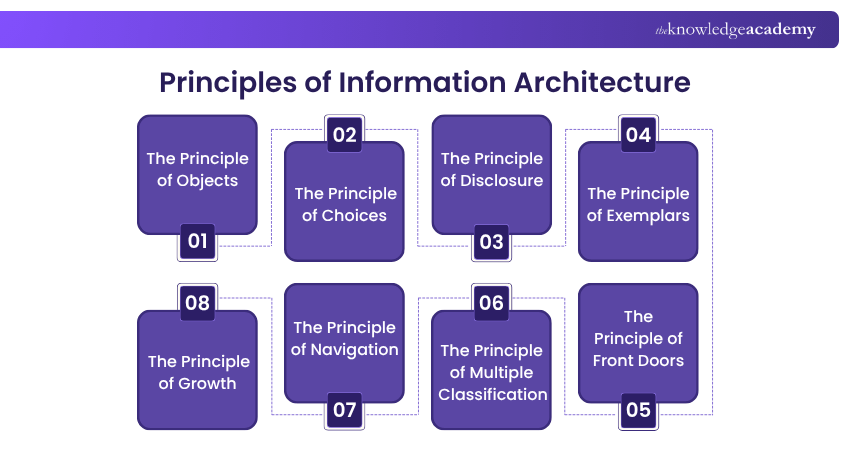
1) The Principle of Objects
Treat content as a living, reusable asset. Just like physical objects, each piece of content has its own structure, purpose, and lifecycle. Understanding this helps teams manage and repurpose content more effectively across platforms.
2) The Principle of Choices
Less is more when it comes to options. Give users a clear, manageable set of choices so they can make decisions without feeling overwhelmed or confused. The goal is to keep them moving forward with confidence.
3) The Principle of Disclosure
Reveal information gradually. Provide just enough detail to help users at each stage of their journey, while keeping deeper content tucked away until it’s actually needed. This helps reduce cognitive load and prevents users from feeling overloaded.
Become an IAM Architect and design trust with every login. Our Identity and Access Management ArchitectTraining will show you how - Register now!
4) The Principle of Exemplars
Show, don’t just tell. When categorising or grouping content, include a few examples to illustrate what belongs in each section. This makes the structure more intuitive and helps users find what they’re looking for faster.
5) The Principle of Front Doors
Not every user will enter your site through the homepage. Many arrive from search engines, shared links, or bookmarks. As a result, they often land deep within the site. Each page should therefore be clear and self-contained, offering context and navigation so users can easily orient themselves.
6) The Principle of Multiple Classification
People think and search in different ways. Some might look for content by topic, others by task or user type. This helps in providing multiple paths to the same information like filters, tags, or categories. This makes your content more accessible and easier to explore.
7) The Principle of Navigation
Users should always know where they are, how they got there, and where they can go next. Clear, consistent navigation helps build trust and encourages users to stay engaged with your content.
8) The Principle of Growth
Your content isn’t static. This is because it will change and expand over time. Design your information structure with flexibility in mind so it can scale smoothly as new pages, topics, and features are added.

Key Components of an Information Architecture System
A strong Information Architecture doesn’t happen by accident. That’s because a good digital experience doesn’t happen by accident. It’s built on a clear structure made up of systems that organise content and help users find their way around. These four parts are the backbone of any well-designed site or app. They make everything feel simple and natural. Here’s how each one plays its part.
1) Organisation Systems
These systems determine how your content is grouped and structured. You might organise by topic, audience type, task, or even by time (like news updates or event listings). The key is to choose a structure that mirrors how your users naturally think and look for information. When the organisation makes sense to them, they can find what they need faster and with less effort.
2) Labelling Systems
Labels are the names and terms you use to describe content, categories, and actions across your site or app. Clear, familiar language is essential here. Good labelling helps users make sense of what they’re looking at and know what to expect when they click. It’s not only about being accurate. It’s also about using language your audience naturally uses. When labels feel familiar and clear, people can find what they need without having to second-guess themselves.
3) Search Systems
As websites and platforms grow, search becomes more important. A solid search system doesn’t just return results. This is because it helps users narrow their choices, discover related content, and still find what they need even if they make a typo or use different terms. Tools like filters, autocomplete, and smart search results can make a big impact, especially on websites or apps with a lot of information to sort through.
Be at the forefront of crafting future-ready digital ecosystems with our Enterprise Integration Advanced Course - Sign up now!
4) Navigation Systems
Navigation is how users move through your content. Menus, breadcrumbs, links, tabs all of these are part of the navigation system. A well-designed system helps people understand where they are, what’s around them, and how to get to where they want to go next. Consistency is key here. When navigation is intuitive and predictable, users can explore confidently without getting lost.
Key Processes of Information Architecture
Creating strong Information Architecture takes a clear, step-by-step approach. This is because it’s about finding the right balance between what users need and what the business wants to achieve. Plus, the goal is to build a structure that makes content easy to find and simple to move through. Let’s explore the key processes:
1) Identify Business Goals
Before you start thinking about menus, labels, or layouts, you need to understand the bigger picture. This includes the type of business you are trying to accomplish. Consider whether you are aiming to boost conversions, increase engagement, reduce support calls, or improve the overall Customer Service and Customer Experience. These goals will influence how your content is organised and prioritised. A strong IA system always reflects and supports the business’s objectives.
2) Understand User Needs
Your users are at the heart of every decision you make in IA. Spend time learning about them. This can include who they are, what they need, how they search, and what frustrates them. This might involve user interviews, surveys, analytics, or usability testing. The better you understand your audience, the better you can design a structure that feels natural and helpful to them.

3) Conduct Competitor Analysis
Take a close look at what similar businesses or platforms are doing. Consider what seems to be working well for them and where they are falling short in. Competitor Analysis can help you avoid common pitfalls and identify opportunities to stand out. Maybe they’re missing a user-friendly filtering system or burying key content deep in their site. Thus, insights like these can shape a more effective approach for your own IA.
4) Define and Structure Content
With clear goals and user insights in hand, it’s time to shape the content itself. Consider what needs to be included and how it should be grouped, ordered and presented. Create a content inventory, then organise it in a way that reflects the way your users think and browse. Decide on your main categories, subcategories, and pathways. Sketch out a sitemap or use wireframes to visualise how everything connects.
Think big and build smart. Lead as an Enterprise Architect with our Enterprise Architect Training - Sign up now!
How to Design Your Website’s Information Architecture?
Designing the Information Architecture of your website is essential. It’s not just something that happens behind the scenes. This is because it directly affects how people interact with your site.
A clear and well-structured layout helps users find what they’re looking for faster, keeps them engaged, and makes browsing feel easy and natural. While it doesn’t have to be overly complex, it does require thoughtful planning. Here’s a simple breakdown of how to get started.
Step 1: Group and Label Content
Start by laying out your pages, blog posts, products, FAQs, and whatever else lives on your site. Then, look for natural groupings. Consider what fits together and what feels like it belongs in the same bucket. Essentially, think like your users and how they would expect to see things arranged?
Once you’ve got those groups sorted, give them clear, simple labels. Use everyday language that your audience would recognise and avoid company lingo or technical terms. The goal is to make things feel obvious, not confusing.
Step 2: Plan Navigation and Create a Sitemap
Now that your content is grouped and labelled, it’s time to figure out how people will move through it. Think about the flow. What should be front and centre, and what can sit deeper in the site? Try to map out the user journey in a way that makes sense and feels easy to follow. A sitemap is a great way to visualise this. It gives you a big-picture view of your site’s structure and helps you spot any dead ends, overlaps, or areas that could use some rethinking.
Step 3: Conduct User Testing
Before you lock everything in, test it out. Get real users involved and see how they interact with your structure. You don’t need a fancy setup. As you can work out with simple tools like card sorting or tree testing can give you great insights. Watch where people pause, where they get confused, or where they take a different path than expected.
Those little moments tell you a lot. Use that feedback to tweak your labels, reorganise content, or adjust the navigation. Sometimes even small changes can make the whole experience feel smoother and more natural.
Difference Between Information Architecture and UX?
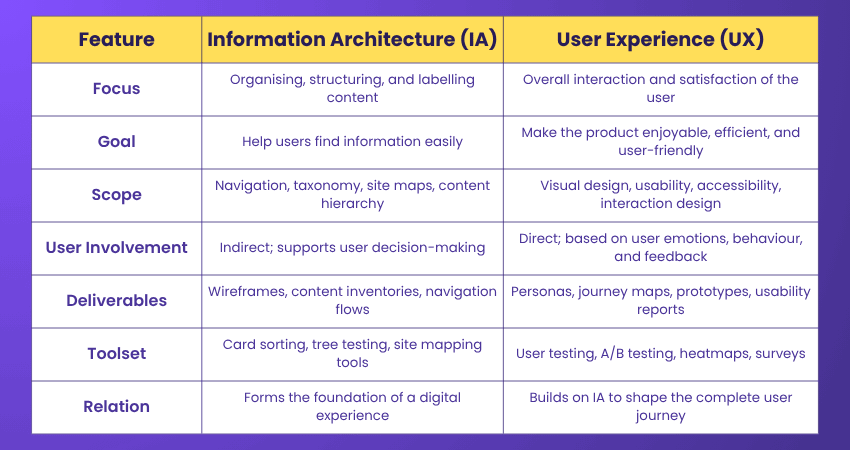
Information Architecture (IA) and User Experience (UX) often go hand in hand, but they’re not the same thing. Here are the key differences between them:
Conclusion
Understanding What is Information Architecture is important because it's the silent roadmap behind every smooth digital experience. By organising content clearly and logically, it empowers us to navigate with ease and confidence. When paired with thoughtful design and user-centric strategy, IA makes websites, apps, and systems more usable, accessible and successful.
Unlock the basics of enterprise synergy with our Enterprise Integration Fundamentals Training - Sign up now!
Frequently Asked Questions
Is Information Architecture the Same as UX?

Information Architecture is about how content is structured and organised. UX focuses on the full user journey, from the moment someone lands on a site to when they leave. They’re not the same, but they work closely together. IA supports UX by making sure people can find what they need easily and move through the site without confusion.
What are the Three Pillars of Information Architecture?
The three main pillars of Information Architecture are organisation, labelling and navigation. Together, they shape how content is arranged, how it’s named and how users move through it. When these elements are well designed, they make it easier for people to find what they need, understand where they are and get a clear sense of how everything connects.
What are the Other Resources and Offers Provided by The Knowledge Academy?
The Knowledge Academy takes global learning to new heights, offering over 3,000 online courses across 490+ locations in 190+ countries. This expansive reach ensures accessibility and convenience for learners worldwide.
Alongside our diverse Online Course Catalogue, encompassing 19 major categories, we go the extra mile by providing a plethora of free educational Online Resources like Blogs, eBooks, Interview Questions and Videos. Tailoring learning experiences further, professionals can unlock greater value through a wide range of special discounts, seasonal deals, and Exclusive Offers.
What is The Knowledge Pass, and How Does it Work?
The Knowledge Academy’s Knowledge Pass, a prepaid voucher, adds another layer of flexibility, allowing course bookings over a 12-month period. Join us on a journey where education knows no bounds.
What are the Related Courses and Blogs Provided by The Knowledge Academy?
The Knowledge Academy offers various Enterprise Architect Training, including the Certified Enterprise Architect Professional (CEAP) Course, Information Architecture Course, and Enterprise Architecture Green Belt Course. These courses cater to different skill levels, providing comprehensive insights into Integration Architect.
Our Business Improvement Blogs cover a range of topics related to Information Architecture, offering valuable resources, best practices, and industry insights. Whether you are a beginner or looking to advance your IA skills, The Knowledge Academy's diverse courses and informative blogs have got you covered.
Upcoming Business Improvement Resources Batches & Dates
Date
 Information Architecture Training Course
Information Architecture Training Course
Fri 24th Jul 2026
Information Architecture Training Course
Fri 9th Oct 2026

 If you wish to make any changes to your course, please


